Teedy's checked in compose file pins an older image than its own documentation, and its example hash is weaker than the default
Lightweight document management system packed with all the features you can expect from big expensive solutions
At a glance
- What is it?
- What the repository of Teedy shows about a Java document management system shipped as a Docker image: a compose file that pins v1.10 while the README examples pin v1.11, a bcrypt example generated at cost 5 against a documented default work factor of 10, 27 OCR language packs for 24 interface languages, an embedded H2 fallback that is for testing only, and a one million documents claim with no benchmark behind it.
- Who is it for?
- Teedy fits a small team that wants OCR, tagging and versioning in one Java application and is willing to run PostgreSQL behind it.
- Can I use it commercially?
- Yes, with conditions. GPL-2.0 is a copyleft licence: if you distribute software that includes it, you must release that software's source code under the same licence. Running it internally without distributing it does not trigger that obligation.
- Is it still maintained?
- Yes. The repository last received commits 2 days ago.
- What is it written in?
- Mainly JavaScript, according to GitHub's language statistics.
Answers come from the project's GitHub data, last synced on November 14, 2026, and from our analysis. They are not legal advice.
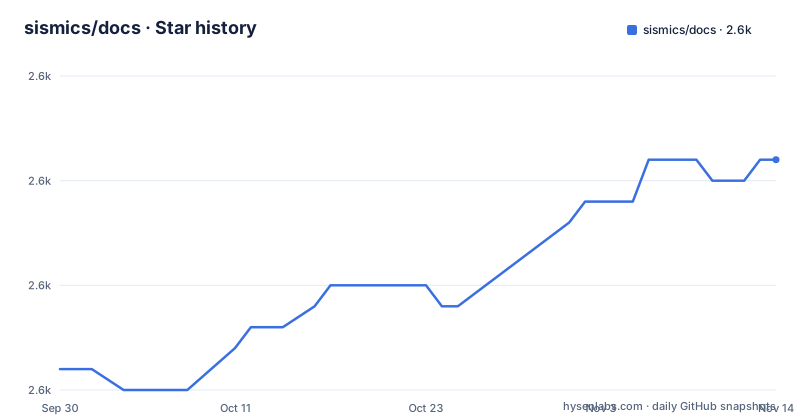
Star history
- sismics/docs2,576 ★ · +10
| Repository | 2026-09-30 | 2026-11-14 |
|---|---|---|
| sismics/docs | 2.6k | 2.6k |
10 Stars in the last 45 days, measured from the daily GitHub snapshot. Compare with other projects
Editorial analysis
The compose file in the repository pins v1.10, the documentation pins v1.11
Two different versions of the same deployment example sit in this repository. The README calls v1.11 the latest stable version and both of its compose examples use it, while the docker-compose.yml at the root of the tree uses sismics/docs:v1.10.
image: sismics/docs:v1.11So the file a reader is likelier to copy is one release behind the one the documentation walks through. The gap is small, and v1.10 was the stable line before it, but the examples are the only complete deployment descriptions in the repository, and they disagree with each other about what to pin.
The same README also offers a moving tag, sismics/docs:latest, and is explicit about its risk: it tracks the master branch, which can be unstable and is not recommended for production use. That framing is worth keeping in mind next to the release history, where v1.11 was tagged on 2023-03-12 while the repository has been pushed to as recently as 2026-08-17.
The example admin hash is a cost 5 bcrypt, the documented default is 10
Both compose examples set the admin password to the same bcrypt hash, and the comment above it names the plaintext it came from.
DOCS_ADMIN_PASSWORD_INIT: "$$2a$$05$$PcMNUbJvsk7QHFSfEIDaIOjk1VI9/E7IPjTKx.jkjPxkx2EOKSoPS"The 05 in that string is the bcrypt work factor of the hash, and the documented default for new users is 10. Someone who copies the example as is therefore starts with a hash several orders of magnitude cheaper to attack than the one the same document recommends. DOCS_BCRYPT_WORK accepts values from 4 to 31 inclusive, and the documentation is upfront about the other end of that range: a high factor can heavily impact login and user creation performance. The value applies to new users and to users changing their password, not to existing hashes.
The doubled dollar signs in the same line are not a typo either. DOCS_ADMIN_PASSWORD_INIT needs a bcrypt hash, and every $ inside it has to be escaped with a second $, because compose would otherwise treat the rest as a variable.
27 OCR language packs ship for 24 interface languages
The image installs a base tesseract-ocr package and then adds language packs one by one: ara, ces, chi-sim, chi-tra, dan, deu, fin, fra, heb, hin, hun, ita, jpn, kor, lav, nld, nor, pol, por, rus, spa, swe, tha, tur, ukr, vie and sqi, which is 27 of them.
The application side is a shorter list. DOCS_DEFAULT_LANGUAGE accepts 24 codes: eng, fra, ita, deu, spa, por, pol, rus, ukr, ara, hin, chi_sim, chi_tra, jpn, tha, kor, nld, tur, heb, hun, fin, swe, lav and dan.
Every non-English code on that list has a matching pack, including the two Chinese variants, whose codes are written chi_sim and chi_tra for the variable and chi-sim and chi-tra for the package. The mismatch runs the other way: Czech, Norwegian, Vietnamese and Albanian are installed for OCR but have no code to set the interface to, so text in those four languages can be extracted from a scan and then not displayed. The gap is invisible until somebody scans a Czech document.
No database configuration means the image starts on embedded H2
The Docker section explains the fallback in one sentence, and it is the most consequential line in the install instructions. A preconfigured image is available including OCR and media conversion tools, listening on port 8080. If no PostgreSQL config is provided, the database is an embedded H2 database, and that embedded database should only be used for testing. Production usage is directed to the provided PostgreSQL configuration, with a pointer to the compose example.
The connection settings are four variables: DATABASE_URL as the jdbc connection string used by hibernate, plus DATABASE_USER, DATABASE_PASSWORD and DATABASE_POOL_SIZE. None of them has a default in the documentation, which is exactly why the H2 fallback exists and why it is easy to end up on it by omission rather than by choice.
Two more environment settings decide whether links in the application work. The data directory is /data and the documentation asks twice for a volume to be mounted on it. DOCS_BASE_URL is what the server uses to build external URLs, given as https://teedy.mycompany.com as the shape of value, and without it generated links point at whatever the request host happened to be.
The shipped admin password is admin, and the demo publishes three logins
The admin password warning appears twice, once under the Docker section and once under the download section, and both times it says the default is admin and should be changed before going to production. The WAR distributed through the releases page has the same default, so a manual install and a container install start in the same state.
The demo instance goes further and lists its credentials openly: guest login is enabled with read access on all documents, admin logs in with the password admin, and a demo account logs in with the password password. Those are demo.teedy.io logins rather than production defaults, but they show the shape of the initial state the application ships with, including an anonymous reader role over every document.
The admin account is created on initialization, and its address and password hash are both settable through environment variables, DOCS_ADMIN_EMAIL_INIT and DOCS_ADMIN_PASSWORD_INIT. That is the clean way to avoid the default entirely, provided the hash is escaped as described.
The documented build skips tests and needs Maven, NPM and Grunt
Building from source wants JDK 11, Maven 3, NPM, Grunt and Tesseract 4, which is an unusual combination to find in one prerequisite list. The project is organised as three Maven modules, docs-core, docs-web and docs-web-common, and the repository's largest share of code by volume is JavaScript rather than Java, which is what the front end is.
The three commands the file gives are these.
mvn clean -DskipTests install
mvn jetty:run
mvn -Pprod -DskipTests clean install
The first builds from the root, the second runs a stand-alone Jetty from the docs-web directory, and the third produces a deployable WAR in docs-web/target with the prod profile. Both build commands pass -DskipTests, so the test suite is not part of either documented path, and nothing in these instructions asks for it either.
A manual install also expects Tesseract 4 for OCR, ffmpeg for video thumbnails and mediainfo for video metadata extraction, plus a servlet container such as Jetty or Tomcat, so the feature list is really a list of external programs to install alongside the WAR.
The clone command uses git protocol while the rest of the file uses https
The build section asks you to clone the repository with git clone git://github.com/sismics/docs.git, or to download the sources from GitHub as an alternative. Every other address in the file is https, including the releases page for the WAR and the Maven repository the Docker image downloads Jetty from.
The git protocol in that command is the older unauthenticated transport, and it is the one place in the instructions where the repository is named without a scheme, while every other address carries one. The alternative sentence in the same paragraph, downloading from GitHub, is the path that has no such question attached to it.
The tree around it holds docs-android/ for the Android client, docs-importer/ for the bulk importer, docs/ and docs.xml for documentation, scripts/, CODE_OF_CONDUCT.md, .gitattributes, COPYING, pom.xml and the Dockerfile. The repository is a Java server, a JavaScript front end, an Android application and a bulk import tool at the same time.
One million documents is stated without a measurement
The feature list ends with two entries that are worth separating. One is the bulk files importer, available in single or scan mode. The other is a single line claiming the system is tested to one million documents.
Nothing in the repository backs that number. There is no benchmark script, no dataset, no configuration describing what one million documents means in size, page count or attachment weight, and no statement of what hardware or which database was used. It sits in the same list as concrete, checkable items such as 256-bit AES encryption of stored files and full text search in all supported files.
The shipped image does give one fixed number worth holding next to it: JAVA_OPTIONS sets the heap at -Xmx1g for the whole container, and nothing in the environment documentation describes changing it. Whether a document count of that order fits inside a gigabyte of heap depends on what is indexed and how, which is precisely what the claim does not say.
Editorial conclusion
Teedy fits a small team that wants OCR, tagging and versioning in one Java application and is willing to run PostgreSQL behind it. Three things decide whether a deployment goes smoothly: supply the database configuration, because without it the image quietly starts on embedded H2, which the project restricts to testing; change the admin password, since admin is the shipped default in both the image and the WAR download; and mount a volume on /data, since that directory holds the files and the README asks for it twice. Pin an explicit tag rather than latest, which tracks master and is described as possibly unstable. Ignore the one million documents figure: nothing in the repository measures it.
Frequently asked questions
What is the default admin password for Teedy?
admin, in both the Docker image and the WAR download, and the README repeats the instruction to change it before going to production. The initial credentials can be set instead with DOCS_ADMIN_EMAIL_INIT and DOCS_ADMIN_PASSWORD_INIT, where the password has to be a bcrypt hash with every $ escaped by a second $.
Which database does the Teedy Docker image use if no database is configured?
An embedded H2 database, and the README says it should only be used for testing. For production it directs you to the provided PostgreSQL configuration, which is built from DATABASE_URL, DATABASE_USER, DATABASE_PASSWORD and DATABASE_POOL_SIZE.
Should I run the sismics/docs:latest image in production?
Not according to the README, which describes latest as tracking the master branch, possibly unstable and not recommended for production. It names sismics/docs:v1.11 as the latest stable version, although the compose file checked into the repository still pins v1.10.
How many languages can the Teedy interface be set to?
Twenty-four, through the DOCS_DEFAULT_LANGUAGE variable, with eng, fra, ita, deu, spa, por, pol, rus, ukr, ara, hin, chi_sim, chi_tra, jpn, tha, kor, nld, tur, heb, hun, fin, swe, lav and dan among them. The Docker image installs 27 OCR language packs, four more than the interface can be set to.
How do I run Teedy without Docker?
Deploy the WAR from the GitHub releases page to a servlet container such as Jetty or Tomcat, with Java 11, Tesseract 4, ffmpeg and mediainfo installed. To build it yourself you need JDK 11, Maven 3, NPM, Grunt and Tesseract 4, and mvn jetty:run from docs-web starts a stand-alone server.
What happens to the DOCS_BASE_URL setting in Teedy?
It is the base URL the application uses when it generates links, given as https://teedy.mycompany.com as the example value. The data directory is /data, and the README asks for a volume to be mounted on it.
Official sources
Add this badge to your README
If you maintain this project, the badge below links readers to this analysis and shows its maintenance status from the daily GitHub snapshot. Paste the markdown into your README; add ?metric=license or ?metric=stars to the image URL for a different field.

[](https://hysenlabs.com/projects/sismics-docs)Star history chart for your README
[](https://hysenlabs.com/projects/sismics-docs)Was this useful?