MakerSkillTree: fifty-eight topic directories, a progress counter that says forty-four, and a non-commercial licence with a software carve-out
A repository of Maker Skill Trees and templates to make your own.
At a glance
- What is it?
- A repository of printable skill tree templates, one directory per topic, each a sheet of seventy-three hexagonal tiles running from basics at the base to advanced skills at the top. The editing, conversion and tracking tools are three separate projects by three other people, the generator lets you delete the credit line the licence requires you to keep, and using the trees to build software needs a commercial licence.
- Who is it for?
- Maker Skill Trees fit a teacher, makerspace leader or workshop facilitator who wants a printed page that makes a skill conversation visual, and who is content for the artefact to be a PDF and a conversation rather than an application.
- Can I use it commercially?
- The repository metadata does not identify a licence. Check the project’s published terms and any component-specific licences before reuse.
- Is it still maintained?
- Yes. The repository last received commits 13 days ago.
- What is it written in?
- Mainly Jinja, according to GitHub's language statistics.
Answers come from the project's GitHub data, last synced on November 24, 2026, and from our analysis. They are not legal advice.
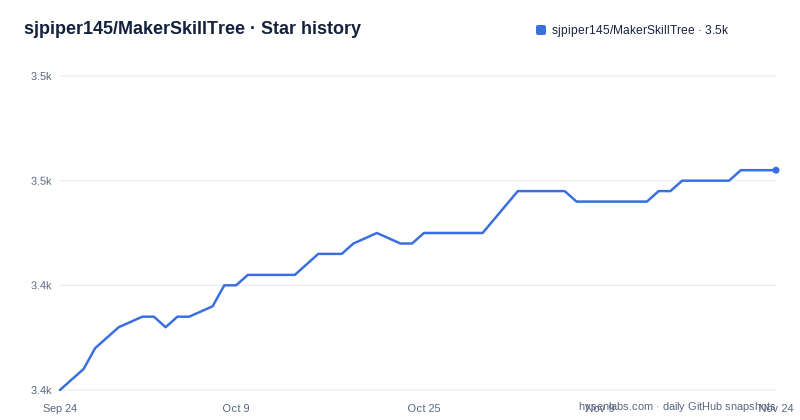
Star history
- sjpiper145/MakerSkillTree3,451 ★ · +21
| Repository | 2026-09-24 | 2026-11-24 |
|---|---|---|
| sjpiper145/MakerSkillTree | 3.4k | 3.5k |
21 Stars in the last 61 days, measured from the daily GitHub snapshot. Compare with other projects
Editorial analysis
Fifty-eight directories and a counter that implies forty-four
The repository is one directory per topic, and the visible listing runs alphabetically from 3D Modelling through Electronics, Finance, Glassblowing, IT Security, Kubernetes, Linux, Metalworking and on to Photography, where the listing ends. That is fifty-eight directories before the alphabet runs out, covering subjects as far apart as cattle showing, cocktails, crochet, Dungeons and Dragons, facial expressions, gyroplanes, PCB design and taxidermy-adjacent crafts like glassblowing and metalworking. Now set that against the progress heading near the bottom of the README, which reads Yet to Make with the fraction 77/121. One hundred and twenty-one planned trees minus seventy-seven remaining implies forty-four finished. So the tree already holds more directories than the progress counter says exist, before the listing is cut off. Either the counter counts something narrower than directories or it has not been kept up.
Two of the fifty-eight do not follow the naming convention
Fifty-six directories are named for a topic followed by the words Skill Tree. Two are not. One is Kids STEAM Skills, with no tree in the name at all, and the other is Makerspace Skill Trees, in the plural and with the trailing s on both nouns. For a collection whose whole organising idea is a consistent artefact you can pick up and use, those two are the odd ones out, and they are the two most likely to be wanted by a specific audience, since one is aimed at school students and the other at makerspace members. The topic names themselves are inconsistent in another way: several use an ampersand where others use the word and, so Build & Repair, CNC & Cam, Civics & Community and Photo & Video sit beside Boating and Fishing, and Game Dev, Dev Boards and Embedded Systems. None of that breaks anything, but a script listing these directories has to handle all four forms.
The licence is non-commercial and carves out software
The trees are released under Creative Commons BY-NC-SA 4.0, and the paragraph explaining it is longer than the sentence naming it. You may share, adapt, remix or transform the printables and templates and use them at no cost in teaching, workshops, businesses, conferences, schools and makerspaces, with two conditions: credit must be given to Steph Piper / Maker Queen, or the existing credit left at the bottom of the page, and a remix must carry the same licence. Then the carve-out, which is the part worth reading twice: if you wish to use the project to build skill tracking software, apps or systems, you need a commercial licence, obtained by sponsoring. The same restriction is stated again later in the section on building your own software, with the open-source case explicitly welcomed. So the non-commercial clause covers derived software, not just derived printables.
The generator will let you delete the credit the licence asks for
The generator is a separate web application by another author, and the README lists its capabilities in five bullets. Heading text is editable. Tiles are moved by clicking and dragging. A right click on a tile edits its text. Save downloads an SVG of the tree. And the last one is the interesting one: a left click edits the credit at the base, to add your own name, or to remove the author's name if you are just using it for personal use, or do not want her to proof read and edit it. That last parenthetical is a candid reason rather than a legal one. The licence asks for attribution or for the existing credit to be left in place, so removing it is a departure from the terms rather than a neutral option, and it is two clicks away in the tool the README recommends.
Three tools, three other repositories, none of them here
Everything you use to make or track a tree lives somewhere else, and the README credits each author by name. The Skill Tree Generator, by one author, is the editor described above. The Skill Tree Tool, by a second, converts between generator SVGs and machine-readable YAML files in both directions, and carries a changelog generator that can show the changes made between an old skill tree and a refreshed one, which the README frames in terms of peer review. The third is Skill Quest, free and open source software by a third author, which tracks skill growth, calculates a Maker XP score and presents progress in a video-game-style dashboard, with collaborative goals. So this repository is the library of printable sheets, and the editing, the diffing and the tracking are separate projects that others maintain.
Seventy-three tiles, coloured in, never finished
The design is deliberately loose, and the README is explicit about it. Every skill tree has seventy-three skill or experience hexagonal tiles, ordered in a spectrum from basic skills at the bottom to more advanced skills at the top, and you colour in the boxes as you go, starting at the base. But the instructions immediately loosen that: everyone's journey is different, goals can be interpreted flexibly, the tiles are suggestions that can be changed based on your priorities and ability, tiles can be completed out of order, and skill trees do not need to be completed to 100%. Beginners are advised to start at the base. There is a suggested colouring convention you can tailor, and a set of sticker templates under a templates folder so you can cut replacement goal stickers on a vinyl cutter and lay them over the printed boxes, which is also how you change a goal without reprinting.
The commercial side is three books and a sponsor-only repository
The same project sells printed and digital books that use the same tiles. Skill Seeker: Maker Edition combines fifteen maker skills into one book with goal-setting activities, a calculated Maker XP score and a dashboard in video-game style. Skill Seeker: Young Maker Edition is for eight to twelve year olds across twelve maker skill areas, from electronics and 3D printing to sewing and vinyl cutting, and the README describes it as now available. A third title, Life Quest, is announced as coming soon: a life skills book for adults covering cooking, self care, life admin and travel, with work starting in 2026 and a beta tester signup. Alongside that, sponsoring is described as unlocking an exclusive repository of higher quality resources, so part of the material is deliberately not in this repository. The usage list also includes recruitment, competency checking and careers counselling, which is the one audience a printed skill grid can quietly become an assessment form.
Editorial conclusion
Maker Skill Trees fit a teacher, makerspace leader or workshop facilitator who wants a printed page that makes a skill conversation visual, and who is content for the artefact to be a PDF and a conversation rather than an application. Before you use one, read the licence paragraph rather than the licence name, because the terms are narrower than the badge suggests: sharing and remixing are free for teaching and community work with attribution, and building software from the trees is carved out to a commercial licence obtained by sponsoring. The templates themselves are simple to use, with the design intent that they are never finished, but the editing tools live in three other repositories and the one that generates templates will let you remove the author's credit with a click. If you want tracking software rather than paper, note that the free option is somebody else's project and that sponsors get a separate repository of resources this one does not contain.
Frequently asked questions
What is in the MakerSkillTree repository?
Printable skill tree templates, one directory per topic, each a sheet of seventy-three hexagonal tiles running from basic skills at the base to advanced skills at the top. The visible listing holds fifty-eight directories covering subjects from astronomy to PCB design, and there are also sticker template files for cutting replacement goal tiles on a vinyl cutter.
How do I make my own skill tree with MakerSkillTree?
With a separate web app by another author, the Skill Tree Generator, hosted outside this repository. Heading text is editable, tiles move by dragging, a right click on a tile edits its text, Save downloads an SVG, and a left click on the credit at the base edits or removes the author's name.
What licence covers MakerSkillTree printables?
CC BY-NC-SA 4.0. You may share, adapt, remix and use the printables and templates at no cost in teaching, workshops, businesses, conferences, schools and makerspaces, giving credit to Steph Piper / Maker Queen, and any remix must carry the same licence.
Can I use MakerSkillTree to build skill tracking software?
Not under the free licence. The README says using the project to build skill tracking software, apps or systems requires a commercial licence obtained by sponsoring, while open source work is welcome to build and experiment with as you please.
What software exists for tracking progress on a maker skill tree?
Skill Quest, a separate free and open source project by another author, which tracks skill growth, calculates a Maker XP score and shows progress in a video-game-style dashboard. A second tool converts generator SVGs to and from YAML and can produce a changelog between an old tree and a refreshed one.
Official sources
Add this badge to your README
If you maintain this project, the badge below links readers to this analysis and shows its maintenance status from the daily GitHub snapshot. Paste the markdown into your README; add ?metric=license or ?metric=stars to the image URL for a different field.

[](https://hysenlabs.com/projects/sjpiper145-makerskilltree)Star history chart for your README
[](https://hysenlabs.com/projects/sjpiper145-makerskilltree)Was this useful?