skyadb: an adb client that runs on the phone, not the desktop
An adb assistant for Android that makes it easy to manage Android phones, tablets, TVs and set-top boxes.
At a glance
- What is it?
- sky adb is a Kotlin Android application that acts as an ADB client for other Android devices, using wireless debugging or USB OTG to manage phones, tablets, televisions and boxes. It does not shell out to a desktop adb binary: Kadb implements the protocol in Kotlin and scrcpy-server provides screen mirroring. The two features worth thinking about before deploying it on a work network are subnet scanning and a recent device list that stores target addresses locally.
- Who is it for?
- Use this if you need to reach a television or a box that has no usable file manager, since a phone is the one device you already carry that can speak wireless debugging. Skip it if you are on a locked-down corporate network, because the subnet scan generates traffic across ranges you did not name and there is no caveat about it on the page.
- Can I use it commercially?
- Yes, with conditions. GPL-3.0 is a copyleft licence: if you distribute software that includes it, you must release that software's source code under the same licence. Running it internally without distributing it does not trigger that obligation.
- Is it still maintained?
- Yes. The repository received new commits within the last day.
- What is it written in?
- Mainly Kotlin, according to GitHub's language statistics.
Answers come from the project's GitHub data, last synced on November 15, 2026, and from our analysis. They are not legal advice.
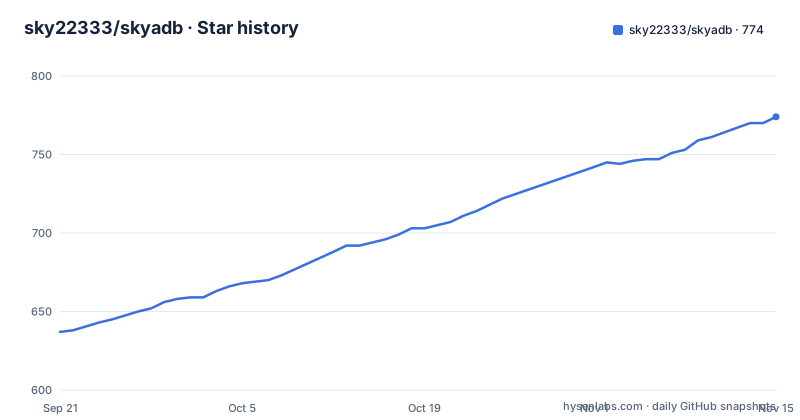
Star history
- sky22333/skyadb774 ★ · +137
| Repository | 2026-09-21 | 2026-11-15 |
|---|---|---|
| sky22333/skyadb | 637 | 774 |
137 Stars in the last 55 days, measured from the daily GitHub snapshot. Compare with other projects
Editorial analysis
The adb client is itself an Android app managing other Android devices
The inversion is the whole idea. sky adb is an ADB management tool that runs on an Android phone, and what it manages is other devices: phones, tablets, televisions and set-top boxes, reached over WiFi ADB or wireless debugging.
The usual shape of an adb tool is a desktop binary on your laptop talking to a phone over USB or over the network. This one puts the client on a third device, so the phone in your hand is the workstation and the phone on the desk is the target.
The practical case that falls out of that is managing a television or a box that has no keyboard and no file manager worth using. Wireless debugging is the only sane way into such a device, and a phone is the one device you already have that can speak it.
The repository is named skyadb and the product is styled sky adb, the licence recorded for the repository is GPL-3.0, the primary language is Kotlin, and the default branch is main. It is not archived and the last recorded push is 2026-08-02.
Kadb and scrcpy-server do the protocol and the mirroring
The technology stack lists eight items and two of them are other people's projects doing the hard work.
Kadb at version 2.1.3 is a Kotlin implementation of the ADB protocol, so there is no native adb binary being shelled out to and no desktop adb in the loop. The acknowledgements credit it to flyfishxu.
scrcpy-server is the other one, credited to the scrcpy project at Genymobile. Screen mirroring on the target is therefore scrcpy's own server, launched on the remote device and driven from the phone, which is why the README can offer screen mirroring, physical key simulation and a virtual remote control as separate features without any of them being a from-scratch input implementation.
The rest of the stack is the ordinary modern Android set: Kotlin, Jetpack Compose, Material 3, Coroutines and Flow for concurrency and reactive state, DataStore for local preferences, and OkHttp for network calls. The build is Kotlin DSL Gradle with the wrapper committed and both gradlew and gradlew.bat present.
Fifteen features spread across seven pages of a device detail view
The feature list is fifteen bullets long and the usage instructions say what you land on after connecting. The device detail page carries app management, APK install, file management, screenshot, remote control, screen mirroring and Shell.
Those seven pages are where most of the fifteen features live. App management covers the app list, filtering by category, search, launch, force stop and uninstall. File management covers directory browsing on the target, uploading a local file and downloading from the device. The Shell page executes commands and shows the output.
Two of the fifteen are about this device rather than the target. One exports the user applications installed on the phone running sky adb and installs them onto the target device, which is how you would provision a new box with the same app set as your handset. The other is the screenshot preview, which renders on demand and only writes a file locally when you ask it to.
There is also device log viewing and copying, and a diagnostic log that records errors to help with connection and function problems. That second one is the app writing down what went wrong, which matters more here than in a desktop tool because the failure is usually a network one.
USB OTG is the second connection path, and it changes what the phone is
Two connection paths are supported and one of them is unusual. Wireless debugging pairing, connecting, disconnecting and recent device records handle the network case. The other is USB OTG, used to connect to ADB or Fastboot and then run the corresponding commands on the Shell page.
USB OTG from a phone means the phone acts as the USB host and the target is the peripheral. That is the opposite of the ordinary arrangement, where the computer is the host and the phone is the device, and it is why OTG is listed alongside wireless debugging rather than as an afterthought.
The two paths are not equally capable, and the feature list does not hide it. Fastboot is named only in the OTG bullet, so the Fastboot command path belongs to the cable connection rather than to wireless debugging.
Once either path is up, the instructions say to enter the device detail page and use whichever of the seven features you need, and frequently used devices are saved automatically so the connection details are filled back in next time.
Subnet scanning and the recent device list are the two features that keep state
Most of the fifteen features are actions you take once. Two of them are different in kind because they look outward and remember.
The first is LAN auto-discovery and subnet scanning, described as a way to find adb devices quickly. Rather than typing an IP address, the app sweeps the local network looking for something answering as an adb device. That is the feature that needs a second thought on a corporate network, because it means the app is generating traffic across subnets you did not name.
The second is the recent device record. Frequently used devices are saved automatically to a recent devices list so that the connection details can be filled back in later. That is convenient and it also means the app stores the IP addresses and ADB ports of the devices you have connected to, on the phone, through DataStore.
Neither of these is described with any caveat on the page. There is no statement about whether the recent list can be cleared, whether it expires, or whether the scan respects a subnet mask, so both are worth checking against your own network before use.
Five settings, and only one of them affects what you see
The last feature bullet is the settings list and it names five values: the default port, the connection timeout, the command timeout, the mirror quality and the theme.
Three of those are about failure rather than appearance. A default port saves you typing one, and the two timeouts decide what happens when a target stops answering, which on a wireless adb connection is a situation you will meet.
Mirror quality is the setting that matters most for screen mirroring, since the mirror is scrcpy rendering on the target and streaming back to the phone, and the phone's screen is the bottleneck rather than the target.
That is the complete configuration surface the README describes. There is no mention of parallel connections, of how many devices can be held at once, or of any option for the ADB authentication that wireless debugging requires.
Three releases in eleven days, and the beta is in the list too
The release history is three entries across eleven days. v1.1.4 on 2026-07-22, v1.1.5-beta on 2026-07-27, and v1.1.5 on 2026-08-02.
A prerelease tagged v1.1.5-beta appears as a GitHub release in its own right rather than as a prerelease flag on the final one. So the list of what you can install includes a beta, and nothing on the page tells a user which of the two they should take.
The final release and the last recorded push are the same timestamp, 2026-08-02 at 13:42 UTC, which means the tag was cut immediately after the commit rather than at the end of a stabilisation window.
The repository root is fourteen entries and is a standard Android project layout: the app module, two Gradle Kotlin DSL files, gradle.properties, the Gradle wrapper with both shell and batch launchers, and a docs directory. There is no changelog file at the root, so the release history is the only record of what changed between 1.1.4 and 1.1.5.
Editorial conclusion
Use this if you need to reach a television or a box that has no usable file manager, since a phone is the one device you already carry that can speak wireless debugging. Skip it if you are on a locked-down corporate network, because the subnet scan generates traffic across ranges you did not name and there is no caveat about it on the page. Before you install, read the settings list, since the two timeouts are what decide whether a flaky wireless connection fails fast or hangs, and pick between v1.1.5 and the v1.1.5-beta release deliberately, because both are in the list and nothing marks one as the intended install.
Frequently asked questions
What is sky adb?
An ADB management tool that runs on an Android phone and is used to manage other Android devices, phones, tablets, televisions and boxes, over WiFi ADB or wireless debugging. Fifteen features are listed, covering app management, APK install, file management, screenshots, screen mirroring and Shell command execution.
Do I need a computer to use sky adb?
No. The client is the Android app itself. You enable developer options and wireless debugging on the target, then either enter the target IP and ADB port in sky adb or use wireless debugging pairing first. Frequently used devices are saved to a recent devices list so the connection details are filled back in.
How does sky adb do screen mirroring and remote control?
It uses scrcpy-server, credited to the scrcpy project, rather than implementing mirroring itself. The README lists screen mirroring, physical key simulation and a virtual remote control as separate features, alongside a Shell page that executes commands and shows the output.
What licence is sky adb under?
The repository record says GPL-3.0, with a LICENSE file at the root. The acknowledgements name Kadb and scrcpy as the projects it builds on, and the stack pins Kadb at version 2.1.3 alongside scrcpy-server.
Official sources
Add this badge to your README
If you maintain this project, the badge below links readers to this analysis and shows its maintenance status from the daily GitHub snapshot. Paste the markdown into your README; add ?metric=license or ?metric=stars to the image URL for a different field.

[](https://hysenlabs.com/projects/sky22333-skyadb)Star history chart for your README
[](https://hysenlabs.com/projects/sky22333-skyadb)Was this useful?