Compose Stability Analyzer for Jetpack Compose diagnostics
🦄 Real-time analysis of Jetpack Compose composable functions' stability directly within Android Studio and IntelliJ.
At a glance
- What is it?
- Compose Stability Analyzer adds stability diagnostics, recomposition tracing, runtime heatmaps, and Gradle reports to Android Studio and IntelliJ. It is aimed at Compose developers who need evidence about why a composable is stable, skippable, or repeatedly recomposed.
- Who is it for?
- Compose Stability Analyzer fits Android Studio and IntelliJ users who need to inspect static stability predictions beside live recomposition evidence. It is less suitable for non-Compose Kotlin work or developers who only want a one-time offline report.
- Can I use it commercially?
- Yes. Apache-2.0 is a permissive licence: you can use, modify and sell software built on it, as long as you keep its copyright and licence notices.
- Is it still maintained?
- Yes. The repository last received commits 25 days ago.
- What is it written in?
- Mainly Kotlin, according to GitHub's language statistics.
Answers come from the project's GitHub data, last synced on November 7, 2026, and from our analysis. They are not legal advice.
Star history
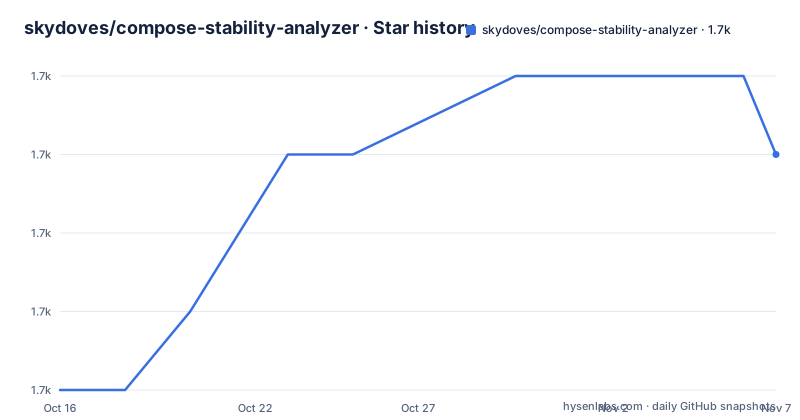
- skydoves/compose-stability-analyzer1,663 ★ · +3
| Repository | 2026-10-16 | 2026-11-07 |
|---|---|---|
| skydoves/compose-stability-analyzer | 1.7k | 1.7k |
3 Stars in the last 22 days, measured from the daily GitHub snapshot. Compare with other projects
Editorial analysis
Why Compose Stability Analyzer targets editor feedback
Compose Stability Analyzer addresses a specific gap in Jetpack Compose work: a composable may have stability metadata, but the reason for that classification is not always obvious at the call site. The project brings that information into Android Studio and IntelliJ, where developers can inspect composable functions and their parameters while editing code. Its intended users are Compose developers investigating recomposition behavior, particularly those who need more context than a broad statement that a function is stable or unstable.
The project also goes beyond static labels. Its documented features include recomposition cascade visualization, a live heatmap fed by a connected device, runtime recomposition counts, recomposition blame, and a "Stability Reality Check" that compares compiler predictions with live results. The README describes tracing through the `TraceRecomposition` annotation, while Gradle tasks can export stability compatibility reports.
That scope makes the plugin a debugging and inspection tool rather than a general Compose optimizer. It does not say that every composable should be made skippable or every parameter stable. Its own note warns that these states are not direct performance indicators. The useful question is whether a classification or repeated recomposition matters in a particular code path, not whether a project can remove every warning.
Compiler, runtime, Gradle, and IDE module boundaries
The repository layout separates the main implementation across modules named `compose-stability-analyzer-idea/`, `stability-compiler/`, `stability-gradle/`, `stability-lint/`, and `stability-runtime/`. It also contains `compiler-tests/`, `samples/`, shared application modules, build logic, and documentation. This division suggests a pipeline in which compiler-derived information is connected to editor inspection, runtime measurement, lint, and report generation.
The IntelliJ-facing module can expose findings directly in source files. Documented editor features include colored gutter icons that indicate whether a composable is skippable, hover tooltips that explain stability decisions, inline parameter badges, and inspections with warnings or quick fixes. The editor can also visualize downstream composables associated with recomposition. These are views attached to code locations rather than a general project-health score.
A separate runtime layer is necessary for the documented live features. The repository contains `stability-runtime/`, while the plugin promises recomposition counts from a connected device and attribution of a recomposition to an exact state write site such as `onClick (Screen.kt:42)`. The README does not document the complete runtime protocol, supported device transport, or refresh sequence, so those operational details should be checked in the project documentation before deployment.
The Gradle module serves a different purpose. Its tasks produce stability compatibility reports for review when stability behavior changes. That is useful for teams that need an inspectable artifact alongside code review. It does not make the plugin a replacement for compiler diagnostics, because the README describes report export rather than a complete standalone policy engine.
Nine IDE features for tracing Compose behavior
The README groups the plugin's editor experience into nine features. Gutter icons provide a quick visual indication of skippability, while hover tooltips explain why a composable is considered stable or unstable. Inline parameter hints identify the stability status of individual parameters. Code inspections provide warnings and quick fixes for composables that the analyzer considers problematic.
The recomposition-oriented features supply a different view. Recomposition Cascade visualizes downstream composables affected by a recomposition. The Live Recomposition Heatmap overlays counts from a connected device onto the editor. Recomposition Blame traces a recomposition back to a state write site and the origin of a parameter value. Stability Doctor combines static verdicts, blast radius, and measured runtime waste into a ranked list of possible fixes.
The "Stability Reality Check" is particularly important because it compares the compiler's static prediction with live runtime data. That comparison can distinguish an unstable classification that has no visible runtime consequence from a case where static warnings correspond to measurable recomposition work. The README presents this as a diagnostic aid, not as a guarantee that every runtime event has one simple cause.
The feature set is broad for an IDE plugin. Developers should check which features their intended workflow uses. A team interested only in code inspection may not need the connected-device heatmap, while a performance investigation may need both the static explanation and runtime attribution.
Configuration choices that change the analysis surface
The documented settings affect both presentation and which types are considered. Developers can change the colors used for stability indicators so the marks fit the IDE theme. They can enable Strong Skipping mode when analyzing behavior, toggle visual indicators such as gutter icons, warnings, and inline hints, and adjust parameter hint colors.
Analysis scope is configurable as well. The project supports analysis in test source sets and accepts a stability configuration file. It also supports ignored type patterns, allowing selected types to be excluded from stability analysis. These options matter because a result is not meaningful without knowing whether a type was analyzed, whether test code was included, and whether Strong Skipping was enabled.
The README does not publish a complete settings file or enumerate every configurable key. It specifically names `TraceRecomposition` as the annotation used to trace the reason a composable is triggered to recompose, but it does not show a configuration block containing the other settings. As a result, a working installation should not be documented with guessed syntax. The correct procedure is to install the plugin and use the settings exposed by the running IDE version.
This configurability is useful for focused investigations, but it also creates a review burden. Different configurations can produce different visual results. A team should record the relevant settings when saving a heatmap or reviewing a compatibility report.
Installation and a first inspection
The README identifies Android Studio and IntelliJ as the plugin environments and links the project through its JetBrains plugin listing. It does not provide a copyable installation command, Gradle dependency declaration, or configuration file. Consequently, the documented path is to obtain the Compose Stability Analyzer IntelliJ plugin from its JetBrains listing and install it through the IDE plugin system.
After installation, open a Jetpack Compose source file and inspect a composable. The expected first check is the editor gutter, where the plugin documents a colored dot indicating whether the composable is skippable. Hovering over the function is expected to show the stability classification and its stated reasons. Parameter badges can provide a more local view of individual argument stability.
For a runtime-oriented first use, the README says that the heatmap uses a connected device. The documentation excerpt does not specify the exact application initialization call, device selection command, logging setup, or trace annotation parameters, so those commands cannot be reproduced reliably here. A developer should follow the project's dedicated documentation for those steps and verify that the device data reaches the IDE before interpreting the displayed counts.
For report-based review, the README states that Gradle tasks can export stability compatibility reports. It does not give the task names or invocation syntax. Do not assume an undocumented task name. Discover the documented task in the project version being installed, run it as documented, and inspect the generated report before adding it to review policy.
Where the analyzer can mislead or become the wrong tool
The most important limitation is stated by the project itself. A stable or skippable composable is not automatically evidence of good performance, and an unstable composable is not automatically a problem. Stability is one input to Compose behavior, not a complete performance measurement. Ignoring that boundary can lead developers to refactor code solely because a visual indicator changed.
Runtime features add another boundary. The heatmap and recomposition counts depend on a connected device and on the code paths exercised by the application. The README does not claim that the displayed data represents every screen, configuration, or workload. A quiet heatmap can therefore mean that a path did not run, while a busy one can reflect the behavior of a particular interaction rather than a universal defect.
The plugin is also the wrong tool for projects that do not use Jetpack Compose. Its editor, compiler, runtime, lint, and Gradle components are tied to composable stability and recomposition. For ordinary Kotlin libraries, a general static analyzer or profiler may be more appropriate. For a one-time build report, using the documented Gradle task without installing the full IDE workflow may be sufficient.
The repository includes `stability-lint/`, but the README does not document a complete lint rule catalog or its default severity. Teams should not assume that every lint diagnostic has the same CI meaning. Review the actual rules and configuration in the version they adopt.
Maintenance, releases, and Apache-2.0 implications
The repository is not archived, and its last push was on 2026-10-14. The release history includes version 0.15.0 on 2026-09-23, 0.14.0 on 2026-09-16, and 0.13.0 on 2026-08-22. These dates show recent project activity around the analyzer releases, but they do not establish compatibility with every current IDE or Compose compiler release.
The repository uses the Apache-2.0 license. That permits use and modification under the license's conditions, including preservation of applicable notices and the license text. This paragraph is not legal advice. Projects distributing a modified build should review `LICENSE` and `NOTICE` and follow the attribution and notice requirements that apply to their distribution.
Upgrade cost depends on which parts are adopted. Installing the IDE plugin is one step, but adopting its runtime and Gradle components adds configuration and review work. The README names the available settings but does not document a migration procedure for changes between versions. Before upgrading a plugin version already used in CI or connected-device debugging, compare its documented IDE requirements and task names with the local build.
Choosing between editor analysis and static Compose reports
The real alternative is to rely on Compose compiler diagnostics and build-time reports without adding this plugin. That approach can answer whether code compiles and can expose compiler messages, but it does not provide the documented gutter indicators, parameter hints, recomposition cascade, connected-device heatmap, or blame from the README's feature list. It is simpler when the question is limited to build correctness.
Compose Stability Analyzer takes a different approach by joining source-level explanations with runtime observations and ranked diagnostics. Its value is highest when a team needs to investigate why a particular composable recomposes and whether the static classification corresponds to measured activity. Its cost is an additional plugin, configuration surface, and device-based debugging workflow.
For CI, the Gradle report path may be more relevant than the heatmap. For local development, the IDE features may answer questions faster than waiting for a report. A team should select the path that matches the question rather than enabling every available feature by default.
Editorial conclusion
Compose Stability Analyzer fits Android Studio and IntelliJ users who need to inspect static stability predictions beside live recomposition evidence. It is less suitable for non-Compose Kotlin work or developers who only want a one-time offline report. Before adopting it, verify compatibility with the IDE and Compose compiler versions used by the project, then review the ignored type patterns, test-source setting, indicator colors, and Strong Skipping configuration.
Frequently asked questions
Does Compose Stability Analyzer work with Jetpack Compose?
Yes. The project is designed for Jetpack Compose composable functions and provides stability analysis in Android Studio and IntelliJ.
How does Compose Stability Analyzer show why a composable is unstable?
The README says hover tooltips provide stability information and explain why a composable is stable or unstable. Inline parameter hints can also show the stability status of individual parameters.
Can Compose Stability Analyzer trace runtime recomposition?
The documented features include a live recomposition heatmap, recomposition counts from a connected device, recomposition blame, and tracing through the `TraceRecomposition` annotation.
Official sources
Add this badge to your README
If you maintain this project, the badge below links readers to this analysis and shows its maintenance status from the daily GitHub snapshot. Paste the markdown into your README; add ?metric=license or ?metric=stars to the image URL for a different field.

[](https://hysenlabs.com/projects/skydoves-compose-stability-analyzer)Star history chart for your README
[](https://hysenlabs.com/projects/skydoves-compose-stability-analyzer)Was this useful?