z.lua: a single-file Lua directory jumper that claims 10x and 3x speedups
:zap: A new cd command that helps you navigate faster by learning your habits.
At a glance
- What is it?
- A frecency-based directory jumper distributed as a single Lua script that a shell initialises, with integrations for POSIX shells, Fish, Nushell, PowerShell, and Windows cmd and cmder. Its feature list claims 10x speed over fasd and autojump and 3x over z.sh, the default matching algorithm is deliberately different from the recommended one, and on Windows it needs an interpreter, a shim file and sometimes a filesystem module.
- Who is it for?
- This fits someone who wants directory jumping with no compiled binary and no package to install, and who is willing to put one eval line in a shell startup file and learn four option words. Three things to check before you trust the numbers.
- Can I use it commercially?
- Yes. MIT is a permissive licence: you can use, modify and sell software built on it, as long as you keep its copyright and licence notices.
- Is it still maintained?
- Yes. The repository last received commits 18 days ago.
- What is it written in?
- Mainly Lua, according to GitHub's language statistics.
Answers come from the project's GitHub data, last synced on November 13, 2026, and from our analysis. They are not legal advice.
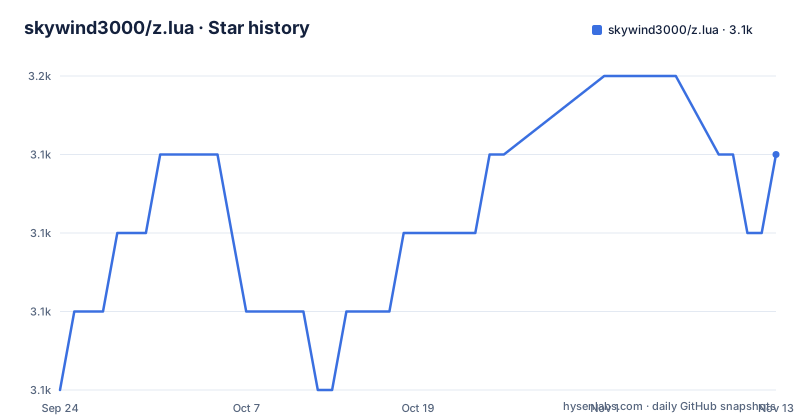
Star history
- skywind3000/z.lua3,149 ★ · +3
| Repository | 2026-09-24 | 2026-11-13 |
|---|---|---|
| skywind3000/z.lua | 3.1k | 3.1k |
3 Stars in the last 50 days, measured from the daily GitHub snapshot. Compare with other projects
Editorial analysis
Multiple patterns must all match, in order
The description section is where the actual semantics are, and they differ from what most jumpers do.
The tool tracks the directories you use most, on a frequency and recency basis, and after a short learning phase it takes you to the highest ranked directory matching the patterns you give. The words that matter are all and in order.
So two arguments are conjunctive rather than alternative: both have to match. And they have to match in sequence, which the README demonstrates with a path: a call of `z foo bar` would match a directory containing foo then bar, and would not match one containing bar then foo.
That is what makes the tool predictable when your directory tree has both orderings, and it is the one behavioural decision here that is stated in a sentence rather than left to the examples.
The examples then group the flags by mode rather than by function. One pair ranks differently, with one flag for highest ranked and one for most recently accessed. One pair is read-only, with one flag listing matches and one echoing the best match without changing directory. One pair is interactive, with one for built-in selection and one delegating to a fuzzy finder. One flag restricts matches to subdirectories of the current directory. And one flag has nothing to do with frequency at all: it goes to the parent directory whose name starts with the given text, with a two-argument form that rewrites one path segment and goes there instead.
That last pair is worth noticing, because it is a find-and-replace on the current path wearing the same clothes as the rest of the interface.
The speed claims are ratios, and the only measurement is a testimonial
The first line of the features list is the performance claim, and it is three numbers with no conditions.
Ten times faster than two named tools, three times faster than another, and an optional native module written in C for more speed still.
The only timing figure in the Reputation section is not from the author. It is a quotation from a user who says they can have the functionality of a comparable tool on a Raspberry Pi 1 without waiting thirty seconds every time they open a new shell.
So the only timing figure in the Reputation section is somebody else's anecdote about a different tool.
The comparison set is also worth noting. The tool positions itself as an alternative to one named predecessor, and the performance line names two others.
Self contained in one script, with an interpreter as its dependency
The distribution claim is specific and appealing: a single script, self contained, with no other dependence.
And it is nearly true. The file is one script, and there is nothing to compile by default.
But every installation instruction in the README begins by invoking a Lua interpreter against that file. A shell startup line is an eval of the output of running the script with an init flag naming the shell. So a Lua interpreter is a hard prerequisite on every platform, which the self-contained claim does not mention, and the version requirement is stated as compatible with three release series of the language plus a just-in-time implementation of it.
Two optional dependencies sit on top of that. One is the native module written in C, which trades the single-file property for speed and needs a build step and a toolchain. The other is a fuzzy finder, wired into the interactive flags and into shell completion.
So the honest description is: one script, no package to install, and one interpreter you must already have. For a tool whose whole appeal is not installing anything, that is the trade, and the README makes it without quite naming it.
Four bash lines, each one word longer, and none of the words explained
The bash installation section is four commands, each a variation on the same `--init bash` line with extra option words.
The first initialises the script for bash. The second adds a word the README calls the enhanced matching algorithm, and says the default is similar to the predecessor tool to keep compatibility, so you may prefer the enhanced one for productivity. The third adds `echo`, which the README says makes z.lua print the new directory after cd. The fourth uses `fzf` instead and is introduced as being for tab completion with the fuzzy finder.
So the README's guidance is that the default is similar to z.sh for compatibility, while the enhanced algorithm may suit productivity better.
That default is a design decision with a cost. Choosing compatibility means the out-of-the-box behaviour matches a tool that is being replaced, which is sensible for anyone migrating and wrong for anyone starting fresh.
The zsh section repeats the same pattern in one line and adds that the script can also be loaded through zsh plugin managers, naming two of them. The POSIX section is the same again, and then adds a separate legacy variant for older shells, noting that some features are missing and that the legacy form generates an older-compatible script.
Home-manager configuration is offered for three shells only, with an enable flag, a per-shell integration flag and an options list carrying the same three words. Nothing equivalent is offered for the three shells further down.
Nushell needs a cache file, and PowerShell has to come after Starship
Two of the integrations have prerequisites the others do not, and both are stated as warnings rather than as requirements.
Nushell is a two-step install. The script's output is written to a file under the user's cache directory, and a separate line in the configuration file then sources that file. So unlike the eval-one-line shells, this shell gains a generated file on disk that has to be regenerated when the options change. There is also a floor: only a recent version of the shell is supported.
PowerShell carries an explicit warning, and it is about a third-party tool. Users of a popular prompt are told to put the initialisation command after that prompt's own initialisation, because the ordering matters. The command itself is more involved than the POSIX ones: the interpreter output is joined into a single string with a newline before being evaluated, rather than being handed to the shell wholesale.
Both of these are the kind of detail that gets discovered by breaking, so the fact that they are documented at all is worth crediting. The third integration, the Windows terminals, is where the prerequisites stack up.
Windows needs an interpreter on the path, a shim file, and on one subsystem a filesystem module
There are three Windows routes, and each one adds a requirement the others do not have.
For the command shell with a third-party readline layer, three steps: copy two files into that layer's home directory, add that directory to the path so the shim can be called from anywhere, and make sure the interpreter itself is on the path. The two files are the script and a command shim.
For another terminal emulator, the same three steps with a different destination directory, the vendor directory rather than the home directory.
And for the first subsystem, one more: a filesystem module has to be installed through the system package manager before the script is initialised. The reason is given as a defect in that subsystem, with a link to the issue tracker.
So the Windows path is the interpreter on the path, a second file to place by hand, and on one subsystem a compiled module. The interpreter requirement appears in every install line in the document, so it is easy to miss that it is also a hard requirement here.
The fish integration has a fish init file at the root, but the README tells you to create a file in a configuration directory with a one-line pipeline that runs the script and sources its output. An optional extra line tells fish to set a variable so the tool cooperates with fish's own directory history.
Two other root files complete the picture: a zsh plugin-manager entry point matching the managers the README names, and the Windows shim.
A Python file and a double-extension file sit beside the single script
The repository root is eleven entries, and the distribution model is visible in them.
The script itself is there, plus the Windows shim, the zsh plugin entry point, and the fish init file. There is a Chinese version of the readme, an image directory, and an ignore file.
Two of the entries are not part of that model.
One is a Python file whose name suggests an integration with a console file manager, a Python script inside a Lua project. It appears, from its name, to be an integration for one specific file manager, and it introduces a second language into a project whose selling point is a single self-contained file.
The other is a file with two extensions, the second being a rename, sitting at the root. Whether it is a template or a fixture is not stated anywhere, and either way it is a loose end in a repository whose README is otherwise careful about what it claims.
The tag naming is worth a final note for anyone scripting against it. The three recent tags are inconsistent: one carries a leading letter and two do not. Each tag also embeds a date in its release title, so the history can be read as a dated sequence, but a version lookup by prefix has to handle both forms.
Editorial conclusion
This fits someone who wants directory jumping with no compiled binary and no package to install, and who is willing to put one eval line in a shell startup file and learn four option words. Three things to check before you trust the numbers. The speed claims are ratios against three named tools (10x over fasd and autojump, 3x over z.sh), and the only timing figure in the Reputation section is a user testimonial about a different tool. The default matching algorithm is chosen for compatibility with the tool it replaces, so the enhanced matching is opt-in through an extra option word. And the argument order is significant: multiple patterns must match in sequence.
Frequently asked questions
What is the z command?
In this repository `z` is the default command name, and it can be changed by setting a variable before initialisation. The command jumps to the highest ranked directory matching patterns you give, ranked by how often and how recently you visit directories. The tool is distributed as a single script that your shell initialises at startup.
Is "Lua" an acronym?
No. Lua is the language's name, and this repository is a script written in it rather than an implementation of it. The readme states compatibility with three release series of the language and with a just-in-time implementation of it.
Is Lua a fast language?
The repository does not benchmark the language. Its performance claims are about this tool against three named alternatives, stated as 10x faster than fasd and autojump and 3x faster than z.sh, plus an optional native module written in C for more speed. The only timing figure in the Reputation section is a user quotation about another tool.
Can I use Lua in Linux?
The readme lists the supported shells, and the POSIX group covers bash, zsh, dash, sh, ash, ksh and busybox, with fish, nushell, PowerShell and the Windows command shell also covered. A Lua interpreter has to be on the path for every install line, and on one Windows subsystem version a filesystem module is required as well because of a defect in that subsystem.
Official sources
Add this badge to your README
If you maintain this project, the badge below links readers to this analysis and shows its maintenance status from the daily GitHub snapshot. Paste the markdown into your README; add ?metric=license or ?metric=stars to the image URL for a different field.

[](https://hysenlabs.com/projects/skywind3000-z-lua)Star history chart for your README
[](https://hysenlabs.com/projects/skywind3000-z-lua)Was this useful?