Slather for Xcode coverage reports and CI uploads
Generate test coverage reports for Xcode projects & hook it into CI.
At a glance
- What is it?
- Slather is a Ruby command-line tool for collecting Xcode coverage data, filtering source files, and sending reports to Coveralls or Codecov. It suits Apple-platform projects whose CI already produces instrumented test builds, but its setup depends on valid schemes, configurations, binaries, and Xcode coverage data.
- Who is it for?
- Adopt Slather when the project uses Xcode-generated coverage data and needs a repeatable report step for Coveralls or Codecov. Do not choose it if your tests do not gather coverage, your build produces ambiguous universal binaries without an explicit architecture, or your CI cannot provide the expected project and scheme details.
- Can I use it commercially?
- Yes. MIT is a permissive licence: you can use, modify and sell software built on it, as long as you keep its copyright and licence notices.
- Is it still maintained?
- Yes. The repository last received commits 24 days ago.
- What is it written in?
- Mainly Ruby, according to GitHub's language statistics.
Answers come from the project's GitHub data, last synced on November 6, 2026, and from our analysis. They are not legal advice.
Star history
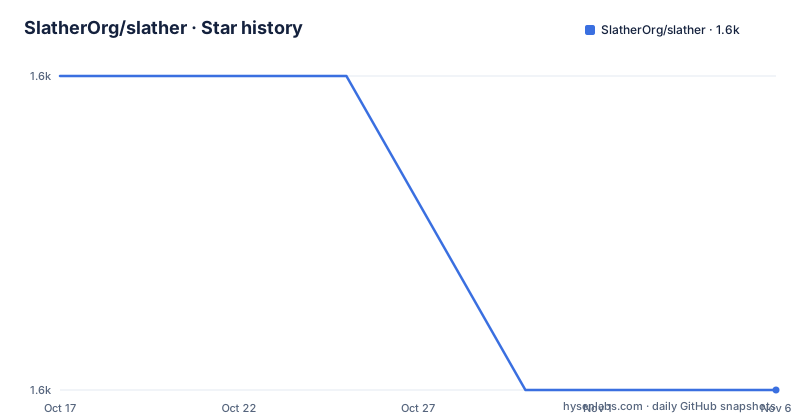
- SlatherOrg/slather1,593 ★ · -1
| Repository | 2026-10-17 | 2026-11-06 |
|---|---|---|
| SlatherOrg/slather | 1.6k | 1.6k |
-1 Stars in the last 20 days, measured from the daily GitHub snapshot. Compare with other projects
Editorial analysis
Where Slather fits in an Xcode coverage workflow
Slather addresses a specific gap between running an Xcode test suite and publishing its coverage report. Xcode can gather code coverage during tests, but a CI job usually needs a separate command that locates the coverage output, applies source-file rules, produces a service-specific report, and invokes an uploader. Slather is built for that reporting stage.
The intended users are Ruby developers and CI maintainers working with Xcode projects or workspaces. Ruby is not required for the iOS or macOS application itself, but it is required to install and invoke Slather because Slather is distributed as a gem. The README explicitly supports Xcode projects, workspace-based setups, multiple modules, and CI integrations with Coveralls and Codecov.
Slather does not create coverage measurements by itself. The first prerequisite comes from Xcode: the scheme must have its "Gather coverage data" checkbox enabled. A test run must also complete and leave usable coverage data behind. That boundary matters. A CI job that runs tests without instrumentation, points at the wrong scheme, or cannot access the built products directory does not become a coverage workflow merely by adding Slather to the Gemfile.
From Xcode instrumentation to filtered coverage reports
The documented flow starts inside Xcode, where a scheme gathers coverage data. After the test suite runs, the `slather coverage` command receives an Xcode project and usually a scheme name. Depending on the project, it may also need a workspace, build configuration, or architecture.
Slather then applies project-specific controls. The `--ignore` option and `ignore` configuration key exclude files matched by glob patterns. The `--source-files` option and `source_files` key can include selected files. The documented precedence is strict: if a scanned file matches `ignore`, it is excluded before `source_files` is considered. If it is not ignored and `source_files` has been defined, Slather includes it when it matches a configured glob.
The output is configured through `coverage_service`, `source_directory`, and `output_directory`. For Codecov, the documented configuration requests `cobertura_xml`, names the project, scheme, configuration, source directory, and report directory, then excludes generated code and test groups. The CI command invokes Slather and passes the resulting `cobertura.xml` to the Codecov uploader. For Coveralls, the project instead sets `coverage_service: coveralls` and a recognized `ci_service`, then calls Slather after a successful build.
This design keeps Xcode responsible for executing instrumented code and Slather responsible for turning that coverage information into a report or CI handoff. The README does not document the internal parsers or algorithms, so claims beyond that documented boundary should not be inferred from the repository description alone.
Installing Slather and producing the first report
Install Slather as a bundled development dependency when the application already uses Bundler. Add the documented gem declaration to the application's `Gemfile`.
gem 'slather'Then resolve and install the bundle from that project directory.
bundleAlternatively, install the gem directly into the current Ruby environment.
gem install slatherBefore invoking Slather, enable "Gather coverage data" in the Xcode scheme and run the test suite. For a conventional project, issue the documented coverage command after those tests have completed.
slather coverage -s --scheme YourXcodeSchemeName path/to/project.xcodeprojThe placeholder scheme and project path must be replaced with values from the target repository. A successful invocation is expected to begin processing coverage for that scheme and project, although the README does not define a specific success message or exit-status contract.
If Xcode opens the code through a workspace, supply that workspace too.
slather coverage -s --scheme YourXcodeSchemeName --workspace path/to/workspace.xcworkspace path/to/project.xcodeprojA project that does not test its default configuration can identify the build configuration explicitly.
slather coverage -s --scheme YourXcodeSchemeName --configuration YourBuildConfigurationName path/to/project.xcodeprojFor configuration output that contains a universal binary, select the architecture Slather should use.
slather coverage -s --arch x86_64 --scheme YourXcodeSchemeName --configuration YourBuildConfigurationName path/to/project.xcodeprojFiltering modules and resolving `.slather.yml` precedence
Large Xcode repositories often contain modules that should not contribute coverage, including dependencies created by CocoaPods. Slather accepts repeated `--binary-basename` arguments when only selected modules should be included.
slather coverage --binary-basename module1 --binary-basename module2 path/to/project.xcodeprojThe equivalent persistent configuration is an array under `binary_basename` in `.slather.yml`.
binary_basename:
  - module1
  - module2
A configuration file reduces command-line repetition, which is useful when local use and CI need the same project selection. Command-line arguments still take precedence over matching `.slather.yml` settings. This is documented as "Commandline Arguments Win," so a CI command can override a configured scheme, configuration, path, or other matching setting without editing the YAML file.
File inclusion has a different and stricter rule. `ignore` is evaluated before `source_files`, and an ignored match prevents inclusion even if the file would also match the source list. This behavior is useful for excluding dependency code or test infrastructure, but it can produce unexpectedly small reports if a broad ignore glob overlaps real application files. Repository owners should inspect their glob patterns before accepting a coverage baseline.
Configuring Coveralls and Codecov from CI
For Codecov, the README documents a report file at `path/to/xml_report/cobertura.xml`. A CI job can invoke Slather after tests and then pass that file to the Codecov uploader. The following is the documented `.travis.yml` sequence, with paths and scheme names adapted to the target project.
after_success:
  - slather
  - bash <(curl -s https://codecov.io/bash) -f path/to/xml_report/cobertura.xml -X coveragepy -X gcov -X xcode
The CircleCI example follows the same two-stage structure: Slather creates the report, and the Codecov command uploads it.
test:
  post:
    - bundle exec slather
    - bash <(curl -s https://codecov.io/bash) -f path/to/xml_report/cobertura.xml -X coveragepy -X gcov -X xcode
The associated `.slather.yml` binds Slather to `coverage_service: cobertura_xml` and defines the Xcode project, scheme, configuration, source directory, output directory, and exclusions.
coverage_service: cobertura_xml
xcodeproj: path/to/project.xcodeproj
scheme: YourXcodeSchemeName
configuration: TestedConfiguration
source_directory: path/to/sources/to/include
output_directory: path/to/xml_report
ignore:
  - ExamplePodCode/*
  - ProjectTestsGroup/*
For Coveralls, the README lists CircleCI, Travis CI, Travis CI Pro, Jenkins, Buildkite, and TeamCity as supported `ci_service` values. The short invocation is:
after_success: slatherA private Codecov repository requires the uploader's documented token option. This report does not assess token handling or permissions, so repository owners should keep CI secrets outside committed configuration.
Slather limitations, maintenance, and the MIT boundary
Slather's main failure modes occur before report publication. Missing scheme coverage collection means there may be no useful data to process. A workspace-backed build needs `--workspace`, a nondefault test setup needs `--configuration`, and a universal binary needs an explicit `--arch`. A wrong project path, scheme name, or ignore pattern can also make a job run without producing the expected report.
The alternative approach is to use Xcode's built-in coverage interface and report handling without Slather. Xcode can gather coverage as part of the scheme and can display coverage within its own tools. Slather adds value when the requirement is a command-line and CI workflow, persistent `.slather.yml` configuration, module selection, source filtering, Codecov XML output, or automatic Coveralls handoff. If those are not required, adding Ruby and Slather introduces another tool into the build environment.
The repository is not archived. Its last push was on 2026-10-14, and releases v2.8.7 and v2.8.6 were published on 2026-10-14 and 2026-10-09 respectively. This is evidence of recent repository and release activity, not evidence that every Xcode release or future project configuration will work without changes.
The project uses the MIT license. That permits use, modification, distribution, and sublicensing subject to its notice and license conditions. This is not legal advice, and downstream repositories should retain the required license notice. Upgrade planning should account for Ruby and Bundler availability, changes to Xcode coverage output, CI provider changes, and the need to rerun the report command after version upgrades.
Editorial conclusion
Adopt Slather when the project uses Xcode-generated coverage data and needs a repeatable report step for Coveralls or Codecov. Do not choose it if your tests do not gather coverage, your build produces ambiguous universal binaries without an explicit architecture, or your CI cannot provide the expected project and scheme details. Verify scheme coverage collection, the selected configuration, source filters, generated report path, and CI service credentials first. For an Xcode repository whose first report can be produced directly by the shown Slather command, Slather is a practical fit.
Frequently asked questions
How do I install Slather for an Xcode project?
Add `gem 'slather'` to the application's `Gemfile` and run `bundle`, or install it with `gem install slather`. Slather requires a Ruby environment because it is distributed as a Ruby gem.
How do I generate the first Slather coverage report?
Enable "Gather coverage data" in the Xcode scheme, run the test suite, and then invoke `slather coverage -s` with the scheme and Xcode project. Workspace, configuration, and architecture options may also be required.
Can Slather upload coverage to Codecov and Coveralls?
Yes. The README documents Codecov through Cobertura XML plus the Codecov uploader, and Coveralls through supported `ci_service` settings including Travis CI and CircleCI. The CI service and credentials still need to be configured correctly.
Official sources
Add this badge to your README
If you maintain this project, the badge below links readers to this analysis and shows its maintenance status from the daily GitHub snapshot. Paste the markdown into your README; add ?metric=license or ?metric=stars to the image URL for a different field.

[](https://hysenlabs.com/projects/slatherorg-slather)Star history chart for your README
[](https://hysenlabs.com/projects/slatherorg-slather)Was this useful?