Tinkers' Construct: a Minecraft mod about tools that never stop changing
Tinker a little, build a little, tinker a little more...
At a glance
- What is it?
- Tinkers' Construct is a Minecraft mod whose central mechanic is that a tool is a set of parts you can keep modifying, made from many materials in a part builder or a multiblock smeltery. The repository is organised per game version, and its support policy is written down in the README with unusual bluntness.
- Who is it for?
- Tinkers' Construct fits a Minecraft player who wants the crafting of tools to be the game rather than a side activity, and a mod developer who wants to extend it through addons and datapacks.
- Can I use it commercially?
- Yes. MIT is a permissive licence: you can use, modify and sell software built on it, as long as you keep its copyright and licence notices.
- Is it still maintained?
- Yes. The repository last received commits 11 days ago.
- What is it written in?
- Mainly Java, according to GitHub's language statistics.
Answers come from the project's GitHub data, last synced on October 24, 2026, and from our analysis. They are not legal advice.
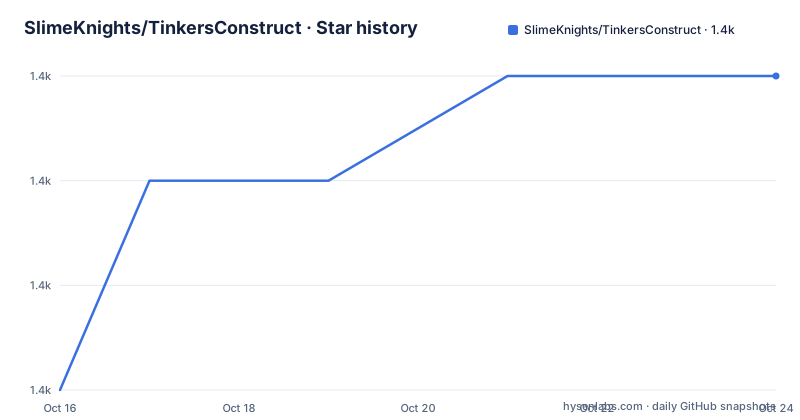
Star history
- SlimeKnights/TinkersConstruct1,411 ★ · +3
| Repository | 2026-10-16 | 2026-10-24 |
|---|---|---|
| SlimeKnights/TinkersConstruct | 1.4k | 1.4k |
3 Stars in the last 8 days, measured from the daily GitHub snapshot. Compare with other projects
Editorial analysis
The mechanic, stated in one paragraph
Tinkers' Construct is a mod about putting tools together in a wide variety of ways and then modifying them until they turn into something else. The tools never disappear and can be named and changed to your heart's desire. Many different materials can be used to make your tools, and they can be forged in the part builder or by melting down metals in the multiblock smeltery.
That paragraph is the whole design brief, and it is worth reading carefully because the mod is often described as a crafting overhaul when the mechanism is more specific than that.
The unit of the game is the tool, and a tool is not a recipe. It is an assembly of parts, and the parts come from materials, and the assembly persists. Once you have made a tool it is yours forever, which means the mod is not about a nicer anvil and it is not about more recipes either. It is about a tool that has a history: the parts that went into it, the materials they were made from, the modifiers applied to it, and the name you gave it.
The consequence is that the content of the mod is combinatorial rather than hand authored. A material that is good at one thing and bad at another is interesting because it can be combined with a part that compensates for it, and the number of interesting combinations is a product rather than a sum. That is also why the two construction stations matter: the part builder for assembling, the multiblock smeltery for melting metals down into the material you need, which is a deliberate loop in the progression rather than a station in a list of stations.
The project is maintained by SlimeKnights, the primary language is Java, the licence is MIT for the code, the textures and the binaries, and the default branch is `1.20.1`. The last push was on 2026-10-13, and the recent releases are v3.12.1.231 from 2026-09-22, v3.12.0.220 from 2026-09-04 and v3.11.2.166 from 2026-01-12.
The branch names are the game versions
The repository layout explains the versioning model, because the branches and the release names are not what a Java project normally looks like.
The default branch is `1.20.1`, which is a Minecraft version rather than a mod version, and the releases are named with three numbers: `v3.12.1.231` is described as Just Enough Update for 1.20.1, and `v3.12.0.220` as the Slimesuit Update for 1.20.1. So the first number is the mod version, the second is the Minecraft version, and the third is the build number.
That is a per-game-version branch layout, and the presence of `multimodel.txt` and the `project_files/` directory in the root points at why. A Minecraft mod is not a library with one set of sources: the game itself is the dependency, and different game versions have different APIs, different data pack formats and different tooling. Supporting several of them at once means a branch per version, with the shared parts carried across, which is what the multi-model build and the `project_files/` directory are for.
The other files in the root are equally telling. There is a `Jenkinsfile`, so the continuous integration is Jenkins rather than a hosted service, and a `changelog.txt` rather than a changelog generated from commit messages. There are two formatter configurations, `TConstruct IntelliJ Formatter.xml` and `eclipse_formatter.xml`, so the project supports both IDEs and pins the formatting for each, and there is a `lombok.config` because the code uses Lombok.
The practical consequence for a contributor is that a change is not just a change. It is a change to a branch tied to a game version, with a formatting convention per IDE, and it has to build with the Gradle setup that the project pins in `gradle/` and `gradle.properties`.
Setting up a workspace, and the two commands that matter
The development section is short, and it reads like a note to somebody setting this up for the first time.
Git must be installed and in the system path to use the scripts. The setup is to import Tinkers' Construct as a Gradle project into IDEA and let it run setup. The run step is to run the `genIntellijRuns` task through IDEA, which generates the run configurations the IDE needs to launch the game with the mod loaded. The build step is `gradlew build`.
gradlew genIntellijRuns
gradlew build
The generated run configurations are the point of the `genIntellijRuns` task. A Minecraft mod is not a library with a main method, so the only way to see your change working is to launch the game with it, and the IDE needs the launch configuration that does that. The task exists so that every developer gets the same configuration rather than setting it up by hand, and it is run through the IDE because the IDE is what consumes the output.
There is also an escape hatch for the build system itself: if obscure Gradle issues are found, try running `gradlew clean` and `gradlew cleanCache`. That is a blunt instruction and it is the one everybody learns, because a stale Gradle cache in a project with a Jenkinsfile, a multi-model layout and a pinned Gradle version is a common afternoon.
The repository ships the wrappers, `gradlew` and `gradlew.bat`, so the build does not need a system Gradle, and the `gradle/` directory pins the version, which is the difference between a build that works on a machine in 2026 and one that worked on the maintainer's machine in 2024.
Support is written as a policy, not offered as a favour
The README has a section on licences and support restrictions, and it is more specific than most mod projects bother to be, so it is worth quoting the substance rather than paraphrasing it.
The code, the textures and the binaries are licensed under the MIT licence, and you are allowed to use the mod in your modpack. Then the conditions. Any modpack which uses Tinkers' Construct takes full responsibility for user support queries. For anyone else, only official builds from the main CI server are supported, not custom built jars. And no bug reports are taken for outdated builds of Minecraft.
Three decisions are packed into that paragraph, and each of them solves a real problem. The first is the modpack rule: a server operator who puts the mod in a pack inherits the questions from their players, and the project says so plainly instead of being surprised by the volume. The second is the official builds rule, which is what makes the Jenkinsfile the single source of artefacts and what makes the jar signing policy below coherent. The third is the outdated builds rule, which is the one that saves the most time, because an issue against a game version from years ago cannot be reproduced and cannot be fixed in a way that helps anybody.
The jar signing section follows the same logic. Some jars from the build servers may be signed, no one has permission to verify the signatures on those jars from other mods, and the signing is for informational purposes only. That is a small permission, and it is stated in a way that cannot be misread as an invitation.
The README also says that any queries about the licence or the support restrictions should go to the Discord or to the links on the project's site, which is the right place for the conversation that does not belong in an issue tracker.
The documentation is a separate site with two audiences
The README keeps its own documentation short and points elsewhere, and the two destinations are aimed at different people.
For writing addons or working with Tinkers' Construct datapacks, the pages are on the SlimeKnight's documentation site. For a gameplay overview there is a separate page for the third version of the mod. So the project separates the two things a reader might want, the mechanic as a player experiences it and the extension surface as a developer writes against it, and it keeps both out of the repository.
That is a sensible split for a mod of this size, and it is also the mechanism that makes the mod extensible at all. A mod that changes the crafting of tools has to expose its internals to other mods, and the addon and datapack surface is how that exposure is documented. The datapack route in particular is the one that does not need Java, which means a server operator can change the behaviour of a tool without a modpack, and the interface for that is where the documentation effort goes.
The issue reporting section carries the same audience split in mind. A report should include the Minecraft version, the Tinkers' Construct version, the Forge version or build, the versions of any mods potentially related to the issue, and any relevant screenshots, which are greatly appreciated. For crashes there is a specific request: the steps to reproduce and the latest.log, the FML log, from the root folder of the client.
The last item is the one that separates a useful report from an unusable one. A crash report without the log is a description of a symptom, and the log is the part that says where it happened.
Where Tinkers' Construct is the wrong tool
The limits here are not surprising, but they are worth stating so that a reader knows what kind of project this is.
The first is scale. This is a mod that changes the progression of an entire game, and a server operator who installs it inherits a different economy, a different early game and a different set of player expectations. The support rule in the README is a direct consequence of that, and it is the reason to read the mod's own guidance before putting it in a pack rather than after.
The second is the game version. The branches are tied to specific Minecraft releases, and the project states that it does not take bug reports for outdated builds. So a server on an old version is on its own with the last release that supported it, and a player on a new version is waiting for the port. For a project whose whole point is a large, hand-authored content surface, that is the real cost of the model, and it is a cost the alternative, a smaller mod that adds one recipe, does not pay.
The third is that the extension surface and the base game are tightly coupled. A tool assembly system that survives a game version upgrade is a considerable piece of engineering, and the multi-model build and the per-version branches are the price of doing it well. A team that wants to reuse the idea in its own project is facing a Java codebase built around a specific game version and a specific loader, and the parts worth reusing are the design, not the code.
The alternative, for a developer who wants the mechanic rather than the mod, is to write a datapack or a small addon, which the project documents and which is the supported extension route. The difference in approach is that Tinkers' Construct is a total replacement for one part of the game's progression with its own stations, its own materials and its own smeltery, and the alternative is a set of recipes layered on top of the vanilla loop, which is less impressive and far cheaper to maintain across game versions.
Editorial conclusion
Tinkers' Construct fits a Minecraft player who wants the crafting of tools to be the game rather than a side activity, and a mod developer who wants to extend it through addons and datapacks. It is the wrong choice for a server operator who wants one well-behaved build, because the mod changes the progression of the whole game, and it is the wrong choice for a developer who wants a small, self-contained change to a modern Minecraft version, since the repository's own branches are tied to specific game releases. Before contributing, read the issue reporting requirements, because the project will not act on a report that does not name the Minecraft version, the mod version and the loader build, and check the branch you are on, since each game version has its own.
Frequently asked questions
What is Tinkers' Construct?
It is a Minecraft mod about putting tools together in a wide variety of ways and then modifying them until they turn into something else. The tools never disappear and can be named and changed, many materials can be used, and tools can be forged in the part builder or by melting down metals in the multiblock smeltery.
How do I build Tinkers' Construct from source?
Import it as a Gradle project into IDEA and let it run setup, run the `gradlew genIntellijRuns` task through IDEA to generate the run configurations, then run `gradlew build`. Git must be installed and on the system path for the scripts, and `gradlew clean` plus `gradlew cleanCache` is the first thing to try if Gradle misbehaves.
Which Minecraft version does the current branch of Tinkers' Construct target?
The default branch is 1.20.1, and the releases carry the mod version, the game version and the build number, such as v3.12.1.231 for 1.20.1, so each game version is maintained on its own branch.
Who is responsible for supporting Tinkers' Construct?
Any modpack that uses the mod takes full responsibility for user support queries, and the project supports only official builds from the main CI server rather than custom built jars. It also does not take bug reports for outdated builds of Minecraft, and some jars from the build servers are signed for informational purposes only.
Official sources
Add this badge to your README
If you maintain this project, the badge below links readers to this analysis and shows its maintenance status from the daily GitHub snapshot. Paste the markdown into your README; add ?metric=license or ?metric=stars to the image URL for a different field.

[](https://hysenlabs.com/projects/slimeknights-tinkersconstruct)Star history chart for your README
[](https://hysenlabs.com/projects/slimeknights-tinkersconstruct)Was this useful?