Slint: compiled .slint markup, Beta JavaScript and Python bindings, and a workspace split for build speed
Slint is an open-source declarative GUI toolkit to build native user interfaces for Rust, C++, JavaScript, or Python apps.
At a glance
- What is it?
- Slint compiles a declarative markup language ahead of time into native code and wires it to logic written in Rust, C++, JavaScript or Python. Two of those four bindings are still marked Beta, rendering backends are picked at compile time, and the repository splits its examples into separate Cargo workspaces on purpose.
- Who is it for?
- Slint suits teams that want one markup file driving a real compiled UI across desktop, mobile, web and microcontrollers, and that can live with the language binding risk that implies. It does not suit a project that needs a stable JavaScript or Python API today, since both are labelled Beta while Rust and C++ are not.
- Can I use it commercially?
- Check first. The repository uses a licence we do not classify automatically, so read its LICENSE file before any commercial use.
- Is it still maintained?
- Yes. The repository received new commits within the last day.
- What is it written in?
- Mainly Rust, according to GitHub's language statistics.
Answers come from the project's GitHub data, last synced on November 14, 2026, and from our analysis. They are not legal advice.
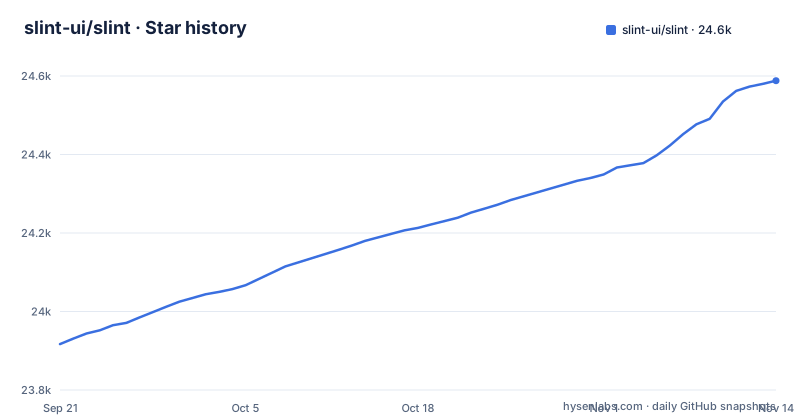
Star history
- slint-ui/slint24,588 ★ · +671
| Repository | 2026-09-21 | 2026-11-14 |
|---|---|---|
| slint-ui/slint | 23.9k | 24.6k |
671 Stars in the last 54 days, measured from the daily GitHub snapshot. Compare with other projects
Editorial analysis
Of the four language bindings, two are labelled Beta and two are not
The `api` directory holds one crate per language, and the differences in how they are labelled are the most consequential line in the project page. C++ at `api/cpp` and Rust at `api/rs/slint` are listed with documentation links and no qualifier. JavaScript and NodeJS at `api/node` are marked Beta, and Python at `api/python/slint` is marked Beta. Both of those also carry package registry badges, npm for the Node binding and PyPI for the Python one.
So the answer to which language to use is not a matter of taste. Rust and C++ are the paths presented as settled, and the JavaScript and Python paths are presented as still settling.
What you lose by ignoring the label is predictability. A Beta binding means the API surface can move under you between minor releases, and the project's own stability promise is narrower than it first looks: it promises that the 1.x API evolves carefully without breaking your code, and it does not extend that promise separately to the two bindings marked Beta. If your product is a web app in TypeScript or a Python service, you are choosing the part of Slint the project has not finished.
Expressions are pure functions, so the compiler is free to delete them
The `.slint` files are compiled ahead of time, and the reason the compiler can do meaningful work is stated plainly: the expressions in a `.slint` file are pure functions, so the compiler can optimize them. The example given is inlining properties and removing those that are constant or unchanged.
The compilation pipeline runs the usual phases of lexing, parsing, optimization and then code generation, and the code generation stage is per language. The C++ generator produces a C++ header file, the Rust generator produces Rust code, and so on. An interpreter for dynamic languages is included as well.
That purity rule is a contract with real consequences for how you write the markup. Because an expression cannot have a side effect and the compiler is entitled to remove it, anything with an effect belongs in your application code and not in a binding inside the `.slint` file. Work that happens on every frame because a property was touched, or a side effect placed next to a constant, is not something the optimizer will respect. The whole hello world is short enough to read in one go:
export component HelloWorld inherits Window {
    width: 400px;
    height: 400px;

    Text {
       y: parent.width / 2;
       x: parent.x + 200px;
       text: "Hello, world";
       color: blue;
    }
}
Notice that the geometry here is written as expressions over the parent element, `parent.width / 2` and `parent.x + 200px`, and that they are exactly the kind of expression the compiler is describing when it says properties get inlined. The text itself is a constant, which is the other kind of thing it says it will remove.
Compile available renderers and select a backend
Rendering backends and styles are configurable at compile time, and three renderers are named. The `femtovg` renderer uses OpenGL ES 2.0, the `skia` renderer uses Skia, and the `software` renderer uses the CPU with no additional dependencies. Separately, there is a note that when Qt is installed on the system, the `qt` style becomes available, using Qt's QStyle to get native looking widgets.
The compile-time part is the constraint. The build determines which renderers are available, but selection among compiled backends or renderers can also occur at runtime, including through SLINT_BACKEND where supported. Include and test the appropriate options for each target.
The `software` renderer existing at all is the answer for constrained targets, and it costs nothing in dependencies. The Qt behaviour is different in kind: it is keyed on whether Qt is installed on the system, so the `qt` style is only an option where Qt is available.
The root Cargo workspace excludes roughly seventy crates on purpose
The repository is not one Cargo workspace. A comment in the root `Cargo.toml` explains that this workspace contains only the library and tool crates that developers actively work on, and that the examples, demos, integration tests and the material UI library each live in their own workspace, under `examples/`, `demos/`, `tests/` and `ui-libraries/material/`.
The stated reason is toolchain load time. Loading the root workspace would pull in around seventy crates that depend on the `slint!` proc-macro, and the comment says this is kept out so that rust-analyzer and cargo do not have to load them just to work on the libraries. All the workspaces share the repository `target/` directory and use identical profile settings, so artifacts are still built once and reused.
The practical effect is that a command run from the repository root does not see the examples, the demos or the integration tests. They are separate workspaces with their own `Cargo.toml` and their own lockfiles, so testing an example means moving into that directory. That is an unusual amount of ceremony for a repository, and it is a speed decision rather than an accident.
One backend per platform, and a selector that chooses between them
The workspace members show the platform layer directly. Under `internal/backends` there are `winit` for windowed desktop, `android-activity` for Android, `qt` for the Qt style, `linuxkms` for a direct kernel mode setting surface, `testing` for headless runs, and `selector`, which picks between the available backends. Under `internal/renderers` the four entries are `software`, `skia`, `femtovg` and `anyrender`.
So the platform coverage is not one abstraction but a set of concrete backends, and the `selector` crate exists to choose among the ones compiled in. That is also why the renderers are a compile-time decision: the selector can only choose from what the build included.
For embedded Linux work the relevant backend is `linuxkms`, which is a different backend from the windowed `winit` one, and microcontroller targets get their own examples in `mcu-board-support` and `mcu-embassy`.
Embedded boards and WebAssembly are two different targets, not one web story
The project covers embedded systems, desktops, mobile and the web, and the examples make the first of those concrete: the embedded table shows Raspberry Pi, STM32 and RP2040, each with a video. On the desktop side there are screenshots of a Gallery on Windows, macOS and Linux, and the web section is headed Web using WebAssembly, with a printer demo, a slide puzzle, an energy monitor, a widget gallery and a weather demo.
The WebAssembly label is the honest part. The web target is WebAssembly, and `api/wasm-interpreter` is a workspace member in its own right. There is no separate browser-native renderer in the list; the renderers named in the project are `femtovg`, `skia`, `software` and `anyrender`.
The gap worth knowing before you start is that the same `.slint` file has to survive three quite different constraints at once: a phone GPU, a microcontroller with no GPU and a browser sandbox. The `software` renderer exists for the middle case, and the compiler's promise of removing constant properties is what keeps a constrained target cheap.
The workspace offers three SPDX licence options at once
The copyright header in the root `Cargo.toml` names SixtyFPS GmbH and gives a triple licence expression: `GPL-3.0-only`, `LicenseRef-Slint-Royalty-free-2.0` or `LicenseRef-Slint-Software-3.0`. The repository backs that up structurally, with a `LICENSE.md`, a `LICENSES/` directory and a `REUSE.toml` file, which is the machine readable side of the same declaration.
Three options is a choice you make, not a menu the project picks from for you. A GPL obligation, a royalty-free licence and a Slint software licence are different commitments, and which one you can accept depends on how you ship the application. The terms of the two Slint specific licences have to be read in the `LICENSES/` directory rather than inferred from the names.
One more caution. The repository's own licence metadata reports `NOASSERTION`, which is what a licence scanner emits when it cannot classify a multi-option expression automatically. If a tool in your pipeline reads that field instead of the licence files, it will not tell you what you are actually obliged to do.
Editorial conclusion
Slint suits teams that want one markup file driving a real compiled UI across desktop, mobile, web and microcontrollers, and that can live with the language binding risk that implies. It does not suit a project that needs a stable JavaScript or Python API today, since both are labelled Beta while Rust and C++ are not. Before you commit, decide which binding you will actually ship on, pick the renderer your target hardware can afford at build time, remember that the software renderer exists precisely because some targets have no GPU, and read the LICENSES directory rather than trusting a single licence field, since the workspace offers three SPDX options at once.
Frequently asked questions
is slint open source
Yes. Slint is described as an open-source declarative GUI toolkit for building native user interfaces for embedded systems, desktops and mobile platforms. You write the interface once in the `.slint` markup language and connect it to business logic written in Rust, C++, JavaScript or Python.
is slint free
The workspace copyright header offers three SPDX options rather than one: `GPL-3.0-only`, `LicenseRef-Slint-Royalty-free-2.0` or `LicenseRef-Slint-Software-3.0`. The repository ships a `LICENSE.md`, a `LICENSES/` directory and a `REUSE.toml` file, so the terms of each option have to be read there.
slint vs qt
The project page makes no comparison. The one relationship it describes is that when Qt is installed on the system, the `qt` style becomes available, using Qt's QStyle to get native looking widgets. The workspace also contains an `internal/backends/qt` crate for that style.
Official sources
Add this badge to your README
If you maintain this project, the badge below links readers to this analysis and shows its maintenance status from the daily GitHub snapshot. Paste the markdown into your README; add ?metric=license or ?metric=stars to the image URL for a different field.

[](https://hysenlabs.com/projects/slint-ui-slint)Star history chart for your README
[](https://hysenlabs.com/projects/slint-ui-slint)Was this useful?