DLNA-PLAYER is two Groovy files you paste into the SmartThings IDE
Generic DLNA Player to Smartthings
At a glance
- What is it?
- A SmartThings device handler and discovery SmartApp that make a generic DLNA renderer look like a Sonos to the official Sonos smartapps. The header says v 2.0.1, the revision history stops at 1.9.5, and an upgrade means reinstalling every player by hand.
- Who is it for?
- DLNA-PLAYER fits a SmartThings household that already runs the Sonos smartapps and has DLNA speakers it cannot otherwise include, and that is willing to paste code into a hosted IDE and manage the result by hand. It does not fit anyone who wants a package, a pinned version or a rollback.
- Can I use it commercially?
- Not without permission. GitHub finds no licence file in the repository, and without a licence all rights are reserved by default: you may read the code but not reuse it. Check the README, or ask the authors, before using it.
- Is it still maintained?
- Probably not. The repository last received commits 97 months ago, on October 13, 2018.
- What is it written in?
- Mainly Groovy, according to GitHub's language statistics.
Answers come from the project's GitHub data, last synced on October 22, 2026, and from our analysis. They are not legal advice.
Star history
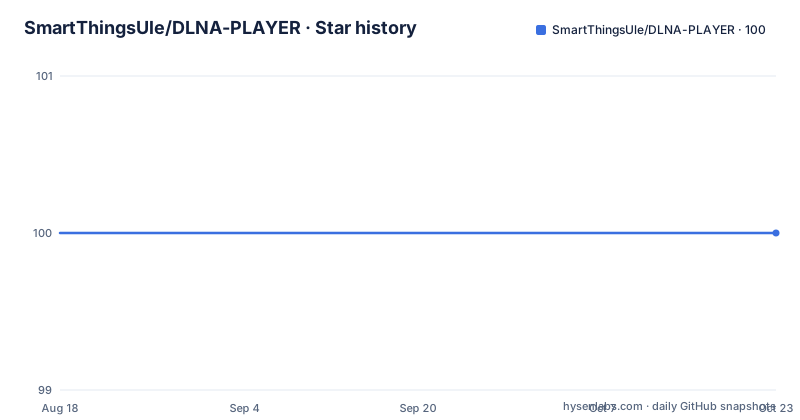
- SmartThingsUle/DLNA-PLAYER100 ★ · +0
| Repository | 2026-08-18 | 2026-10-22 |
|---|---|---|
| SmartThingsUle/DLNA-PLAYER | 100 | 100 |
0 Stars in the last 65 days, measured from the daily GitHub snapshot. Compare with other projects
Editorial analysis
Installation is copy and paste, twice
There is no package, no clone step and no build. The whole thing is two Groovy files installed into the SmartThings IDE through a browser.
The first is the connector, `MediaRenderer_Connect.groovy`, which goes in as a SmartApp. Open the SmartThings IDE and log in, click My Smart Apps in the navigation bar, click the + New SmartApp button, and on the New SmartApp page select the From Code tab. Copy the MediaRenderer_Connect source from the repository, paste it into the editor, click the blue Create button at the bottom, then Save, then Publish and select For Me. That self-publishes the SmartApp to your own account.
The second is the handler, `MediaRenderer_Player.groovy`, and the procedure is identical inside My Device Types with the + New Device Type button.
Two consequences follow from the mechanism. There is no version pinning, because there is nothing resolved; you paste whatever text the repository currently holds. And there is no rollback, because the platform keeps one copy in your account and the repository has no tags to go back to. Both files have to be pasted again to update either one.
The header says 2.0.1 and the revision history stops at 1.9.5
The version story in this repository does not add up, and it is worth settling before you paste anything.
The title line reads Generic DLNA Player to Smartthings v 2.0.1. The revision history at the bottom of the page stops at Version 1.9.5, with no 2.x entries at all. So the number in the header is not represented anywhere in the changelog, and the two places a reader would look disagree.
There are no GitHub releases either, so there is no tag that resolves the question.
The changelog has its own gaps. Version 1.8.0 has one line under it, excluded by bugs, which is the project's own record of a version that shipped and was withdrawn. Versions 1.9.0, 1.9.2 and 1.9.5 follow, and the last of those is described as a protocol fix compatible with `x-rincon-mp3radio`, the scheme a Sonos speaker needs to play an external MP3 radio stream. That last entry tells you the most recent recorded work was about Sonos compatibility rather than about generic renderers.
The first release is dated: Version 1.0.0, released 2015-02-13, first public release. And the last push to the `master` branch was on 2018-10-13.
Discovery is a separate SmartApp, and it needs two taps of Done
Finding renderers is the job of the connector, and the flow is documented in the specific detail that only comes from someone who has done it.
Open the SmartThings app on your smartphone. Select the (+) icon to install new things. Go to the My Apps section and select MediaRenderer Connect, which starts searching for your players. Once the app shows the quantity of media renderers found, activate all of them and finish the process by pressing the Done Button in both pages.
Two details there are the kind you only write down after a support conversation. There are two pages, so one Done is not enough. And then the instruction to get back to the main window, where the new players should be in your things section, with a refresh of the page if no players appear.
So discovery is a scan you trigger, a selection you confirm, and a manual refresh if the list comes back empty. The revision history says when the no-device-present detection arrived: version 1.9.0 added it, which is to say that before that release the handler did not notice when a renderer was gone. That fix is the same release that carries the reinstall instruction in the next section.
The trick is that a Sonos handler can drive a generic renderer
The design decision that makes this useful is a piece of impersonation, and the page is explicit about it.
The claim is compatibility with the official smartapps made for Sonos speakers, and five are named. Sonos Control by SmartThings plays or pauses your Sonos when certain actions take place in your home. Sonos Mood Music plays a selected song or station. Sonos Notify with Sound plays a sound or custom message through your Sonos when the mode changes or other events occur. Sonos Weather Forecast plays a weather report on the same trigger. And Talking Alarm Clock by Michael Struck controls up to 4 waking schedules using a Sonos speaker as an alarm.
A device handler that satisfies those apps opens up an existing ecosystem of published automations for hardware Sonos did not build. That is worth a lot in SmartThings, where the smartapp catalogue is the scarce resource.
There is a second section, headed Unoficial, with a single official spelling, covering unofficial smartapps for music and messages. One is named: Media Renderer Events, which plays a custom message, sound or RadioTunes station through your Media Renderer when the mode changes. Then an ellipsis, which is the page's way of saying the list is open.
The device control interface itself is eight items: Play, Stop, Next, Forward, Mute/Unmute, volume control, show media description, and a Mode with four settings, Msg Enabled, Msg Disabled, Msg On Stopped and Msg on Playing. Those mode settings are what decide whether a spoken message interrupts.
An upgrade means reinstalling every player by hand
This is the operational cost, and the page states it plainly in two separate entries.
Version 1.9.0 carries the note: it is necessary to update the connector too, and to uninstall and reinstall the players; if you do not have software devices it is not necessary to update, but recommended. Version 1.7.0 carries almost the same wording again.
So an upgrade is not a reinstall of the app. It is: paste the new connector code, then go through every player you have and remove it, then reinstall each one from the new discovery scan. With more than 20 devices confirmed as working, that is a manual, per-device procedure performed through the mobile app, and it has been the documented upgrade path since at least version 1.7.0.
The qualifier about software devices matters more than it looks, because it implies the handler can expose a synthetic renderer. The changelog supports that: version 1.7.0 added Foobar and Software device autocorrect, and version 1.5.6 fixed volume refresh in software MediaRenderers. So some of the install base is not a physical speaker at all, and the two populations have different upgrade requirements.
If your setup is entirely physical DLNA hardware, you can skip the connector update, which is the one piece of relief in that note.
P.L. and Unavailable are written into the container on purpose
Version 1.5.6 is the densest entry in the changelog and the most revealing, because it shows how the handler works around renderers that do not behave.
Two of the items write sentinel text into what the speaker displays. Prefix P.L. in the container when the last song list is displayed in music apps, and prefix Unavailable in the control point when the last song list is displayed. So the handler is not reading the renderer's browse state, it is substituting strings into the container list that the renderer's own app then shows.
The other items in the same release explain themselves: Fix TTS delay, Implemented Msg only when playing and Msg only when no playing, Fix Resume in control point list (No container), Fix Volume Refresh in software MediaRenderers, Better play event, and several minor fixes.
Two earlier entries are about timing rather than content, and they are the clearest sign of how heterogeneous DLNA renderers are. Version 1.2.0 implemented a new delay between actions because some slow renderers need more time between actions. Version 1.3.0 implemented a new delay before a message because some slow renderers need more time to load an external http file.
And version 1.4.0 implemented message in progress, with version 1.1.0 adding a Do Not Disturb state to avoid messages. Between them those two features are what a spoken-message device type is actually for.
No licence file, twelve top-level files, last push in 2018
The repository is small enough to inventory, and what is in it is worth knowing.
There are twelve top-level entries. Nine are Groovy source files: `Alexa Connect.groovy`, `Media Renderer Events.groovy`, `MediaRenderer_Connect.groovy`, `MediaRenderer_Connect_Beta.groovy`, `MediaRenderer_Player.groovy`, `Sonos_Weather_Forecast_External_TTS.groovy`, `Weather_Report.groovy` and `WatchDog.groovy`, plus one more without a `.groovy` name at the end of the alphabetical listing. Also `README.md`, `Readme_MediaRenderer_Events.md`, and an entry called `Talking_Alarm_Clock_External_TTS` that carries no file extension at all.
The set tells you the scope is wider than the README's framing. There is an Alexa connector, a WatchDog, a separate weather report handler, a beta of the connector alongside the current one, and a fork of the alarm clock smartapp with an external TTS function, which matches the version 1.9.2 note about using an alternative to the built-in TTS.
What is absent is a licence file, and none is recorded for the repository. For a project whose installation instructions are copy this text into a hosted IDE and publish it to your own account, that is the first thing to resolve before you rely on it. The page asks for donations through PayPal and labels itself unofficial, which describes intent rather than granting terms.
The last push was on 2018-10-13. The repository is not archived and publishes no releases.
Editorial conclusion
DLNA-PLAYER fits a SmartThings household that already runs the Sonos smartapps and has DLNA speakers it cannot otherwise include, and that is willing to paste code into a hosted IDE and manage the result by hand. It does not fit anyone who wants a package, a pinned version or a rollback. Verify four things first: that the two files you are pasting correspond to the revision you expect, since the header version and the changelog disagree; that your renderers appear in the discovery scan at all; whether your setup includes the software devices the upgrade notes talk about, because that changes whether the connector needs replacing; and what licence applies, since there is no licence file in the tree for code you self-publish inside someone else's platform. The last push was on 2018-10-13 and there are no GitHub releases.
Frequently asked questions
How do I install DLNA-PLAYER into SmartThings?
Copy MediaRenderer_Connect.groovy and MediaRenderer_Player.groovy from the repository. In the SmartThings IDE, open My Smart Apps or My Device Types, click the + New button, select the From Code tab, paste the source, click Create, then Save, then Publish and select For Me.
Which official SmartApps work with the DLNA-PLAYER device type?
The Sonos apps: Sonos Control, Sonos Mood Music, Sonos Notify with Sound, Sonos Weather Forecast by SmartThings, and Talking Alarm Clock by Michael Struck, which controls up to 4 waking schedules using a speaker as an alarm.
What controls does the DLNA-PLAYER interface expose?
Play, Stop, Next, Forward, Mute/Unmute, volume control, show media description, and a Mode setting with four choices: Msg Enabled, Msg Disabled, Msg On Stopped and Msg on Playing.
What do I have to do after updating DLNA-PLAYER?
Version 1.9.0 says to update the connector too and to uninstall and reinstall the players, and version 1.7.0 repeats the same instruction. If you have no software devices the connector update is not necessary, though it is recommended.
What are the P.L. and Unavailable prefixes in DLNA-PLAYER for?
Version 1.5.6 added prefixing P.L. in the container and Unavailable in the control point when the last song list is displayed in music apps, so the handler substitutes its own text where a renderer does not report its browse state.
Is DLNA-PLAYER still being worked on?
The last push to the master branch was on 2018-10-13 and there are no GitHub releases. The README header says v 2.0.1 while the revision history stops at 1.9.5, and no licence file is present in the tree.
Official sources
Add this badge to your README
If you maintain this project, the badge below links readers to this analysis and shows its maintenance status from the daily GitHub snapshot. Paste the markdown into your README; add ?metric=license or ?metric=stars to the image URL for a different field.

[](https://hysenlabs.com/projects/smartthingsule-dlna-player)Star history chart for your README
[](https://hysenlabs.com/projects/smartthingsule-dlna-player)