Smithay wayland-rs for Rust Client and Server Development
Rust implementation of the wayland protocol (client and server).
At a glance
- What is it?
- Smithay wayland-rs is a Rust workspace for implementing Wayland clients, servers, protocol extensions, and graphics integrations. It is suited to projects that need direct control over Wayland protocol behavior, but its system-library and FFI-related crates add requirements that application developers should verify first.
- Who is it for?
- Adopt wayland-rs when the application needs a Rust-native Wayland client or server, custom protocol handling, or access to the workspace's protocol-generation crates. Do not choose it solely for a simple Wayland dependency when its FFI, backend, and system-library requirements are unwanted.
- Can I use it commercially?
- Yes. MIT is a permissive licence: you can use, modify and sell software built on it, as long as you keep its copyright and licence notices.
- Is it still maintained?
- Yes. The repository last received commits 6 days ago.
- What is it written in?
- Mainly Rust, according to GitHub's language statistics.
Answers come from the project's GitHub data, last synced on November 6, 2026, and from our analysis. They are not legal advice.
Star history
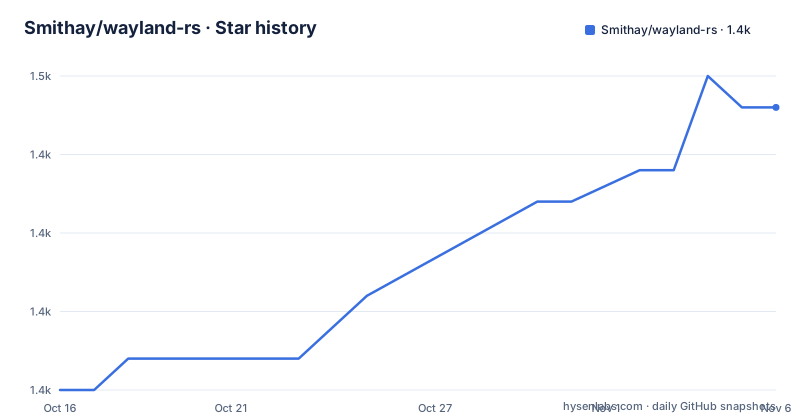
- Smithay/wayland-rs1,449 ★ · +9
| Repository | 2026-10-16 | 2026-11-06 |
|---|---|---|
| Smithay/wayland-rs | 1.4k | 1.4k |
9 Stars in the last 21 days, measured from the daily GitHub snapshot. Compare with other projects
Editorial analysis
What wayland-rs Covers
wayland-rs solves the problem of accessing the Wayland protocol from Rust on both sides of a display connection. The repository is a workspace containing multiple crates rather than one application or one protocol binding. The primary audience includes developers building graphical clients, display servers, compositors, input or output tools, and Rust components that need to exchange typed Wayland objects with other processes.
The workspace lists `wayland-client` and `wayland-server` as the main crates for client-side and server-side bindings. This separation matters because the two sides do not share the same responsibilities. A client-side component needs to create connections, send requests, and receive events, while server-side code needs to create and manage the objects exposed to clients. The repository description does not provide an API walkthrough, so the exact object model should be checked in the crate documentation rather than inferred from the workspace names.
The project also contains protocol packages. `wayland-protocols` collects bindings for official protocol extensions. The repository additionally contains `wayland-protocols-experimental`, `wayland-protocols-misc`, `wayland-protocols-plasma`, and `wayland-protocols-wlr`, which indicate separate protocol groups in the workspace. Their presence does not by itself establish which extensions are stable, supported by every implementation, or appropriate for a particular compositor. That distinction belongs in the documentation for each protocol crate.
Workspace Architecture and Backend Boundaries
The architecture is split between public-facing crates and lower-level implementation crates. `wayland-backend` contains the actual protocol logic and provides two backends: a Rust implementation and a backend that uses the system Wayland libraries for FFI contexts. `wayland-client` and `wayland-server` sit above that layer, while `wayland-sys` provides bindings to the C Wayland libraries used by `wayland-backend`.
This arrangement gives an integrator a meaningful choice about where the protocol implementation comes from. The Rust backend is intended for contexts that can use the Rust implementation. The system backend is relevant when an FFI context requires the system libraries. The README does not document the API for selecting a backend, nor does it explain compatibility differences between them. That is a limitation for an adoption decision because choosing a crate does not by itself answer which transport and integration path the application will use.
The repository also includes `wayland-scanner`, which converts XML protocol specifications into Rust code. This is the mechanism behind custom protocol extension integration and FFI-related work. The repository layout confirms that protocol handling is not limited to handwritten bindings. It also shows that application developers may be able to generate code for extensions outside the packaged protocol groups, although the README does not provide a complete build or integration example for that workflow.
Client Graphics, Cursors, and Protocol Extensions
Two auxiliary crates address common client-side concerns. `wayland-egl` is described as necessary for client-side OpenGL integration. `wayland-cursor` helps applications load cursor images from system themes. These are separate from the core client crate, which means a graphics application may need to choose more than one dependency. The README does not document feature flags, platform conditions, or the exact relationship between `wayland-egl` and a particular renderer, so those details require inspection of the relevant crate documentation.
The protocol crates cover a different problem. `wayland-protocols` regroups bindings for official protocol extensions, while the experimental, Plasma, and WLR packages organize additional extension bindings. For a compositor or specialized client, this can reduce the need to hand-maintain interfaces for known extensions. For a tool that only needs basic Wayland client functionality, depending on several protocol packages may add unnecessary selection work.
The internal crates are not equivalent to ordinary end-user helpers. `wayland-scanner` is aimed at custom protocol integration or FFI, `wayland-backend` holds protocol implementation choices, and `wayland-sys` binds the C libraries. The README explicitly says these are needed only for those cases. That boundary is useful because it distinguishes application development from lower-level protocol work.
Requirements and First Integration
The documented minimum Rust version is 1.65.0. Projects using the system backend also require version 1.15 of the Wayland system libraries. The README points to the online documentation for the `master` branch and to docs.rs for released crate documentation, but it does not provide installation commands, a minimal client, a server example, or a Cargo dependency snippet.
A first real use begins by identifying the side of the connection being built. A client project would select `wayland-client`, while a server or compositor project would select `wayland-server`. A client that renders with OpenGL may also need `wayland-egl`. A client that displays themed cursors may need `wayland-cursor`. Protocol-specific work should begin with the matching `wayland-protocols-*` crate or with `wayland-scanner` for custom XML specifications.
The reader should then follow the selected crate's documentation for the actual connection setup, object creation, event handling, and dispatch loop. The repository includes a `wayland-tests` workspace member, which indicates a test area in the repository structure, but the README does not explain how to invoke those tests or what they cover. It is therefore not appropriate to present a test command here.
Trade-offs for Rust Wayland Projects
The principal advantage is a Rust workspace with separate client, server, protocol, backend, scanner, EGL, and cursor crates. That structure can fit an application that already uses Rust and needs access to Wayland at more than one layer. It also avoids treating protocol generation, graphics integration, and cursor loading as one undifferentiated dependency.
The principal limitation is that the repository describes a collection of low-level building blocks, not a complete application framework. The README does not document a display lifecycle policy, a compositor architecture, error recovery policy, object-dispatch design, or compatibility matrix for individual protocol packages. Those omissions matter when evaluating a server implementation. The lower-level crates can be technically suitable while still requiring substantial application-specific work.
The system-library requirement is another boundary. A project using the Rust backend may avoid the documented version 1.15 system-library requirement, but the README does not state how to select or configure that backend. A project that needs FFI must account for `wayland-sys` and the system libraries. An application that only needs a high-level graphical toolkit may find another approach more direct, because this repository does not present itself as a ready-made user-interface toolkit.
Maintenance, Licensing, and Upgrade Boundaries
The repository is not archived. Its last push was on 2026-10-15. The repository is not archived, so the available history does not justify treating the project as abandoned. However, the listed releases are older, including `v0.24.0` from 2019-09-14. The README points users to the `master` documentation for current branch content and to docs.rs for releases, so version selection is an important part of integration planning.
The repository is licensed under MIT. That identifies the stated licensing model, but it does not replace checking the license files for the individual crates or dependencies. The repository includes `LICENSE.txt`, while the workspace also contains several packages and system-library bindings. License obligations for a particular application therefore depend on the exact crate and dependency set used.
Upgrade cost is likely to depend on which parts are adopted. Moving between client, server, protocol, and backend crates can involve different compatibility questions. The README does not provide a migration guide or a claim that releases follow a stable semantic-versioning policy for every crate. Pin the chosen crate versions in the application's manifest and compare the selected release documentation with the repository's current documentation before upgrading.
Editorial conclusion
Adopt wayland-rs when the application needs a Rust-native Wayland client or server, custom protocol handling, or access to the workspace's protocol-generation crates. Do not choose it solely for a simple Wayland dependency when its FFI, backend, and system-library requirements are unwanted. Verify the relevant crate documentation, backend choice, required Rust version, and available system libraries before integrating it.
Frequently asked questions
What is Smithay wayland-rs used for?
It provides Rust crates for Wayland client-side and server-side development, along with bindings for protocol extensions. The workspace also includes crates for OpenGL integration, cursor loading, protocol scanning, backends, and system-library bindings.
Which wayland-rs crate should a Rust Wayland client use?
The README identifies `wayland-client` as the main client-side crate. A client using OpenGL may also need `wayland-egl`, and a client loading system-theme cursors may need `wayland-cursor`.
What are the requirements for using wayland-rs?
The README requires Rust 1.65.0 or later. It also states that version 1.15 of the Wayland system libraries is required when using the system backend.
Does wayland-rs include a ready-made Wayland compositor?
The repository describes Rust crates for client and server bindings and protocol logic, not a complete compositor application. The `wayland-server` crate provides server-side building blocks, while application-specific server behavior is outside what the README describes.
Official sources
Add this badge to your README
If you maintain this project, the badge below links readers to this analysis and shows its maintenance status from the daily GitHub snapshot. Paste the markdown into your README; add ?metric=license or ?metric=stars to the image URL for a different field.

[](https://hysenlabs.com/projects/smithay-wayland-rs)Star history chart for your README
[](https://hysenlabs.com/projects/smithay-wayland-rs)Was this useful?