iNiR for Niri: a configurable Quickshell desktop shell
// A Niri shell // with bloat and stuff!
At a glance
- What is it?
- iNiR replaces the usual collection of Niri status bars, launchers, notification tools, and settings panels with one configurable shell built on Quickshell. It fits users who want a visually complete Niri desktop, but its personal-project origin, resource demands, and limited stability claims deserve attention.
- Who is it for?
- Adopt iNiR if you use Niri and want an integrated, theme-driven shell with enough customization to justify troubleshooting it. Do not choose it for a low-resource system or when software polish and predictable behavior matter more than feature density.
- Can I use it commercially?
- Yes, with conditions. GPL-3.0 is a copyleft licence: if you distribute software that includes it, you must release that software's source code under the same licence. Running it internally without distributing it does not trigger that obligation.
- Is it still maintained?
- Yes. The repository last received commits 9 days ago.
- What is it written in?
- Mainly QML, according to GitHub's language statistics.
Answers come from the project's GitHub data, last synced on October 23, 2026, and from our analysis. They are not legal advice.
Star history
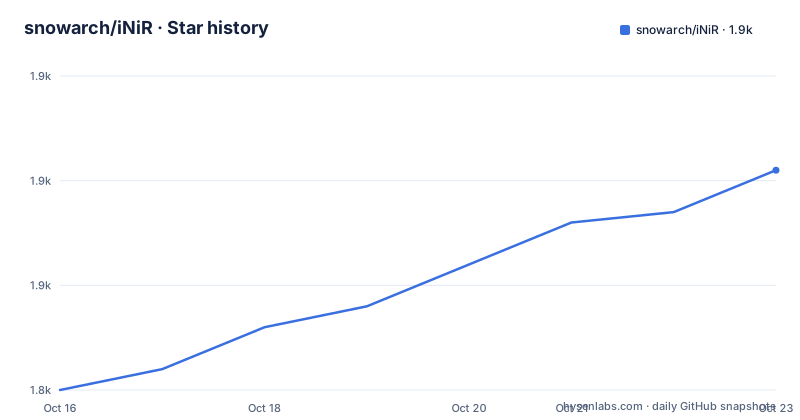
- snowarch/iNiR1,861 ★ · +21
| Repository | 2026-10-16 | 2026-10-23 |
|---|---|---|
| snowarch/iNiR | 1.8k | 1.9k |
21 Stars in the last 7 days, measured from the daily GitHub snapshot. Compare with other projects
Editorial analysis
What iNiR changes in a Niri desktop
iNiR addresses the gap between Niri and the surrounding desktop interface. Niri manages windows, rendering, and input, while iNiR supplies the visible shell around those applications. The project documentation describes the bar at the top, dock, notifications, settings, and wallpapers as parts of one desktop environment rather than independent dotfile snippets.
The intended audience is a Linux user already running Niri and looking for a complete graphical layer with extensive appearance controls. iNiR is not presented as a compositor or a replacement for Niri. It expects Niri to handle windows and drawing while Quickshell executes the QML shell. Applications remain above the shell in the display stack, and Niri remains responsible for compositor operations.
This distinction matters when evaluating scope. iNiR is much more than a panel theme, but it is narrower than replacing the whole Linux operating system. The README also says it began as a fork of end-4's Hyprland dots before being rewritten around Niri. Some Hyprland code remains in the repository, yet that code is explicitly described as untested. The supported design boundary is therefore clear: Niri is the target compositor, Quickshell is the runtime framework, and QML is the implementation language.
The QML, Quickshell, and Niri execution chain
The documented data path starts with applications, passes through the iNiR shell, and then reaches Quickshell, Niri, Wayland, and the GPU. Applications launch into Niri, while iNiR composes interface elements such as panels, cards, overlays, menus, and notification surfaces around them. Quickshell runs the QML components that make up those interface elements.
The repository layout supports that description. Top-level files include `shell.qml`, `GlobalStates.qml`, `settings.qml`, `waffleSettings.qml`, and separate panel files named for the three interface families: `ShellIiPanels.qml`, `ShellIrisPanels.qml`, and `ShellWafflePanels.qml`. Supporting code is divided among `modules/`, `services/`, `scripts/`, `defaults/`, and `sdata/`. The Go module is named `inir` and declares `go 1.26`, which is consistent with the presence of Go-based tooling rather than a QML-only interface layer.
Configuration can be handled through the graphical settings interface or a JSON file. The README also references an IPC page, indicating that shell behavior is not limited to static QML declarations. However, it does not provide the full IPC command reference or explain every service boundary, so the repository should be inspected before assuming that any Niri action or shell component can be controlled from the command line.
Panel families and automatic Material You theming
iNiR groups its interface into three panel families that can be changed with `Super+Shift+W`. Material ii follows a Material Design direction and includes a floating bar, sidebars, a dock, and nine named global styles. Waffle uses a bottom taskbar with a start menu, action center, and notification center. iRiS is positioned as the flagship family, with an Island that changes shape when opened into pages, cards, or panels, plus edge placement, a movable Dock, glass treatment, and themes for light, dark, and ink modes.
The Island is not a fixed status widget. According to the README, it sits against a selected screen edge, reports what is happening, expands into the surface requested by the user, and folds back into its compact form. Its placement can be changed with the documented `inir iris edge <side>` command or through dragging, based on the feature description.
Automatic theming starts from a wallpaper and uses Material You for shell colors. The documentation says those colors propagate into GTK3, GTK4, Qt, terminals, Firefox, Discord, and SDDM. Ten theming targets are also listed, including editors, browsers, Spicetify, Steam, and Cava. Presets include Regalia, Regalia Ivory, Gruvbox, Catppuccin, Rosé Pine, and a custom option. This is broader than recoloring the iNiR panels, but the README does not enumerate every target or document how failures in an external application are handled.
Installing iNiR and switching panel families
The README links users to the repository's `INSTALL` wiki page but does not reproduce the complete installation procedure there. The repository does provide a Makefile target that installs the shell and related files under `/usr/local` by default. The following command is copied from its package-update hint:
sudo make installThe Makefile defines `PREFIX ?= /usr/local`, places the command as `$(PREFIX)/bin/inir`, and installs the shell payload under `$(PREFIX)/share/quickshell/inir`. It also defines targets for systemd user files, desktop metadata, icons, and documentation. Those details show that source installation affects several locations rather than only adding one executable to `PATH`.
After installation and Niri setup, the first documented interaction is switching panel families. Press `Super+Shift+W` to cycle through ii, waffle, and iRiS. That shortcut gives a new user an immediate way to compare the three designs without editing configuration first.
Super+Shift+WThe README says the GUI and `config.json` are configuration paths, but it does not include a complete first-launch JSON example. Users who need exact startup or autostart instructions should follow the linked `INSTALL` wiki page rather than infer Niri startup syntax from the shell source.
Resource demands, instability, and troubleshooting boundaries
The README carries a direct warning that iNiR is not for low-specification machines. It suggests reducing the load by disabling effects, removing panels, and flattening the design through settings or `config.json`. That warning is material because iNiR combines animated panel systems, several visual families, automatic color propagation, and application-specific theming in one shell.
Stability is another adoption constraint. The author calls it a personal project that became larger than intended, says that things sometimes break, and explicitly asks users not to expect polished software. The stated first troubleshooting step is `inir doctor`, which the documentation says fixes most problems.
inir doctorIf that command does not resolve the issue, the README points to Discord. It does not explain which diagnostics `inir doctor` checks, which errors are safe to ignore, or whether repairs can alter configuration. Nor does it document rollback behavior. For an existing desktop, this means iNiR should initially be treated as a replacement environment that may require repair rather than a minimal panel placed above a known-good setup.
Release activity, licensing, and upgrade work
The repository is not archived, and its last push was on 2026-10-14. Releases v2.31.0, v2.32.0, and v2.33.0 were published on 2026-09-19, 2026-09-29, and 2026-10-08 respectively. Those dates indicate recent repository activity, but the README's stability warning remains the better guide to software expectations.
iNiR is licensed under GPL-3.0. The repository includes a `LICENSE` file and a `NOTICE` file. This review does not interpret the license or provide legal advice. Distribution, modification, packaging, or integration of the project should be assessed against the actual `LICENSE` and `NOTICE` files.
Upgrades can involve more than replacing the shell directory. The Makefile installs the `inir` command, Quickshell payload, systemd user directory, desktop metadata, icons, and documentation. It also embeds package and installation metadata such as `install_mode`, `update_strategy`, and `package_manager`. The README does not publish a formal migration guide for each release, so users need to read `CHANGELOG.md` and inspect configuration changes before moving between iNiR versions.
Editorial conclusion
Adopt iNiR if you use Niri and want an integrated, theme-driven shell with enough customization to justify troubleshooting it. Do not choose it for a low-resource system or when software polish and predictable behavior matter more than feature density. Before replacing an existing desktop setup, verify that your machine can sustain the shell, inspect the documented installation path, and test `inir doctor` behavior with your Niri configuration.
Frequently asked questions
What is iNiR and which compositor does it support?
iNiR is a complete QML-based desktop shell for Linux, including panels, a dock, notifications, settings, and theming. It is made for the Niri Wayland compositor and runs through Quickshell.
How do I install iNiR for Niri?
The README directs users to the `INSTALL` wiki page. The repository Makefile also contains `sudo make install`, which installs the command, shell payload, and supporting files under the default `/usr/local` prefix.
Can I change iNiR's panel design after installation?
Yes. Press `Super+Shift+W` to cycle through the ii, waffle, and iRiS panel families. The documentation also says that appearance and feature settings can be changed through the GUI or `config.json`.
Is iNiR suitable for a low-resource Linux computer?
The README explicitly warns that iNiR is not for low-specification machines. It suggests turning off effects, removing panels, and flattening the design to reduce the resource load.
What should I do if iNiR stops working?
The documented first step is `inir doctor`, which the README says fixes most problems. If that does not work, the project directs users to its Discord community, although it does not document a rollback procedure.
Official sources
Add this badge to your README
If you maintain this project, the badge below links readers to this analysis and shows its maintenance status from the daily GitHub snapshot. Paste the markdown into your README; add ?metric=license or ?metric=stars to the image URL for a different field.

[](https://hysenlabs.com/projects/snowarch-inir)Star history chart for your README
[](https://hysenlabs.com/projects/snowarch-inir)Was this useful?