live-debugger: a LiveView inspector whose safety depends on two configuration decisions you can get wrong separately
Tool for debugging LiveView applications
At a glance
- What is it?
- A browser-based debugging tool for Phoenix LiveView applications, built by Software Mansion, that runs on its own local port and hooks into your root layout. The documentation says in one line not to use it in production, and the mechanism that enforces that is two independent settings rather than one.
- Who is it for?
- This is a good tool if you build LiveView applications, and the design decisions are mostly sound: the component tree, the assigns and the callback trace are the three things you actually need and the three things the tool gives you, with filtering on the callback stream rather than a firehose. Take the safety seriously as two separate checks rather than one.
- Can I use it commercially?
- Yes. Apache-2.0 is a permissive licence: you can use, modify and sell software built on it, as long as you keep its copyright and licence notices.
- Is it still maintained?
- Yes. The repository last received commits 4 days ago.
- What is it written in?
- Mainly Elixir, according to GitHub's language statistics.
Answers come from the project's GitHub data, last synced on November 14, 2026, and from our analysis. They are not legal advice.
Star history
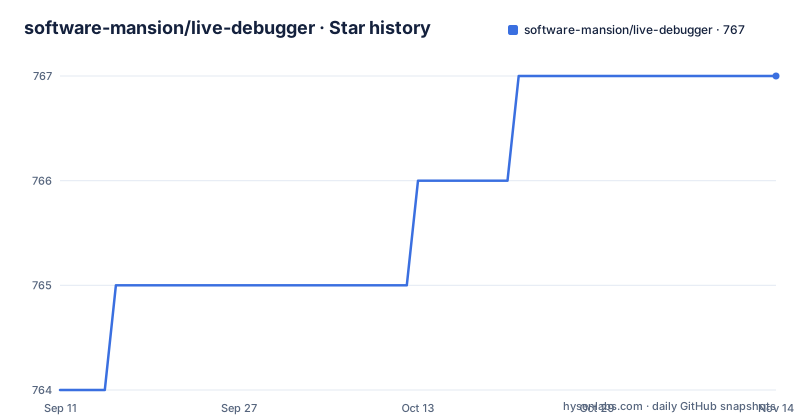
- software-mansion/live-debugger767 ★ · +3
| Repository | 2026-09-11 | 2026-11-14 |
|---|---|---|
| software-mansion/live-debugger | 764 | 767 |
3 Stars in the last 64 days, measured from the daily GitHub snapshot. Compare with other projects
Editorial analysis
Two independent settings stand between you and a debugger in production
The warning is blunt: the tool should not be used in production, and the dependency you added must be scoped to the development environment. Underneath that warning is a mechanism worth reading, because it is two decisions rather than one. The first is the dependency scope in the build file:
  defp deps do
    [
      {:live_debugger, "~> 1.0.0", only: :dev}
    ]
  end
The second is the layout hook, a line added to the application root layout that reads a configuration value and injects a meta tag and the tool's scripts. That read is unconditional in the template, and its safety comes from the configuration being absent outside development. So there are two ways to end up with scripts in production markup: shipping the dependency outside the development environment, or configuring the tags value in an environment that serves real traffic. Either mistake is easy to make during a dependency change and neither produces an error.
The documented version requirement names a line the latest release has left
The install snippet asks for a requirement that admits the 1.0 series up to but not including 1.1, and the release history shows the newest tag at 1.0.2. That combination is fine, and worth stating because a requirement written with the second component fixed looks pinned when it is not. What it does mean is that the snippet in the documentation was written against the first release of the line and has not been updated to name the current patch, which is a small signal about how quickly the getting-started section is revisited. The more consequential pinning is elsewhere. The repository ships a lock file, so a real application resolves one exact version at install time and stays there until something updates it, and the documentation does not say which version its feature descriptions were written against. The features overview lives on the package documentation site rather than in the repository, so it tracks releases, while this readme's snippet does not.
A maintenance tag on the old line landed after the 1.0 tag
Three releases are visible, and their timestamps are the interesting part. The 1.0.1 tag and a 0.8.1 tag were both published on the same day less than two hours apart, with the older line's patch published after the newer one. Then 1.0.2 followed some six weeks later. That pattern is what a maintenance policy looks like in practice: a fix needed on the older line, released after the fact, while the newer line moved on. It also means version comparison by string is not enough to know what you have, because the newest tag by date is 1.0.2 while the newest tag by number is also 1.0.2, so the two orderings agree today and would not necessarily agree after the next backport. The repository is not archived and its last commit is dated 2026-09-11, a few weeks after the newest release, so the branch is ahead of the tags.
The contributor path runs a separate application from a dev directory
The contributing section explains how to run a development version of the tool against a demo rather than against your own project, and the arrangement is worth noting because it explains why the repository has the directories it has. Running the setup task and then an interactive session starts the application declared in the dev directory with the library installed into it. That gives contributors a LiveView application to exercise the tool against, which is the right shape for a debugger, since there is nothing to debug in the tool itself. Two supporting details are stated plainly rather than left to be discovered. Live reloading works for both Elixir source files and static files, so a change to either is picked up, and when styles fail to appear after a change the documented remedy is to rebuild the development assets rather than to debug the browser. The repository also carries an end-to-end test directory and a browser extension directory.
The browser extension is useless without the server-side dependency
Official browser extensions exist for Chrome and Firefox, and have since the 0.2.0 line, and they are described as letting you interact with the tool alongside your application's runtime rather than in a separate tab. The note attached to them is the part that matters operationally: the main dependency must be added to the project, because the browser plugin alone is not enough. That is not an oversight in the documentation, it is the architecture, since the extension is a view onto state that lives in the Elixir application and in the tool's own local server. So there is no way to try the extension before adding a dependency and a layout hook, and a reader who finds the extension in a store listing should know what they are installing before they do. Two organisations appear in the documentation, the one that owns the tool and a separate one that hosts a guided tour repository, which is a small sign of how the project is organised internally.
A copyright line from 2025 sits next to releases from 2026
The attribution block names Software Mansion, describes the company as an agency founded in 2012 that contributes to React Native, works in the Elixir ecosystem and builds live streaming and broadcasting technology, and carries a copyright line dated 2025. The releases in the visible history include a tag from July 2026, so the copyright year is a year behind the artefacts it covers. That is the kind of detail nobody updates because nobody is harmed by it, and it is worth exactly one sentence in a review because it is the sort of staleness that tends to appear elsewhere too. The substantive part of the block is the agency framing, which is honest and relevant to how you evaluate the project: this is a consultancy's open-source tool, it is maintained by people whose day job is client work, and the roadmap lives in a discussion page rather than in a file in the repository.
Three invisible tracking images load before the first badge
The first three lines of the readme are image references pointing at a delivery domain owned by the vendor, each with a zone identifier and an index parameter, and they render as nothing. They are delivery tracking pixels, the mechanism used to measure which sponsors or campaigns a page view came from. For a documentation page that is a normal commercial arrangement, and it is disclosed by the vendor's own infrastructure rather than hidden. It is still the first thing the document does, before any content, and it means every render of the page, including renders from package mirrors and from tools that fetch readme text, causes three outbound requests to the vendor's delivery host. If you mirror readmes, vendor them into an internal package index, or read them in a sandboxed environment, that is a small network effect worth knowing about rather than a security finding.
Editorial conclusion
This is a good tool if you build LiveView applications, and the design decisions are mostly sound: the component tree, the assigns and the callback trace are the three things you actually need and the three things the tool gives you, with filtering on the callback stream rather than a firehose. Take the safety seriously as two separate checks rather than one. The dependency must be scoped to the development environment in your build file, and the layout hook reads a configuration value that is expected to be empty outside development, so an environment where either of those is wrong yields a debugging interface where there should not be one. Both defaults are correct in a fresh application, and both are easy to break by copying a template or by loosening a dependency scope during a refactor. Note also that the version requirement in the documented snippet names the 1.0.0 line while the newest release is 1.0.2, so check what a lock file actually resolved before assuming you are current.
Frequently asked questions
What is Software Mansion's LiveDebugger?
A browser-based debugging tool for applications built with Phoenix LiveView. It shows the tree of your live components, lets you view assigns, trace and filter callback executions, and inspect elements in the page.
Can I use LiveDebugger in production?
No. The README carries an important note that it should not be used in production and that the dependency must be added for the development environment only. The layout hook injects a meta tag and the tool's scripts by reading a configuration value, so both the dependency scope and that value have to stay development-only.
How do I install LiveDebugger?
Add the dependency to your mix file restricted to the development environment, and optionally add a line to the root layout template that reads the tags from application configuration. There is also an Igniter task that adds the dependency and edits the layout for you.
Where does LiveDebugger run?
On its own local port after you start your application, 4007 by default. It runs alongside your application rather than inside it, which is why the browser extension is a view onto that local server rather than a standalone tool.
Is there a browser extension for LiveDebugger?
Yes, official Chrome and Firefox extensions have existed since version 0.2.0. A note warns that the main dependency must be added to the project, because the browser plugin alone is not enough.
Official sources
Add this badge to your README
If you maintain this project, the badge below links readers to this analysis and shows its maintenance status from the daily GitHub snapshot. Paste the markdown into your README; add ?metric=license or ?metric=stars to the image URL for a different field.

[](https://hysenlabs.com/projects/software-mansion-live-debugger)Star history chart for your README
[](https://hysenlabs.com/projects/software-mansion-live-debugger)Was this useful?