Three files in the tree, one jar per release, and tags from a different product
Android Studio Chinese language pack (a modified version of the official one).
At a glance
- What is it?
- This repository is the distribution channel for a Chinese interface pack for Android Studio, rebuilt from the JetBrains language plugin for IntelliJ IDEA. There is no source, no build file and no CI here: the tree holds a licence, a Chinese README and a folder of screenshots, and the artifact itself is attached to each release.
- Who is it for?
- This repository is worth using if you want the Android Studio interface in Chinese and you are willing to install a jar from disk and check the release page yourself. It is not worth following if you need an IDE plugin that updates itself, or if you need to know which Android Studio build a given release matches, because the tags carry the IntelliJ IDEA plugin's own version numbers and the page tells you to take the newest one.
- Can I use it commercially?
- Yes. Apache-2.0 is a permissive licence: you can use, modify and sell software built on it, as long as you keep its copyright and licence notices.
- Is it still maintained?
- Yes. The repository last received commits 6 days ago.
- What is it written in?
- GitHub does not report a main language for this repository.
Answers come from the project's GitHub data, last synced on November 24, 2026, and from our analysis. They are not legal advice.
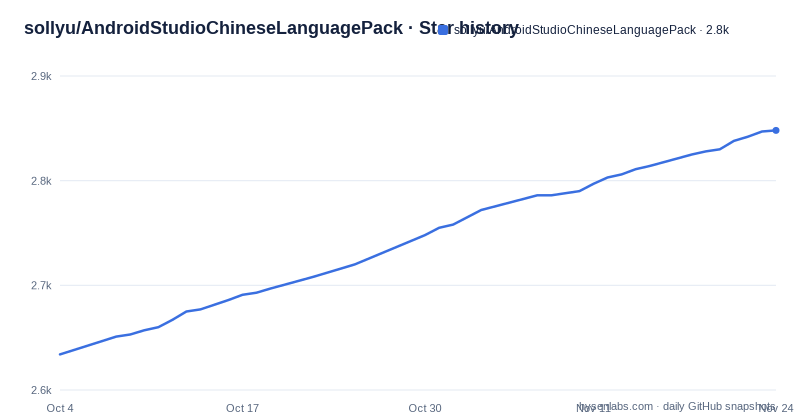
Star history
- sollyu/AndroidStudioChineseLanguagePack2,848 ★ · +214
| Repository | 2026-10-04 | 2026-11-24 |
|---|---|---|
| sollyu/AndroidStudioChineseLanguagePack | 2.6k | 2.8k |
214 Stars in the last 51 days, measured from the daily GitHub snapshot. Compare with other projects
Editorial analysis
The tree is a licence, a README and a folder of images
Three entries sit at the root: LICENSE, README.md and images/. There is no build file, no source directory, no packaging manifest and no CI configuration anywhere in that list, which is why the repository's detected language is empty rather than a programming language. The build does not happen here. What happens here is that a compiled jar is attached to a release and the release page becomes the distribution channel, which is exactly what the page itself says when it explains that the repository is only updated in Releases and that the language pack does not need frequent updates. The images/ directory holds the screenshots, and the section of the README set aside for previews has no content under its heading, so the visual material is delivered as files in the repository rather than as pictures in the page.
Release tags carry the IDEA plugin version, not Android Studio's
Three releases are visible, and their names explain why the page keeps telling readers to ignore version numbers. The tags are zh-262.10315.125 from 9 September 2026, zh-261.22158.277 from 15 April 2026 and zh-253.30387.90 from 24 January 2026, so the zh prefix marks the language and the number behind it is the build the JetBrains plugin itself was given for IntelliJ IDEA. The note attached to the release page says this in as many words: the number in the release name is the version IDEA gives that plugin, not the Android Studio version it lines up with. The download section adds that the newest release claims compatibility with every Android Studio version, and advises that unless you have a specific reason, you take the latest and stop thinking about numbers. That leaves no way to choose a release by Android Studio version from the tag list.
Two menu paths, and the IDE restarts twice
The whole install procedure is three lines of text, given in Chinese, and it splits into an install step and a language switch, each followed by a restart:
第一步:AndroidStudio->设置->插件->从磁盘安装插件->下载的jar包->重启AndroidStudio
第二步:自定义(Customize)->语言和地区(Language and Region)->语言(Language)->Chinese->重启AndroidStudio
或者 设置->外观与行为->系统设置->Language and Region->语言(Language)->Chinese->重启AndroidStudio
The two routes in the second step exist because the menu moved. One goes through Customize, Language and Region; the other goes through Settings, Appearance and Behavior, System Settings, then Language and Region, and both end at Language, Chinese. Which one you need depends on your Android Studio version, and the page does not say which versions use which path. The artifact installed in the first step is a jar chosen from disk, so the IDE is not fetching anything itself, and the language only changes after the second restart.
The licence block on the page stops mid sentence
The README closes with a licence section whose content is a C style comment header rather than the licence text, and that header ends partway through the boilerplate, on a line reading limitations under the Li. The copyright line above it reads Copyright (C) 2022-2026. sollyu, followed by the standard Apache License, Version 2.0 grant and the URL for the full terms. The licence metadata for the repository says Apache 2.0 and a LICENSE file sits at the root, so the complete text lives in that file and the page carries only the header. Worth knowing before redistributing the jar: the artefact in the release has to be checked against the LICENSE file rather than against what the page displays, and the visible part names a copyright holder and a licence but does not include the terms themselves.
The author added a line to prove the repository is alive
Near the end of the page there is a note that explains itself. Because a language pack does not need very frequent updates, and because this repository is only touched when there is a release, the author wrote a sentence into the page so that readers would not conclude the project had been abandoned. The note ends with a last edited date of 2026-09-09, which is also the newest release date and the last push to the repository, so all three point at the same day. The release trail before that shows three updates in nine months of 2026: 24 January, 15 April and 9 September. For a language pack that is an ordinary rhythm rather than a sign of a dormant project, and the note exists precisely because the commit history alone would not tell a visitor that.
The README is Chinese only, so the paths are Chinese only
Every instruction on the page is written in Chinese, including the two menu routes through Customize and Settings, the restart steps, and the note about version numbers. There is no English translation and no second README in the tree. The consequence is narrow but real for anyone who cannot read the page: the two menu paths are named in Chinese with the English interface terms in parentheses only for some of them, Customize, Language and Region and Language being the ones translated, while 外观与行为 and 系统设置, meaning Appearance and Behavior and System Settings, are given without an English equivalent. The plugin page for the original IntelliJ IDEA language pack is linked from the explanation section, so the upstream plugin can be identified even when the page itself cannot be read.
Editorial conclusion
This repository is worth using if you want the Android Studio interface in Chinese and you are willing to install a jar from disk and check the release page yourself. It is not worth following if you need an IDE plugin that updates itself, or if you need to know which Android Studio build a given release matches, because the tags carry the IntelliJ IDEA plugin's own version numbers and the page tells you to take the newest one. Before installing, check three things: that the two menu paths in the instructions match your Android Studio version, since one goes through Customize and the other through Settings, Appearance and Behavior and System Settings; that you can restart the IDE twice, once after installing the jar from disk and once after switching the language; and that the licence is what you expect, an Apache 2.0 header that the page shows only in part, with the full text in the LICENSE file at the root. The last release was zh-262.10315.125 on 9 September 2026.
Frequently asked questions
Which Android Studio version does the Chinese language pack match?
The release tags do not answer that, because they carry the version JetBrains gave the IntelliJ IDEA plugin, not the Android Studio version. The page says to take the newest release unless you have a specific reason not to, and states that the latest release is compatible with every Android Studio version.
How do I install the Android Studio Chinese language pack?
Two steps, each followed by a restart. First, in Settings, Plugins, install the plugin from disk by choosing the downloaded jar. Second, set the language to Chinese, either through Customize, Language and Region, or through Settings, Appearance and Behavior, System Settings, then Language and Region, depending on your Android Studio version.
Is this the same plugin as the JetBrains Chinese language pack?
It is derived from it rather than being an independent translation. The page states the work was done by modifying the IntelliJ IDEA plugin for Android Studio compatibility and links the original plugin address, and the repository itself contains no source, only a jar attached to each release.
Official sources
Add this badge to your README
If you maintain this project, the badge below links readers to this analysis and shows its maintenance status from the daily GitHub snapshot. Paste the markdown into your README; add ?metric=license or ?metric=stars to the image URL for a different field.

[](https://hysenlabs.com/projects/sollyu-androidstudiochineselanguagepack)Star history chart for your README
[](https://hysenlabs.com/projects/sollyu-androidstudiochineselanguagepack)Was this useful?