SOTAcat puts an Elecraft KX rig in your phone's pocket
CAT control for Elecraft KX radios and SOTAMAT
At a glance
- What is it?
- SOTAcat is a WiFi box that puts an Elecraft KX2, KX3 or KH1 behind a browser interface on the rig's own access point. Rig control survives with no cell service; the spot list does not.
- Who is it for?
- SOTAmat's SOTAcat earns its box for an owner of an Elecraft KX2, KX3 or KH1 who operates portable and needs CW and rig control at a summit with no bars. It is the wrong tool if your radio is another brand, or if spotting without a data connection is the whole point of the trip.
- Can I use it commercially?
- Check first. The repository uses a licence we do not classify automatically, so read its LICENSE file before any commercial use.
- Is it still maintained?
- Yes. The repository last received commits 7 days ago.
- What is it written in?
- Mainly JavaScript, according to GitHub's language statistics.
Answers come from the project's GitHub data, last synced on October 22, 2026, and from our analysis. They are not legal advice.
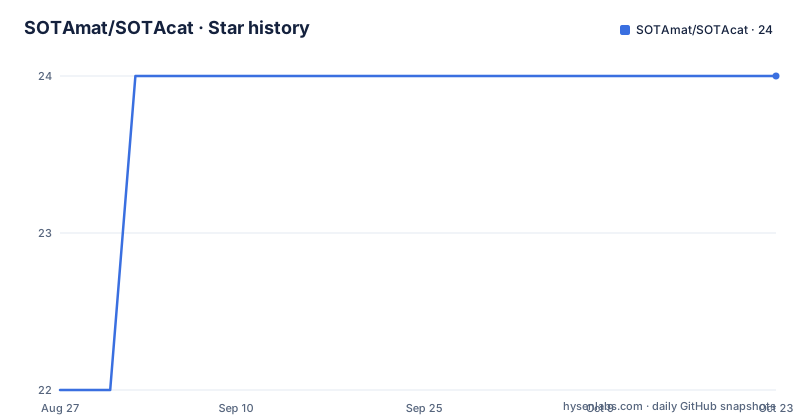
Star history
- SOTAmat/SOTAcat24 ★ · +2
| Repository | 2026-08-27 | 2026-10-22 |
|---|---|---|
| SOTAmat/SOTAcat | 22 | 24 |
2 Stars in the last 56 days, measured from the daily GitHub snapshot. Compare with other projects
Editorial analysis
Three steps from a cold rig to a live console
Out of the box the hardware is its own WiFi access point, named SOTACAT_xxxx, with the password 12345678. Joining it puts the phone on the rig's network rather than your home WiFi, which is how the browser interface reaches the radio. Two addresses serve that interface: http://192.168.4.1 and http://sotacat.local. The check after opening either one is the header bar, where UTC time, a battery percentage and a green connection dot tell you the device answered. Treat that dot as the only health signal the interface gives you, because everything else on the page is downstream of it. There is no account to create, no sign in step and no pairing handshake beyond knowing the SSID pattern and the fixed password. That simplicity is also the security model: anyone close enough to see the access point can drive your transmitter once they know 12345678.
Android cannot be trusted with sotacat.local
Two addresses serve the same interface and only one of them resolves everywhere. The project warns that .local addresses may not work on Android and sends those users to the numeric address http://192.168.4.1 instead. Both are plain http rather than https, so the browser treats the box as a host on the local network instead of a public site. When the page loads but stops responding, the answer is a specific anchor inside the networking guide: docs/user/Networking.md#connection-lost-recovery. That page is worth reading before a summit, because the failure mode is a loaded page with dead controls rather than a browser error, and the recovery path lives in the repository rather than in the interface. Until you have read it, make the numeric address your default on any phone, including the iPhone.
RUN survives with no bars, CHASE comes back empty
The interface splits into modes with very different dependencies. RUN works fully with no internet at all: tune the radio, send CW, toggle TX. CHASE needs a data connection, and off grid it returns an empty list rather than an error. Self spot still works without bars, but it takes a different route, FT8 synthesis handled through the SOTAmat app. So the failure worth planning for is not losing control of the radio, it is losing sight of who else is on frequency. An operator whose habit is to check a spot list before answering will notice that gap immediately, and an operator whose habit is to call CQ on CW will not. Both are running the same firmware; only the expectations differ.
Tap a spot and the radio tunes itself
The spotting workflow rests on one gesture: tap a spot and the radio tunes. Scan mode cycles through spots without touching the phone, which is what makes the rig usable while both hands are occupied with a pack or an antenna. The spot list mixes SOTA, POTA and WWFF entries in one list instead of splitting them by program. With cell service, CHASE pulls live spots and adds tap to tune, auto scan, and two SMS buttons labelled SMS Spot and SMS QRT for telling the outside world that you are transmitting or finished. Without cell service that whole panel is empty. Tap to tune and auto scan are therefore one feature with one dependency: they need data, and they disappear together the moment the signal goes.
Self spot borrows FT8 from the SOTAmat app
Off grid self spotting is not handled inside SOTAcat's own interface. It runs through FT8 synthesis in a separate phone app, SOTAmat, published for both iOS and Android, and the project states plainly that self spot via SOTAmat FT8 synthesis requires that app. The hardware and the app share a vendor name, SOTAmat, with the project homepage at sotamat.com, while the rig itself is reached through a browser at 192.168.4.1. An operator is therefore carrying two pieces of software at once, one on the radio's own network and one from the app store, and the reason for splitting them is not explained further. Anyone buying the box for portable work should install the SOTAmat app before the trip, because an FT8 self spot with the app missing is not a degraded mode, it is a field that stays empty.
The Makefile is a shortcut onto PlatformIO
The firmware build is PlatformIO, and the root Makefile is a set of shortcuts over it. Its header comment says every target is optional and prints the raw PlatformIO calls:
pio run -e seeed_xiao_esp32c3_release
pio run -e seeed_xiao_esp32c3_release -t upload
Defaults live in a handful of variables, and both the OTA target and the test target resolve to the same hostname unless you override them:
ENV ?= seeed_xiao_esp32c3_release
IP ?= sotacat.local
HOST ?= sotacat.local
FIRMWARE_DIR := firmware/webtools
OTA_BIN := $(FIRMWARE_DIR)/SOTACAT-ESP32C3-OTA.bin
MERGED_BIN := $(FIRMWARE_DIR)/esp32c3.bin
So ota-upload sends firmware over WiFi to the box, monitor opens the serial monitor, test-unit runs JavaScript unit tests with no device required, test runs the integration suite, and test-setup creates the venv and dependencies that suite needs. github-release builds the firmware and cuts a GitHub release in one step, which is why the tags carry their own dates: v260918.1710, v260804.2114 and v260603.2111, the last of them from 19 September 2026.
KX2, KX3 and KH1 share one ESP32-C3 image
Radio support is named down to three models, the Elecraft KX2, KX3 and KH1, and the rest of the repository exists to serve that one job. The firmware side is C and C++ driven by PlatformIO, with platformio.ini, sdkconfig.defaults, CMakeLists.txt, partition_definitions/, include/, src/, lib/ and test/ in the root, plus merge_binaries.py and pio-pre-build-script.py as build helpers. Editor and formatting configuration sits beside them in .clang-format, .clangd and .vscode/, while .prettierrc and .prettierignore cover the web side and website/ holds the site itself. GitHub reports JavaScript as the primary language, which describes the browser interface rather than the firmware, and that split explains the mixed toolchain. Two different output images are produced into firmware/webtools: an OTA bundle named for the board and a merged image for flashing.
Two ways to get the hardware, and where help lives
The device has two acquisition paths and the project treats them as equals. A pre-made SOTAcat is sold through K5EM's Store at store.invertedlabs.com/product/sotacat/, and the alternative is to build your own from the hardware guide in docs/Hardware.md. Soldering your own also puts you in charge of the firmware, since the same repository builds it, which matters if you change the radios in your bag. Support is split by question type: bugs go to GitHub Issues, feature ideas to GitHub Discussions, and live help sits in the #sotacat-sotamat channel on SOTA-NA Slack, with joining instructions in docs/user/FAQ.md#slack. The user documentation set covers Getting-Started.md, UI-Tour.md, Networking.md, Rig-Control-Apps.md and Troubleshooting.md under docs/user, while docs/dev holds BUILD.md, Architecture.md and Web-UI.md for anyone changing the firmware.
Editorial conclusion
SOTAmat's SOTAcat earns its box for an owner of an Elecraft KX2, KX3 or KH1 who operates portable and needs CW and rig control at a summit with no bars. It is the wrong tool if your radio is another brand, or if spotting without a data connection is the whole point of the trip. Before ordering, confirm which Elecraft model you have, accept that the access point password is the fixed 12345678 and readable by anyone standing nearby, and read docs/user/Networking.md so the connection lost recovery path is already known before you need it.
Frequently asked questions
What does SOTA mean in ham radio, and where does SOTAcat use it?
SOTAcat's spot list carries SOTA, POTA and WWFF entries together in one list rather than one program per view. The project uses the abbreviation without expanding it, and the separate SOTAmat app for iOS and Android, published from sotamat.com, handles the FT8 side of self spotting.
Does SOTAcat work when there is no cell service?
Partly, and the split is explicit. RUN works fully offline: it tunes the radio, sends CW and toggles TX. CHASE needs internet and comes back empty off grid. Self spot still runs, through FT8 synthesis in the SOTAmat app.
Which radios can SOTAcat control over WiFi CAT?
The Elecraft KX2, KX3 and KH1. The project describes itself as CAT control for Elecraft KX radios, and the phone becomes the console by joining the SOTACAT_xxxx access point and opening the interface in a browser.
Can I build a SOTAcat myself instead of buying one?
Yes. A pre-made unit is sold through K5EM's Store, and the repository carries a hardware guide at docs/Hardware.md for building your own, alongside the PlatformIO firmware build you would flash to it.
Official sources
Add this badge to your README
If you maintain this project, the badge below links readers to this analysis and shows its maintenance status from the daily GitHub snapshot. Paste the markdown into your README; add ?metric=license or ?metric=stars to the image URL for a different field.

[](https://hysenlabs.com/projects/sotamat-sotacat)Star history chart for your README
[](https://hysenlabs.com/projects/sotamat-sotacat)