PAROL6 is a 3D printed desktop arm that requires you to read a lethal voltage warning first
BOM, STL files and instructions for PAROL6 3D printed robot arm
At a glance
- What is it?
- Source-Robotics ships the bill of materials, STL files and firmware for the PAROL6 desktop robot arm, with one release and nineteen months of commits after it. Every build link in the README points at a different GitHub account, the hardware requirements page lives in another repository, and the safety document is not optional reading.
- Who is it for?
- PAROL6 makes sense if you want an industrial style desktop arm you can build from printed parts and open firmware, and the BOM, the STL files and the control software are all in the repository. It is not a weekend project, and the project's own document says so.
- Can I use it commercially?
- Check first. The repository uses a licence we do not classify automatically, so read its LICENSE file before any commercial use.
- Is it still maintained?
- Yes. The repository last received commits 5 days ago.
- What is it written in?
- Mainly HTML, according to GitHub's language statistics.
Answers come from the project's GitHub data, last synced on November 15, 2026, and from our analysis. They are not legal advice.
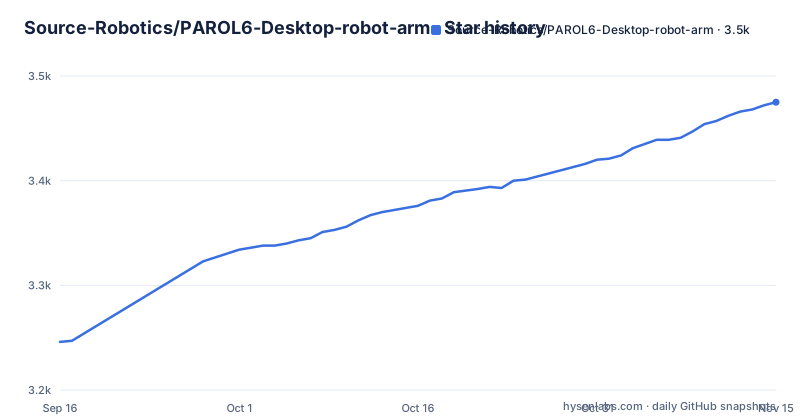
Star history
- Source-Robotics/PAROL6-Desktop-robot-arm3,475 ★ · +229
| Repository | 2026-09-16 | 2026-11-15 |
|---|---|---|
| Source-Robotics/PAROL6-Desktop-robot-arm | 3.2k | 3.5k |
229 Stars in the last 60 days, measured from the daily GitHub snapshot. Compare with other projects
Editorial analysis
The lethal voltage warning comes before the BOM
The safety section is the longest prose block in the README and it is not boilerplate. The project states that it involves lethal voltages and other serious hazards that can cause severe injury, and that you must read the full safety warning and disclaimer document before using any project files, with proceeding taken as acknowledgement and acceptance of all risk. The disclaimer above that paragraph is specific about what is not promised. The software, hardware designs and assembly documentation are described as still under development and as possibly containing bugs, errors or incomplete features. You accept that you are solely responsible for safe assembly, testing and operation, that no guarantee is made about correctness, safety or reliability, and that hardware performance and safety depend on your assembly, component quality, calibration and handling. The project is provided as is, with no warranty of suitability for any particular purpose.
Every build link points at a different GitHub account
The repository is hosted under Source-Robotics, and the links inside it are not. The BOM link, the building instructions link and the documentation link are three of the first links on the page, and the BOM and building instructions both resolve to github.com/PCrnjak/PAROL6-Desktop-robot-arm rather than to the repository you are reading. The same account appears throughout the resource list: the commander software, the Python API, the legacy Python API and the ROS2 and MoveIt simulation are all PCrnjak repositories. The alternative web based commander belongs to Jepson2k. The funding links are PayPal and Patreon pages under PCrnjak as well. The practical consequence is that the documentation a builder actually needs is maintained in a different repository from the files it describes, so an issue filed here may not reach the person who maintains the instructions.
One release, then nineteen months of commits
The project has a single release, V1, tagged on 2025-03-08. The last push to the main branch is dated 2026-10-02, so the branch has moved a long way past the tag without a second release. That gap matters for anyone pinning a build: the V1 tag and the current state of main are not the same thing, and there is no version marker inside the documentation to tell you which one the build instructions describe. The project does say the design approach was to be similar to industrial robots in terms of mechanical design, control software and usability, and that the control software, the GUI and the robot STL files are open source, so the intent is a maintained product rather than a one-off design. Nothing in the repository records which changes landed after V1, so the commit log is the only source for that.
Four root directories have spaces in their names
The repository is mostly directories, and the names are exactly as you would expect to break a script: Building instructions, PAROL6 control board main software, PAROL6 control board test code and Print table all contain a space and all sit at the repository root. Anything that walks this tree has to quote those paths. The rest of the root follows the build sequence: STL for the printed parts, BOM for the parts list, Building instructions for assembly, Print table for the furniture the arm bolts to, PAROL6 control board main software for the firmware, PAROL6 control board test code beside it, and PAROL6_URDF for a robot description usable in simulation. Extras and Images hold supporting material, and community_projects.md collects what other people have built on top, described as GUIs, vision and AI demos, and hardware mods.
Three front ends and two Python APIs
Controlling the arm is the part with the most choice, and the README does not rank the options. The commander software is the primary one, and it is linked together with a page called minimal hardware specs, which is really a list of machines confirmed to work. PAROL-Web-Commander is offered as an alternative web based commander, maintained by someone other than the core team. For scripting there are two Python APIs, one current and one labelled legacy and kept under a name ending in Alvar, so you can tell which one a tutorial is written against. A ROS2 and MoveIt simulation repository covers the case where you want to develop against the arm before you have one. Add the firmware in the repository itself, and the picture is a device whose hardware, firmware and control surfaces are all published, with the choice of front end left to whoever is holding the parts.
The parts list is the entry point either way
There are two documented routes. You can buy the arm from the manufacturer's website, or you can source every part yourself and build it, and the second route has three steps: source all the parts from the BOM, follow the building instructions to assemble the robot, and then follow the documentation to get it running. The split matters because the repository's title is the BOM, the STL files and the instructions, which is also its description, and the purchase route is mentioned once and then never again. What is not stated anywhere in the README is what the machine will not build. There is no bill of materials total, no print time estimate, no bed size requirement and no list of fasteners with sizes, all of which live inside the BOM directory itself rather than in the page you are reading.
The hardware requirements page is in another repository
One link in the resources list carries more weight than its placement suggests. Next to the commander software there is a link labelled minimal hardware specs, pointing at a file called confirmed_working_systems.md inside the commander software repository. That file, not this one, is where the answer to whether your computer can run the software lives, and it is a list of confirmed systems rather than a stated minimum. So the single most disqualifying fact for a prospective builder is documented outside the build repository, under a different account, and described as what has been confirmed to work rather than what is required. The video tutorials playlist and the Discord channel are linked alongside it, which suggests the working configuration knowledge lives in those places too. Read that file before printing anything.
HTML is the reported language, binaries are the content
The repository's primary language is reported as HTML, which is a fair description of a repository whose documentation is the main text. The actual payload is elsewhere: an STL directory of printed parts, firmware directories, a URDF description, images and a zip archive named en.stsw-link009.zip sitting at the root, which the README never mentions. A .gitattributes file is also at the root, and the binary-heavy directories sit alongside it, so version control behaviour for those files is delegated to git attributes rather than described in the documentation. The licence side is simpler and stated in one line: the project is under the GPLv3 licence, with a LICENSE file in the root and a GPL-3.0 badge at the top of the README, which also links the robotics toolbox for Python.
Editorial conclusion
PAROL6 makes sense if you want an industrial style desktop arm you can build from printed parts and open firmware, and the BOM, the STL files and the control software are all in the repository. It is not a weekend project, and the project's own document says so. Read the safety warning and disclaimer before ordering anything, because the arm runs on lethal voltages and the designers accept no responsibility for assembly, calibration or handling. Two practical warnings before you start. Every build link in the README resolves to a different GitHub account than the one hosting it, so follow the links carefully and expect the documentation you land on to be maintained elsewhere. And the page that would tell you whether your machine qualifies lives in the commander software repository, not here. There is one release, V1 from 2025-03-08, while the branch has moved on since, so treat the current state of main as the thing to read rather than the tag.
Frequently asked questions
Is it safe to build a PAROL6 desktop robot arm?
The project states plainly that it involves lethal voltages and other serious hazards that can cause severe injury, and that you must read the full safety warning and disclaimer document before using any project files. It also describes the software, hardware designs and assembly documentation as still under development and as possibly containing bugs, errors or incomplete features, with no guarantee of correctness, safety or reliability.
What licence is the PAROL6 robot arm under?
The licensing section says the project is under the GPLv3 licence, and the repository carries a LICENSE file at the root with a GPL-3.0 badge at the top of the README. The control software, the GUI and the robot STL files are named as open source, while the mechanical designs are what you print or buy.
Where do I find the PAROL6 parts list and build instructions?
In the BOM and Building instructions directories of the repository, with the separate documentation site for getting the robot running afterwards. Note that the README's links for the BOM and the building instructions both resolve to the PCrnjak account's copy of the repository rather than to the Source-Robotics one hosting them.
Can I buy a PAROL6 arm instead of building one?
Yes. The README says the arm can be bought from the manufacturer's website, and separately lays out the route for sourcing every part yourself: source all the parts from the BOM, follow the building instructions to assemble the robot, then follow the documentation to get it running.
What software can control a PAROL6 robot arm?
Several options are listed: the commander software, PAROL-Web-Commander as an alternative web based commander, a Python API and a legacy Python API, and a ROS2 with MoveIt simulation repository for developing without the hardware. Community GUIs, vision and AI demos and hardware mods are collected in community_projects.md.
Official sources
Add this badge to your README
If you maintain this project, the badge below links readers to this analysis and shows its maintenance status from the daily GitHub snapshot. Paste the markdown into your README; add ?metric=license or ?metric=stars to the image URL for a different field.

[](https://hysenlabs.com/projects/source-robotics-parol6-desktop-robot-arm)Star history chart for your README
[](https://hysenlabs.com/projects/source-robotics-parol6-desktop-robot-arm)Was this useful?