spark builds production and then dev, so the dev bundle is what lands in dist
:sparkles: An advanced 3D Gaussian Splatting renderer for THREE.js
At a glance
- What is it?
- sparkjsdev/spark is an MIT licensed 3D Gaussian Splatting renderer for THREE.js built by World Labs, published as @sparkjsdev/spark at 2.3.1. It carries a Rust and WebAssembly core, a committed dist directory that contributors are told to hide from git, and a build script whose last stage overwrites its first.
- Who is it for?
- Spark fits a team already rendering with THREE.js that wants 3D Gaussian splats in the same scene as mesh geometry, since the renderer fuses the two and takes the sort order across multiple splats, which is where most single-asset viewers fall down. Three things to know first.
- Can I use it commercially?
- Yes. MIT is a permissive licence: you can use, modify and sell software built on it, as long as you keep its copyright and licence notices.
- Is it still maintained?
- Yes. The repository last received commits 3 days ago.
- What is it written in?
- Mainly TypeScript, according to GitHub's language statistics.
Answers come from the project's GitHub data, last synced on October 23, 2026, and from our analysis. They are not legal advice.
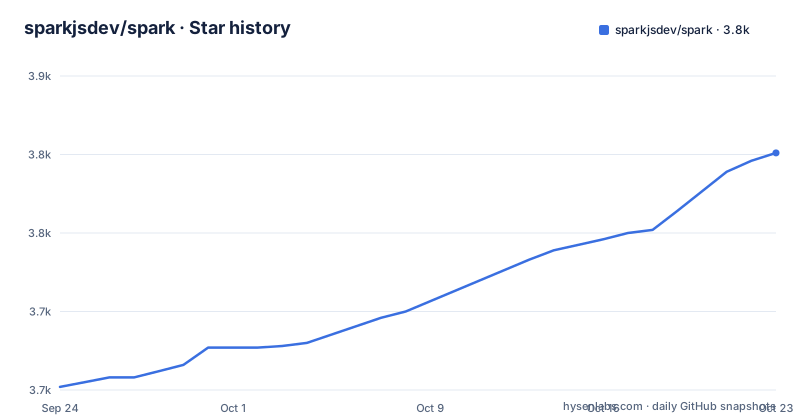
Star history
- sparkjsdev/spark3,801 ★ · +149
| Repository | 2026-09-24 | 2026-10-23 |
|---|---|---|
| sparkjsdev/spark | 3.7k | 3.8k |
149 Stars in the last 29 days, measured from the daily GitHub snapshot. Compare with other projects
Editorial analysis
The build script ends with the dev bundle, not the production one
The `build` script in `package.json` is a chain of three commands, and the order matters more than it looks:
npm run build:production && npm run build:dev && npm run build:typesThe two Vite builds differ only by mode, `vite build --mode production` and `vite build --mode dev`. Since the dev build runs second and both write into the same output directory, the artifact left in `dist/` after a plain build is the development bundle. The type declarations are generated last by `tsc`, so the types match the source and the JavaScript does not necessarily match what a release would ship.
The per-mode outputs are the ones you would expect from the names, so nothing here is broken; it is a default that favours iterating over producing a shippable bundle. Anyone building for release needs to run the production step on its own, or reorder the chain.
Watch mode is set up separately. `build:watch` runs `onchange` over `src/**/*.{ts,glsl}`, which is the detail that matters: shader sources are compiled through the same build, so a GLSL edit triggers a rebuild exactly like a TypeScript edit.
dist/ is committed, and contributors are told to hide it
The tree contains a `dist/` directory, so the built output is versioned. The contributing notes address that directly, with three Git commands.
To stop local builds from showing up as changes:
git update-index --assume-unchanged dist/*To undo it and commit into `dist/` again:
git update-index --no-assume-unchanged dist/*And to list what is currently hidden:
git ls-files -v | grep '^[a-z]' | cut -c3-The reason given is accidental commits and merge conflicts. That is the real cost of tracking build output: every contributor who rebuilds locally has a modified tracked directory, and the fix is a per-machine index flag rather than a `.gitignore` entry, because the files still need to be tracked for everyone else.
The last command is the diagnostic worth remembering. `git ls-files -v` marks assume-unchanged entries with a lowercase letter, so filtering on `^[a-z]` and stripping the first two characters lists exactly the files being hidden, which is how you find a path you forgot to unhide.
The import map pins both THREE.js and the Spark version in the URL
The copy-and-paste route is an import map, and every version in it is written out:
<script type="importmap">
  {
    "imports": {
      "three": "https://cdn.jsdelivr.net/npm/[email protected]/build/three.module.js",
      "three/addons/": "https://cdn.jsdelivr.net/npm/[email protected]/examples/jsm/",
      "@sparkjsdev/spark": "https://sparkjs.dev/releases/spark/2.3.1/spark.module.js"
     }
  }
</script>
Two things are frozen there. The THREE.js version is 0.180.0 on both the core module and the addons prefix, and the Spark build is addressed by a URL containing the version, 2.3.1, which is the same version as the npm package. Neither is resolved at runtime, so moving to a new Spark release means editing the map in every page that uses it.
The longer copy-code example that precedes this block is the one aimed at first-time users, and it ends mid-line at `window.inner`, so the snippet as printed does not compile. The smaller CDN block above it is the complete one.
One more detail in the header: the Documentation link and the FAQ link both point at `https://sparkjs.dev/`, the same URL, so the FAQ is the documentation site rather than a separate page.
There is no versioning system for assets
The examples fetch their assets from a remote URL, which is the default. Downloading and caching them locally is optional and is presented as the way to get offline development and faster loading:
npm run assets:downloadThe gap is stated without hedging. There is no versioning system for assets, so to re-download a specific file you delete that asset file individually, or you take the whole set again from scratch:
 npm run assets:clean
 npm run assets:download
So the cache is all or nothing. There is no manifest of expected files with versions, no per-file refresh, and no integrity check described. In practice that means a stale asset survives until someone deletes it, and the troubleshooting path for a wrong-looking example is to wipe everything rather than identify the one file that changed.
The same script family also handles compression. `npm run assets:compress` takes a file or a URL to a ply and produces spz, which is the compressed distribution format the renderer reads alongside ply, splat, kspat and sog.
The TypeScript package carries a Rust core and two Rust entry points
Building Spark locally needs Rust installed, and the build has a WebAssembly stage that is separate from the bundling stage. The documented sequence is:
npm install
npm run build:wasm
npm run build
`build:wasm` runs `node rust/build_wasm.js`, so the Rust side is driven from Node rather than from a Cargo command, and it has to complete before the Vite build runs. A dev server then starts on `http://localhost:8080/`, with the note to read the console output in case the port differs.
There are two more Rust entry points beyond the WebAssembly build. `build-lod` runs `cargo run --manifest-path rust/build-lod/Cargo.toml --release`, a separate crate for level of detail work. And `lint:rust` runs `cargo clippy --manifest-path rust/Cargo.toml --all-targets -- -D warnings`, treating Rust warnings as errors.
The clean target reflects how much state accumulates. It removes `dist/`, `node_modules/`, `rust/target/` and `rust/spark-rs/pkg/`, then runs the asset clean, so a stale WebAssembly package under `rust/spark-rs/pkg/` is exactly the kind of thing the full wipe is there to clear. TypeScript and Rust are both linted, by Biome and by clippy respectively.
One export entry, shipping both CommonJS and ES module builds
The published package is `@sparkjsdev/spark` at version 2.3.1, and the manifest gives it a single entry point with three faces.
`type` is `module`, `main` points at `./dist/spark.cjs.js`, `module` points at `./dist/spark.module.js`, and `types` points at `./dist/types/index.d.ts`. The `exports` map has a single key, `.`, carrying `types`, `import` and `require` conditions. So a bundler gets the ES module, a CommonJS require gets the other build, and both get the same declarations.
A single root export is a deliberate constraint. Deep imports into the source layout are not published, so anything a consumer needs has to come through the root entry. For a renderer with shader modules, LOD tiers and editor pieces, that means the public surface is the API and not the file layout.
The version in the manifest matches the release tags, which is not always the case with build tooling. The tags are v2.3.1 on 2026-10-01, v2.3.0 on 2026-09-30 and v2.2.0 on 2026-09-11, so two of the three landed within a day of each other and the package version is the same string as the tag.
Docs are MkDocs, the examples are Vite, and deploy pushes to another repository
Documentation and site are two separate pipelines. The docs site needs MkDocs Material, installed with `pip install mkdocs-material`, and the macOS note is specific: if you hit an `externally managed environment` error after installing Python through Homebrew, install it with `brew install mkdocs-material` instead.
The commands divide cleanly. `npm run docs` serves the docs, which the script wires to cleaning and copying site files and then running `mkdocs serve`. `npm run site:build` produces a static site and docs in a `site` directory, `npm run site:serve` serves that directory, and `npm run site:deploy` generates a static site from the `docs` directory and pushes it to a different repository, sparkjsdev.github.io, over gh-pages.
So the documentation source lives here and the published site lives in another repository, which means a docs change needs two commits in two places to appear online.
The examples are the other half of the surface: more than twenty directories under `examples/`, from `hello-world` and `multiple-splats` through `depth-of-field`, `dynamic-lighting`, `lod-on-demand`, `multi-lod`, `interactive-ripples`, `mobile-joystick` and an `editor`, plus an `examples/assets.json` and a Vite config at the root. Editor, keyboard and multi-viewport examples are a reasonable signal about where the project's centre of gravity sits.
Editorial conclusion
Spark fits a team already rendering with THREE.js that wants 3D Gaussian splats in the same scene as mesh geometry, since the renderer fuses the two and takes the sort order across multiple splats, which is where most single-asset viewers fall down. Three things to know first. The CDN route pins both a THREE.js version and a Spark version inside the import map URL, so a version bump is an edit in your page rather than a resolution at runtime. The local build is a two language build, with a Rust step producing WebAssembly and a Vite step producing the bundle, and the documented clean procedure is a full wipe including the Rust target directory and the asset cache. And dist/ is tracked in git, which is why the contributing notes ask contributors to mark it assume-unchanged locally. MIT licensed, one entry point with both CommonJS and ES module builds, and a CHANGELOG in the tree.
Frequently asked questions
What is @sparkjsdev/spark used for?
It is a 3D Gaussian Splatting renderer for THREE.js, MIT licensed and built by World Labs. It fuses splat and mesh objects in the THREE.js pipeline, renders multiple splats together with correct sorting and multiple viewpoints at once, supports ply including the compressed form, spz, splat, kspat and sog, and targets 98% or more WebGL2 support.
How do I install the Spark renderer?
With npm, using npm install @sparkjsdev/spark. The alternative is an import map that points three at the jsdelivr copy of [email protected] and @sparkjsdev/spark at https://sparkjs.dev/releases/spark/2.3.1/spark.module.js, so both versions are fixed in the URL and have to be edited when you upgrade.
Do I need Rust to build the Spark examples locally?
Yes for the local build. Install Rust, then run npm install, npm run build:wasm and npm run build, where build:wasm runs node rust/build_wasm.js. A dev server then starts on http://localhost:8080/. Consuming the published npm or CDN build does not require Rust.
How do I compress a splat file with Spark?
Run npm run assets:compress with a file or a URL to a ply, and the output is spz. The related scripts are assets:download and assets:clean, and the contributing notes point out that there is no versioning system for assets, so refreshing one file means deleting it and fetching the whole set again.
Why does Spark ask contributors to hide dist from git?
Because dist/ is tracked in the repository. The notes ask you to run git update-index --assume-unchanged dist/* so local builds do not create accidental commits or merge conflicts, git update-index --no-assume-unchanged dist/* to undo it, and git ls-files -v filtered to lowercase letters to list what is currently hidden.
Official sources
Add this badge to your README
If you maintain this project, the badge below links readers to this analysis and shows its maintenance status from the daily GitHub snapshot. Paste the markdown into your README; add ?metric=license or ?metric=stars to the image URL for a different field.

[](https://hysenlabs.com/projects/sparkjsdev-spark)Star history chart for your README
[](https://hysenlabs.com/projects/sparkjsdev-spark)Was this useful?