Endcord: a feature rich Discord client that lives in the terminal
The most feature rich Discord TUI client.
At a glance
- What is it?
- Endcord is a third-party Discord client that runs entirely in a terminal or in its own GTK3 window, with voice calls, vim mode, an extension API, a Cython accelerated core and a low memory footprint, and it is source available rather than open source, with public forks explicitly disallowed. It suits a keyboard-first user on a small machine, and it comes with a warning that using a third-party client may get your account banned.
- Who is it for?
- Adopt Endcord if you want a Discord client that works over SSH, on a machine with no desktop environment, or with nothing but a keyboard, because that is what the terminal client is for and the feature list is not a toy. Do not adopt it for an account you cannot afford to lose, because the project states plainly that using a third-party client is against Discord's terms of service and may get you banned.
- Can I use it commercially?
- Check first. The repository uses a licence we do not classify automatically, so read its LICENSE file before any commercial use.
- Is it still maintained?
- Yes. The repository received new commits within the last day.
- What is it written in?
- Mainly Python, according to GitHub's language statistics.
Answers come from the project's GitHub data, last synced on November 7, 2026, and from our analysis. They are not legal advice.
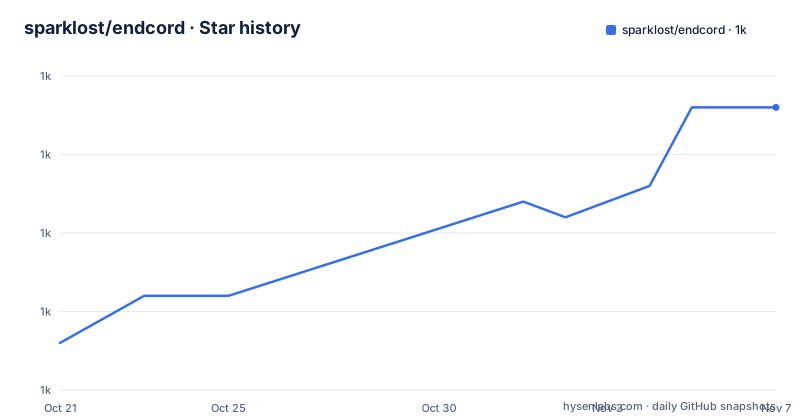
Star history
- sparklost/endcord1,028 ★ · +15
| Repository | 2026-10-21 | 2026-11-07 |
|---|---|---|
| sparklost/endcord | 1k | 1k |
15 Stars in the last 17 days, measured from the daily GitHub snapshot. Compare with other projects
Editorial analysis
What Endcord is, and the licence caveat first
Endcord is a third-party, feature rich Discord client that runs entirely in the terminal, or in its own GTK3 window, and it is built with Python and the ncurses library to deliver a lightweight but feature rich experience.
Two things are stated at the top of the README and both matter more than the feature list.
The first is the licence. Endcord is source available licensed, and thus not open source, with the details in the FAQ, and you are not allowed to create a public fork that modifies the code. The official project will always stay a purely human project, which is the author's way of saying that automated or scaled modification of the codebase is not what this is for.
The second is the warning about forks, and it is the reason for the first. Any third party endcord forks may add features that can lead to an account ban, cause instability, or contain outdated or even malicious code, so it is strongly recommended to avoid them.
That is a coherent position. A Discord client is a credential holder, it speaks to a service that is actively hostile to unofficial clients, and the only way to keep the official build trustworthy is to keep it small and not let people republish it.
The current version is 1.5.4, with the last push to the repository on 2026-10-13 and the most recent release on 2026-09-21.
The terminal as the whole application
The design decision is that the application is the terminal. There is no browser view and no separate renderer, and where a window is wanted the project supplies a GTK3 one.
That has consequences, and the feature list is really a list of things that are hard in a terminal and are nonetheless done here.
There is mouse control, so you can click a tab, and the tab list supports temporary tabs with click, double click and middle click. There is a configurable bar or block shaped cursor, which is a small detail that anyone who has used a terminal for hours appreciates. There is unlimited chat scrolling, so the scrollback is not capped the way a normal terminal buffer is, and there is a configurable set of chat lines covering the message, the newline, the reaction and the reply.
There is Vim mode, which for a terminal client is close to mandatory, and there is a configurable status, title and prompt line. There is spellchecking, and there are advanced input line operations plus the ability to use an external editor, which is how you get a real editor for a long message.
The GUI variant adds the things a terminal cannot do. Customisable tray icons, the window can be minimised to the tray, the window can be transparent and the background colours can carry an alpha value, there is GTK native pasting and drag and drop for text and files, and on Linux there is desktop integration with an app icon, a notification count badge and a click action on the notification.
And the memory claim is specific, that it uses only 15MB more RAM on Linux, against the 20 to 100MB that most terminals use, which is what makes the client viable on a small machine or over a slow link.
The feature list, and what a terminal client can realistically do
The feature list is long, and the interesting parts are the ones that involve the network rather than the display.
Voice calls are supported, for direct messages, groups and servers, and you can record and send voice messages. The Rich Presence integration is present, but the entry says only Rich Presence, so the app reports what you are playing without going further.
The media handling is extensive. You can view images, gifs, videos, audio, stickers and YouTube, as either ASCII art or in an external application, and you can search, preview and send gifs. Inline images are supported in three renderings, pixelated, ASCII art and the Kitty protocol, and the Kitty protocol images, profile pictures and emoji are delivered through extensions rather than built in.
The message handling is close to complete. You can reply, edit, delete, jump to the replied message, react, and vote in a poll. You can show reactions, replied messages and forwarded messages, embeds, attachment types and links, and code blocks with syntax highlighting. You can keep deleted messages, which is off by default.
Then there is the interface work. The channel tree is toggleable and configurable in detail, with options to hide hidden channels, show muted channels in grey, show unread channels in bold, show channels with a mention in red with the number of mentions, collapse categories and servers, keep direct messages in a separate drop-down with their status, and handle forums, imageboards and threads. There are folders with custom naming, a member list, a user profile view, message search, and assist when typing a channel, username, role, emoji or sticker.
Other things worth noting are the profile manager for multiple accounts, storing the token in the system keyring, proxy support, channel chat caching, a macro system for binding a key to a chain of commands, a headless mode, and the ability to run bots with interactions.
The extension API, and the split between core and add-ons
The extension system is the most architecturally interesting part, because it shows what the author considers core and what he is willing to hand to plugins.
The feature list mentions an extension API with builtin extension search, and the Kitty protocol image, profile picture and emoji support is delivered through three separate extensions rather than being built in. The list also includes a separate repository for the inline images extension and one for the profile pictures and one for the emoji, so the picture handling of a chat client is partly a plugin ecosystem.
That is a deliberate division. The rendering of a message is core, and the way an image is turned into pixels is a plugin, because the three renderings have different dependencies and different platform support.
The binary distribution reflects the same split in a different way. There is a full version with media support, a lite version without voice calls and media support, and a windowed version using GTK3, and the Arch packages are named to match, with a git variant that builds from source for the latest changes.
The search and the FAQ links in the README header point at a wiki, a configuration document, an extensions document, a usage document with the client commands, and a FAQ that answers questions about RAM usage, Python performance, the GUI windowed mode and the source available licence.
Installing, and the packaging choices
The install section gives four routes on Linux and the reasoning behind each.
The recommended one is an install script fetched and run in one command, and the note is that the script interactively manages multiple installations, so you can install, build, modify or uninstall.
bash -c "$(curl -fsSL https://raw.githubusercontent.com/sparklost/endcord/main/tools/install.sh)"The second is the pre-built binaries in the releases, and the description of how they are built is worth noting. They are built on an Ubuntu-like distribution with the custom Python and Nuitka build script options and with clang, which the author says means they are maximally optimized.
The third is the AUR, with four packages. The installer package runs the same script, the full package includes media support and produces a larger executable, the lite package omits voice calls and media support, and the gui package is the windowed GTK3 version. Each has a git variant that builds from source with the latest changes.
The fourth is building the project and copying the executable into the system path.
sudo cp dist/endcord /usr/local/bin/On Windows there are pre-built binaries built with Nuitka, the standalone executable ends up in the dist directory, and the README recommends the windowed variant on Windows. It also recommends a terminal, with WezTerm first, and Windows Terminal and cmder as alternatives.
The source available licence does not stop any of this, since using the official builds and scripts is exactly what the author wants.
Why it is written in Python, and where Cython comes in
The Python choice is defended in the README with a link to a FAQ section on Python performance misconceptions, and the answer is visible in the build configuration rather than in an argument.
The project requires Python 3.12 or later, and the dependencies are ordinary: a websocket client, a proxy library, a fast JSON library, and the audio stack of soundcard, soundfile and numpy. On Windows there are the platform specific packages for the window layer, the clipboard and the desktop toasts, and the manifest pins a Python maximum and a last known safe version.
The performance answer is the Cython layer. There is an endcord_cython package with compiled extensions for the media handling, the search, the terminal interface, the formatter and the colour handling, and the setup file builds them with aggressive optimisation flags including -O3, fast math and loop unrolling, and turns on thin link time optimisation when the compiler is clang and the lld linker is present.
The hot paths of a chat client are the rendering loop and the text search, and those are exactly the five things that are compiled. Everything else stays in Python, which is what makes the extension API and the plugin ecosystem practical to write.
The build section also shows that the project cares about the size of the dependency set, with separate exclusion lists for the mini, micro and medium builds, so a small install does not pull in numpy, the audio libraries and the crypto library. There is a build dependency group with Cython, Nuitka, PyInstaller and setuptools, so the same source can be turned into a one-file executable or a compiled binary in several ways.
The Terms of Service warning, and where the project stands
The disclaimer section is short and it is the most important thing to read before you install anything.
The warning says that using a third-party client is against Discord's Terms of Service and may cause your account to be banned, and that you should use endcord at your own risk, with more information in the FAQ.
That is not a formality. Discord has repeatedly changed how it detects unofficial clients, and a client that automates the protocol rather than using the official one is exactly the kind of thing that gets flagged. The author does not pretend otherwise, and he adds the fork warning on top, so the risk is stated in two directions, your account and the integrity of the build you run.
The project itself is in good shape. The releases come steadily, with 1.5.4 in September 2026 after 1.5.3 in July and 1.5.2 in July, and the repository is worked on actively with a push on 2026-10-13, the day before the article was written. There is a changelog at the root, a todo list, a pre-commit configuration, a ruff configuration and a uv lock file.
The one structural caution is the licence. Source available means you can read the code and run it, and it does not mean you can publish a modified copy, and the FAQ explains the terms. For a personal client that is exactly the right balance, and it is the reason to take the official build rather than a fork.
Editorial conclusion
Adopt Endcord if you want a Discord client that works over SSH, on a machine with no desktop environment, or with nothing but a keyboard, because that is what the terminal client is for and the feature list is not a toy. Do not adopt it for an account you cannot afford to lose, because the project states plainly that using a third-party client is against Discord's terms of service and may get you banned. And do not plan to fork it, because the licence is source available rather than open source and public forks that modify the code are explicitly not allowed.
Frequently asked questions
Is Endcord open source?
No. The README states that Endcord is source available licensed, and thus not open source, with the details in the FAQ, and that you are not allowed to create a public fork that modifies the code. It also warns that third party forks may add features that lead to an account ban, cause instability or contain outdated or malicious code.
Can I use Endcord without risking my Discord account?
No. The disclaimer warns that using a third-party client is against Discord's Terms of Service and may cause your account to be banned, and says to use endcord at your own risk. The project treats that as a real constraint rather than a formality.
How do I install Endcord on Linux?
The recommended way is the install script, which interactively manages multiple installations and can install, build, modify or uninstall. Pre-built binaries are also in the releases, the AUR carries installer, full, lite and gui packages, and you can build the project and copy the executable into the system path yourself.
Does Endcord really run at a low cost in a terminal?
The README claims extremely low CPU and RAM usage and points to a FAQ page on RAM usage, and in the GUI section it says the windowed version uses only 15MB more RAM on Linux against the 20 to 100MB that most terminals use. The rendering, search, formatting, colour and media paths are compiled with Cython, and the rest is Python.
Official sources
Add this badge to your README
If you maintain this project, the badge below links readers to this analysis and shows its maintenance status from the daily GitHub snapshot. Paste the markdown into your README; add ?metric=license or ?metric=stars to the image URL for a different field.

[](https://hysenlabs.com/projects/sparklost-endcord)Star history chart for your README
[](https://hysenlabs.com/projects/sparklost-endcord)Was this useful?