efsw watches directories across four backends and falls back when one fails
efsw is a C++ cross-platform file system watcher and notifier.
At a glance
- What is it?
- efsw is a C++ file system watcher with no dependencies, using inotify on Linux, I/O Completion Ports on Windows, FSEvents or kqueue on macOS, kqueue on the BSDs and a polling fallback that snapshots and compares directories. Its documentation is unusually specific about the limits of each backend.
- Who is it for?
- Adopt efsw if you need a file watcher in C++ that you can vendor into a project without adding a dependency tree, and if your deployment targets one or more of the platforms it covers with their native mechanisms.
- Can I use it commercially?
- Check first. The repository uses a licence we do not classify automatically, so read its LICENSE file before any commercial use.
- Is it still maintained?
- Yes. The repository last received commits 10 days ago.
- What is it written in?
- Mainly C++, according to GitHub's language statistics.
Answers come from the project's GitHub data, last synced on November 7, 2026, and from our analysis. They are not legal advice.
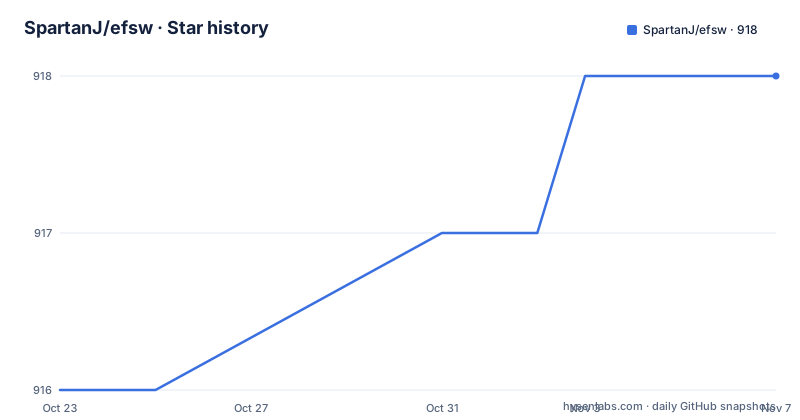
Star history
- SpartanJ/efsw918 ★ · +2
| Repository | 2026-10-23 | 2026-11-07 |
|---|---|---|
| SpartanJ/efsw | 916 | 918 |
2 Stars in the last 15 days, measured from the daily GitHub snapshot. Compare with other projects
Editorial analysis
Four native backends and one polling fallback
efsw is a C++ cross-platform file system watcher and notifier. It monitors the file system asynchronously for changes to files and directories by watching a list of specified paths, and raises events when a directory or file changes. It supports recursive directory watch, tracking the entire subdirectory tree.
The platform list is the interesting part, because each entry names the operating system mechanism rather than a library.
Linux uses inotify. Windows uses I/O Completion Ports. macOS uses FSEvents or kqueue. FreeBSD and the other BSDs use kqueue. And there is an OS-independent generic watcher that polls the disk for directory snapshots and compares them periodically.
That generic watcher is not a separate mode you have to opt into. The README says that if any of the backends fails to start for any reason, it will fallback to the OS-independent implementation.
The fallback comes with one exception the documentation flags explicitly. This should never happen, except for the Kqueue implementation, and the section on platform limitations explains why.
So there are two ways to read this design. Either it is a resilience feature, in which case a machine with an exhausted file descriptor limit still gets notifications instead of silence. Or it is a way of turning a hard failure into a slow one, which is a real trade: polling gives you correct events eventually and a busy disk in the meantime. Both readings are true, and the practical consequence is that a misconfigured watcher can look like it is working while running orders of magnitude slower.
For a tool that also states its dependencies as None, this backend spread is the main engineering content.
The listener pattern, and the five actions you can receive
The API is a listener interface plus a watcher object, and the example code in the README shows the whole shape of it.
You inherit from the abstract listener class and implement the file action handler.
class UpdateListener : public efsw::FileWatchListener {
  public:
    void handleFileAction( efsw::WatchID watchid, const std::string& dir,
                           const std::string& filename, efsw::Action action,
                           const std::string& oldFilename ) override {
The action is an enum with the cases you would expect: Add, Delete, Modified and Moved, with a default branch that prints Should never happen.
            case efsw::Actions::Moved:
                std::cout << "DIR (" << dir << ") FILE (" << filename << ") has event Moved from ("
                          << oldFilename << ")" << std::endl;
                break;
            default:
                std::cout << "Should never happen!" << std::endl;
Note the Moved case takes an extra string, oldFilename, so a rename gives you both the old and the new name in one event rather than a delete followed by an add.
Then you create the watcher, create your listener, and add watches. The third parameter of addWatch is the recursive flag.
efsw::WatchID watchID = fileWatcher->addWatch( "/tmp", listener, true );
efsw::WatchID watchID2 = fileWatcher->addWatch( "/usr", listener, false );
The watcher is started asynchronously and watches can be removed while running.
fileWatcher->watch();
fileWatcher->removeWatch( watchID2 );
There is one detail in the API worth knowing before you design around it. The FileWatcher constructor allows a first boolean parameter that indicates if it should start with the generic file watcher instead of the platform specific backend, so the fallback is reachable deliberately as well as automatically.
And removeWatch can also be called by passing the watch path, with the constraint that it must end with a slash or backslash on Windows, since that is how it is internally saved.
Building it with Premake, and the CMake file nobody officially supports
The build has no dependencies to install and no package manager to configure, which is the point of the None under Dependencies.
To generate project files you need to download and install Premake. Then you go to the project directory where the premake4.lua file is located and run one of three commands.
premake5 gmakeThat generates project Makefiles, then you change into the make directory for your platform and run make, or make config=release_x86_64, which generates the static lib, the shared lib and the test application.
The other two targets are Visual Studio and Xcode.
premake5 vs2022premake5 xcode4The CMake route exists but comes with a caveat worth quoting in full, because it is the sort of honesty that saves an afternoon. There is also a cmake file that the author does not officially support but that works just fine, provided by Mohammed Nafees and improved by Eugene Shalygin.
The repository listing confirms the layout. There is a premake4.lua and a premake5.lua, so both Premake generations are handled. There is a CMakeLists.txt along with efswConfig.cmake.in, which is the template for the installed package config. The sources are in src/, the public headers in include/, and the scripts/ directory holds helper scripts. There is also a .clang-format and a compile_flags.txt, so the code is formatted with clang-format and the editor knows the include paths.
The .ecode/ directory is an ECLAIR code index project, and .github/ holds the CI configuration with a build workflow badge pointing at the master branch.
Package recipes from the community, maintained by nobody
The package story is the part of this project that needs the most care from an adopter.
The community has been kind and contributed recipes for different popular package systems, and the README names three: Conan, vcpkg and the xmake repository. Then it adds the caveat. The author does not personally maintain those packages, so they could not be up to date, but they tend to be quite up to date.
That is a fair summary of how community packaging usually works, and it means something specific in practice. If you pull efsw through vcpkg or Conan, the version you get is as current as the last person who updated that recipe, which may lag the repository. If a bug fix matters to you, the fix is in the repository and may not be in the recipe yet.
There is also a fourth route, which is the one this project is set up for. Since efsw has no dependencies at all, vendoring the source into your own tree is entirely viable, and the README's build instructions assume exactly that: clone, generate with Premake, compile.
For a library of this size with a permissive licence, vendoring is often the pragmatic answer. It removes the version skew problem entirely, at the cost of owning the merge when upstream changes.
The licence is the MIT License, linked from the README as the code licence, with a LICENSE file at the repository root. The repository's licence field is a custom type that GitHub cannot categorise, so the file itself is the reference.
On maintenance, the repository is not archived and the last push was on 2026-10-15, so the tree is current, although there are no GitHub releases published, which means version tracking is by commit or by whatever the package recipes publish.
The platform limitations section is the real documentation
Most file watcher libraries hide their rough edges. This one has a section titled Platform limitations and clarifications, and it is the most useful part of the README.
The first item is about strings. Directory paths are expected to be encoded as UTF-8 strings in all platforms, and handleFileAction returns UTF-8 strings in all platforms. That is a contract you can code against, which is more than most libraries give you.
The second is the one that bites hardest. File modification events may be reported multiple times during a copy operation, typically after each write flush. This behavior is inherent to how file watchers operate and cannot be altered. If you need to open the file after receiving a modification event, it is recommended to wait for a reasonable period of time after the last event to avoid potential issues.
That last sentence contains the whole practical instruction. A copy of a large file produces a burst of modification events, one per write flush. Code that treats each event as a signal to read the file will read a partially written file, several times. The fix is on your side: debounce.
The third item is about symbolic links. The Windows and FSEvents macOS implementation cannot follow symlinks, and it will ignore followSymlinks() and allowOutOfScopeLinks(). So the two most common desktop platforms do not support that feature, and any code that relies on it has to branch.
The fourth item is about macOS and FSEvents resource usage, and it is the subtlest. On macOS, all paths registered on the same FileWatcher share one active FSEvents stream. Paths added before watch() are started together. After watching has started, adding or removing a path starts the replacement stream before stopping the previous one, so the handover does not leave a gap. In steady state, each FileWatcher therefore consumes one client from the system-wide FSEvents client pool instead of one client per call to addWatch.
That last detail is a design decision with a clear rationale. Sharing one stream means a watcher with fifty paths costs one client, not fifty, and the start-before-stop handover means adding a path during operation does not silently stop delivering events for the others. If you were adding watches one at a time to a live watcher and did not know about this, you would eventually hit a client pool exhaustion you would have no way to diagnose.
Where efsw is the wrong tool
Four cases rule it out, and each one is a documented limit rather than a missing feature.
The first is symbolic links on Windows and macOS. The README is explicit that those implementations ignore followSymlinks and allowOutOfScopeLinks. If your application watches a tree of symlinked directories on a desktop platform, efsw will not report changes through them.
The second is a need for exactly-once modification events. The documentation says modification events may be reported multiple times during a copy operation and that this cannot be altered. Code that has to open a file exactly once per change has to debounce on its side.
The third is scale beyond a process's descriptor limit. The Kqueue implementation is limited by the maximum number of file descriptors allowed per process by the operating system, and in the case of reaching that limit, in BSD around 18000 and in macOS around 10240, it falls back to the generic file watcher. That fallback is not a crash, but it is a silent change of behaviour, and a watcher that suddenly starts polling a large tree is going to burn CPU.
The fourth is a hosted or serverless environment with no real filesystem to watch, where the only option is the generic polling watcher and you are paying the polling cost for every path.
There is also a maintenance caveat to weigh. The project has no GitHub releases, so there is no version stream to pin against from the repository itself, and the community package recipes are not maintained by the author. Vendoring the source is the most predictable option for a library with no dependencies.
On the alternative: the platform-native mechanisms efsw wraps are not alternatives so much as the components. On Linux, inotify is directly usable through the kernel interface; on Windows, ReadDirectoryChangesW is the underlying primitive that I/O Completion Ports wrap; on macOS, FSEvents and kqueue are the system interfaces. The difference efsw provides is a single listener API across all of them, recursive watch handling, the notifier thread, and the fallback, rather than a different way of detecting changes.
Editorial conclusion
Adopt efsw if you need a file watcher in C++ that you can vendor into a project without adding a dependency tree, and if your deployment targets one or more of the platforms it covers with their native mechanisms. Do not adopt it if you need to follow symbolic links on Windows or macOS, because the README says those backends ignore followSymlinks and allowOutOfScopeLinks, or if you need modification events to be one per change, since the documentation states modification events may be reported multiple times during a copy. Before you adopt, read the platform limitations section in full and decide what your code does when an event arrives more than once.
Frequently asked questions
What is efsw and which platforms does it support?
efsw is a C++ cross-platform file system watcher and notifier with no dependencies. It supports Linux via inotify, Windows via I/O Completion Ports, macOS via FSEvents or kqueue, FreeBSD and BSD via kqueue, plus an OS-independent generic watcher that polls the disk.
How do I build efsw?
Install Premake, then run premake5 gmake, premake5 vs2022 or premake5 xcode4 in the directory holding the premake file, and compile with make or make config=release_x86_64. A CMakeLists.txt also exists, though the README says the author does not officially support it.
What happens if the platform backend fails to start?
efsw falls back to the OS-independent generic watcher, which polls the disk for directory snapshots and compares them periodically. The README says this should never happen except for the Kqueue implementation, where reaching the process file descriptor limit causes the fallback.
Does efsw support recursive directory watching?
Yes. It supports recursive directory watch, tracking the entire subdirectory tree, and the third parameter of addWatch indicates whether the watch is recursive.
Why do I get several modification events for one file change?
The README states that file modification events may be reported multiple times during a copy operation, typically after each write flush, and that this behavior is inherent to how file watchers operate and cannot be altered. It recommends waiting a reasonable period after the last event before opening the file.
Can efsw follow symbolic links?
Not on the Windows or FSEvents macOS implementations, which ignore followSymlinks() and allowOutOfScopeLinks(). The Linux inotify and kqueue backends are not listed as having this restriction.
Official sources
Add this badge to your README
If you maintain this project, the badge below links readers to this analysis and shows its maintenance status from the daily GitHub snapshot. Paste the markdown into your README; add ?metric=license or ?metric=stars to the image URL for a different field.

[](https://hysenlabs.com/projects/spartanj-efsw)Star history chart for your README
[](https://hysenlabs.com/projects/spartanj-efsw)Was this useful?