spatie/laravel-medialibrary: one collection, two disks
Associate files with Eloquent models
At a glance
- What is it?
- A Laravel package that attaches files to Eloquent models through a short addMedia and toMediaCollection chain, hands storage to Laravel's Filesystem, and can build image manipulations for images and PDFs. The README shows four calls and defers migrations, conversion details and install steps to the docs.
- Who is it for?
- laravel-medialibrary fits a Laravel app that already stores its files somewhere Laravel's Filesystem can reach and simply wants rows attached to models rather than a path column you maintain by hand. The API surface it shows is four calls long, and the disk argument is the part that decides your layout, so choose it once per collection rather than per file.
- Can I use it commercially?
- Yes. MIT is a permissive licence: you can use, modify and sell software built on it, as long as you keep its copyright and licence notices.
- Is it still maintained?
- Yes. The repository last received commits 1 day ago.
- What is it written in?
- Mainly PHP, according to GitHub's language statistics.
Answers come from the project's GitHub data, last synced on November 14, 2026, and from our analysis. They are not legal advice.
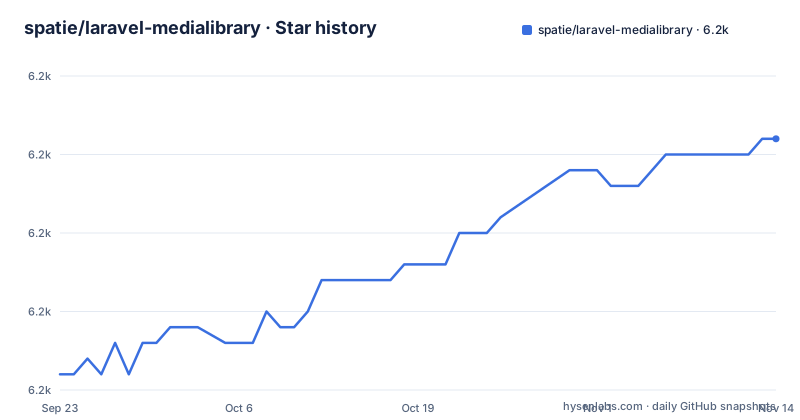
Star history
- spatie/laravel-medialibrary6,176 ★ · +15
| Repository | 2026-09-23 | 2026-11-14 |
|---|---|---|
| spatie/laravel-medialibrary | 6.2k | 6.2k |
15 Stars in the last 52 days, measured from the daily GitHub snapshot. Compare with other projects
Editorial analysis
The second argument to toMediaCollection names the disk
The whole multi storage story sits in one optional argument. Pass a collection name and the file lands on the default disk. Pass a second argument and that string names the filesystem disk instead, which is how the same collection can end up in two places:
$newsItem->addMedia($smallFile)->toMediaCollection('downloads', 'local');
$newsItem->addMedia($bigFile)->toMediaCollection('downloads', 's3');
Both calls target the collection called downloads. Only the disk differs, so a collection name is a grouping you pick and a disk name is Laravel's own identifier. That is the mechanism to hold in your head when reading anyone else's medialibrary code: the interesting decision is not which file you add, it is which disk each collection points at.
addMedia accepts a path or an uploaded file directly
There is one entry point and it takes either form of input. Give it a path to something already on disk:
$newsItem = News::find(1);
$newsItem->addMedia($pathToFile)->toMediaCollection('images');
Or hand it the uploaded file straight out of the request, which the package claims to handle directly:
$newsItem->addMedia($request->file('image'))->toMediaCollection('images');Both end in the same toMediaCollection call, so the difference is only where the bytes start. The model is fetched first in the first example, since the call hangs off a model instance. Nothing in these snippets shows a validation rule, a size limit or a mime check, which tells you the package is not trying to be an upload validator.
Storage is Laravel's Filesystem, not the package's
Nothing here implements a disk. The storage of the files is handled by Laravel's Filesystem, so you can use any filesystem you like, which means the disk strings in those calls ('local', 's3') resolve against your own filesystem configuration rather than against anything this package configures. If a filesystem your app needs is not in Laravel's list, the answer is not in this package.
On top of that storage sit image manipulations. The package can create image manipulations on images and pdfs that have been added to the media library, so a pdf gets the same derived output treatment as a jpeg even though the transformation work differs underneath. What the README does not say is when those manipulations run: whether adding a file blocks on them, whether they are deferred to a queue, or what happens when one fails.
The README installs nothing and shows no migration
Read this page as a sample of the API rather than a setup guide. There is no Composer command here, no step for publishing configuration, and no migration or table command, even though the repository ships config/ and database/ directories at its top level, so the configuration file and the schema both exist somewhere outside this text. There is also no model trait and no registration step shown, which is where a newcomer will look first.
Four calls is the entire behavioural surface on display, and the real reference is the documentation at spatie.be/docs/laravel-medialibrary/v11, which the README calls extensive and sends you to before anything else. If you need to know what column types back a media row, or how a collection is validated, or which events fire, none of that is answered here.
Tests run through pest, the matrix runs through act
The one part of the page with exact commands is the test section. The suite itself runs through pest:
./vendor/bin/pestThe GitHub Actions workflow can be run locally with act, first as a whole job:
act -j run-teststhen narrowed to one combination of PHP, Laravel and dependency preference:
act -j run-tests --matrix php:8.3 --matrix laravel:"11.*" --matrix dependency-version:prefer-stableSo the tested range is a matrix, not a single combination, and the available matrix options live in the workflow file at .github/workflows/run-tests.yml. The repository also carries phpunit.xml.dist, phpstan.neon.dist and phpstan-baseline.neon next to tests/, which tells you static analysis runs with a committed baseline of accepted findings.
Three alternatives are listed without a single comparison
The README names three other packages and stops there: plank/laravel-mediable, CodeSleeve/laravel-stapler and talvbansal/media-manager. No sentence explains what any of them does differently, what its API looks like, or which kind of project it suits, so the list functions as pointers rather than as guidance. Read it as a claim that the file-to-model attachment problem has several answers, then go and read each of those projects yourself.
What the list does establish is that this is a solved-enough problem to have competition, and that choosing between them is a matter of API taste and maintenance history rather than of capability gaps described here.
Patch releases land weekly inside the 11.x line
The release history is dense at the patch level. Version 11.23.9 shipped on 5 October 2026, 11.23.10 on 19 October 2026, and 11.23.11 on 26 October 2026, and the last recorded push to the repository is dated 26 October 2026. The documentation link points at the v11 path, so the docs you are reading track the current major line, and UPGRADING.md is where breaking changes between majors are described. The default branch is main.
Two support channels are named with different rules. Ordinary bugs, stuck usage and suggestions go to the GitHub issue tracker, and security issues go by mail to [email protected] instead of the tracker. The project is MIT licensed, credits Freek Van der Herten and all contributors, and records a specific thank you to Nicolas Beauvais for help on issues, with the logo credited to Caneco.
Editorial conclusion
laravel-medialibrary fits a Laravel app that already stores its files somewhere Laravel's Filesystem can reach and simply wants rows attached to models rather than a path column you maintain by hand. The API surface it shows is four calls long, and the disk argument is the part that decides your layout, so choose it once per collection rather than per file. Before you commit, read the docs for the three things this page leaves out: how the media table and model registration work, whether conversions run inline or on a queue, and what UPGRADING.md asks you to change when you move between major versions. If you would rather own the queries, the README names plank/laravel-mediable, CodeSleeve/laravel-stapler and talvbansal/media-manager as places to look instead.
Frequently asked questions
What is Laravel, and why does spatie/laravel-medialibrary need it?
The package attaches files to Eloquent models, which is a Laravel feature, and it hands storage to Laravel's Filesystem, so the disk names you pass to toMediaCollection are Laravel's own. No filesystem layer of its own ships with it.
Is Laravel backend or frontend, and where does medialibrary fit?
The README does not take a position on that split. What it states is that this package associates files with Eloquent models, handles uploads directly, and stores files through Laravel's Filesystem.
Is there a Laravel library for generating PDFs, like spatie/laravel-medialibrary?
This one does not generate PDFs. It can create image manipulations on images and pdfs that have already been added to the media library, so the document has to arrive through addMedia first.
What is an alternative to spatie/laravel-medialibrary?
The README names three and offers no comparison: plank/laravel-mediable, CodeSleeve/laravel-stapler and talvbansal/media-manager. Each is listed only as a link.
Official sources
Add this badge to your README
If you maintain this project, the badge below links readers to this analysis and shows its maintenance status from the daily GitHub snapshot. Paste the markdown into your README; add ?metric=license or ?metric=stars to the image URL for a different field.

[](https://hysenlabs.com/projects/spatie-laravel-medialibrary)Star history chart for your README
[](https://hysenlabs.com/projects/spatie-laravel-medialibrary)Was this useful?