SPR gives every container host networking and privileged access
One wifi password per device. Ad Blocking & Privacy Blocklists. Policy Based Network Access
At a glance
- What is it?
- A self-hosted router that issues a distinct WiFi passphrase per device and a /30 subnet per device, wrapped in about twenty services, all of which run privileged on the host network. The release tags still carry the product's previous name, and the documented build mounts a memory filesystem by default.
- Who is it for?
- SPR is for someone who wants their own network rather than a consumer router with a settings page, and the per-device credential model is the part worth stealing regardless of whether you run it. One passphrase per device means revoking access is a single device's key rather than a network-wide password change, and the per-device DNS rules, ad block lists, row level and device level time limits all hang off the same identity.
- Can I use it commercially?
- Yes. BSD-3-Clause is a permissive licence: you can use, modify and sell software built on it, as long as you keep its copyright and licence notices.
- Is it still maintained?
- Yes. The repository last received commits 3 days ago.
- What is it written in?
- Mainly JavaScript, according to GitHub's language statistics.
Answers come from the project's GitHub data, last synced on November 15, 2026, and from our analysis. They are not legal advice.
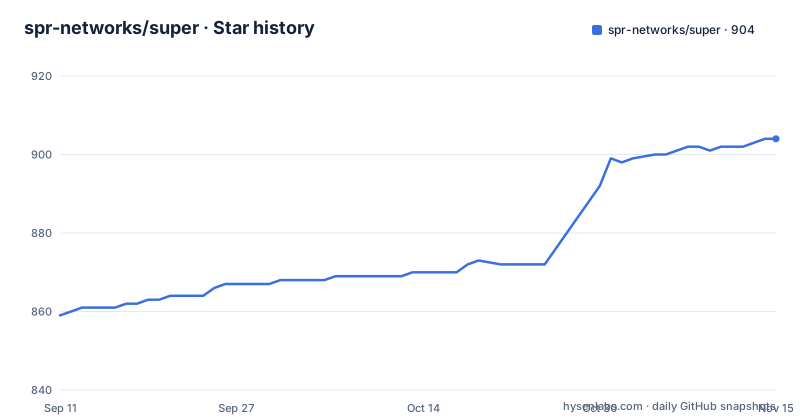
Star history
- spr-networks/super904 ★ · +45
| Repository | 2026-09-11 | 2026-11-15 |
|---|---|---|
| spr-networks/super | 859 | 904 |
45 Stars in the last 65 days, measured from the daily GitHub snapshot. Compare with other projects
Editorial analysis
Every service is privileged and shares the host network
The compose file is where the architecture stops being a marketing claim. Each service declares `network_mode: host` and `privileged: true`, and the first three are `base`, `watchdog` and `superd`, published from the project's own registry as `super_base`, `super_watchdog` and `super_superd`.
Host networking is what a router needs, since a firewall that cannot see the traffic cannot filter it, and the privileged flag is what lets the containers touch interfaces and namespaces. So the two settings are not accidents. They are also the reason the security section's claim of almost no unmanaged code and minimized attack surfaces has to be read as being about the code the project ships rather than about the privilege its containers are granted.
The same file passes the hardware watchdog device through from the host, so a hung system can be reset by the watchdog service rather than left up. State is bind mounted out of the working directory rather than kept in volumes: configuration under `configs/`, state under `state/`, and plugins under `plugins/`.
Logging is uniform, with every service using the `journald` driver through a shared anchor, so container logs land in the host journal rather than in per-container files.
The CI label is a constant so the image digest matches a local build
The image labels are set from a YAML anchor shared by every service, and one of the two lines carries a comment explaining itself.
The CI label is written as the literal string `true`, with the comment that it is constant and deliberately not a variable, so that digests are reproducible across CI and local builds.
The reasoning is sound. A build label that differed between a pipeline build and a local build would produce different image digests for identical inputs, which defeats the point of pinning anything by digest. The cost is the opposite of what the comment implies: a build cache cannot be shared between the two contexts, so the first local build after a pipeline build recompiles everything, and the two paths are permanently divergent in the cache.
The second label is the version line, and it is assembled from two environment variables. The image reference is `${RELEASE_VERSION:-latest}${RELEASE_CHANNEL:-}`, and each service's bake configuration publishes two tags from it: one with a `latest` base plus the channel, and one with the release version plus the channel. So a channel build produces a tag beginning with the literal string `latest` as well as a versioned one, which means channel images and the stable `latest` tag are the same shape and differ only in the suffix.
The build mounts a memory filesystem and a small board can run out
The documented build path is two commands:
./build_docker_compose.sh --load
docker-compose up -d
The prebuilt path pulls instead of building, and setup is optional:
docker-compose pull
./setup.sh # (optional)
docker-compose up -d
Between them sits a design decision that explains most of the project's target hardware. The build uses a memory-backed filesystem, and the stated reasons are performance and to minimize wear on SD cards. Both are correct reasons for a Raspberry Pi.
The stated failure mode is also given. On memory-limited devices, the memory filesystem can cause build failures if memory is exhausted, and the documented escape is a build argument that turns the setting off:
--set "*.args.USE_TMPFS=false"So the default build path trades a possible out-of-memory failure on a small board for faster builds and a longer-lived SD card. That is a sensible default for the hardware the setup guides point at, including a Raspberry Pi 4 and 5 guide, and a less sensible one for a virtual machine, which is why there is a separate compose file for virtual deployments.
The two paywalled features are the multi-node ones
Nine of the listed feature groups carry no marker. Two entries in the advanced networking list do, with an asterisk, and a single footnote explains what the asterisk means: some features are part of SPR PLUS, a paid subscription that supports the project.
The two marked entries are mesh with wired backhaul, and policy based site forwarding.
Those are the two features that describe more than one location. Mesh with wired backhaul is what turns two units into one network with a wired path between them, and policy based site forwarding is what carries routing rules between sites. Everything else in the free list describes a single router: the firewall's isolation by default, the DNS ad block lists and per-device overrides, the Wireguard VPN, multi WAN with load balancing, wireless uplink, multicast, and the observability set of traffic insights by country and ASN, health monitoring, alerts and DNS logs.
So a single-site install gets the whole of the security, DNS, firewall and WiFi story, including multi-PSK with WPA3, which the page marks as a first, and the subscription buys the topology. That is a coherent boundary, and it is worth knowing before you plan a two-site or two-node deployment, because that is the point at which the free list stops answering your question.
Identity is a MAC address plus a passphrase, and the claim is unspoofable
The mechanism section is four sentences and it is the technical core. An unspoofable device identity is established with a MAC address and a per-device passphrase for WiFi, or a VPN public key for remote devices. Each device then gets its own /30 subnet to exist on. Hardening and strict firewall rules block network spoofing and impersonation, and routing rules redefine connectivity between devices and to the internet.
The per-device subnet is the concrete part. A /30 is four addresses, of which two are usable, so the segmentation is by address rather than by port or by VLAN, and a device has an address in a range of its own rather than a shared one distinguished by policy alone.
The identity is the part to reason about carefully. A MAC address on its own is not an identity, since it is a field on the frame that any device can set. What binds it is the per-device passphrase, which is also the WiFi credential, so a device that does not know its own key cannot associate as itself. Remote devices take the same slot with a VPN public key instead, which is a stronger primitive because the key is a secret the device holds rather than a broadcast identifier.
That is the argument behind the unspoofable claim, and it holds to the extent that the passphrase stays secret and the enforcement is in the firmware rather than in a client.
Release tags are still named clearfog while the images are super
The three most recent releases are `clearfog-v1.2.8` from 2026-10-01, `clearfog-v1.2.7` from 2026-09-29 and `clearfog-v1.2.6` from 2026-08-26, and they are titled as Clearfog releases.
The project is called SPR, and the README opens with SPR, Secure Programmable Router. The container images are `super_base`, `super_watchdog` and `super_superd` on the project's registry. The repository is `spr-networks/super`, the documentation site is supernetworks.org, and the product's goals are stated in three lines with no mention of the older name.
So the previous product name survives in exactly one place that matters operationally, which is the release tag prefix. Anything that resolves a version by tag, an upgrade script, a bookmarked release URL or a watch on releases, is looking for `clearfog-v1.2.8` and not for a semver tag or an `spr-` prefix.
The naming is otherwise consistent within the tree. The top level holds directories named after their function: `superd/` for the main daemon, `wifid/` and `wifid-setup/` for the wireless daemon and its setup, `dhcp/`, `dns/`, `wireguard/`, `watchdog/`, `ppp/`, `dyndns/`, `db/`, `api/`, `frontend/`, `installer/`, `host-packages/` and `base/`.
Four compose files for four deployment shapes
Four compose files sit at the top level, and the names are the deployment matrix: `docker-compose.yml` for the default, `docker-compose-kvm.yml` for KVM, `docker-compose-virt.yml` for a virtual machine, and `docker-compose-test.yml` for testing.
The default file is the one that builds, with a `build:` context and an `x-bake:` block per service alongside the `image:` reference, so the same service can be built locally or pulled. The other three are for shapes where the virtualisation layer changes what has to run: a virtual setup guide for a personal VPN is one of the links on the page, and a virtual machine has no WiFi hardware to hand to `wifid`, which is the sort of difference those two files exist to absorb.
A few more top level entries are working files rather than shipped components. There is an `experiments/` directory, a `packet_logs/` directory, a `flowgather/` directory, a `virtual_install.sh` alongside `setup.sh` and `build_docker_compose.sh`, a `pull_containers.sh`, an `update-pins.sh`, and a `reproducible.env`. There is also an `api_sample_plugin/` next to the real `api/`, which is the template a third party would copy to write a Docker based plugin, and a `plugin-lookup/` component that pairs with the plugin catalog on the website.
Documentation is the other thing not in the repository. Every documentation link on the page points at supernetworks.org, including the API reference, which is served at a path ending in a version zero, while a `docs/` directory exists in the tree and is not linked.
Editorial conclusion
SPR is for someone who wants their own network rather than a consumer router with a settings page, and the per-device credential model is the part worth stealing regardless of whether you run it. One passphrase per device means revoking access is a single device's key rather than a network-wide password change, and the per-device DNS rules, ad block lists, row level and device level time limits all hang off the same identity.
The deployment reality is the deciding factor. Every service in the compose file runs with `network_mode: host` and `privileged: true`, images come from a registry rather than being built locally, and the hardware watchdog device is passed through. That is a coherent choice for a device that is itself the router, where host networking is what lets the firewall see and filter traffic at all. It also means the blast radius of any container compromise is the host, so the security claims should be read with that in mind rather than alongside it.
Three smaller things to settle. Two of the routing features, mesh with wired backhaul and policy based site forwarding, are marked as part of the paid subscription, which puts the multi-node and multi-site cases behind the paywall. The build mounts a memory filesystem by default for speed and to spare SD cards, so on a memory-limited board you may need to turn that off, and the flag is documented. And the three most recent release tags are still named `clearfog`, so an upgrade script written against the image names will not find them by tag.
Frequently asked questions
What is the one password per WiFi device model in SPR?
Each device is issued its own passphrase instead of sharing one network password, and the identity is that MAC address plus that passphrase, or a VPN public key for remote devices. Each device then gets its own /30 subnet, so segmentation is by address as well as by policy.
How do I run SPR using prebuilt containers?
Run docker-compose pull, optionally run ./setup.sh, then docker-compose up -d. To build instead, run ./build_docker_compose.sh --load followed by docker-compose up -d, and pass --set "*.args.USE_TMPFS=false" if the build runs out of memory on a small board.
Which SPR features need the paid subscription?
Two entries in the advanced networking list are marked: mesh with wired backhaul, and policy based site forwarding. Everything else in the list, including the firewall, DNS, Wireguard, multi WAN and observability features, is unmarked.
How are SPR release tags named?
With the previous product name as the prefix. The three most recent are clearfog-v1.2.8, clearfog-v1.2.7 and clearfog-v1.2.6, while the images are published as super_base, super_watchdog and super_superd.
What privilege do the SPR containers run with?
Every service in the compose file sets network_mode to host and privileged to true, and the watchdog service additionally passes /dev/watchdog through from the host. The watchdog is used so a hung system is reset rather than left running.
Can SPR be extended with plugins?
Yes, with Docker based plugins, either from the community or written by you. The catalog is on the project's website, and the repository carries an api_sample_plugin directory as a starting point alongside the api component.
Official sources
Add this badge to your README
If you maintain this project, the badge below links readers to this analysis and shows its maintenance status from the daily GitHub snapshot. Paste the markdown into your README; add ?metric=license or ?metric=stars to the image URL for a different field.

[](https://hysenlabs.com/projects/spr-networks-super)Star history chart for your README
[](https://hysenlabs.com/projects/spr-networks-super)Was this useful?