DepotDownloader puts Steam depot credentials on the command line unless you stop it
Steam depot downloader utilizing the SteamKit2 library.
At a glance
- What is it?
- SteamRE/DepotDownloader is a console program built on SteamKit2 that downloads depot content by app id, depot id or workshop id. Its parameter list is long, but the four documented failure modes are all about identity: a shared login id, a two-factor prompt on every run, a password in your shell history, and old manifests that return no code at all.
- Who is it for?
- DepotDownloader suits someone who needs a specific depot build or a workshop item for one app and can live in a terminal. It does not suit a scripted download on a shared machine without thought, because the login id is global to the account and a second instance will close the first session.
- Can I use it commercially?
- Yes, with conditions. GPL-2.0 is a copyleft licence: if you distribute software that includes it, you must release that software's source code under the same licence. Running it internally without distributing it does not trigger that obligation.
- Is it still maintained?
- Yes. The repository last received commits 5 days ago.
- What is it written in?
- Mainly C#, according to GitHub's language statistics.
Answers come from the project's GitHub data, last synced on November 14, 2026, and from our analysis. They are not legal advice.
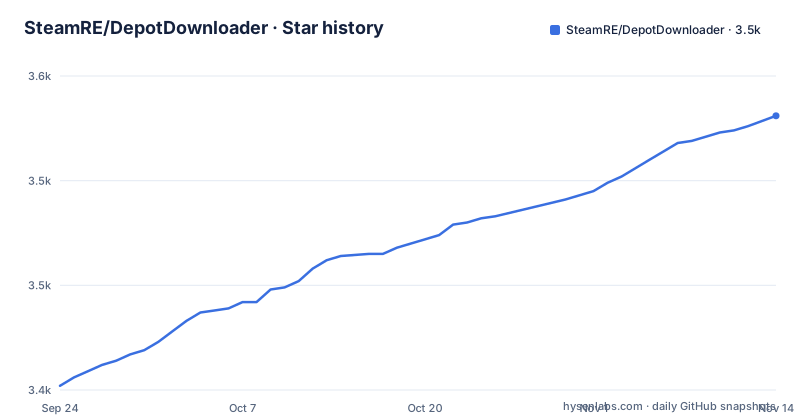
Star history
- SteamRE/DepotDownloader3,531 ★ · +129
| Repository | 2026-09-24 | 2026-11-14 |
|---|---|---|
| SteamRE/DepotDownloader | 3.4k | 3.5k |
129 Stars in the last 51 days, measured from the daily GitHub snapshot. Compare with other projects
Editorial analysis
Three install routes and one console-only promise
The tool states its platform and its shape in two lines: it supports .NET 8.0, and it must be run from a console because it has no graphical interface. Installation has three documented routes and none of them builds anything. The first is to download a binary from the releases page. The second is the Windows package manager, installing a package identified by its full name, which resolves to the latest terminal release rather than a specific version. The third is Homebrew on macOS, which needs two steps: tapping a tap owned by the project first, then installing the package by its short name. That asymmetry is worth noting before you follow the wrong one, since the Homebrew tap and the Windows package identifier do not look related.
winget install --exact --id SteamRE.DepotDownloaderbrew tap steamre/tools
brew install depotdownloaderThe documentation tells you not to pass a password
The authentication section offers six parameters, and the frequently asked questions immediately warn against one of the obvious ways to use them. If you pass a password containing special characters you have to escape it for whichever shell you are in, and the guidance is that you do not have to include the parameter at all as long as you supply a username, because the program then prompts for the password interactively. That is the single most useful sentence in the documentation for anyone scripting this, since it keeps a credential out of a command line and therefore out of shell history. Two further flags change how the second factor is delivered: one displays a QR code to be scanned with the mobile app, and one prefers typing a two-factor code instead of accepting a prompt in that app. A third flag makes the login persist between runs.
./DepotDownloader -app <id> [-depot <id> [-manifest <id>]]
                 [-username <username> [-password <password>]] [other options]
A shared login id closes your existing Steam session
The second question in the frequently asked section is about running the tool while already signed into Steam, and the answer is blunt: any connection to Steam will be closed if two sessions share a login identifier. That makes the tool unusable twice at once on the same account unless you intervene, and the intervention is a parameter that takes a unique 32-bit integer login identifier in decimal form. The documentation states that this parameter is required specifically when running multiple instances concurrently, which is the case the default cannot handle. It is worth internalising that this is an account-level property rather than a per-process one: the identifier is what tells Steam which session to evict, and nothing in the tool namespaces it for you.
Old manifests fail at lookup, not at download
The third question covers an error code and an empty result together, and the answer explains both. Error 401, or no manifest code returned at all for an old manifest identifier, can happen because the tool is using the anonymous account, and the suggested fix is to sign in with a real one. The second half is the important one: Steam allows developers to block downloading old manifests, in which case no manifest code is returned even when the parameters appear correct. In other words, the failure mode is indistinguishable from a typo in the identifier. The parameter that names the manifest is documented as requiring the depot parameter and defaulting to the current one for the selected branch, so an old identifier has to be supplied explicitly along with the branch it belongs to.
Slow old builds are a cache problem, not a bandwidth one
The fourth question is about slow speeds and repeated connection timeouts, and the diagnosis is specific: when downloading old builds, the cache server may not have the chunks readily available, which makes the download slower. The suggested remedy is to raise the concurrency limit, whose documented default is eight chunks at a time. So the tuning knob exists and the default is deliberately conservative. Two other parameters belong with it in the same category. One overrides the cell identifier of the content server to download from, and one forces downloads over the local network through a Lancache instance, which is the setting to reach for on a shared network where many users pull the same depot.
./DepotDownloader -app 730 -depot 731 -manifest 7617088375292372759Three bulk flags sit beside three single-value ones
Depot selection is where the parameter list is widest, and it is organised in pairs. For the operating system there is a single-value flag taking windows, macos or linux, defaulting to whatever the program is running on, and a bulk flag that downloads every platform-specific depot when only an app is named. The same pairing exists for architecture, where the single value is 32 or 64 and the bulk flag takes all of them, and for language, where the single value defaults to english and the bulk flag takes all of them. A fourth bulk flag exists for low violence depots. Two content filters work on top: a flag naming a local file containing a list of paths to pull from the manifest, with a prefix that switches matching to regular expressions and one path per line, and a flag that verifies checksums of files already downloaded.
Two flags let you inspect before you download
One parameter produces a human readable manifest for whatever depots would otherwise be downloaded, which turns the tool into an inspector: run it the way you intend to run it, add that flag, read the list, and only then commit the bandwidth. The companion flag covers the other direction, adding checksum verification of files that are already present rather than only of newly fetched ones, which matters when a previous run was interrupted and you want to know whether the partial directory is trustworthy. Two smaller settings round out the download group: the directory to place files in, and the branch to download from, which defaults to Public and has its own password parameter for private branches. A workshop item can be fetched by either its published file identifier or its UGC identifier, and the documentation notes that the former resolves to the latter automatically.
Editorial conclusion
DepotDownloader suits someone who needs a specific depot build or a workshop item for one app and can live in a terminal. It does not suit a scripted download on a shared machine without thought, because the login id is global to the account and a second instance will close the first session. Before running it, read the authentication section rather than the download section, decide whether to pass a password at all, and if you are fetching an older build expect the manifest lookup itself to fail rather than the download.
Frequently asked questions
Is DepotDownloader safe to use?
The project offers no safety guidance. What it does document is relevant: the program is console only, it uses an anonymous account by default, and its own advice on credentials is that you do not have to pass a password on the command line as long as you supply a username, because it will then prompt for the password interactively.
how to use DepotDownloader
Install a binary from the releases page, or use the Windows package manager or Homebrew, then run the program with an app identifier. A depot identifier and a manifest identifier can be added for a specific build, and a username with an optional password switches from the anonymous account to your own.
what does DepotDownloader do
It downloads Steam depot content. Beyond the identifiers you can filter by operating system, architecture and language, or take every variant of each at once, restrict the download to a list of paths with optional regular expression matching, verify checksums of files already downloaded, produce a readable manifest without downloading, raise the concurrent chunk limit above its default of eight, and force traffic through a local network cache.
what is DepotDownloader
It is a Steam depot downloader built on the SteamKit2 library, written in C#, released under the GNU General Public License version 2 and built for .NET 8.0. It runs from a console and has no graphical interface.
depotdownloader is a console application
Yes. The documentation states that the program must be run from a console because it has no graphical interface. Two flags help when a console session is not giving you what you need: one enables verbose debug logging, and one prints the version together with the runtime.
Official sources
Add this badge to your README
If you maintain this project, the badge below links readers to this analysis and shows its maintenance status from the daily GitHub snapshot. Paste the markdown into your README; add ?metric=license or ?metric=stars to the image URL for a different field.

[](https://hysenlabs.com/projects/steamre-depotdownloader)Star history chart for your README
[](https://hysenlabs.com/projects/steamre-depotdownloader)Was this useful?