VSTGUI is a plug-in UI toolkit that predates the plugin economy
A user interface toolkit mainly for audio plug-ins
At a glance
- What is it?
- VSTGUI is a user interface toolkit from Steinberg Media Technologies, aimed mainly at audio plug-ins and designed to work well with VST 3 and its AU and AAX wrappers. It was first written in house around 1998, shipped as binary libraries with the official VST SDK, and has been open source since May 2003, with a BSD style licence and a Linux build that is still marked as preview.
- Who is it for?
- VSTGUI suits a plug-in developer who needs one user interface codebase to serve VST 3, AU and AAX hosts on Windows, macOS and iOS, and who is willing to target the SDK version that matches their VST3 release. It does not suit a developer building a standalone application, and it is the wrong choice for a team that wants a UI toolkit with a broad plugin catalogue behind it.
- Can I use it commercially?
- Check first. The repository uses a licence we do not classify automatically, so read its LICENSE file before any commercial use.
- Is it still maintained?
- Yes. The repository received new commits within the last day.
- What is it written in?
- Mainly C++, according to GitHub's language statistics.
Answers come from the project's GitHub data, last synced on November 7, 2026, and from our analysis. They are not legal advice.
Star history
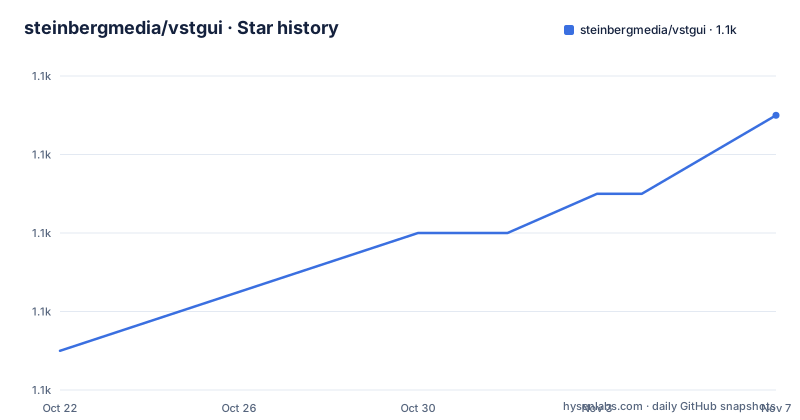
- steinbergmedia/vstgui1,111 ★ · +6
| Repository | 2026-10-22 | 2026-11-07 |
|---|---|---|
| steinbergmedia/vstgui | 1.1k | 1.1k |
6 Stars in the last 16 days, measured from the daily GitHub snapshot. Compare with other projects
Editorial analysis
It was in house before it was open source
The history section of the README is three lines and explains most of what a reader needs to know.
VSTGUI was first developed in house at Steinberg Media Technologies, around 1998, for their first VST plug-ins. It was later added as binary libraries to the official VST SDK, and it has been open source since May 2003.
The middle step is the interesting one for anyone deciding whether to use it today. VSTGUI was not an open source project that grew a community around it, it was a proprietary in house toolkit that was given away inside the SDK as compiled libraries, and only later opened up. That history explains both its strengths and its shape: the code is battle tested against more than two decades of shipping plug-ins, and the API reflects the conventions of the 1990s and early 2000s rather than the ones of the current generation of C++ toolkits.
It also explains the second half of the positioning. VSTGUI is a user interface toolkit mainly for audio plug-ins, covering VST, AAX and AudioUnit, and it is designed for working well with VST 3 plug-ins and its wrappers like AU and AAX. The emphasis on VST 3 is a real constraint, because the wrapper formats inherit the VST 3 design, and a toolkit that has to serve all three ends up optimised for the common ancestor.
The audience is a plug-in developer with a codebase to ship on more than one operating system and more than one host format, and who would rather not write and maintain three user interfaces.
A toolkit for one domain, not a general UI library
The description is deliberately narrow: a user interface toolkit mainly for audio plug-ins. There is no claim to be a general purpose widget library, and that framing decides the evaluation.
A general purpose cross platform toolkit asks you to build your interface from neutral primitives and then adapt it to the host's look. VSTGUI inverts that. It provides a user interface designed for the plugin environment, with the constraints that environment imposes already handled, and the adaptation to the host happens in the places the host format requires rather than in every window you draw.
The practical consequence is that the drawing model is not a free choice. A plug-in has to obey the host's rules about where it can draw, how it resizes, and how it handles a focus change, and a toolkit built around those rules saves a category of work that a generic library cannot.
The second consequence is the flip side. If you are building a desktop application, a plugin host, or a settings window that is not a plug-in editor, most of the value of this toolkit is not available to you, because the value was in the plug-in specifics.
So the fit test is short. If your deliverable is an audio plug-in that has to run as a VST 3, an AU and an AAX, the alternative is three codebases or a wrapper, and this is one codebase with the awkward parts already solved. If your deliverable is anything else, the comparison to make is not with another plugin toolkit but with the platform's own user interface facilities.
Platform support, and a Linux build that is still preview
The system requirements section is short and specific enough to plan a build matrix around.
The supported operating systems are Microsoft Windows 10 and 11, Apple macOS from 10.12 to 26, and Apple iOS from 9 to 26, with Linux listed as Preview. That last entry is the one to read carefully, because a preview label in a support matrix means the platform builds and is exercised, but the team is not standing behind it in the way it stands behind the three others.
The supported IDEs are Visual Studio 2019, 2022 and 2026, a minimum of Xcode 10.1, Qt Creator, and Visual Studio Code. The spread tells you something about the build. Visual Studio covers the Windows targets, Xcode covers macOS and iOS, and the presence of Qt Creator and Visual Studio Code suggests the CMake based project definition is expected to be usable outside the vendor's own toolchain, which is what you would want from a library that has to build on three platforms.
The macOS and iOS ranges are worth noting too. The iOS floor of 9 and the macOS floor of 10.12 are old enough to include a substantial installed base, and the ceiling of 26 tells you the range is maintained as new releases appear.
The repository matches the requirements. There is a CMakeLists.txt at the root, the vstgui/ directory holds the code, and the .github/ directory carries three workflows, one each for macOS, Windows and Linux, all running on the develop branch.
The licence has one clause worth reading twice
The licence is described as BSD style, and the text is reproduced in full in the README under the VSTGUI LICENSE heading, with the copyright held by Steinberg Media Technologies and all rights reserved.
The first two conditions are the familiar BSD ones. Redistributions of source code must retain the copyright notice, the list of conditions and the disclaimer, and redistributions in binary form must reproduce the same in the documentation or other materials provided with the distribution.
The third condition is the one that matters for a plug-in company. Neither the name of the Steinberg Media Technologies nor the names of its contributors may be used to endorse or promote products derived from this software without specific prior written permission.
That is the standard no endorsement clause, and it is stricter than a plain BSD grant in one practical way. You can ship a commercial plug-in built on VSTGUI, and you can say it is built on VSTGUI, but you cannot put Steinberg's name on the product, or imply that Steinberg endorses it, without asking. For a developer whose product brand is the point, that is the condition to plan for, not discover later.
The rest of the licence is the standard disclaimer of warranties and limitation of liability, and there is a separate LICENSE file at the root of the repository for the full text.
Building it, and where the documentation actually is
There is no install or build walkthrough in the README, which is worth saying plainly rather than working around.
What the repository gives you is the shape of the build. There is a CMakeLists.txt at the root and the vstgui/ directory with the sources, plus the three CI workflows that build on macOS, Windows and Linux. The build definition is therefore CMake based, which is what lets the same project be built from Visual Studio on Windows, Xcode on macOS and from a Linux CI runner, and it is consistent with the list of supported IDEs.
For the step by step, the README points elsewhere. For bug reports and feature requests it says to use GitHub or visit the VST Developer Forum at sdk.steinberg.net, and that forum is where the practical questions about integrating a particular host format are asked and answered by people who work on the SDK itself.
That division is typical of a library owned by a platform vendor. The code is open and the build is reproducible, but the knowledge about how to use the toolkit well lives with the maintainers on the forum, and a developer adopting VSTGUI today should expect to read there as well as in the headers.
The three CI workflows are still the most informative artefact for an adopter, because they show which platforms are built on every change and they are the definition of what the project considers supported.
The comparison that matters is one toolkit versus three
The alternative to VSTGUI for a plug-in developer is not another plugin toolkit, it is writing the interface against each host's native facilities separately.
The two approaches differ in where the cost sits. With a cross platform toolkit, the cost is paid once, in learning a model that was designed for this domain, and the price is that the interface looks and behaves like a plug-in interface rather than like the platform's own. With native code per platform, the cost is paid three times over, in development, in testing and in keeping three code bases in step, and the price is that each version looks native and each feature has to be written and tuned three times.
The history makes that trade concrete. VSTGUI was written in house in 1998 for Steinberg's own plug-ins, which means the code has been shaped by the requirement that a single codebase serve VST, AU and AAX, and later by the requirement that it be shipped as binary libraries inside the SDK so that third party developers would use the same user interface the Steinberg plug-ins did. Consistency of look across the whole plug-in ecosystem was a design goal from the start.
For a team shipping one plug-in to a handful of hosts, the trade is different from that of a framework vendor shipping hundreds. The more hosts and platforms you cover, the more the toolkit pays for itself.
Maintenance, versions and what to check before you start
The project is not archived and the last push was on 2026-09-06. The release tags follow a scheme that includes the major line and the patch, with vstgui4_15_1 from 2026-07-15, vstgui4_15_0 from 2025-10-16 and vstgui4_14_3 from 2025-06-12, and the default branch is develop with the CI workflows running against it.
Two things follow. The first is that releases come roughly every three to nine months with patch releases in between, and a team that pins a version should expect to move it alongside its VST 3 SDK version rather than independently. The second is that the repository's develop branch is where the active work is, and the tags are the stable points.
For an adopter, the checks to run before writing any code are these. Confirm that the release you take is the one your VST 3 SDK expects, since the plug-in format and the toolkit version the SDK bundles are released together and a mismatch shows up as a load failure in the host. Confirm that your deployment targets are inside the supported ranges, particularly the iOS floor of 9 and the macOS floor of 10.12, and remember that Linux is a preview.
And read the endorsement clause, which is the one part of the licence with a consequence that is not technical.
The honest summary is that this is an old, widely used and still maintained toolkit whose value has been proven by two decades of plug-ins, and whose adoption cost is mostly in learning the model rather than in fighting it.
Editorial conclusion
VSTGUI suits a plug-in developer who needs one user interface codebase to serve VST 3, AU and AAX hosts on Windows, macOS and iOS, and who is willing to target the SDK version that matches their VST3 release. It does not suit a developer building a standalone application, and it is the wrong choice for a team that wants a UI toolkit with a broad plugin catalogue behind it. Verify first that the release you take matches the VST 3 SDK you are compiling against, that your macOS and iOS deployment targets are inside the supported range, and that the no endorsement clause in the licence is acceptable for how you brand the product.
Frequently asked questions
What is VSTGUI?
It is a user interface toolkit mainly for audio plug-ins, supporting VST, AAX and AudioUnit, designed for working well with VST 3 plug-ins and its wrappers such as AU and AAX. It is written in C++ and distributed under a BSD style licence.
What is the history of the VSTGUI project?
It was first developed in house at Steinberg Media Technologies around 1998 for their first VST plug-ins, later added as binary libraries to the official VST SDK, and it has been open source since May 2003.
Which platforms does VSTGUI support?
Microsoft Windows 10 and 11, Apple macOS from 10.12 to 26 and Apple iOS from 9 to 26, with Linux listed as Preview. The supported IDEs are Visual Studio 2019, 2022 and 2026, Xcode from 10.1, Qt Creator and Visual Studio Code.
What are the licence conditions for VSTGUI?
Source redistributions must retain the copyright notice, the conditions and the disclaimer, binary redistributions must reproduce them in the documentation or other materials, and neither the name of Steinberg Media Technologies nor the names of its contributors may be used to endorse or promote derived products without prior written permission.
How is the VSTGUI repository built?
It is a CMake project, with a CMakeLists.txt at the root and the code under vstgui/, and the GitHub workflows build it on macOS, Windows and Linux against the develop branch. The README points to GitHub issues and the VST Developer Forum for bug reports and feature requests.
Official sources
Add this badge to your README
If you maintain this project, the badge below links readers to this analysis and shows its maintenance status from the daily GitHub snapshot. Paste the markdown into your README; add ?metric=license or ?metric=stars to the image URL for a different field.

[](https://hysenlabs.com/projects/steinbergmedia-vstgui)Star history chart for your README
[](https://hysenlabs.com/projects/steinbergmedia-vstgui)Was this useful?