Pika ships seven colour formats, forty two URL routes, and one contested system requirement
An open-source colour picker app for macOS
At a glance
- What is it?
- A native macOS colour picker whose feature list undercounts its own format table, whose URL scheme lets any caller set its colours, and whose stated minimum combines a macOS codename with a version number that does not belong to it.
- Who is it for?
- Pika suits a designer who wants format switching, a history panel, and keyboard control without leaving the current app, and the Homebrew cask is the shortest path to try it. Verify two things first.
- Can I use it commercially?
- Yes. MIT is a permissive licence: you can use, modify and sell software built on it, as long as you keep its copyright and licence notices.
- Is it still maintained?
- Yes. The repository received new commits within the last day.
- What is it written in?
- Mainly Swift, according to GitHub's language statistics.
Answers come from the project's GitHub data, last synced on November 15, 2026, and from our analysis. They are not legal advice.
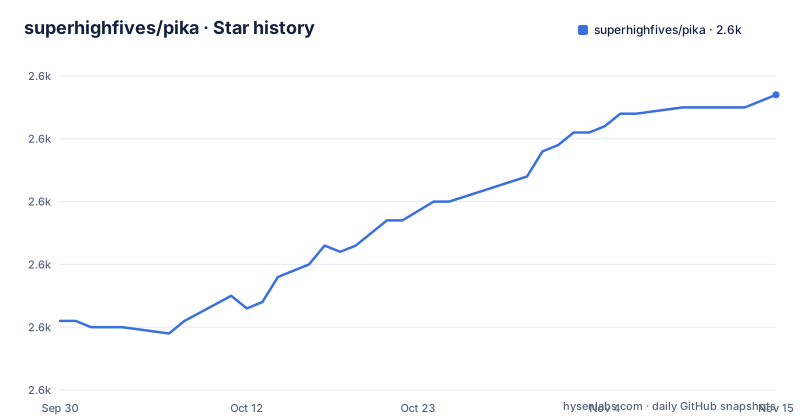
Star history
- superhighfives/pika2,617 ★ · +36
| Repository | 2026-09-30 | 2026-11-15 |
|---|---|---|
| superhighfives/pika | 2.6k | 2.6k |
36 Stars in the last 46 days, measured from the daily GitHub snapshot. Compare with other projects
Editorial analysis
The feature list counts six formats while the tables count seven
The bullet list near the top says multiple colour format support and then names six of them: Hex, RGB, HSB, HSL, LAB, and OpenGL. The keyboard shortcut table gives that same list seven slots, with ⌘ 1 through ⌘ 6 for those six and ⌘ 7 reserved for OKLCH. The URL documentation repeats the discrepancy in the other direction, since the `<format>` placeholder is described as one of hex, rgb, hsb, hsl, lab, opengl, or oklch, and the change format routes include `pika://format/oklch`. So the newest colour space in the app is documented twice in the tables and missing from the summary. That is a small thing on its own, and it matters more as a pattern: the feature list is the part of the document most likely to be quoted, and it is the part that is out of date.
The macOS floor names a codename and a number that do not match
There is exactly one line about system requirements, and it reads macOS Sequoia (Version 14) and newer. The codename and the number in that line do not describe the same release of macOS, so a reader cannot tell from it whether the floor is the release named Sequoia or the release numbered 14. What the line does communicate clearly is that Pika is not a wide compatibility target: it wants a recent system, and anything older is out. There is no fallback statement, no list of tested versions, and no note about what changes on the older systems. The project also states its name is pronounced like the word picker, which is the one piece of guidance in the document aimed at somebody hearing about it for the first time.
Forty two URL routes make the app drivable from anything that can open a link
The automation surface is much larger than the single bullet that mentions URL scheme support. Counting the documented routes gives forty two: five pick routes including a contrast pair and two format variants, two system picker routes, six copy routes including copying every colour as text or as JSON, seven format routes, swap, undo, and redo, two routes that set the foreground or background colour from a hex value, nine panel routes that show, hide, or toggle the history, compliance, and preview panels, five window routes including resize by width and height, and three appearance routes for light, dark, and system. Two of those deserve attention from a security angle. A caller can set the picker's colours directly with `pika://set/foreground/<hex>`, and a caller can copy every colour the app holds as JSON. No confirmation step, no allowlist, and no caller restriction appears anywhere in the document.
Bare letter shortcuts sit beside command key versions of the same letters
The shortcut table is organised into four groups, and the Actions group uses unmodified letters for four operations: X swaps the two colours, H toggles the history, C toggles compliance, and P toggles the colour preview. Elsewhere in the same table C with the command key copies the foreground colour and D with the command key starts a pick. That gives the letter C two meanings at two levels and leaves four single keys captured globally with no modifier. Whether that is comfortable depends entirely on how the app handles a focused text field, and the README says nothing about it. The URL table compensates by offering a route for each of these operations, so anything bound to a bare key is also reachable without a keyboard.
A missing signing profile ends in a crash signal rather than a build error
The contributor instructions ask for Xcode, Swift Package Manager, and Mint, and the bootstrap step is two commands.
brew install mint
mint bootstrap
After that you open `Pika.xcodeproj`, and here the documentation turns a warning: Sparkle, the software update framework the project depends on, requires a team and signing profile to be set, and without one it crashes with a dyld or SIGABRT error. A first contributor therefore meets an update framework failure at launch time rather than a diagnosable build message, and the text they are sent to for that requirement is a discussion thread on a different project entirely. The repository does carry the toolchain files a Swift project needs, with a Mintfile, a `.swift-version`, and a `.swiftlint.yml`, so the setup is otherwise conventional.
Three betas in six days, named after song titles, with no 2.0.0 yet
The release history is 2.0.0-beta1 on 2026-08-19, 2.0.0-beta2 on 2026-08-24, and 2.0.0-beta3 on 2026-08-24, an hour and twenty minutes apart on the second day. Each carries a name rather than a description: Never Going Back!, Bobby, and Still Standing. So the 2.0 line is in public beta with three builds shipped inside a week, and the last of them is still a beta, which means anyone reading the download link is pointed at prerelease software. The default branch moved on 2026-09-25, about a month after beta3, and the repository is not archived. The project also keeps its roadmap in GitHub projects and its motivations in a separate post, so the version trail and the design trail live in different places.
The download line wraps raw HTML in bold and the award badge has no image
Two small rendering faults sit in the most-read part of the document. The download instruction is written as bold text wrapped around a raw `<br />` tag and a link, which GitHub renders inconsistently because the break is HTML inside Markdown emphasis rather than a Markdown break. The badge above it is worse: it is a picture element whose only child is a source tag for the dark colour scheme, with no fallback image element and no light mode alternative, so the 2022 Golden Kitty Awards hall of fame reference is invisible in one appearance and empty in the other. Neither fault changes the software. Both are in the part of the README a first-time visitor reads first, which is usually where a project's polish is judged.
Editorial conclusion
Pika suits a designer who wants format switching, a history panel, and keyboard control without leaving the current app, and the Homebrew cask is the shortest path to try it. Verify two things first. The stated system floor names a codename and a version number that do not describe the same macOS release, so confirm the real minimum against the build you download. And read the URL scheme as an open control channel: routes exist to set colours, copy all of them as JSON, resize the window, and force an appearance, with no confirmation step or caller restriction described anywhere in the document.
Frequently asked questions
How do I install Pika on macOS?
Download the latest build from superhighfives.com/pika, or install the cask with `brew install --cask pika`. The stated system requirement is macOS Sequoia (Version 14) and newer, and the newest published builds are 2.0.0 beta releases.
Which colour formats does Pika support?
Seven: Hex, RGB, HSB, HSL, LAB, OpenGL, and OKLCH. Each has a keyboard shortcut from ⌘ 1 through ⌘ 7 and its own route such as `pika://format/oklch`, and the same formats work as a path segment on pick and copy routes. The feature list near the top of the README names only the first six.
Can other apps control Pika?
Yes, through the `pika://` URL scheme, which covers picking, copying, setting the foreground or background colour from a hex value, swapping, undo, redo, panel visibility, window resizing, and forcing an appearance. The README documents no confirmation prompt and no restriction on which app or link may call those routes.
What does the compliance toggle in Pika check?
The README does not say. It lists a compliance panel with show, hide, and toggle routes under `pika://compliance/`, and a bare C shortcut to toggle it, alongside a history panel and a colour preview that have the same three verbs. What the compliance check measures is not described in the document.
What does Pika need before I can build it from source?
Xcode, Swift Package Manager, and Mint, with `brew install mint` followed by `mint bootstrap`. The README warns that Sparkle needs a team and signing profile configured, and that without one the app crashes with a dyld or SIGABRT error.
Official sources
Add this badge to your README
If you maintain this project, the badge below links readers to this analysis and shows its maintenance status from the daily GitHub snapshot. Paste the markdown into your README; add ?metric=license or ?metric=stars to the image URL for a different field.

[](https://hysenlabs.com/projects/superhighfives-pika)Star history chart for your README
[](https://hysenlabs.com/projects/superhighfives-pika)Was this useful?