Company Brain: a Slack agent that remembers the team and acts in the tools
Open-sourcing our company brain - A teammate in your Slack that remembers everything your team says, and can go do the work.
At a glance
- What is it?
- Company Brain is a Slack bot that keeps what your team says in memory, answers from those conversations, opens issues and reads pull requests through MCP, and can run code in a sandbox, and it was a paid product at supermemory before being released as free and open source to run on your own Cloudflare account. It suits a team that wants the agent to be useful without handing a hosted service every message, and its design leans hard on a permissions graph.
- Who is it for?
- Adopt Company Brain if you want a team agent that can both remember and act, and you are willing to own the deployment on your own Cloudflare account, because the permission model and the Slack setup are the parts that need an owner. Do not adopt it if your requirement is a read only assistant, since the tool acting is where the complexity and the risk live.
- Can I use it commercially?
- Yes. Apache-2.0 is a permissive licence: you can use, modify and sell software built on it, as long as you keep its copyright and licence notices.
- Is it still maintained?
- Yes. The repository last received commits 36 days ago.
- What is it written in?
- Mainly TypeScript, according to GitHub's language statistics.
Answers come from the project's GitHub data, last synced on November 7, 2026, and from our analysis. They are not legal advice.
Star history
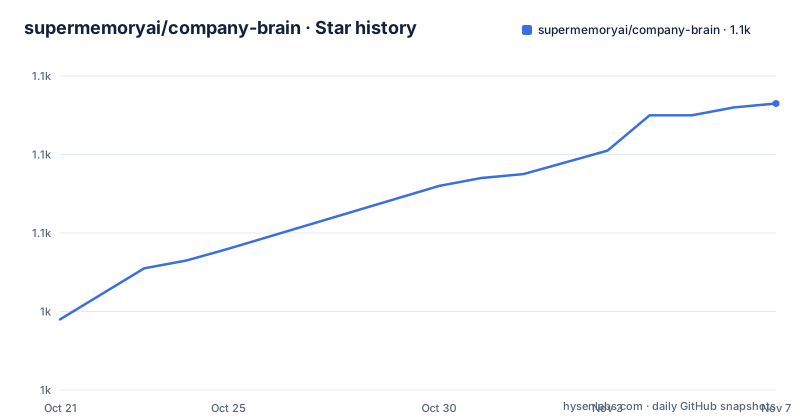
- supermemoryai/company-brain1,093 ★ · +55
| Repository | 2026-10-21 | 2026-11-07 |
|---|---|---|
| supermemoryai/company-brain | 1k | 1.1k |
55 Stars in the last 17 days, measured from the daily GitHub snapshot. Compare with other projects
Editorial analysis
What Company Brain is
The pitch is one sentence, that it is a teammate in your Slack that truly knows and understands your company and can do anything.
The product itself was not open source at first. The README explains that a few weeks ago the Company Brain product was discontinued at supermemory, and that this is that product, the whole thing, open sourced and rebuilt to run on your own Cloudflare account. It also says the product used to be a paid product with thousands of users, and that it is now free and open source, with a link to the announcement.
The problem it addresses is stated in plain terms. A team's knowledge is scattered across Slack threads, documents, tickets and people's heads. Company Brain sits in Slack, remembers what the team says, and answers from it. Then it does the work, opening the issue, reading the pull request, digging into the repository. And when a conversation needs something it knows, it speaks up on its own.
The example in the README is the one that makes the idea concrete. A developer asks in a channel whether production is down. The bot replies that it is not fully down, that one endpoint is elevated with 42 errors in the last fifteen minutes, that someone is already on it, and that it is probably this morning's deploy. And then the line that sells the design, that nobody mentioned the bot, it spoke up because it knew the answer.
The stack is TypeScript on Cloudflare Workers, with memory held by supermemory, and the licence is Apache-2.0. The last push to the repository was on 2026-10-02.
Private by design: the permissions graph
The privacy section is the most important part of the README, and it is short because the model is simple.
Memory is not one big bucket, it is a permissions graph, and the brain only ever reads with the asker's own access. The table that follows is the whole thing.
In a public channel, it can draw on the shared brain that everyone in the organisation can see. In a private channel, it can draw on that channel's memory plus the shared brain. In your direct messages, it has your personal memory, every private channel you are in, and the shared brain.
So the guarantee is direct, that it cannot leak something you could not see yourself. That is a stronger property than a model trained on the workspace, and it is structural rather than a policy, because the read is filtered by the access of the person asking.
The second half of the section applies the same logic to tools. Writes always run under your own connection, and when a request needs a tool only a teammate has connected, it asks them first, with an approve or deny card. Nothing is granted silently.
That last mechanism is the part worth pausing on, because it is the difference between an agent that can act and an agent that can act without a human in the loop. The rule is that the agent never escalates its own permissions, and when a human's connection is the missing piece, that human gets a card in Slack and decides. The documentation for permissions is one of the links in the header.
The feature surface, from remembering to working while you sleep
The capability table is the product description, and each row is a distinct behaviour.
It remembers, taking decisions, projects, owners and context from the channels it is in and keeping them current as people talk, so no one has to write anything down. It answers from your team, and the emphasis is on where the answer comes from, not from the internet and not from guesswork, but from your own conversations and connected tools.
It acts in your tools, across GitHub, Linear, Notion, Google Workspace and hundreds more over MCP, and the phrasing is the point, it opens the issue instead of telling you to. It speaks up, chiming in when a conversation needs something it knows, and you decide how chatty it is, both organisation wide and per channel.
It runs code in its own sandbox, cloning repositories, running scripts and handing back charts, CSV files and PDFs right in Slack. It works while you sleep, with scheduled digests to a channel or your direct messages, plus research it starts on its own. And it learns your way, because skills teach it your processes, formats and voice, and a workspace prompt sets how it behaves everywhere.
Two of these are the unusual ones. The code sandbox is what turns it from a responder into something that can produce a deliverable rather than a paragraph, and the scheduled work is what makes it useful to a team rather than to one person at a desk.
Deploying in five minutes
The deployment path is unusually short, and the README gives it as four numbered steps.
The first is to click deploy, and the deploy button provisions the worker. It asks for two secrets. The first is SUPERMEMORY_API_KEY, which is where the brain keeps its memory, obtainable from the supermemory console. The second is MODEL_API_KEY, an Anthropic, OpenAI, Google or xAI key, whichever you have, and the brain works out the provider from the key itself. You pay the provider directly with no markup, and an OpenRouter key works too and reaches every provider's models through one account.
Everything else is provisioned for you, with D1, KV, Durable Objects and Workers AI set up as part of the deployment.
The second step is to open the setup path on the new worker. It checks your keys, hands you a Slack app manifest with your URLs already filled in, and takes the Slack credentials back.
The third is to sign in with Slack, and the first person to sign in owns the deployment.
The fourth is to install it to Slack and say hi. Your team then signs in with Slack at the root path to see the brain's home, which is a live graph of everything it remembers, along with the settings for tools, models, proactivity, automations and skills.
So the manual configuration is two API keys and a Slack app manifest, and everything else is the platform's job. That is a genuinely short path, and it is the reason the product could be released as a deploy button rather than as a document.
The free plan limit, and what the paid tier changes
The plan comparison is the one place where the deployment decisions bite, and it is worth reading before you pick.
Company Brain runs on Cloudflare's free plan, and the Workers Paid option at five dollars a month is described as better and worth it if the team leans on the brain.
The difference that matters is in the table. Long, multi step answers can get cut short on the free plan, because the free plan allows fifty outbound calls per request, while the paid tier has room for the brain's full tool loop. That is a hard cap, and a request that needs twenty tool calls to answer will be truncated rather than completed.
The code sandbox differs too. On the free plan the sandbox is the Daytona path, which needs a Daytona key of its own, while on the paid tier the sandbox is built in and runs on a Cloudflare container, and Daytona still works if you prefer it.
Everything else is the same on both plans, and the README is specific about one detail. Code Mode, where the brain writes code to chain tool calls or to work through your team directory, runs in QuickJS inside the worker, and not on paid Dynamic Workers. So the code execution path is the same on both plans even though the shell sandbox is not.
To use the built-in container on the paid plan, you uncomment the Workers Paid block in the wrangler configuration file, set the container sandbox option to on, and redeploy. That is a configuration change rather than a code change, which is a small sign of how the runtime is structured.
The codebase and the local development loop
The repository is a Cloudflare Workers application with a web front end, and the layout shows it.
There is a src directory for the worker, a web directory for the front end, a drizzle directory with its configuration for the database, a sandbox directory, scripts, patches, tests and documentation. The wrangler configuration comes in two files, one for the project and one that is a reference, alongside a generated worker configuration and an environment type file.
The package manifest is a good summary of the stack. The AI provider SDKs are present for Anthropic, Google, OpenAI and xAI, with an agent framework and an AI gateway provider, and the Cloudflare pieces include the code mode package and the sandbox package. Daytona has an API client and a toolbox API client. The Model Context Protocol SDK is there, which is how the tool layer works. The interface is built with Radix UI components, the data layer uses Drizzle ORM, the web side uses a React query library, and the HTTP layer is Hono. There is a memory graph package from supermemory itself, a command palette component, a cron schedule library, and a QuickJS WebAssembly file release package.
The scripts are the ones you would expect for this stack. The dev script runs wrangler dev and deploy runs wrangler deploy, with a build that does a dry run into a dist directory. Type checking runs the compiler over the worker and the web project separately. The database scripts generate migrations with the Drizzle kit and bundle them, and apply them either locally or against the remote database. Tests run on vitest, and the web build has its own script.
Local development is three commands.
bun install
cp .dev.vars.example .dev.vars   # fill in the two keys
bun run dev
And there is a catch that is easy to miss. If you have enabled the Workers Paid block, Docker has to be running for the sandbox container. And Slack has to be able to reach your machine, so you point a tunnel at the dev server and set the public URL in the development variables.
Editorial conclusion
Adopt Company Brain if you want a team agent that can both remember and act, and you are willing to own the deployment on your own Cloudflare account, because the permission model and the Slack setup are the parts that need an owner. Do not adopt it if your requirement is a read only assistant, since the tool acting is where the complexity and the risk live. Before you deploy, decide which plan you are on, because the free plan caps a request at fifty outbound calls and cuts long multi step answers short, and read the permissions guide before you connect anyone's GitHub account.
Frequently asked questions
What is Company Brain?
It is an open source Slack agent that remembers what your team says, answers from those conversations and connected tools rather than from the internet, acts in tools such as GitHub, Linear, Notion and Google Workspace over MCP, and can run code in its own sandbox. It was a paid product at supermemory that was discontinued and released as free and open source to run on your own Cloudflare account.
How does Company Brain avoid leaking private information?
Memory is modelled as a permissions graph and the brain only ever reads with the asker's own access. In a public channel it uses the shared brain, in a private channel that channel's memory plus the shared brain, and in direct messages your personal memory and every private channel you are in.
What does Company Brain need to deploy?
Two secrets, a supermemory API key for the memory and a model API key from Anthropic, OpenAI, Google or xAI, with the provider worked out from the key. The rest, D1, KV, Durable Objects and Workers AI, is provisioned by the deployment, and you then open the setup path, install the Slack app, and the first person to sign in owns the deployment.
What is the difference between the free plan and Workers Paid for Company Brain?
The free plan allows fifty outbound calls per request, so long multi step answers can be cut short, while the paid tier has room for the full tool loop. The code sandbox also differs, with the free plan using a Daytona key and the paid tier using a built-in container on a Cloudflare container, while Code Mode runs in QuickJS inside the worker on both plans.
Official sources
Add this badge to your README
If you maintain this project, the badge below links readers to this analysis and shows its maintenance status from the daily GitHub snapshot. Paste the markdown into your README; add ?metric=license or ?metric=stars to the image URL for a different field.

[](https://hysenlabs.com/projects/supermemoryai-company-brain)Star history chart for your README
[](https://hysenlabs.com/projects/supermemoryai-company-brain)Was this useful?