Sentinel: the repository, the system and the release tags have three names
Local monitoring with AI vision — a LAN-based, smartphone-powered AI monitoring framework with structured event output for data acquisition and analysis.
At a glance
- What is it?
- A LAN monitoring framework that turns spare Android phones into camera nodes feeding a Flask dashboard over JPEG uploads. The repository is CCTV-Smartphone-AI-Monitoring, the system is Sentinel, the Android client is CamFlow, the app source sits in PhoneCamSender, and the newest tag is two versions behind the README.
- Who is it for?
- Sentinel suits someone with two or three spare Android phones on the same network who wants live preview, segmented recording and event-triggered analysis without buying IP cameras, and who is willing to read the user guide in order before the first run. It does not suit a deployment that cannot send the triggering frame to an external inference service, because the documented path to multimodal analysis leaves the LAN even though the frames themselves do not.
- Can I use it commercially?
- Yes. MIT is a permissive licence: you can use, modify and sell software built on it, as long as you keep its copyright and licence notices.
- Is it still maintained?
- Yes. The repository received new commits within the last day.
- What is it written in?
- Mainly Python, according to GitHub's language statistics.
Answers come from the project's GitHub data, last synced on November 25, 2026, and from our analysis. They are not legal advice.
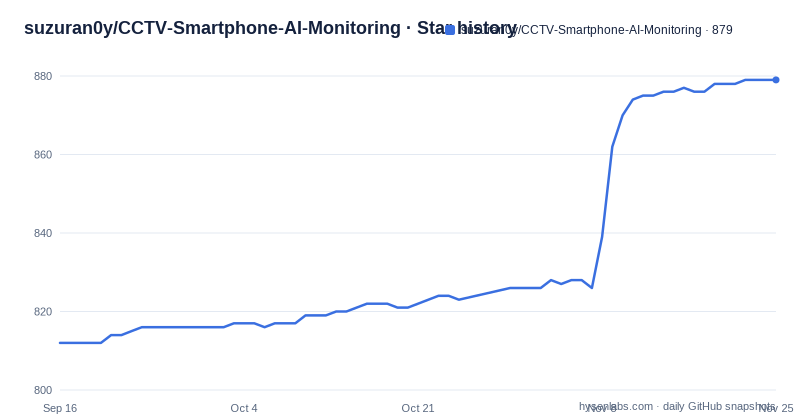
Star history
- suzuran0y/CCTV-Smartphone-AI-Monitoring879 ★ · +67
| Repository | 2026-09-16 | 2026-11-25 |
|---|---|---|
| suzuran0y/CCTV-Smartphone-AI-Monitoring | 812 | 879 |
67 Stars in the last 70 days, measured from the daily GitHub snapshot. Compare with other projects
Editorial analysis
One project, five identifiers, and the release tags use the third name
The repository is called CCTV-Smartphone-AI-Monitoring and the README's own title is Sentinel Real-Time Monitoring System. The Android client inside it is CamFlow. The release tags call themselves CamFlow too, with v1.1.0 named CamFlow v1.1.0 with the note Configurable Upload Settings, followed by CamFlow v1.1.1 and CamFlow v1.1.2. The Android application source, though, is in a directory named `PhoneCamSender/`. So a search for the project name, the system name and the client name all land in different places, and the code directory matches none of the three. The repository root also carries `CamFlow_UserGuide.md` and `CamFlow_UserGuide_CN.md` beside `README.md` and `README_CN.md`, so the documentation is bilingual in the same way the naming is inconsistent: the client guide is named after the client, the readme after the repository.
The README advertises v1.1.4 and the newest tag is v1.1.2
The banner at the top of the README points at an ongoing update labelled v1.1.4 dated 2026-09-27, and it links to issue 2 rather than to a tag. The release list tops out lower:
- v1.1.2, CamFlow v1.1.2, published 2026-09-27 - v1.1.1, CamFlow v1.1.1, published 2026-08-19 - v1.1.0, CamFlow v1.1.0 with Configurable Upload Settings, published 2026-03-17
The v1.1.2 release shares its timestamp with the last push to the default branch, so the tag and the tip of main were the same commit. The version in flight is therefore tracked in prose and in an issue rather than in a tag, and a reader looking for the current number has three candidates: 1.1.2 from the releases page, 1.1.4 from the banner, and whatever `version.properties` at the repository root records, which is a key and value properties file in a project with no build manifest. The cadence is also uneven, roughly six months between v1.1.0 and v1.1.1 and six weeks to v1.1.2.
The wire format is a stream of whole JPEG frames, not video
CamFlow captures the phone camera and uploads it as single-frame JPEG images to an HTTP POST endpoint at /upload. The PC side Flask server writes each frame into a latest-frame cache called FrameBuffer, and that one structure is what everything else reads from. It serves an MJPEG stream at /stream so a browser can watch without a plugin, it serves a snapshot, the recorder consumes it, and the AI analyser consumes it. The documentation states that FrameBuffer exists to avoid repeated decoding, and that recording and AI analysis both read from it without interfering with each other. The Dashboard sits above this as a pure control and presentation layer and takes no part in image processing. The practical consequence of choosing frames over video is that bandwidth scales with frame rate times frame size rather than with motion, so a static scene costs the same as a busy one, and the MJPEG stream is a response the browser can render with no plugin rather than a container it has to demux.
Recording is segmented on purpose, so long runs stay manageable
Video is written locally in MP4 or AVI with time-based segmentation, and the segmentation is called out as the thing that makes the tool suitable for long-term operation and archival management. That follows from the capture design. Because the server reassembles video from individual uploaded frames rather than receiving a stream, an unbroken recording would be one file that grows until something reopens it, so the writer cuts on a time boundary instead. Alongside recording there are real-time screenshots, and both write into the recordings directory that sits at the repository root. The system also generates local runtime logs and AI event records, with the log directory next to it, and the documentation describes this as structured logging and configuration management in support of traceability and data analysis. The practical advice that comes with it is that you will still want to prune: the output directories are versioned alongside the source, not kept outside the checkout.
A two stage trigger keeps the model call off the hot path
The AI path is two stages, and the documentation gives the reason plainly: a two-stage architecture of traditional CV algorithms followed by model inference, to improve real-time performance and reduce compute and inference costs. The first stage decides whether anything is happening. Only when the trigger conditions are met does the system call a vision model for semantic analysis, and that second stage produces structured output supporting risk grading and event management. So the cost profile is not one model call per frame, it is one model call per event, and the frames that pass the trigger are the frames that carry the risk grade. The AI module is described as interface based so different vision models can be integrated, and the table of contents reserves a separate section for third-party model integration. numpy and opencv-python are what carry the first stage, which is why neither of them is optional and neither has an upper bound in requirements.txt.
Frames stay on the LAN and the model call does not
The architecture section states that all image data flows only within the local area network, and the overview says the system supports running in a local LAN environment without relying on cloud services. The next sentence qualifies it: to run multimodal models, it is recommended to use an online model inference service. The dependency list makes that concrete. It has four entries, and one of them is a cloud vendor SDK:
flask>=2.2
numpy>=1.23
opencv-python>=4.8
volcengine-python-sdk[ark]
`volcengine-python-sdk[ark]` is the Volcengine Ark extra, which is the inference endpoint the documented AI path is built against. So the boundary is precise and worth stating before you deploy it: the continuous stream never leaves the LAN, but the frame or frames that pass the trigger are what get sent for semantic analysis. The two claims are compatible and they are not the same claim, and a site that cannot make outbound calls still gets preview, recording, screenshots and logging while losing the cognitive output.
Four lower bounds, no upper bounds, and a desktop OpenCV build
Every requirement is open ended. flask, numpy and opencv-python each carry a floor and nothing above it, and volcengine-python-sdk is unpinned behind the ark extra, so a reinstall six months from now resolves a different set of versions than the one this was written against. The choice of `opencv-python` rather than the headless build is also a decision rather than a default, because a headless server has no display for a GUI wheel to talk to. It is plausibly the package that provides the video writer, since nothing else in the four lines can encode MP4 or AVI and no ffmpeg binding is declared. There is a `tests/` directory in the repository and no test runner in requirements.txt at all, so whatever checks those tests run under are not installed by the documented setup. For a system whose whole premise is repurposing hardware rather than provisioning it, the dependency surface is the part that will age first.
Connection is manual because the phone has to be told where the server is
There is no discovery step, and the documentation names that as a deliberate property: explicit and verifiable manual connection setup, where the PC prints the CamFlow address at startup, the Android client validates it, and a `/ping` connection test is provided. The browser side is the opposite, deliberately permissive: the MJPEG preview is HTTP streaming output that a browser can render directly with no plugins. So the server announces itself in a terminal and the browser finds it by URL, which keeps a phone on the same network from needing to broadcast anything. The deployment chapters follow the same order the table of contents does, moving from environment requirements to getting the source code to PC-side deployment to Android-side deployment, and then to running the project with separate steps for starting the PC side and starting CamFlow. The README asks readers to go through those chapters in order before first use, with a jump list from project overview through deployment, run and the dashboard guide.
Editorial conclusion
Sentinel suits someone with two or three spare Android phones on the same network who wants live preview, segmented recording and event-triggered analysis without buying IP cameras, and who is willing to read the user guide in order before the first run. It does not suit a deployment that cannot send the triggering frame to an external inference service, because the documented path to multimodal analysis leaves the LAN even though the frames themselves do not. Check four things first. Check what version you are actually installing, since the newest release tag is v1.1.2 from 2026-09-27 while the README banner advertises v1.1.4 as ongoing. Check how you will join the phone to the server, because connection setup is manual and relies on the PC printing an address that the client then validates over a ping test. Check your dependencies, because requirements.txt carries four lower bounds with no upper bounds and includes a cloud vendor SDK. And check where your recordings and logs land, because the log and recordings directories sit at the repository root. The licence is MIT and the default branch was last pushed on 2026-09-27.
Frequently asked questions
What is CamFlow in the Sentinel monitoring project?
CamFlow is the self developed Android client. It captures the phone camera feed and uploads it to the PC side server as single frame JPEG images over an HTTP POST to /upload, which is what lets an ordinary phone act as a camera endpoint without dedicated IP hardware.
Does Sentinel send camera images to the cloud?
The image stream does not: all image data flows only within the local area network. The model call does, since running multimodal models is recommended through an online inference service and the only model SDK in requirements.txt is volcengine-python-sdk with the ark extra.
What packages does the Sentinel PC side need?
Four, all with lower bounds and no upper bounds: flask>=2.2, numpy>=1.23, opencv-python>=4.8 and volcengine-python-sdk with the ark extra. The repository has a tests directory, and no test runner appears in that list.
How does Sentinel record video from the phones?
It records MP4 or AVI locally with time based segmentation, which the documentation ties to long term operation and archival management. Recording and AI analysis both read from the same FrameBuffer latest frame cache, so neither re-decodes the stream nor blocks the other, and the Dashboard itself performs no image processing.
What version of Sentinel is current?
The newest release tag is v1.1.2, published 2026-09-27, with v1.1.1 from 2026-08-19 and v1.1.0 from 2026-03-17. The README banner advertises an ongoing v1.1.4 dated 2026-09-27 and links it to an issue rather than to a tag.
Official sources
Add this badge to your README
If you maintain this project, the badge below links readers to this analysis and shows its maintenance status from the daily GitHub snapshot. Paste the markdown into your README; add ?metric=license or ?metric=stars to the image URL for a different field.

[](https://hysenlabs.com/projects/suzuran0y-cctv-smartphone-ai-monitoring)Star history chart for your README
[](https://hysenlabs.com/projects/suzuran0y-cctv-smartphone-ai-monitoring)Was this useful?