SVG.js maps three JavaScript builds and points its docs at version 3.0
The lightweight library for manipulating and animating SVG
At a glance
- What is it?
- SVG.js is a dependency-free JavaScript library for creating and animating SVG, published as @svgdotjs/svg.js. Its package.json routes bundlers, Node and CDN consumers to four different files, and its README hands the whole API to a documentation site pinned at the 3.0 path while the manifest already reads 3.2.8.
- Who is it for?
- Adopt SVG.js if you want to create and animate SVG nodes from JavaScript without pulling a charting or layout library into the bundle, and if you are willing to treat svgjs.dev as part of the dependency. Skip it if you need a documented server-side story, a framework binding, or a written browser support matrix, because the README provides none of those and the published package contains only dist, svg.js.d.ts and CHANGELOG.md.
- Can I use it commercially?
- Check first. The repository uses a licence we do not classify automatically, so read its LICENSE file before any commercial use.
- Is it still maintained?
- Yes. The repository last received commits 103 days ago.
- What is it written in?
- Mainly JavaScript, according to GitHub's language statistics.
Answers come from the project's GitHub data, last synced on November 15, 2026, and from our analysis. They are not legal advice.
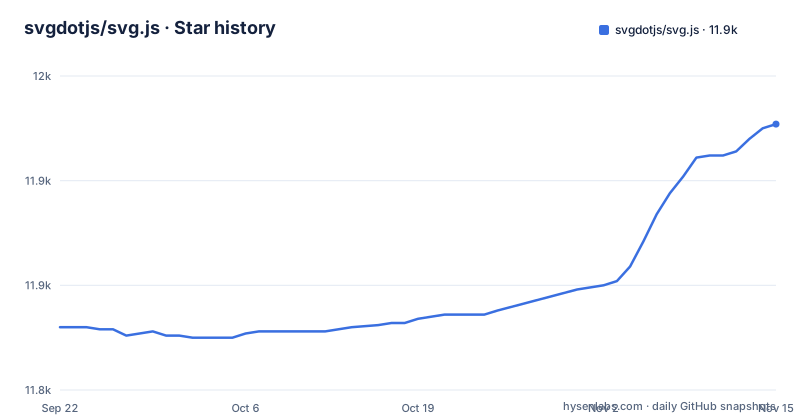
Star history
- svgdotjs/svg.js11,927 ★ · +97
| Repository | 2026-09-22 | 2026-11-15 |
|---|---|---|
| svgdotjs/svg.js | 11.8k | 11.9k |
97 Stars in the last 54 days, measured from the daily GitHub snapshot. Compare with other projects
Editorial analysis
The exports map hands bundlers, Node and CDNs four different files
One package name, @svgdotjs/svg.js, and four destinations inside it. Here is the exports map exactly as package.json declares it:
"exports": {
  ".": {
    "types": "./svg.js.d.ts",
    "browser": "./dist/svg.esm.js",
    "import": "./dist/svg.esm.js",
    "require": "./dist/svg.node.cjs",
    "default": "./dist/svg.esm.js"
  }
}
Two JavaScript builds and one declaration file. A bundler honouring the browser or import condition loads dist/svg.esm.js. A CommonJS require loads dist/svg.node.cjs, which is a separate artefact compiled for Node, and the top-level main field points at that same file, so a tool that ignores exports entirely still lands there.
The unpkg and jsdelivr fields then send CDN consumers to a fourth artefact, dist/svg.min.js. What you exercise in a browser is therefore not the file a require() resolves, and any difference between the Node and browser builds stays invisible until you run outside one. Nothing in the README says what the Node build does about a document it cannot see.
Installing gives you dist, a declaration file and a changelog, and nothing else
The files array in package.json is the entire published surface:
"files": [
  "dist",
  "svg.js.d.ts",
  "CHANGELOG.md"
]
TypeScript projects are served by typings, set to ./svg.js.d.ts, which the exports map also reaches through its types condition. No separate @types package is needed for a declaration to resolve.
What is missing from that list matters more than what is in it. src/ and spec/ live in the repository but do not ship, so searching node_modules for how a method behaves turns up a declaration and a minified bundle. You cannot read the implementation of the version you installed without going back to the repository and matching it to a tag. And a declaration file tells you a parameter is optional without telling you what the library does when you leave it out, which is the case you will actually hit.
Three install paths, and none of the CDN URLs carries a version
Package managers come first:
npm install @svgdotjs/svg.js
yarn add @svgdotjs/svg.js
Either one records the same dependency.
Three CDN hosts are offered for the no-package-manager case:
https://cdnjs.com/libraries/svg.js
https://cdn.jsdelivr.net/npm/@svgdotjs/svg.js
https://unpkg.com/@svgdotjs/svg.js
Read the jsdelivr and unpkg fields before choosing one. Both resolve to dist/svg.min.js, so those hosts hand you the minified bundle while an npm install gives you dist/svg.esm.js, and the two are not the same artefact. The sharper problem is that no URL above contains a version segment. A script tag pointing at one of them changes content when upstream publishes, with no deploy on your side. Pin a version if this reaches production.
Polyfills are a build target the README never mentions
The package description calls it a lightweight library for manipulating and animating SVG, without any dependencies, and nothing in the published files array sits beside dist except the declaration file and the changelog. That part is clean.
The repository is not indifferent to older environments though. One script builds polyfills through a config file in the .config directory:
rolldown -c .config/rolldown.polyfills.jsThe build:polyfills script is separate from the default build script. That is the first thing to settle before committing to this library. No browser support matrix appears in the README, and nothing in the repository root states what the polyfill build changes. If your support policy covers anything older than evergreen browsers, you are choosing between two files the project describes in neither place.
The README sends every API question to the 3.0 docs while the manifest reads 3.2.8
The Documentation section is one line: it points at svgjs.dev, and the link resolves to the /docs/3.0/ path. The version field sitting next to it in package.json says 3.2.8.
Nothing in the README says whether that 3.0 path tracks the head of the 3.x line or is frozen at the 3.0 release. If it is frozen, a reader who installs 3.2.8 from npm and then checks that page is reading a signature from an older minor version, and the mismatch stays invisible because neither side states the version it represents.
On its own the README is thin to the point of being unusable. There is no usage example, no method name and no sample beyond the two install commands. The badge row points at travis-ci.org and coveralls.io, while the build tooling in package.json is rolldown and oxlint with pnpm pinned at 11.13.0. Those badges record an earlier pipeline and do not describe how the package is built now, so do not read them as a current build status.
No framework binding and no written browser matrix come with the package
The repository root holds .config/, .github/, .gitignore, .oxfmtrc.json, .oxlintrc.json, .travis.yml, CHANGELOG.md, LICENSE.txt, README.md, bench/, package.json, playgrounds/, pnpm-lock.yaml, pnpm-workspace.yaml, spec/, src/, svg.js.d.ts and tsconfig.json. No framework directory, no binding package, and nothing in the files array that would carry one.
So a React user receives no component and no hook from this package and has to write their own wrapper.
The support statement is missing in the same way. There is no compatibility table in the README and none at the repository root. If your policy requires a written answer to what runs where, you will have to derive it from your own test matrix.
Where d3 and Snap.svg start from a different place
The two comparisons people search for turn on the starting point, and the repository argues neither side.
d3 is built around data joins and scales: you hand it arrays and it decides which elements enter, update or leave. SVG.js describes itself as a library for manipulating and animating SVG. Turn a table into axes and marks and d3 has the parts; that is not what SVG.js claims to be. Animate a shape you already have and the narrower job is the one SVG.js names.
Snap.svg is a separate SVG library, and nothing in this repository compares it with SVG.js, so read both documentations before choosing.
Last push on 2026-08-04, and the manifest runs ahead of the newest tag
The repository is not archived and the last push was on 2026-08-04. The releases move more slowly than that date suggests. 3.2.4 shipped on 2024-06-27, 3.2.5 on 2025-09-15 and 3.2.6 on 2026-07-17, so the gap across the first two is over a year and the gap to the third is ten months.
Set those against the manifest:
"version": "3.2.8",
"packageManager": "[email protected]"
The manifest reads 3.2.8. The newest release in the repository is 3.2.6. Committed work after that tag is already in the source tree, which is ordinary, but it means the number in package.json and the number you get from pinning a tag are different. Pin the tag if you need the code on your server to match a named release, and read CHANGELOG.md from the installed package before upgrading across a minor.
Licensing is the straightforward part. The README states the MIT License, package.json declares MIT, and LICENSE.txt sits at the repository root. Author is Wout Fierens, and four people are listed as maintainers.
Editorial conclusion
Adopt SVG.js if you want to create and animate SVG nodes from JavaScript without pulling a charting or layout library into the bundle, and if you are willing to treat svgjs.dev as part of the dependency. Skip it if you need a documented server-side story, a framework binding, or a written browser support matrix, because the README provides none of those and the published package contains only dist, svg.js.d.ts and CHANGELOG.md. Before you pin a version, check which file your bundler resolves through the exports map, and remember that the newest release in the repository is 3.2.6 while package.json already reads 3.2.8.
Frequently asked questions
What is SVG.js?
SVG.js is a lightweight JavaScript library for manipulating and animating SVG, published with no dependencies under the package name @svgdotjs/svg.js. The README states it is licensed under the MIT License, and package.json carries a TypeScript declaration file at the package root.
How do I add SVG.js to my project?
Run npm install @svgdotjs/svg.js or yarn add @svgdotjs/svg.js, or load it from cdnjs, jsdelivr or unpkg without a package manager. The jsdelivr and unpkg fields in package.json both resolve to dist/svg.min.js, and the README's CDN URLs contain no version segment, so pin one before using it in production.
How does SVG.js compare with d3?
The repository does not document a comparison. SVG.js describes itself as a lightweight library for manipulating and animating SVG.
How does SVG.js compare with Snap.svg?
The README names no alternative library, and the repository contains no comparison to Snap.svg. Snap.svg is a separate SVG library, so compare the two documentations directly.
What is an alternative to SVG.js?
The README names no alternative and its only pointer beyond the install commands is the documentation site at svgjs.dev. No comparison to another graphics library appears anywhere in the repository, so the choice between them is made from their own documentation rather than from anything published here.
Official sources
Add this badge to your README
If you maintain this project, the badge below links readers to this analysis and shows its maintenance status from the daily GitHub snapshot. Paste the markdown into your README; add ?metric=license or ?metric=stars to the image URL for a different field.

[](https://hysenlabs.com/projects/svgdotjs-svg-js)Star history chart for your README
[](https://hysenlabs.com/projects/svgdotjs-svg-js)Was this useful?