SwiftfulRouting connects every SwiftUI segue in advance
Programmatic navigation for SwiftUI applications.
At a glance
- What is it?
- SwiftfulRouting is a SwiftUI navigation framework that replaces NavigationStack with a RouterView, wires the modifiers for every possible route up front, and hands each screen its own router. The price is erased destination types and a minimum of iOS 17 on version 6.
- Who is it for?
- SwiftfulRouting fits SwiftUI apps whose navigation decisions are made in view models or coordinators rather than inside the view hierarchy, and that want a single router abstraction covering pushes, sheets, modals, alerts, transitions and modules.
- Can I use it commercially?
- Yes. MIT is a permissive licence: you can use, modify and sell software built on it, as long as you keep its copyright and licence notices.
- Is it still maintained?
- Yes. The repository last received commits 101 days ago.
- What is it written in?
- Mainly Swift, according to GitHub's language statistics.
Answers come from the project's GitHub data, last synced on November 6, 2026, and from our analysis. They are not legal advice.
Star history
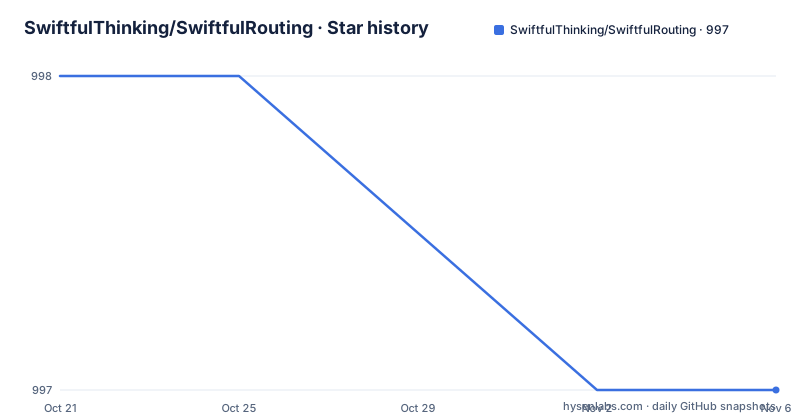
- SwiftfulThinking/SwiftfulRouting997 ★ · -1
| Repository | 2026-10-21 | 2026-11-06 |
|---|---|---|
| SwiftfulThinking/SwiftfulRouting | 998 | 997 |
-1 Stars in the last 16 days, measured from the daily GitHub snapshot. Compare with other projects
Editorial analysis
The problem it solves is where a destination is decided
SwiftUI's own navigation modifiers take their destination as a closure that the view hierarchy evaluates when the view is built, so the choice of screen is made in the view layer, and often earlier than the app knows anything. SwiftfulRouting is described as programmatic navigation for SwiftUI applications, and it covers segues, alerts, modals, transitions and modules with one router. The documentation puts the change plainly. Before the framework, a screen carries its own set of modifiers:
NavigationStack {
  MyView()
    .navigationDestination()
    .sheet()
    .fullScreenCover()
    .alert()
}
With it, the same screen is a single child:
RouterView { _ in
  MyView()
}
The framework adds the modifiers for every potential route to the root of the destination view, connected in advance, so the destination can be chosen at the moment the action runs rather than when the view is created. That is the whole idea, and it is why the library calls itself programmatic.
The router comes from the environment, and the methods are symmetric
Every child view gets a router from the SwiftUI environment, and the API is deliberately symmetric: a show method for each kind of presentation and a dismiss method for each one. The quick start wires a tap gesture to a pushed screen:
struct MyView: View {

    @Environment(\.router) var router

    var body: some View {
        Text("Hello, world!")
            .onTapGesture {
                router.showScreen { _ in
                    AnotherView()
                }
            }
    }
}
The full set of methods listed in the documentation is small and covers the five presentation kinds:
router.showScreen()
router.showAlert()
router.showModal()
router.showTransition()
router.showModule()
router.dismissScreen()
router.dismissAlert()
router.dismissModal()
router.dismissTransition()
router.dismissModule()
The complete set lives in the AnyRouter.swift file in the package sources, and the presence of a single file holding every navigation call is the reason the surface stays predictable. Each presentation kind has a matching dismissal, and a screen style argument such as .push can be passed where a screen has more than one, which is what the setup section shows with router.showScreen(.push). The project also points to a sample application and a starter project, and to a video tutorial, so the intended way to learn the API is by running it.
Every segue hands back a router for the screen it creates
The second half of the design is that the closure of a segue returns a router for the screen that is about to exist, so navigation actions are available before the destination view is created. The documentation recommends passing that router down instead of reading it from the environment, which decouples the routing logic from the view layer and suits architectures such as MVVM or VIPER:
RouterView { router in
  MyView(router: router)
}
The nested example shows why the distinction matters, because each router belongs to its own screen and each dismiss call has a different effect:
RouterView { router1 in
    Text("View 1")
        .onTapGesture {
            router1.showScreen(.push) { router2 in
                Text("View 2")
                    .onTapGesture {
                        router2.showScreen(.push) { router3 in
                            Text("View3")
                                .onTapGesture {
                                    router3.dismissScreen()
                                    router2.dismissScreen()
                                }
                        }
                    }
           }
      }
}
Dismissing on router3 takes down View3, and dismissing on router2 takes down View2 together with View3. That behaviour is deliberate, and it is also the part of the API most likely to surprise a team reading it for the first time.
AnyDestinationStack is how one router reaches the whole hierarchy
Version 6 added the ability for a screen's router to act on the entire hierarchy rather than only on itself, through an internal RouterViewModel that spans the screen tree. The mechanism is a single array that holds bindings for all active segues in the hierarchy, and the documentation illustrates its shape as a list per level:
// Example of what an [AnyDestinationStack] might look like:

 [
    [.fullScreenCover]
    [.push, .push, .push, .push]
    [.sheet]
    []
 ]
So the array holds one entry per level of the hierarchy, and each entry lists the presentation kinds currently active at that level. This is the part that makes the framework more than a wrapper around a navigation stack, because a router can now be asked about, or act on, presentations that were started elsewhere in the tree. It is also the reason the version line moved to 6, and the documentation calls out the internal view model as the change that made hierarchy-wide actions possible.
Adding the package and picking a version your target can use
Setup is a package reference and an import:
https://github.com/SwiftfulThinking/SwiftfulRouting.gitimport SwiftfulRoutingThen a RouterView is placed at the top of the view hierarchy, and it embeds your view in a NavigationStack by default. The deployment target decides which version you can use, and the project lays out three lines: iOS 17 and above takes version 6.0 or above, iOS 14 and above takes 5.3.6, and iOS 13 and above takes 2.0.2. That is a real constraint rather than a footnote, because an app still supporting iOS 14 has to remain on the 5.3.6 line and cannot take the version 6 work on the hierarchy-wide router. The repository itself is a Swift package with Package.swift, Package.resolved, Sources and Tests, and the published versions have been moving steadily, with 6.2.0 on 2026-03-19, 6.2.1 on 2026-05-14 and 6.2.2 on 2026-07-30, the last of which is also the date of the most recent commit to the repository.
Existing apps can keep their NavigationStack, at a cost
Adopting a navigation framework in an app that already has a root NavigationStack is the situation most migrations start from, and the framework has an answer for it. You wrap your content in a RouterView and initialise it without a NavigationStack, which is what addNavigationStack: false does:
RouterView(addNavigationStack: false) { router in
   MyView()
        .navigationBarHidden(true)
        .toolbar {
        }
}
The documentation also says the framework uses the native SwiftUI navigation bar, so the usual bar modifiers keep working, which is why the example hides the bar and sets an empty toolbar. The trade-off is ownership. Once the root is a RouterView, the framework is the thing deciding how the hierarchy is assembled, and the notes in the setup section are explicit that most apps should replace their existing NavigationStack with a RouterView instead. For an app with a custom root container, that is a structural change to make early rather than late.
Erased destinations are the cost of moving the decision
The mechanism that buys programmatic navigation is type erasure. Screen destinations are erased to generic types, and that is what allows the developer to determine the destination at the time of execution rather than when the view is built. The same paragraph of the documentation also notes that the framework adds a set of view modifiers to the root of the destination view to support all potential navigation routes, which is the second half of the trade. A route that can only be chosen at run time cannot also be checked by the compiler, so a typo in a destination type becomes a runtime problem rather than a build failure, and the concrete type of what a screen presents is no longer visible in the call site. On top of that, the API surface is broad enough that the per-screen router semantics have to be learned before they are used, since dismissScreen on one router and dismissScreen on another do different things. The framework also reserves the root of the view hierarchy for itself, which is a constraint a smaller library would not impose.
Editorial conclusion
SwiftfulRouting fits SwiftUI apps whose navigation decisions are made in view models or coordinators rather than inside the view hierarchy, and that want a single router abstraction covering pushes, sheets, modals, alerts, transitions and modules. It does not fit a project that needs its destination types checked by the compiler, since destinations are erased to generic types, and it does not fit an app that must keep a custom root container without the framework owning the top of the hierarchy. Before adopting it, check three things: the deployment target, since version 6 and above is for iOS 17, with older targets pinned to 5.3.6 or 2.0.2; where the router comes from, because a new router is created after each segue, so dismissScreen called on the wrong one dismisses a different screen; and how the root view is wrapped, since RouterView replaces NavigationStack unless you pass addNavigationStack: false. The last push was on 2026-07-30, the current release is 6.2.2, and the licence is MIT.
Frequently asked questions
What does SwiftfulRouting replace in a SwiftUI app?
It replaces the NavigationStack at the root of the hierarchy with a RouterView, which embeds your view in a NavigationStack and adds the modifiers for every potential segue, sheet, modal, transition and module route. If you cannot remove your own NavigationStack, you can pass addNavigationStack: false.
How do I navigate with SwiftfulRouting?
Read a router from the SwiftUI environment with @Environment(\.router) var router, or accept the router handed back in a RouterView or segue closure, and call one of the show methods such as router.showScreen, showAlert, showModal, showTransition and showModule, each with a matching dismiss method.
Which iOS versions does SwiftfulRouting support?
The project maps deployment targets to versions: iOS 17 and above uses version 6.0 or above, iOS 14 and above uses 5.3.6, and iOS 13 and above uses 2.0.2. The current release is 6.2.2, published on 2026-07-30.
What is the AnyDestinationStack in SwiftfulRouting?
It is the single array introduced in version 6 that holds bindings for all active segues in the hierarchy, with one entry per level listing the presentation kinds active at that level. It is what lets a screen's router perform actions that affect the whole hierarchy, through an internal RouterViewModel.
Does SwiftfulRouting need a course to use?
The project links to a paid course on its own site, but the usage path it documents does not depend on it: add the package by its git URL, import SwiftfulRouting, place a RouterView at the top of the hierarchy, and use the sample application and starter project repositories to practise.
Official sources
Add this badge to your README
If you maintain this project, the badge below links readers to this analysis and shows its maintenance status from the daily GitHub snapshot. Paste the markdown into your README; add ?metric=license or ?metric=stars to the image URL for a different field.

[](https://hysenlabs.com/projects/swiftfulthinking-swiftfulrouting)Star history chart for your README
[](https://hysenlabs.com/projects/swiftfulthinking-swiftfulrouting)Was this useful?