Swift Package Manager ships inside the toolchain and delegates its own docs
The Package Manager for the Swift Programming Language
At a glance
- What is it?
- Swift Package Manager is the dependency, versioning, and build tool for Swift source, distributed as part of the Swift toolchains and bundled with Xcode since 8.0. The repository itself documents almost nothing: one verification command, one help command, and a set of links to swift.org and docs.swift.org, with Git as a runtime requirement that is easy to miss.
- Who is it for?
- Use Swift Package Manager if your Swift code already targets the official toolchain or Xcode, and treat swift.org and docs.swift.org as the real manual rather than the repository. Before adopting it in a container or a locked-down CI image, confirm Git is present at runtime, because that is the one requirement the toolchain's own system requirements do not cover, and pin a release rather than a snapshot if you need reproducible builds.
- Can I use it commercially?
- Yes. Apache-2.0 is a permissive licence: you can use, modify and sell software built on it, as long as you keep its copyright and licence notices.
- Is it still maintained?
- Yes. The repository last received commits 1 day ago.
- What is it written in?
- Mainly Swift, according to GitHub's language statistics.
Answers come from the project's GitHub data, last synced on November 14, 2026, and from our analysis. They are not legal advice.
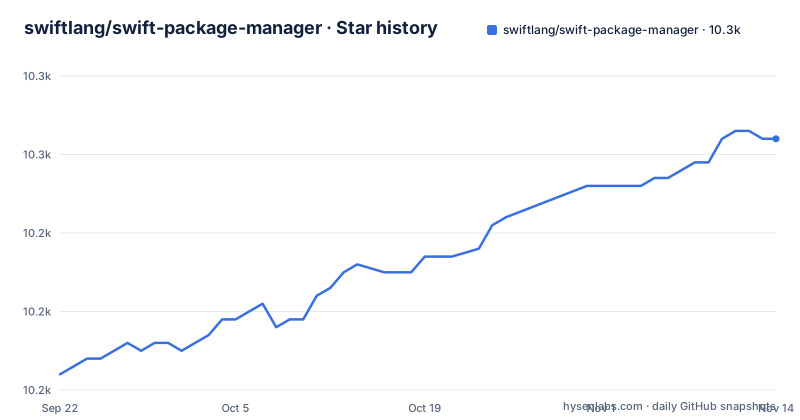
Star history
- swiftlang/swift-package-manager10,252 ★ · +30
| Repository | 2026-09-22 | 2026-11-14 |
|---|---|---|
| swiftlang/swift-package-manager | 10.2k | 10.3k |
30 Stars in the last 53 days, measured from the daily GitHub snapshot. Compare with other projects
Editorial analysis
Git is required at runtime, not just while compiling
The stated system requirements for the package manager are the same as those for Swift itself, with one caveat spelled out: the package manager requires Git at runtime as well as build time. Most build tools treat Git as a build-time dependency that vanishes from the output artifact, so this one changes what a deployed image has to contain. Anyone writing a Dockerfile or a hermetic build should treat Git as part of the runtime footprint of any package, not as a build tool that can be dropped once compilation finishes. The requirement is also the only stated difference from the toolchain's own requirements, which means the Swift system requirements page is the floor you inherit, and Git is the addition you have to discover for yourself.
The bundled build system targets macOS and Linux, Apple platforms arrive through Xcode
Swift Package Manager includes its own build system, and that build system can build for macOS and Linux. Support for the other Apple platforms is not part of that statement: starting with Xcode 11, Xcode integrates with SwiftPM to provide support for including packages in iOS, macOS, watchOS, and tvOS applications. So there are two delivery paths with different platform coverage. A standalone toolchain from swift.org gets you the build system for two platforms, while a package destined for an iOS or watchOS target depends on the Xcode integration layer rather than on the standalone builder. The repository names macOS and Linux only, and says nothing about other systems, which leaves non-Apple, non-Linux developers without a stated position. The scope of the tool is worth reading alongside its stated purpose, which is managing the distribution of source code so that packages can be shared on services like GitHub, used for private personal development, or shared within a team. That is a narrower claim than cross-platform universal coverage.
The README ships one command and delegates everything else
The repository contains almost no command reference of its own. For quick help it offers `swift package --help`. For the actual basics it points at a separate getting started guide hosted on swift.org, and for everything deeper it links the Package Manager Docs, the PackageDescription API documentation, and the release notes, all on docs.swift.org. The one command it does print is the installation check, and the expected output is shown truncated:
$ swift package --version
Apple Swift Package Manager - ...
That is the full surface a reader learns from the repository: a version check, a help flag, and four outbound links. Learning the manifest syntax or the dependency commands means leaving the repository entirely, and the version line the README shows is itself elided after the dash, so the exact identity string a script would match is not written down anywhere here. Even developing the package manager itself is routed elsewhere, to CONTRIBUTING.md.
Snapshot builds track main, which sits ahead of the 6.4.0 release
The package manager is distributed as part of the Swift toolchains available on swift.org, and that includes snapshots for the latest versions built from the main branch. Snapshots are a moving target by construction, and this repository is on main with its last push dated 2026-11-02, while the newest release tag is swift-6.4.2-RELEASE from 2026-10-30. So the main branch has been receiving commits after the 6.4.2 cut, and a developer who installs a main-branch snapshot is running something newer than any tagged release. The README does not describe how to pin a snapshot to a specific commit, and it does not list per-snapshot package manager versions, which means reproducibility has to come from the release notes rather than from the installation page. The recent tags are swift-6.3.1-RELEASE on 2026-04-24, swift-6.4.0-RELEASE on 2026-09-15 and swift-6.4.2-RELEASE on 2026-10-30, so an unpinned snapshot is a moving dependency in someone else's build.
llbuild does the compiling and lives in its own repository
It uses llbuild as the underlying build system for compiling source files, and llbuild is a separate open source project that is part of the Swift project. That boundary has consequences for anyone reading the source or filing a problem: a failure inside the compile step may originate in another repository. The repository also bundles CMakeLists.txt, a cmake/ directory, BuildSupport/, and Utilities/, along with Fixtures/ for test inputs and a Benchmarks/ directory. CHANGELOG.md sits at the top level as well. Reading this tree as one self-contained build system misreads it, since the part that actually drives compilation lives elsewhere and gets its own releases.
SourceKit-LSP borrows libSwiftPM, so editors inherit the same runtime needs
The SourceKit-LSP project leverages libSwiftPM and provides a Language Server Protocol implementation for editors that support LSP. That reuse is the reason an editor integration inherits the package manager's constraints rather than escaping them: whatever libSwiftPM needs at runtime, including Git, is needed by the language server too, on a machine that is running an editor rather than a build. The practical effect is that an editor-side problem with package resolution can be a Git availability problem, and that the version pairing between SourceKit-LSP and the toolchain is worth checking before debugging anything else. Contact details for the code owners live in .github/CODEOWNERS, which is the documented route when a question is too specific for the forums.
Contributing to the tool means reading CONTRIBUTING.md, not the README
The repository carries a large amount of contributor machinery that the README never explains: a .devcontainer/ directory for a prepared environment, .swiftformat and .pep8 for formatting rules, .mailfilter and .mailmap, .swift-version for the toolchain pin, plus Benchmarks/, Fixtures/, Documentation/, and Examples/ holding package-info and package-registry. The README routes every question about policies, best practices, and development environment setup to CONTRIBUTING.md, and the bug reporting guidelines live in that same file under its reporting issues section. For help, the order of preference stated in the README is the Swift Forums, then the GitHub bug tracker, with the forums usually being the better first stop. Licensing follows the same pattern of pointing outward: the code is under the Apache License v2.0 with Runtime Library Exception, copyright 2015 to 2025 Apple Inc. and the Swift project authors, with the full text and the contributor list hosted at swift.org.
Editorial conclusion
Use Swift Package Manager if your Swift code already targets the official toolchain or Xcode, and treat swift.org and docs.swift.org as the real manual rather than the repository. Before adopting it in a container or a locked-down CI image, confirm Git is present at runtime, because that is the one requirement the toolchain's own system requirements do not cover, and pin a release rather than a snapshot if you need reproducible builds.
Frequently asked questions
what is swift package manager
Swift Package Manager is the tool for managing distribution of source code in Swift, covering compiling and linking packages, dependencies, and versioning. It includes a build system that can build for macOS and Linux, and requires Git at runtime as well as build time.
how to install swift package manager
It is part of the Swift toolchains available on swift.org, including snapshots built from the main branch, and it is also included in Xcode 8.0 and all subsequent releases. Confirm the install with `swift package --version`.
how to use swift package manager
The README sends beginners to a getting started guide on swift.org and offers `swift package --help` for quick reference. Longer documentation lives in the Package Manager Docs and the PackageDescription API pages on docs.swift.org.
how to update swift package manager
There is no update command for the package manager itself, because it arrives with the Swift toolchain from swift.org or with Xcode. Differences between versions are recorded in the release notes linked from the README.
Can I use Swift Package Manager with Flutter?
The README does not mention Flutter or any non-Apple integration beyond the Xcode 11 support for iOS, macOS, watchOS, and tvOS applications. It states only that the bundled build system can build for macOS and Linux.
Official sources
Add this badge to your README
If you maintain this project, the badge below links readers to this analysis and shows its maintenance status from the daily GitHub snapshot. Paste the markdown into your README; add ?metric=license or ?metric=stars to the image URL for a different field.

[](https://hysenlabs.com/projects/swiftlang-swift-package-manager)Star history chart for your README
[](https://hysenlabs.com/projects/swiftlang-swift-package-manager)Was this useful?