Contribute To This Project: a ten-step first pull request that adds a contributor card
This project is waiting for your contribution. If you have never contributed code on GitHub before, this is the project to get you started.
At a glance
- What is it?
- Syknapse/Contribute-To-This-Project teaches first-time contributors the fork-and-pull-request flow by having them add one card to a web page.
- Who is it for?
- Use this repository as a first pull request if you are new to GitHub and can edit an anchor tag. Skip it if you already contribute regularly and want review or code experience.
- Can I use it commercially?
- Yes. MIT is a permissive licence: you can use, modify and sell software built on it, as long as you keep its copyright and licence notices.
- Is it still maintained?
- Yes. The repository last received commits 3 days ago.
- What is it written in?
- Mainly JavaScript, according to GitHub's language statistics.
Answers come from the project's GitHub data, last synced on November 25, 2026, and from our analysis. They are not legal advice.
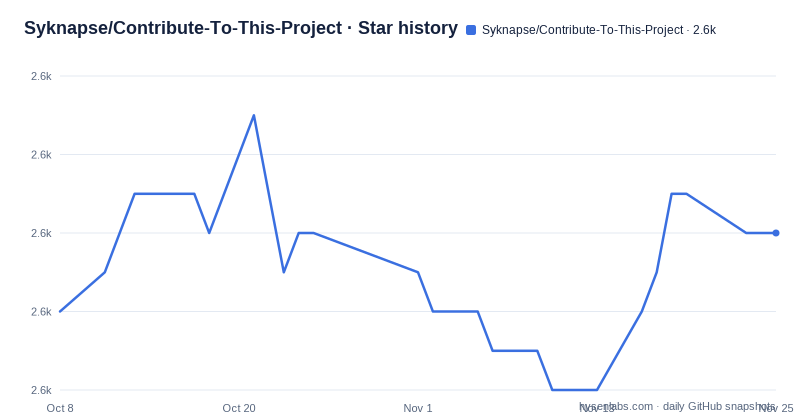
Star history
- Syknapse/Contribute-To-This-Project2,574 ★ · +2
| Repository | 2026-10-08 | 2026-11-25 |
|---|---|---|
| Syknapse/Contribute-To-This-Project | 2.6k | 2.6k |
2 Stars in the last 48 days, measured from the daily GitHub snapshot. Compare with other projects
Editorial analysis
The contribution is a card, and the card is the whole project
Contribute To This Project is a tutorial whose only deliverable is a card on its web page. You copy a ready-made card template file, fill it in with your own information, and submit it as a pull request. The card holds your name, your contact details, a short description, and 3 links to useful resources for web developers that you recommend.
The stated objectives are short: make a contribution to an open source project, and get more comfortable using GitHub. The project has no library to install and no product to evaluate. Its output is a growing page of contributor cards, published at syknapse.github.io/Contribute-To-This-Project/.
The repository is JavaScript under the MIT license. The last push landed on 2026-10-25, and GitHub lists no releases for it. Its cards live in a `cards/` folder next to `index.html`, `translations/` and a `scripts/` directory.
The entry bar is one anchor tag
The README sets the bar for newcomers at a single HTML skill: if you know how to write and edit an anchor tag, `<a href="" target=""></a>`, you should be able to do it. That is the whole prerequisite, and it is why the task is a card with links rather than code.
A second audience is people with more experience who want a first open source contribution, or more contributions for confidence. For them the card is quick, and the README points onward to CONTRIBUTING.md, which covers translations, bug fixes and accessibility improvements.
The README gives its reasoning for the exercise. Any web developer needs Git version control, GitHub is described as the most popular Git hosting service, and a contribution gives you something to show on your GitHub profile. It links the essay You Should've Learned Git Yesterday for anyone unsure whether to learn Git at all.
GitHub Desktop is the default route, the terminal is a second tutorial
The main tutorial is written around the GitHub Desktop app. The README calls that the simplest and easiest way to follow it. You log in to GitHub, or join if you have no account, and the author recommends doing the GitHub Hello World tutorial first.
Two alternatives are named. Anyone comfortable with Git on the command line can follow terminal_tutorial.md instead. VS Code comes with integrated Git and lets you do the needed steps from the editor.
The consequence is that the README itself contains no git commands to copy. A reader who wants the CLI flow has to open the separate terminal tutorial, and a reader on GitHub Desktop never sees a command at all. For learning how pull requests work, the choice of tool decides how much of Git's vocabulary you meet.
Ten numbered steps from fork to celebration
The contribution path is ten steps, each with its own heading: fork the repository, clone it, create a new branch, copy the template file, fill in your card, check your work, commit, push to GitHub, submit a pull request, and celebrate.
Steps 1 to 3 are the standard Git setup. Steps 4 to 6 are the only parts specific to this project: copy the card template, fill it in, and check the result. The rest repeats the normal fork-and-pull-request cycle that nearly every open source project uses.
That makes the repository a rehearsal of a real workflow. The tutorial steps cover no merge conflicts, because each card lives in its own file, and the repository does ship husky and lint-staged configuration in package.json that runs prettier on staged files.
Checks run through husky, prettier and html-validate
The root package.json shows what guards a submission. Dev dependencies are `html-validate`, `husky`, `lint-staged` and `prettier`, and `cheerio` is listed as a runtime dependency. The `prepare` script runs `husky`, and `lint-staged` runs `prettier --write` on `*.{js,yml,yaml,json}` and on `*.html` files, with the `.prettierignore` path for HTML.
Two scripts are defined. `prettier-html` runs `npx prettier --write index.html`, and `format` pipes the changed files from `git diff --name-only HEAD` into prettier with `--ignore-unknown`. A `.htmlvalidate.json` and a `.markdownlint.json` sit in the root.
For a contributor, the practical effect is that formatting is applied for you. The README does not say whether a failed validation blocks a pull request, so read Step 6, check your work, before you submit.
Translations in two dozen languages, and maintainers wanted
The tutorial exists in other languages, including Arabic, Bangla, both Chinese scripts, Dutch, French, German, Hindi, Japanese, Korean, Spanish and Vietnamese, among others in a table in the README. Translating the documentation is a way to contribute, and the translations README is the Translation Guide.
The top of the README carries an announcement: the project is looking for maintainers. Anyone interested is told to read maintainer_guide.md, join the Discord server, and ask the current maintainers to be added to the team.
Both facts point at the limits. A tutorial in this many languages depends on volunteers keeping each file current, and the README says nothing about how out-of-date translations are caught. The README gives no figures on how many pull requests are waiting for review.
Who gains from a card, and who should skip it
A card is a low-stakes first pull request. It fits a bootcamp student, a career changer, or someone told to get something on their GitHub profile, and it needs nothing beyond a GitHub account and one of the three tools.
It will not teach code review, tests, CI failures or working in a large codebase. The contribution is a card of contact details and links, and the README is open about the goal being comfort with GitHub.
Skip it if you already open pull requests regularly. A better route for you is the maintainer path, or the improvements CONTRIBUTING.md lists: translations, bug fixes and accessibility work. First check whether your account details and three recommended links are ones you are happy to publish on a public page, because the card lists your name and contact details for anyone to read.
Editorial conclusion
Use this repository as a first pull request if you are new to GitHub and can edit an anchor tag. Skip it if you already contribute regularly and want review or code experience. Before you submit, check that the name, contact details and three links on your card are ones you want public, then choose between the GitHub Desktop and terminal tutorials.
Frequently asked questions
How to contribute to an open source project with Contribute To This Project?
Fork the repository, clone it, create a branch, copy the card template, fill in your card and submit a pull request. The README walks through ten steps using GitHub Desktop.
Who is Contribute To This Project for?
Absolute beginners who can write an anchor tag, and people with more experience who want a first open source contribution. It aims to make you more comfortable using GitHub.
What goes on a contributor card in Contribute To This Project?
A card includes your name, your contact details, a short description and 3 links to useful resources for web developers that you recommend.
Official sources
Add this badge to your README
If you maintain this project, the badge below links readers to this analysis and shows its maintenance status from the daily GitHub snapshot. Paste the markdown into your README; add ?metric=license or ?metric=stars to the image URL for a different field.

[](https://hysenlabs.com/projects/syknapse-contribute-to-this-project)Star history chart for your README
[](https://hysenlabs.com/projects/syknapse-contribute-to-this-project)Was this useful?