Symbolica puts a Rust computer algebra core behind a Python API
Symbolica is a high-performance computer algebra library for Python and Rust. Manipulate large expressions, match patterns, and generate optimized numerical code — at unprecedented speed.
At a glance
- What is it?
- Symbolica is a computer algebra library written in Rust with Python bindings, built for large expressions, pattern matching and optimized numerical evaluators. The Python wheel is a maturin build of the same crate, and the licence is a custom one that GitHub cannot classify.
- Who is it for?
- Use Symbolica when you need symbolic work on expressions that are too large for a notebook-grade algebra system, especially in Python or Rust code that has to stay fast, and read License.md before you commit, because the terms are custom rather than a standard open source licence. Do not pick it for a small symbolic task where a simple CAS covers the job, and do not enable every default feature blindly, since the arithmetic backends change what your results mean.
- Can I use it commercially?
- Check first. The repository uses a licence we do not classify automatically, so read its LICENSE file before any commercial use.
- Is it still maintained?
- Yes. The repository last received commits 3 days ago.
- What is it written in?
- Mainly Rust, according to GitHub's language statistics.
Answers come from the project's GitHub data, last synced on November 7, 2026, and from our analysis. They are not legal advice.
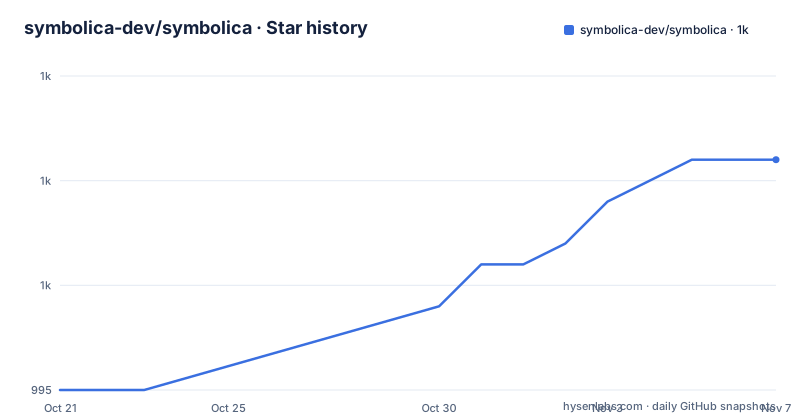
Star history
- symbolica-dev/symbolica1,006 ★ · +11
| Repository | 2026-10-21 | 2026-11-07 |
|---|---|---|
| symbolica-dev/symbolica | 995 | 1k |
11 Stars in the last 17 days, measured from the daily GitHub snapshot. Compare with other projects
Editorial analysis
One symbolic core, a Rust crate and a Python package
Symbolica is a computer algebra library for Python and Rust, and the repository layout shows the arrangement: a Rust crate named symbolica built with Cargo, a pyproject.toml that wraps the same code for Python through maturin, and a symbolica.pyi stub file for type checking. The description in both metadata files is blunt about the intent, a blazing fast computer algebra system, and the README frames it as a modern computer algebra library built for large expressions, symbolic rewrites, exact polynomial arithmetic and optimized numerical evaluators.
The two front ends are not two implementations. The Python package is the same symbolic core compiled and exposed through the python_api feature, with python_abi3 so the wheel is usable across Python versions. That matters for adoption, because a physics or mathematics group can prototype in Python without leaving the library when the work moves into Rust.
The project is not a hobby project with a hobby maintenance profile. The README names CERN and research groups at ETH Zurich, the University of Zurich, the University of Bern and the Karlsruhe Institute of Technology as users, and the version numbering is at 3.0.1 with a Development Status of 5 - Production/Stable in the Python metadata.
Feature flags pick the arithmetic backend, not the API
The Cargo feature list is where the real configuration decisions live, and they are not cosmetic.
Integer arithmetic is pluggable. The default feature integer-gmp pulls in rug for GMP-based integers, and an alternative integer-malachite selects the Malachite implementation instead. Floating point is the same story: float-mpfr is the default, and float-astro selects Astro. A wasm feature exists for the subset of features that compile to WebAssembly, and the comment next to it says default features have to be disabled for that build.
Allocation is a feature too. faster_alloc turns on mimalloc, and faster_alloc_dynamic_tls uses mimalloc with local dynamic thread-local storage, with a comment advising it as the fix if you hit thread-local space issues.
The reason this matters is that these switches change how numbers are represented and therefore what results mean and how fast they come out. A solver that behaves differently between two builds of the same version is a confusing bug report, so the flags are worth reading before you pick defaults for a production deployment.
Pattern matching for algebra that is yours, not the library's
The feature list calls out pattern matching and rewrites for domain-specific algebra, and the examples directory backs that up with dedicated files: pattern_match.rs and pattern_restrictions.rs sit alongside derivative.rs, expansion.rs, factorization.rs, collect.rs and polynomial.rs.
The idea is that general purpose algebra systems have a fixed set of known transformations, and a domain has its own. A lattice field theory code, a chemistry package or a signal model has rules that are specific to it, and expressing them as rewrite rules over matched patterns is often shorter and faster than writing the transformations by hand as function calls.
The same examples directory shows the breadth of the core: groebner_basis.rs, polynomial_gcd.rs, rational_polynomial.rs, rational_polynomial_exact_division.rs, partial_fraction.rs, partition.rs, optimize.rs, optimize_multiple.rs, dual.rs, numerical_integration.rs, nested_evaluation.rs, coefficient_ring.rs, builder.rs, fibonacci.rs, evaluate.rs and a fuel_backend.rs. Each one is a self-contained program against the public API, which is the fastest way to judge whether the library covers your problem.
The pendulum example: series, solve, evaluate
The README walks through a calibration problem, and it doubles as the first-use tutorial. Installing the Python package takes one command:
pip install symbolicaThe Rust equivalent is a single cargo line:
cargo add symbolicaThe example starts from a pendulum whose restoring torque is controlled by a scale kappa. Symbols are created with S, and the torque is derived from the potential:
from symbolica import *

θ, κ = S("θ", "κ")

V = κ*(1 - θ.cos())
τ = -V.derivative(θ)
A small-angle model comes from a series expansion, tau.series(θ, 0, 3), which expands the torque to third order in theta. The calibration then treats the scale and a sensor offset as unknowns, substitutes two measured angles with replace, and solves the resulting linear system with Expression.solve for kappa and the offset. The final step evaluates the fitted expression at the measured readings and takes the real part, which returns 4.905227655986509 for the values in the example.
That sequence is a good shape for a first session, because it touches symbols, differentiation, series, substitution, solving and numerical evaluation in one page.
Optimized numerical evaluators and code generation
Two of the listed capabilities are about leaving the symbolic world rather than staying in it.
The first is optimized numerical evaluators, listed with JIT, C++, SIMD, ASM and CUDA code generation. The default feature set includes native_code_generation, so the shipped build can already generate native code for a compiled expression rather than interpreting it. The examples directory has optimize.rs and optimize_multiple.rs, which is where you would look for what those flags actually change.
The second is mixed exact and numerical computation with error propagation, which is the feature that matters for anyone doing physics rather than pure mathematics. It lets a single expression carry exact parts and floating point parts at once, and the error carried along is the one that belongs to the numerical side rather than an error bar bolted on afterwards.
A third capability is streaming tools for expressions too large to keep in memory. Symbolic work on a physics-scale problem tends to produce intermediate expressions that dwarf the original statement, and a library that cannot stream them will exhaust memory long before it runs out of algebra.
WebAssembly is the alternative deployment, not a different core
The usual alternative to a native computer algebra library is a different library, or a hosted service. Symbolica offers a different axis: the same core compiled to WebAssembly, so symbolic computations can run directly in the browser.
The Cargo features make this a deliberate build configuration rather than an accident. The wasm feature selects the subset that compiles to WebAssembly, and it requires disabling the default features, because the default set includes GMP-backed integers, MPFR floats, mimalloc and native code generation, none of which fit a browser target comfortably. In its place the wasm path uses the Malachite integer backend and the Astro float backend, and a binary_size feature appears for trimming the build.
The project also ships a live Jupyter Notebook demo, so you can try the library in a browser before deciding whether to install it, and the documentation at symbolica.io/docs/ is the entry point for detailed installation instructions.
For a team that wants the same symbolic semantics on a server and in a notebook, that consistency is the real argument for the crate-plus-wheel arrangement.
A custom licence, a 3.x line and three spin-off projects
Licensing needs attention. The repository does not use a standard open source licence that GitHub can classify, and the terms live in a file called License.md. Both the Cargo.toml and the pyproject.toml point their licence field at that file, and the README sends you to symbolica.io for licensing and support information. Anyone evaluating the project for commercial use has to read that document directly, and nothing here is legal advice.
On the engineering side, the release cadence is steady. Version 3.0.1 is dated 2026-10-06, preceded by 2.2.0 on 2026-07-23 and 2.1.0 on 2026-06-21, and the last push to main was on 2026-10-19. The repository is not archived. The crate is edition 2024 and declares rust-version 1.96, so a Rust toolchain older than that will not build it.
The workspace also contains more than the library. The Cargo workspace has lib/numerica and lib/graphica as members, and the README points to numerica, graphica and symbolica-integrate as open-source spin-off projects developed on Zulip. The repository layout adds benches/, tools/, tests/, examples/ and a build.rs, so the performance work and the tooling live in the same tree as the code.
Editorial conclusion
Use Symbolica when you need symbolic work on expressions that are too large for a notebook-grade algebra system, especially in Python or Rust code that has to stay fast, and read License.md before you commit, because the terms are custom rather than a standard open source licence. Do not pick it for a small symbolic task where a simple CAS covers the job, and do not enable every default feature blindly, since the arithmetic backends change what your results mean. First check the Get Started page for the install path that matches your platform and the feature flags you actually need.
Frequently asked questions
How do I install Symbolica for Python and for Rust?
For Python the package comes from PyPI with pip install symbolica, and the wheel is built with maturin from the same Rust crate. For Rust you add the dependency with cargo add symbolica, and detailed instructions for both are on the Get Started page of the documentation.
What licence does Symbolica use?
The repository uses a custom licence stored in License.md, which is why GitHub cannot classify it as a standard licence, and both the Cargo.toml and the pyproject.toml point at that file. Licensing and support details are published on symbolica.io.
Does Symbolica run in the browser?
Yes. The Cargo feature set includes a wasm feature for the subset that compiles to WebAssembly, and it requires disabling the default features, so the browser build uses the Malachite integer backend and the Astro float backend. There is also a live Jupyter Notebook demo to try the library before installing it.
What is the latest version of Symbolica and what Rust does it need?
The current version is 3.0.1, released on 2026-10-06, and the last push to main was on 2026-10-19. The crate uses edition 2024 and declares rust-version 1.96, so older toolchains will not build it.
Official sources
Add this badge to your README
If you maintain this project, the badge below links readers to this analysis and shows its maintenance status from the daily GitHub snapshot. Paste the markdown into your README; add ?metric=license or ?metric=stars to the image URL for a different field.

[](https://hysenlabs.com/projects/symbolica-dev-symbolica)Star history chart for your README
[](https://hysenlabs.com/projects/symbolica-dev-symbolica)Was this useful?