microbin: a self-hosted paste bin where the config is the whole product
A secure, configurable file-sharing and URL shortening web app written in Rust.
At a glance
- What is it?
- A Rust web app that pastes text, serves files, redirects URLs and prints QR codes from one binary, configured entirely through environment variables. The interesting parts are where that simplicity costs you: an optional SQLite backend, an alpha crypto dependency, and an image with no shell.
- Who is it for?
- MicroBin fits a specific shape of use: one operator, one instance, a handful of environment variables, and uploads whose privacy comes from passwords rather than from unguessable links. Before you commit, check four things.
- Can I use it commercially?
- Yes. BSD-3-Clause is a permissive licence: you can use, modify and sell software built on it, as long as you keep its copyright and licence notices.
- Is it still maintained?
- Yes. The repository last received commits 68 days ago.
- What is it written in?
- Mainly Rust, according to GitHub's language statistics.
Answers come from the project's GitHub data, last synced on November 15, 2026, and from our analysis. They are not legal advice.
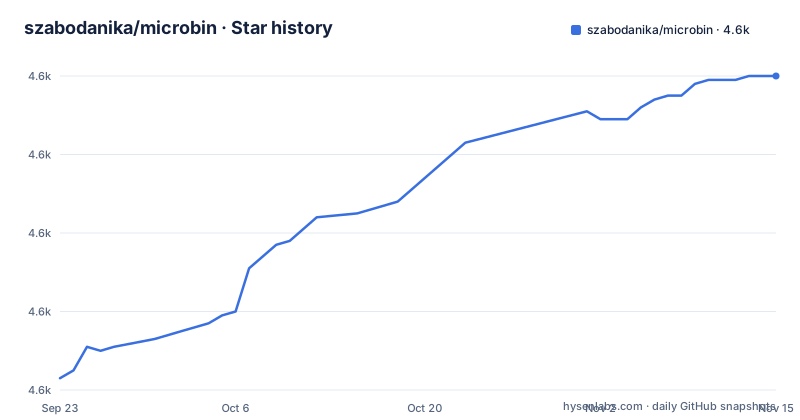
Star history
- szabodanika/microbin4,640 ★ · +77
| Repository | 2026-09-23 | 2026-11-15 |
|---|---|---|
| szabodanika/microbin | 4.6k | 4.6k |
77 Stars in the last 53 days, measured from the daily GitHub snapshot. Compare with other projects
Editorial analysis
One binary, and every setting arrives as an environment variable
MicroBin is a paste bin, a file host and a URL shortener in one executable. The feature list names uploads at `server.com/file/pig-dog-cat` and raw text at `server.com/raw/pig-dog-cat`, plus QR code support, URL shortening, multiple attachments and 64 animal names in place of random numbers. What glues all of that together is the configuration surface, and it is entirely environmental. The compose file enumerates it: MICROBIN_BASIC_AUTH_USERNAME, MICROBIN_BASIC_AUTH_PASSWORD, MICROBIN_ADMIN_USERNAME, MICROBIN_ADMIN_PASSWORD, MICROBIN_EDITABLE, MICROBIN_FOOTER_TEXT, MICROBIN_HIDE_FOOTER, MICROBIN_HIDE_HEADER, MICROBIN_HIDE_LOGO, MICROBIN_NO_LISTING, MICROBIN_HIGHLIGHTSYNTAX, MICROBIN_BIND, MICROBIN_PRIVATE, MICROBIN_PURE_HTML, MICROBIN_DATA_DIR, MICROBIN_JSON_DB, MICROBIN_PUBLIC_PATH, MICROBIN_SHORT_PATH, MICROBIN_READONLY, MICROBIN_UPLOADER_PASSWORD, MICROBIN_SHOW_READ_STATS, MICROBIN_TITLE, MICROBIN_THREADS and MICROBIN_GC_DAYS.
There is no config file format to learn beyond these variables, which is the appeal.
The binary comes from crates.io while the .env comes from master
The manual install path is four lines, and the second one is the interesting one:
cargo install microbin;
curl -L -O https://raw.githubusercontent.com/szabodanika/microbin/master/.env;
source .env;
microbin
`cargo install` resolves the published crate, which at version 2.1.4 is the one in Cargo.toml alongside the pin `rust-version = "1.88.0"`. The very next line does not come from that crate. It fetches `.env` from the raw URL of the master branch, which is the default branch for this repository, and a `.env` file is committed at the top level. The result is that the config you are running is whatever master holds today, not whatever matched the release you installed.
That gap is small and silent. It will not announce itself as a mismatch, it will simply apply defaults you did not write, and there is no version check in the path to catch it. If you want the two pinned together, you have to fetch the file at a tag yourself rather than take the documented line. The upside of shipping config this way is that a new install needs no config authoring at all: source the file and start the process.
The image runs as uid 65532 on a distroless base, so there is no shell to debug in
The Dockerfile builds on `rust:1`, installs ca-certificates and tzdata, and runs `CARGO_NET_GIT_FETCH_WITH_CLI=true cargo build --release`. The runtime stage then throws all of that away: `FROM gcr.io/distroless/cc-debian12`, copy the zoneinfo and the CA bundle across, copy the executable to `/usr/bin/microbin`, `USER 65532:65532`, `EXPOSE 8080`, `ENTRYPOINT ["/usr/bin/microbin"]`. Distroless means no package manager and no shell, so the usual reflex of execing in to poke at a broken container does not work here.
The uid is not a detail either. The compose file uses a named volume, and its comment spells out why: Docker initialises it from the image with the correct ownership, uid/gid 65532, so the nonroot user can write to it.
- microbin_data:/app/microbin_dataSwitch to a bind mount and you inherit the problem the named volume was hiding. The same comment gives the fix, creating the directory and chowning it to 65532 yourself.
Sixty-four animal names are the identifier space, not an unguessable token
Most paste bins lean on a long random identifier so that a link cannot be guessed. MicroBin goes the other way and substitutes animal names for random numbers, with the feature list specifying 64 of them. The example routes make the shape obvious: `pig-dog-cat` is a readable handle, not a 32 character string.
That is a deliberate trade and it changes where privacy has to come from. With a small, enumerable set of names, the URL itself is not a secret, so a paste is protected by the upload's own settings and by passwords rather than by obscurity. The surrounding configuration is what carries the weight: MICROBIN_PRIVATE, MICROBIN_READONLY, MICROBIN_UPLOADER_PASSWORD, MICROBIN_BASIC_AUTH_USERNAME and MICROBIN_BASIC_AUTH_PASSWORD, plus MICROBIN_NO_LISTING when you do not want the index page to advertise what exists. The postbox use case described in the feature list, where people can send you something without seeing or removing anyone else's, is built out of exactly these pieces.
The readability is worth something. A name you can say out loud over a call is a name you can verify. Just do not carry over the assumption that an unshared link is a private link.
SQLite is a compile-time decision while MICROBIN_JSON_DB is a run-time one
The feature list promises both SQLite and JSON database support, and Cargo.toml declares `rusqlite = { version = "0.32", features = ["bundled"], optional = true }`. Read the `optional = true` closely. It makes SQLite a compile-time choice rather than a runtime switch, so whether your build can open a SQLite database is decided when the binary is compiled, not when you set an environment variable. The `bundled` feature means the SQLite library is compiled in rather than linked from the system, which is what lets the single file claim hold.
The runtime switch that does exist is MICROBIN_JSON_DB. So the two backends are not peers at the settings level: one is a variable you can flip on a running instance, the other is a property of the artifact you downloaded from crates.io or pulled from Docker Hub. If you need SQLite and your build does not carry it, no amount of environment configuration will add it.
Confirm which features your build enables before you pick a storage backend.
rustls uses a custom provider, and the matching crypto crate is still alpha
Three lines in the dependency list carry an explicit warning comment: the rustls-rustcrypto version must support the rustls version, and the rustls version must match the one expected by reqwest. The pins are `rustls = { version = "0.23", default-features = false, features = ["custom-provider"], optional = true }` and `rustls-rustcrypto = { version = "0.0.2-alpha", optional = true }`, alongside `reqwest = { version = "0.12", ... }`.
A 0.0.2-alpha version number is the project telling you it is not finished. Both crates are optional, which means the TLS stack is a feature decision rather than a fixed part of the build, and the comment describes a three-way coupling between a transitive expectation inside reqwest and two direct pins. That is exactly the shape of dependency set that breaks on an unrelated upgrade: you pull a new patch of something, cargo re-resolves, and the versions that must agree no longer agree.
The consequence is scoped to whoever builds from source. For anyone running the published binary or the published image, this is invisible. For anyone auditing a self-hosted deployment that must build reproducibly, it is the line in Cargo.toml to read first.
Both server-side and client-side encryption are offered, and neither is named as the default
The feature list offers server-side and client-side E2E encryption as two capabilities of the same upload. What it does not do is say which one a new paste gets, or how you select the other. That gap matters because the two are not interchangeable in what they promise. Client-side encryption is the one where the server never holds readable content. Server-side encryption protects the data at rest and in transit but the server can still read it, which is a different promise from end-to-end.
The dependency list hints at the implementation without settling the question: `magic-crypt` at 3.1.13 for the encryption side, `harsh` at 0.2, `actix-web-httpauth` at 0.8.2 for the HTTP auth layer, and `qrcode-generator` at 4.1.9 for the QR feature. `rust-embed` at 8.3.0 sits alongside the templates directory at the top level, which is how a binary that advertises itself as a single file still serves HTML pages.
If encryption mode is the thing you are buying this for, resolve it in the interface before you rely on it, because the README does not resolve it for you.
Where MicroBin goes past a text-only paste bin
The project does not name any competing paste bin, so there is no stated comparison to reproduce. The feature list is where the difference shows instead. A text-only paste bin accepts a block of text and returns a link. MicroBin treats an upload as one of three things: text you want to move from one machine to another, files you want to share such as a video too large for a chat app or a zip holding a code project, or a URL redirection.
Raw text serving is the piece that changes what the application is for. Serving content at `server.com/raw/pig-dog-cat` turns the instance into a static host for configuration files used in testing, images, or any other file content, which is a different job from sharing a link with a colleague. QR code support, multiple attachments per upload, and automatic dark mode with custom styling built on vanilla JS and water.css fill in the rest.
For a reader deciding whether this replaces a hosted service: the deciding question is not features, it is who runs the box. The README describes one operator running one instance in a few megabytes of memory and disk storage, and it points at microbin.eu for the hosted version, a documentation guide and a roadmap.
Editorial conclusion
MicroBin fits a specific shape of use: one operator, one instance, a handful of environment variables, and uploads whose privacy comes from passwords rather than from unguessable links. Before you commit, check four things. Whether you are going to run the binary or the image, because the image gives you no shell to debug inside. Whether the SQLite backend is compiled into the build you are about to run, since rusqlite is an optional dependency and MICROBIN_JSON_DB is the only runtime switch. Whether you accept a rustls-rustcrypto dependency still at 0.0.2-alpha. And whether you want your .env pulled from master while your binary comes from a tagged crates.io release. If any of those is a problem, the single-file promise stops being an advantage.
Frequently asked questions
What is microbin?
MicroBin is a self-contained, self-hosted paste bin web application written in Rust that ships as a single file executable. It handles text pastes, file uploads, raw text serving, URL shortening and redirection, and QR code support, with SQLite or JSON storage and server-side plus client-side end-to-end encryption.
Is microbin better than privatebin?
The project's own documentation never names PrivateBin, so there is no comparison drawn there. What it states about itself: a single file Rust executable that adds URL shortening and redirection, QR code support, multiple attachments, raw file serving and 64 animal-name identifiers on top of pasting text and sharing files.
What is an alternative to microbin?
No alternative or competing paste bin is listed anywhere in the project's documentation. The reference points it does offer are its own hosted instance at microbin.eu, a guide and documentation section at microbin.eu/docs/intro, and a roadmap page.
Official sources
Add this badge to your README
If you maintain this project, the badge below links readers to this analysis and shows its maintenance status from the daily GitHub snapshot. Paste the markdown into your README; add ?metric=license or ?metric=stars to the image URL for a different field.

[](https://hysenlabs.com/projects/szabodanika-microbin)Star history chart for your README
[](https://hysenlabs.com/projects/szabodanika-microbin)Was this useful?