GPT Mobile keeps keys on the device, except when you open the Tools dialog
Chat app for Android that supports answers from multiple LLMs at once. Bring your own API key AI client. Supports OpenAI, Anthropic, Google, and Ollama. Designed with Material3 & Compose.
At a glance
- What is it?
- A Kotlin Android client that talks to five model providers at once and adds opt-in agent tools per profile, with a privacy claim that has one documented exception: opening a profile's tools list can reach every MCP server you have saved.
- Who is it for?
- GPT Mobile fits someone who wants one Android app for several providers and wants their keys stored in the Android Keystore rather than in a hosted service. It does not fit a user who expects opening a settings dialog to stay offline, since the tools discovery step can contact saved MCP servers with their credentials.
- Can I use it commercially?
- Yes, with conditions. GPL-3.0 is a copyleft licence: if you distribute software that includes it, you must release that software's source code under the same licence. Running it internally without distributing it does not trigger that obligation.
- Is it still maintained?
- Yes. The repository last received commits 1 day ago.
- What is it written in?
- Mainly Kotlin, according to GitHub's language statistics.
Answers come from the project's GitHub data, last synced on November 15, 2026, and from our analysis. They are not legal advice.
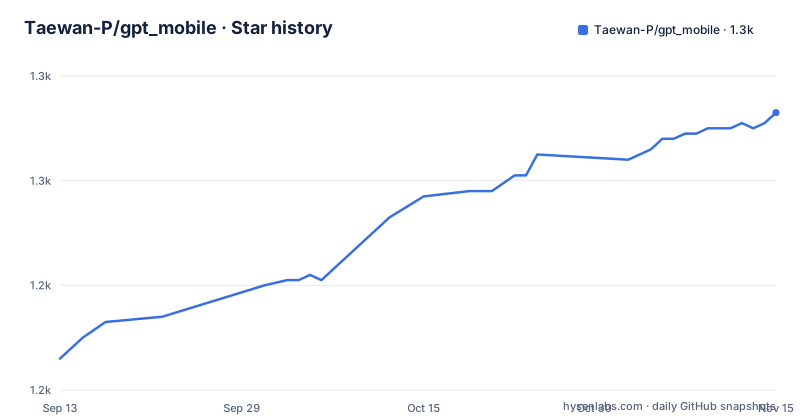
Star history
- Taewan-P/gpt_mobile1,273 ★ · +47
| Repository | 2026-09-13 | 2026-11-15 |
|---|---|---|
| Taewan-P/gpt_mobile | 1.2k | 1.3k |
47 Stars in the last 63 days, measured from the daily GitHub snapshot. Compare with other projects
Editorial analysis
Chat traffic is narrow, but the Tools dialog is not
The privacy story has two halves and they do not match. During an actual conversation, requests go only to the providers selected for that chat and to the tools assigned to it. That is the narrow half, and it is the one most people will notice. The other half is the Tools dialog: opening a profile's tools dialog may contact every saved MCP server for discovery, and it may include that server's bearer or OAuth credential while doing so. So the set of hosts contacted by the app is not the set a given conversation touches. For a user who has saved a dozen MCP servers across work and personal accounts, that matters, and it is not a defect so much as a consequence of discovery needing to ask each server what it offers. The saving grace is that server credentials are held separately from chat content and never leave the profile that owns them.
A profile stays chat-only until you hand it tools
Agent capability is opt-in at the profile level rather than global. Native tool calling is wired for OpenAI, for OpenAI-compatible endpoints including Groq, for Anthropic, and for Gemini, which is the same set as the chat providers with the OpenAI-compatible family folded together. The migration detail is the part worth planning around: profiles that already existed, and profiles created by the migration itself, remain chat-only until tools are explicitly assigned to them. Nobody's existing setup changes behaviour because a release added agents. Once tools are assigned, the runner supports parallel runs, keeps persistent traces of what happened, allows a run to be cancelled, and reports progress in the foreground, which is the set of things that separates a tool call from a blocking request. The traces are the reason to check the storage story before running long research jobs on a phone.
Three web search backends sit behind one hardened URL reader
Web access is not a single built-in scraper but a choice between three external services: Firecrawl, Perplexity, or Exa. Whichever one a profile points at, the reading of a fetched page is hardened, which is the project's word for the sanitising step between the model and whatever a page returns. That ordering is deliberate, because the failure mode of an agent with web access is not a bad summary but content from a page steering the next tool call. Choosing between the three providers is a trade the project leaves open rather than resolving: each has its own account, its own pricing, and its own failure modes, and the profile configuration is where that choice gets recorded. Nothing in the app bundles a search backend, so enabling web search always means adding an external dependency to the profile.
Each provider profile carries its own endpoint, model name, and sampling knobs
The multi-provider part is more than a provider picker. Each profile points at a platform's official API, and the model list covers OpenAI GPT, Anthropic Claude, Google Gemini, Groq, and Ollama, the last one covering local models without a hosted key. Custom API URLs and custom model names are accepted as well, so a self-hosted endpoint that speaks one of these protocols can be added without a code change. Sampling is per profile too: temperature and top p, labelled in the settings as nucleus sampling, are adjustable alongside the system prompt. Running several models at once means comparing their answers to the same prompt, and per-profile sampling settings are what keep that comparison honest, since two profiles left on different temperatures are answering different questions.
Keys are Keystore-encrypted and deliberately left out of backups
Credentials and history are handled separately. Keys are encrypted with the Android Keystore, which keeps the key material inside the platform's hardware-backed boundary rather than in an app-private file, and they are excluded from backup and export so a device-to-device transfer does not carry live credentials to the next phone. Chat history is described in the strongest available terms: only saved locally. Nothing in that sentence promises the history is encrypted at rest, and the Keystore claim is made about credentials, so a reader should not extend it to the transcripts. The distinction matters for anyone who treats a rooted or backed-up device as a risk, and it is the kind of thing to verify against the storage code before putting anything sensitive into a conversation.
GitHub Releases ship days ahead of the two stores
Three channels carry the build: F-Droid, Google Play, and GitHub Releases, all under the package identifier dev.chungjungsoo.gptmobile. The project's own guidance is that GitHub Releases is the fastest track, and the reason given is that there is no verification or auditing process on that channel, which the author puts at roughly a week of difference from the stores. That is the trade being made explicitly: an unvetted APK today, or a reviewed one a week or more later. Store builds also arrive later because review takes time, which is why cross-platform updates are supported at all. Someone who wants the newest agent features first should take the GitHub build and accept that nothing else about it has been checked, and someone who cannot should plan around a week of lag.
Agent instructions sit at the repository root next to the code
The tree is laid out like a working repository rather than a published library. Alongside the Gradle files and the app module there are AGENTS.md, CLAUDE.md, and CONTEXT.md at the top level, plus CODE_OF_CONDUCT.md and a .serena/ directory, which suggests the project expects automated agents to read it. Two data files stand out for anyone curious about how providers are described: model_catalog.json in the root and a metadata/ directory, which is presumably where store listings live. Documentation for the agent side is deliberately separated, with docs/agent-tools.md and docs/release-notes-v0.8.0.md named as the reference for tools, privacy, and security, the version 0.8.0 release being where the agent work landed. The app side is 100% Kotlin with Jetpack Compose and a single activity.
The presentation layer follows the platform rather than a fixed palette. Styling follows Material You, so icons and surfaces pick up the wallpaper-derived colours of the device, and system dynamic theming applies without restarting the activity, which is the part that would otherwise drop an in-progress conversation when the wallpaper changes. Dark mode is supported alongside it. Language is a per-app setting rather than a system-following one, and that option is gated to Android 13 and later, so on an older device the app follows whatever the system locale says and the in-app override is not offered.
There is still no contribution guide, and translations run through Weblate
Two process gaps are worth knowing before anyone sends a patch. The contribution guideline is not available yet, and the project says the maintainer will review submissions directly, so an outside contributor has no documented standard to meet and no test command to trust. Translations are handled through hosted Weblate, which is the path to take for a new language since the repository itself does not carry translated strings. Release cadence has been steady: v0.8.0 on 2026-08-18, v0.9.0 on 2026-09-09, and v0.9.1 on 2026-09-28, with the last commit on main on 2026-10-01. The app also appeared in Kotlin Weekly 431, which is the sort of exposure that brings feature requests, and the project answers those by asking for an issue.
Editorial conclusion
GPT Mobile fits someone who wants one Android app for several providers and wants their keys stored in the Android Keystore rather than in a hosted service. It does not fit a user who expects opening a settings dialog to stay offline, since the tools discovery step can contact saved MCP servers with their credentials. Before adopting it, decide which MCP servers you actually need saved, because the exception above applies to every one of them, and check that your provider's tool calling works through the profile rather than assuming the chat path covers it.
Frequently asked questions
Which model providers does GPT Mobile support?
OpenAI GPT, Anthropic Claude, Google Gemini, Groq, and Ollama, each reached through that platform's official API. Custom API URLs and custom model names are also accepted, so a self-hosted endpoint speaking one of these protocols can be added.
Does GPT Mobile send my chats or keys to a server?
Chat history is only saved locally, and credentials are encrypted with the Android Keystore and excluded from backup and export. During a chat, requests go only to the selected model providers and the tools assigned to that profile.
What can GPT Mobile's agent tools reach on the web?
Web search goes through Firecrawl, Perplexity, or Exa, with hardened URL reading on the fetched page. Native tool calling is supported for OpenAI, OpenAI-compatible endpoints including Groq, Anthropic, and Gemini.
Why would opening the Tools dialog contact my MCP servers?
The Tools dialog may reach every saved MCP server for discovery, and may include that server's bearer or OAuth credential while doing so. That is separate from chat traffic, which stays limited to the selected providers and assigned tools.
Where can I get GPT Mobile, and which channel is fastest?
It is on F-Droid, Google Play, and GitHub Releases under dev.chungjungsoo.gptmobile. GitHub Releases is the fastest because it has no verification or auditing step, with a difference the project puts at roughly one week against the stores.
Official sources
Add this badge to your README
If you maintain this project, the badge below links readers to this analysis and shows its maintenance status from the daily GitHub snapshot. Paste the markdown into your README; add ?metric=license or ?metric=stars to the image URL for a different field.

[](https://hysenlabs.com/projects/taewan-p-gpt-mobile)Star history chart for your README
[](https://hysenlabs.com/projects/taewan-p-gpt-mobile)Was this useful?