teamgram-server: MTProto 2.0 in Go with a narrow feature line
Unofficial open source mtproto server written in golang with compatible telegram client.
At a glance
- What is it?
- teamgram-server is an unofficial MTProto 2.0 server written in Go, carrying four transport variants, an API layer numbered 228 and four core features. What you do not get is Telegram parity: channels, bots, reactions, 2fa and secret chats sit in a paid edition, and every supported client is a patched fork.
- Who is it for?
- Adopt teamgram-server when you control the hardware and can accept private chat, basic groups, contacts and web as the whole feature surface, patched clients on every device, and a paid enterprise edition for channels, bots, reactions, 2fa and secret chats. Do not adopt it expecting Telegram parity or unmodified app-store clients.
- Can I use it commercially?
- Yes. Apache-2.0 is a permissive licence: you can use, modify and sell software built on it, as long as you keep its copyright and licence notices.
- Is it still maintained?
- Yes. The repository last received commits 80 days ago.
- What is it written in?
- Mainly Go, according to GitHub's language statistics.
Answers come from the project's GitHub data, last synced on October 22, 2026, and from our analysis. They are not legal advice.
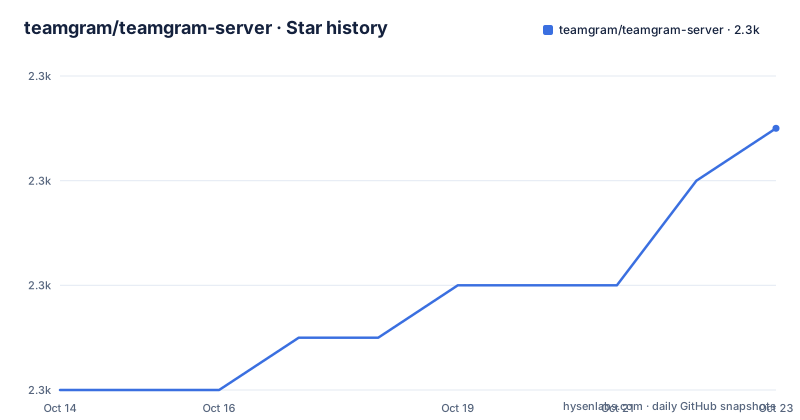
Star history
- teamgram/teamgram-server2,280 ★ · +4
| Repository | 2026-10-14 | 2026-10-22 |
|---|---|---|
| teamgram/teamgram-server | 2.3k | 2.3k |
4 Stars in the last 8 days, measured from the daily GitHub snapshot. Compare with other projects
Editorial analysis
The MTProto 2.0 server teamgram writes in Go
teamgram-server is an unofficial MTProto 2.0 implementation in Go, published so a Telegram-compatible server can run on hardware you control. The project carries no affiliation with Telegram, and that word unofficial is the first thing to hold on to: the wire protocol is the open part, and everything above the wire is teamgram's own design.
Transport support is broad. Four MTProto 2.0 framing modes are implemented, abridged, intermediate, padded intermediate and full, which is what lets a patched client choose according to its connection. Above framing, the API layer is numbered 228, and the module pins that number to a separate repository: `github.com/teamgram/proto v0.228.0`. Protocol definitions and server code therefore version independently, so a proto bump and a server build are two different upgrade decisions.
Plumbing is conventional Go infrastructure. Long-lived connections sit on `github.com/panjf2000/gnet/v2 v2.9.1`, an event-driven listener, while service-to-service calls run on go-zero v1.10.0 and gRPC v1.65.0. Messages serialize as protobuf v1.36.11, uploaded media goes through `github.com/minio/minio-go/v7 v7.0.49`, and traces leave through OpenTelemetry v1.24.0, which is what makes the Jaeger and Zipkin exporters in the configuration layer work at all. Phone numbers are parsed with `github.com/nyaruka/phonenumbers v1.6.11` and IP lookups through `github.com/oschwald/geoip2-golang v1.8.0`, the two dependencies that turn a protocol server into something that talks to carriers. None of this is exotic. Every piece is an existing open-source library rather than something teamgram had to invent to accept a socket.
Four transport modes against a four-item core feature list
Read past the protocol claims and the feature surface is four items: private chat, basic group, contacts and web. That list is what the open repository implements, and neither 228 API methods nor four framing modes say anything about the rest.
The rest of Telegram sits in the enterprise column. Sticker, theme, chat_theme, wallpaper, reactions, secretchat, 2fa, sms, `push(apns/web/fcm)`, scheduled and autodelete are all listed there, together with channels and megagroups, audio, video, group and conferenceCall, bots, and miniapp. `specs/roadmap.md` is the file that draws the line between community and enterprise scope, which is the first document to read before sizing a deployment.
That distinction matters because transport completeness buys framing, not coverage. A connection can complete a full-mode handshake and still meet a method the client needs that nobody implemented. Secret chats, two-factor authentication and push delivery are the omissions with operational weight: without 2fa an account has one factor and no second-device prompt, without apns and fcm the notification path has to be rebuilt by other means, and without secretchat there is no end-to-end secret channel at all. A team that reads full MTProto 2.0 as Telegram will budget for features this repository does not carry.
Patched clients, a fixed code, and no stock Telegram app
Compatible with Telegram clients is the phrase used, and the table that follows narrows it sharply. Every entry is a fork: teamgram-android, teamgram-ios and teamgram-tdesktop, each paired with a patch note under `clients/` that records what was changed to send the app at your own server. No stock app-store build appears in that table, and the documentation offers no host setting that would turn an official client into a working Teamgram client.
That gap is the largest operational difference from a hosted deployment, and it is structural rather than configurable. Clients carry their datacenter endpoints inside the binary, so redirecting one means rebuilding the app, which is why the project ships a patched repository per platform instead of a single configuration value. Anyone handing a phone to a user installs a fork, and on Android that means allowing an install from an unknown source for a build no store has reviewed.
Sign-in then runs against a fixed verification code. The default is `12345`, with a one-line note to change it for production. Taken literally, a deployment shipping the default hands the same code to any client that reaches the code endpoint with a plausible number, so this is the first value to replace, and the documentation never names the configuration key where it lives.
Go 1.21+ in the notes against go 1.23.0 in the module
Manual installation says Go 1.21+. The module disagrees: go.mod opens with `go 1.23.0`, and the Dockerfile builds FROM `golang:1.23.0` before copying the compiled output into an ubuntu:latest image. Two of three build inputs contradict that documented floor, and the module directive is the one that binds, since an older toolchain rejects a higher `go` directive outright instead of degrading quietly. Treat 1.23.0 as the real minimum and ignore the 1.21+ line.
Build entry points are visible but thin. The root file list shows `Makefile`, `Makefile.teamgram`, `build.sh` and `dalgenall.sh`, and the Dockerfile's only compile step is a call to that build script, so flags and version stamping are decided inside a file the top-level listing does not show.
Dependency currency is a better maintenance signal than version numbers here. go-zero sits at v1.10.0, gRPC at v1.65.0, and the indirect block reaches down to go-systemd v22.5.0, so a fix to a transitive library means a rebuild rather than a restart. The repository carries an Apache-2.0 licence, and the last push to master landed on 2026-08-04; the newest of the three published builds, v0.90.4, dates from 2023-03-14, which leaves a gap between what a version number promises and what master actually holds.
First run with two compose files instead of a manual build
Two compose files cover the whole stack, and the Docker route exists to remove one specific chore: manual data initialization. MySQL, Redis, etcd, Kafka and MinIO come up in the first file, the database is created from mounted SQL, and object storage buckets are made with `minio-mc` on first start.
Clone the repository, start the dependency stack, then start the application:
git clone https://github.com/teamgram/teamgram-server.git
cd teamgram-serverdocker compose -f docker-compose-env.yaml up -ddocker compose up -dThe first command returns once the dependency services are up; the second builds the image locally, because the compose file says `build: .`, and starts the server with `restart: always`, so a crash comes back on its own. Nothing is pulled as a published teamgram image, and the compose file pins no version of the server, which means you are always building master.
After step three the mapped ports are listening on the host, and the next real action is a sign-in from a patched client using the default code. Nothing else needs seeding by hand, which is the whole argument for this route. The manual path, documented separately for Linux and for macOS, inverts every one of those steps: install and configure MySQL, Redis, etcd, Kafka, MinIO and FFmpeg yourself, initialize the database and the buckets, then compile with Go. Choose the manual guides when you need to pin dependency versions or spread services across hosts, because the compose file keeps them together on one bridge network and maps them all to the host.
Fifteen host ports published on one bridge subnet
The application compose file publishes fifteen host ports, and that number deserves attention before anything else in the deployment:
    ports:
      - "10443:10443"
      - "11443:11443"
      - "20450:20450"
      - "20010:20010"
      - "20020:20020"
      - "20640:20640"
      - "20110:20110"
      - "5222:5222"
      - "8801:8801"
Two pairs are the TLS-shaped 10443 and 11443, 5222 sits on its own, and the remaining twelve carry the team's own numbering with 20450 among them. The file does not label what any of them carries. Short-syntax mappings with no host address in front of them bind on every interface of the host, so a host with a public address exposes the entire set rather than only the MTProto listener.
Which port carries which service is not in the compose file, and the README does not map them either. That mapping belongs to `docs/service-topology.md`, which the documentation presents as ports, infrastructure dependencies, call graph and a diagram, while `specs/architecture.md` covers the topology itself. Read both before choosing a firewall, because the compose file alone cannot tell you which mappings to keep closed.
Addressing is equally blunt: one bridge network named `teamgram_net` on subnet `172.20.0.0/16`, with a single application service attached to it. There is no internal separation between the data stores and the protocol server in this layout, which is the structural reason those host-side bindings matter.
The logging chain needs components the prerequisites omit
Observability is where the infrastructure list and the logging pipeline disagree. The prerequisites table names MySQL, Redis, etcd, Kafka, MinIO and FFmpeg, and the logging row then describes a chain needing more: Filebeat collects, logs travel into Kafka on topic `teamgram-log`, go-stash writes them onward to Elasticsearch, and Kibana is where you read them. Elasticsearch and Kibana are not in the prerequisites table. Configuration lives at `teamgramd/deploy/filebeat/conf/filebeat.yml` and `teamgramd/deploy/go-stash/etc/`, so the chain is assembled by hand instead of by compose.
The Kafka instance listed as the message and event pipeline is also where the log topic goes, which means log traffic and user traffic share a broker if you enable logging on the same deployment. That is a capacity decision, and `specs/dependencies-and-runtime.md` is the file recording detailed versions and the optional monitoring stack.
Metrics and traces cost less to turn on because they ride configuration keys. Prometheus scrapes the services and Grafana draws the dashboards once you enable the `Prometheus` block in `teamgramd/etc2/*.yaml`, with scrape configuration at `teamgramd/deploy/prometheus/server/prometheus.yml`. Tracing uses the go-zero Jaeger and Zipkin exporters through a `Telemetry` entry in the same directory, and Jaeger already ships inside `docker-compose-env.yaml`, so link tracking needs a flag in a config file rather than another service to install. Monitoring is opt-in and cheap to skip. Logging is opt-in and expensive to get wrong, since without Filebeat no path exists from container output to a searchable store.
Four committed default passwords in .env.example
The environment template is the shortest route to a running stack and the easiest place to ship someone else's credentials. Copying it yields accounts whose passwords are the vendor default or the word admin:
MYSQL_ROOT_PASSWORD=root
MYSQL_DATABASE=teamgram
MYSQL_USER=teamgram
MYSQL_PASSWORD=teamgram
MINIO_ROOT_USER=minio
MINIO_ROOT_PASSWORD=miniostorage
GRAFANA_ADMIN_USER=admin
GRAFANA_ADMIN_PASSWORD=admin
GRAFANA_ROOT_URL=http://localhost:3000
`MYSQL_ROOT_PASSWORD=root` and `GRAFANA_ADMIN_PASSWORD=admin` are values that survive review because the file reads like documentation rather than configuration. On a host reachable from anywhere, those pairs are enough to read and rewrite user rows, replace stored media in MinIO, and repoint dashboards. They are fine on a laptop and unacceptable anywhere the fifteen mappings in the compose file can be reached.
Redis, etcd and Kafka get no entries in the template at all, which leaves their access settings at whatever those services default to with nothing tracked to review. Add a compose file that publishes every mapping on every interface and this repository becomes quick to start and unforgiving to expose unchanged. Replace each value before the first `docker compose -f docker-compose-env.yaml up -d` on a host that has an address, and re-check the template for new gaps every time the stack is rebuilt.
Editorial conclusion
Adopt teamgram-server when you control the hardware and can accept private chat, basic groups, contacts and web as the whole feature surface, patched clients on every device, and a paid enterprise edition for channels, bots, reactions, 2fa and secret chats. Do not adopt it expecting Telegram parity or unmodified app-store clients. Verify three things before the first deploy: the Go 1.23.0 module floor rather than the documented 1.21+, what the fifteen published ports in docker-compose.yaml actually map to, and every password in .env.example.
Frequently asked questions
Can I use the official Telegram apps with teamgram-server?
No. Every client in the compatible table is a teamgram fork, teamgram-android, teamgram-ios or teamgram-tdesktop, and each one has a patch note under `clients/` describing the change that redirects the app to your own server. No configuration value turns an unmodified app-store build into a working client.
What is the default sign-in verification code in teamgram-server?
`12345`, with a note to change it for production. The README does not name the configuration key that holds it, so finding where to replace it means reading the server configuration yourself.
Which Go version does teamgram-server need to build?
go.mod declares `go 1.23.0` and the Dockerfile builds FROM `golang:1.23.0`, while the manual installation notes say Go 1.21+. The module directive is stricter than the prose, so 1.23.0 is the safe floor.
What has to be running before teamgram-server starts?
MySQL 5.7+ or 8.0, Redis, etcd, Kafka, MinIO and FFmpeg, according to the prerequisites table. The Docker route brings them up with `docker compose -f docker-compose-env.yaml up -d` and initializes the database and the MinIO buckets on first start.
Which Telegram features are in the open source teamgram-server edition?
Private chat, basic group, contacts and web. Channels, megagroups, bots, miniapp, reactions, secret chats, 2fa, sms, push delivery and audio or video calls are listed under the enterprise edition, with `specs/roadmap.md` marking the boundary between the two.
How do I turn on metrics and tracing in teamgram-server?
Enable the `Prometheus` block in `teamgramd/etc2/*.yaml` for scraping and Grafana dashboards, and add a `Telemetry` entry in the same directory for go-zero Jaeger or Zipkin tracing. Elasticsearch and Kibana, which the Filebeat logging chain needs, are absent from the prerequisites table.
Official sources
Add this badge to your README
If you maintain this project, the badge below links readers to this analysis and shows its maintenance status from the daily GitHub snapshot. Paste the markdown into your README; add ?metric=license or ?metric=stars to the image URL for a different field.

[](https://hysenlabs.com/projects/teamgram-teamgram-server)Star history chart for your README
[](https://hysenlabs.com/projects/teamgram-teamgram-server)Was this useful?