techgaun/github-dorks hunts committed secrets with GitHub code search and can run entirely offline
Find leaked secrets via github search
At a glance
- What is it?
- A Python command line tool that runs a dictionary of search queries against one repository or a whole organization, and that also reads your own working tree with no credentials and no network. The only release tag is from 2016, exit code 2 means some queries failed rather than the run being over, and nothing in the tool checks whether the account you point it at is yours.
- Who is it for?
- github-dorks earns its place as an audit tool for a repository or an organization you are responsible for, and the offline mode is the part most people underrate: it applies the same dictionary to tracked and non-ignored untracked files without touching the network or asking for a token. Before using it against anything else, notice what the tool does not do.
- Can I use it commercially?
- Yes. Apache-2.0 is a permissive licence: you can use, modify and sell software built on it, as long as you keep its copyright and licence notices.
- Is it still maintained?
- Yes. The repository last received commits 68 days ago.
- What is it written in?
- Mainly Python, according to GitHub's language statistics.
Answers come from the project's GitHub data, last synced on November 21, 2026, and from our analysis. They are not legal advice.
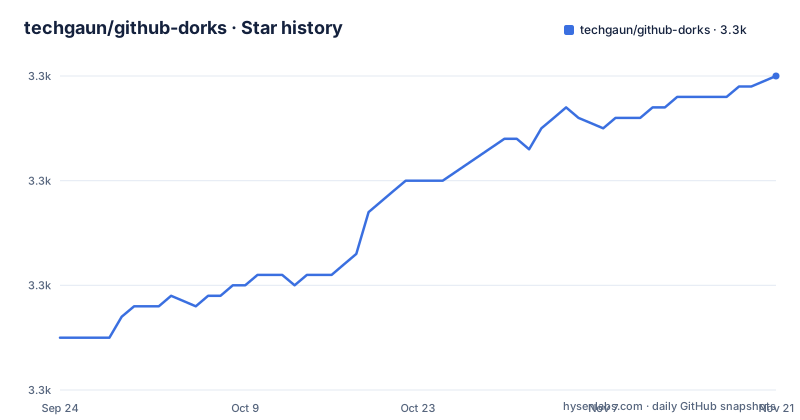
Star history
- techgaun/github-dorks3,310 ★ · +25
| Repository | 2026-09-24 | 2026-11-21 |
|---|---|---|
| techgaun/github-dorks | 3.3k | 3.3k |
25 Stars in the last 58 days, measured from the daily GitHub snapshot. Compare with other projects
Editorial analysis
The only release tag is dated September 2016
There is one release, 0.1, named Initial Release and published 2016-09-08, against a repository whose default branch main was last pushed on 2026-09-15. Ten years separate those two dates. The tag is also not what identifies a version of the installed package, because pyproject.toml takes the version dynamically from an attribute in the package itself, github_dorks.__version__, and never hardcodes it. A Git tag can identify a repository revision, but it does not by itself establish which code a particular pip installation resolves to. What the repository does carry is a CI matrix covering Python 3.10 through 3.13, matching the requires-python floor of 3.10 in pyproject.toml, which is a better description of the current support window than the tag is.
Exit code 2 means queries failed, not that the run was clean
The tool documents three exit codes, and the middle one is the one to know about. Zero is a complete scan. Two is returned when one or more queries failed while others ran. One covers fatal configuration, file or authentication errors. A wrapper that only tests for zero therefore treats a run where most queries succeeded and some were rejected as a failure, and a wrapper that treats any non-zero as failure cannot tell a bad token from a rate limit. Each scan also ends with a summary of queries, matches, failures, retries and elapsed time, so the counts in that summary are the more precise signal than the exit code. Verbose mode prints every query as it runs, which is the way to find which dork is being rejected.
Search needs credentials, local scanning does not
Four environment variables configure the remote side: GH_USER and GH_PWD for username and password, GH_TOKEN for a token, and GH_URL for a GitHub Enterprise base URL. All four are documented, and the README recommends a token over a password in its own Docker examples. The limitations section is blunt about what that buys you: authenticated requests receive higher rate limits, searches may pause until GitHub resets the search limit, and large category combinations take time because GitHub applies a separate search rate limit on top of that. So a scan against a large organization is not a function of your network or your machine but of a quota that belongs to someone else. That is also why the offline path is worth knowing about rather than treating as a convenience.
Offline scanning reads the working tree and never the history
Local scans require no GitHub credentials and no network access at all. Inside a Git working tree the scanner checks tracked files plus untracked files that are not ignored; anywhere else it walks the directory tree and excludes .git. It parses the same dictionary syntax as the remote mode, including quoted text, OR, NOT, and the filename:, path:, extension: and language: qualifiers, so a pattern behaves the same either way. Binary files are skipped, and so is anything over 1 MB unless --max-file-size raises the limit in bytes, so that ceiling is a count of bytes rather than of lines. The gap that matters is written down under limitations: offline scanning inspects the current working tree only, and Git history scanning is not yet supported. A secret that was committed and then deleted may remain in retained history, which this scan does not inspect.
Ten category files and one generated aggregate
The bundled dictionary is split into ai, cloud, databases, devops, frameworks, identity, observability, private-keys, saas and system. Repeating -c/--category combines them, and passing none falls back to the backward-compatible github-dorks.txt aggregate, which contains every category. That aggregate is not hand maintained: it is generated from the category files by scripts/build-dorks.py, and the canonical dictionaries are the categorized files under github_dorks/dorks. Two packaging details make this work outside a source checkout. github-dorks.txt is declared as a data file in pyproject.toml, and the per-category text files are declared as package data, so both travel with the wheel. Editing the aggregate by hand works until the next regeneration overwrites it. The repository root carries both pyproject.toml and a setup.cfg, and a file named github-dorks-test.txt sits next to the generated aggregate itself.
Output is CSV unless you ask for something else
Four result formats are supported, text, csv, json and jsonl. Text is the default for terminal output, but using -o/--output without --format preserves the historical CSV default, which is a quiet trap for scripts written against older versions: adding an output path changes the file format. Existing files are protected unless --force is passed, so a rerun over yesterday's results fails instead of silently replacing them. --quiet suppresses progress and the summary, --verbose prints every query as it runs, and status messages go to stderr, which is why structured stdout stays machine-readable while the console still shows what happened. That split is the reason the tool can be piped into a parser without first filtering chatter.
The image pins Python 3.12 while the matrix runs 3.10 to 3.13
The Dockerfile starts from python:3.12-slim, sets the work directory to /app, copies four paths, github_dorks, github-dorks.txt, pyproject.toml and README.md, installs with pip install --no-cache-dir ., sets PYTHONUNBUFFERED and PYTHONIOENCODING, declares /app/output as a volume and uses github-dorks as the entrypoint. Pinning the interpreter in the image while the test matrix covers 3.10 to 3.13 means the shipped container is only ever exercised on one of the four supported versions. The output volume is why the README's save-results example mounts $(pwd)/output to /app/output. Outside Docker the same suite runs dependency-free through the standard library:
python -m unittest discover -s tests -vThe legacy entry point python github-dork.py also still works, and the package runs as python -m github_dorks.
Nothing in the tool checks whether the target is yours
This is the part to weigh before pointing it anywhere. The flags take a single repository as -r owner/repo or every repository of a user or organization as -u name, and the README's own examples use the author's handles. There is no per-target authorization check, no dry-run mode, no allowlist and no confirmation step, so the tool will enumerate any account named, on github.com or on whichever instance GH_URL points at. The published patterns make that sharper rather than softer: they look for .npmrc and .dockercfg authentication data, private keys by extension, id_rsa and id_dsa, aws_access_key_id inside credentials files, wp-config.php, .htpasswd and .git-credentials. Two rows come with the README's own warning that dummy values produce false negatives, and one suggests adding NOT username for more valid results, which is noise reduction rather than accuracy.
Editorial conclusion
github-dorks earns its place as an audit tool for a repository or an organization you are responsible for, and the offline mode is the part most people underrate: it applies the same dictionary to tracked and non-ignored untracked files without touching the network or asking for a token. Before using it against anything else, notice what the tool does not do. It has no per-target authorization check, no dry-run and no allowlist, so -u and -r will enumerate any account you name, including a GitHub Enterprise instance pointed at with GH_URL. Offline scans also stop at the working tree, since history scanning is not supported, so a removed secret may remain in retained Git history and require a separate history scan. And read the exit codes before scripting it: 2 means queries failed while others succeeded, which a wrapper that only tests for success will misreport.
Frequently asked questions
Does github-dorks need a GitHub token to run?
Only for remote search. GH_USER with GH_PWD, or GH_TOKEN, or GH_URL for a GitHub Enterprise instance. Local scans need no credentials and no network access, and inside a Git working tree they read tracked files plus untracked files that are not ignored.
What does exit code 2 mean in github-dorks?
One or more queries failed while others ran, so the scan is partial. Zero is a complete scan and one is a fatal configuration, file or authentication error. Each run also prints a summary of queries, matches, failures, retries and elapsed time.
Can github-dorks find a secret that was committed and later removed?
No. Offline scanning inspects the current working tree only, and history scanning is not yet supported, so a secret deleted in a later commit is not visible to the local mode.
Which output formats can github-dorks write?
text, csv, json and jsonl. Text is the default for terminal output, while -o/--output without --format keeps the historical CSV default. Existing files are protected unless --force is passed.
How are the dork categories combined in github-dorks?
Repeat -c/--category to combine them, and with no category the command falls back to the github-dorks.txt aggregate, which is generated from the category files by python scripts/build-dorks.py.
Official sources
Add this badge to your README
If you maintain this project, the badge below links readers to this analysis and shows its maintenance status from the daily GitHub snapshot. Paste the markdown into your README; add ?metric=license or ?metric=stars to the image URL for a different field.

[](https://hysenlabs.com/projects/techgaun-github-dorks)Star history chart for your README
[](https://hysenlabs.com/projects/techgaun-github-dorks)Was this useful?