Telegram.Bot: the tests are the documentation, and the releases stopped in 2025
.NET Client for Telegram Bot API
At a glance
- What is it?
- Telegram.Bot is a .NET client for the Telegram Bot API, maintained by the Telegram Bots contributor team and published as a set of packages. What its README is good at is boundaries: it says plainly that the bot interface is not the whole platform, points you to somebody else's project for the rest, and treats its own test cases as the reference for each method.
- Who is it for?
- Telegram.Bot fits a .NET team building anything on the platform's bot interface, since it is maintained by the Telegram Bots contributor team, published as a normal package, and documented well enough that the tests serve as examples. Three things to plan around.
- Can I use it commercially?
- Yes. MIT is a permissive licence: you can use, modify and sell software built on it, as long as you keep its copyright and licence notices.
- Is it still maintained?
- Yes. The repository last received commits 6 days ago.
- What is it written in?
- Mainly C#, according to GitHub's language statistics.
Answers come from the project's GitHub data, last synced on November 15, 2026, and from our analysis. They are not legal advice.
Star history
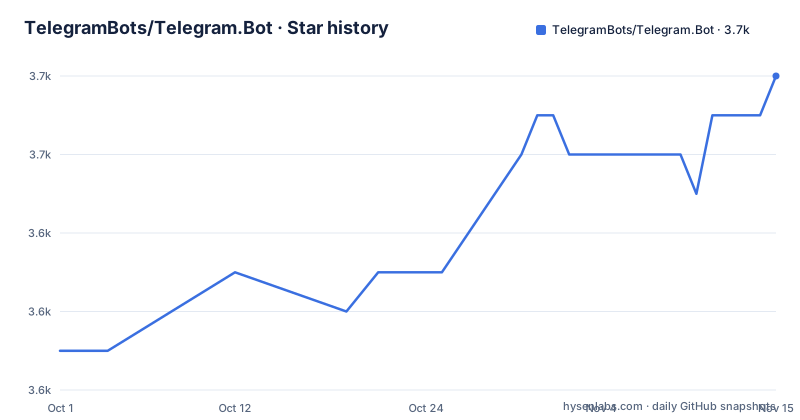
- TelegramBots/Telegram.Bot3,652 ★ · +7
| Repository | 2026-10-01 | 2026-11-15 |
|---|---|---|
| TelegramBots/Telegram.Bot | 3.6k | 3.7k |
7 Stars in the last 45 days, measured from the daily GitHub snapshot. Compare with other projects
Editorial analysis
It wraps the bot interface only, and the readme points elsewhere for the rest
The scope statement is the first thing worth reading, because it is the kind of thing a client library usually blurs.
The project is described as a client for an HTTP-based interface that the platform created for developers building bots. That interface is for bots. It is not for acting as a user.
And the file says so, in a callout near the top. If that interface is too limited for your use case, the readme says, you can try an implementation of the platform's client interface written entirely in the same language, and it links to a repository belonging to somebody else.
So the boundary is clean and it is stated by the maintainers rather than discovered by a user. Anything that needs to read and send messages as an account, rather than as a bot you registered, is out of scope here and is pointed at a third-party implementation.
Two other framing details in the same section. The readme claims to be the most popular client in its language, which is a popularity claim rather than a technical one. And the team describes itself as focused on developing several packages for building chatbots, plural, which is why the extension packages exist at all.
Three target frameworks, two of them as floors and one recommended
The supported platforms section is one sentence, and it contains three framework targets rather than one.
The project targets the cross-platform specification at version 2.0, and one current runtime version, both as minimums. A newer runtime is recommended.
That is a deliberate two-tier answer, and it is what lets a single package serve both a long-lived service on an older framework and a new project on the current one. The cost is on the maintainers, who cannot use APIs newer than the oldest floor without conditional code or dropping support, and on you, if your own project targets something newer than the recommended runtime you are compiling against a lower floor than you could have.
Two things are absent from that section and are worth noticing. There is no platform list beyond the frameworks, because the package is managed code with no native components to worry about. And there is no statement about which runtime versions are tested rather than merely supported, which is the gap a reader has to fill from the build configuration.
The test cases double as the per-method documentation
The correctness section makes an unusual claim and then explains why it is reasonable.
It says the project is fully tested with unit tests and systems integration tests before each release. Then the interesting sentence: the test cases are self-documenting and serve as examples for the interface's methods. Once you learn the basics, the readme says, you will be able to understand the code in the examples and use it in your own projects.
That is a design decision rather than a boast. In a client library whose surface area is a few hundred remote methods, the tests are the only place where each method appears with realistic arguments, and they cannot drift from the implementation because they call it.
The second claim is the one to be careful about. Integration tests running before each release means the library's own CI exercises the live platform, which is a form of continuous compatibility testing with somebody else's service. It also means the suite needs network access and a bot token, which is not a cost a fork inherits quietly.
For a reader, the practical consequence is that the examples repository and the test suite are where you should look first, ahead of the prose documentation.
A core package that is always required, and two optional extensions
The extension packages section is short and states the dependency rule first.
The project calls itself the core package and says it is always required for developing bots. Then it lists the extensions you can add for additional functionality, and there are two.
One is named for a login widget and one for the platform's identity passport product. So the split is functional: the core is the bot interface client, and the extensions cover the two areas where the platform has something extra to offer a bot, both of which sit outside ordinary message handling.
The naming convention is worth noting because it is a namespace convention rather than a product name: the extensions carry the core package's name as a prefix, so a project referencing all three has three similarly shaped package identities.
Two packages is a small number, and it is a useful signal about the surface. The team describes itself as focused on producing several packages, and the visible result is a core client plus two additions, with everything else expected to live in the consuming project.
Continuous integration runs on one hosted service, for two branches
The badges at the top of this README tell you the build story more precisely than the prose does.
Among them are two build-status badges pointing at the same hosted build service, and they are not duplicates. One points at a build definition for the master branch and the other at a different definition for the develop branch.
So the project runs two pipelines on two long-lived branches, which is the standard arrangement for a library that wants a stable line and a next line. It also means the default branch you land on may not be the one whose tests gate releases.
The repository tree agrees with the badges and not with the usual convention. There is a directory for those pipelines at the root, and the contributor-facing GitHub directory sits beside it for the parts that live on the forge.
For local development there is a dev container configuration, which means someone cloning the repository can get a working build environment without assembling a runtime version by hand, and that matters for a package whose lowest supported framework is several versions behind the current one.
The release line stopped in February 2025 while the branch kept moving
The release history is the fact to plan around, and it is three entries.
Two of them are eight days apart in the same month, and the third is a fortnight later. All three are patch increments in the same minor line, and none of them is a minor or major release.
That is the last published version, dated February 2025. The default branch was pushed at the end of September 2026, so there are commits on the tip that no published version contains.
For a package like this one, the gap has two causes worth separating. The interface it wraps changes when the platform changes it, and a client library that tracks a remote API tends to publish when the API moves. The other cause is ordinary maintenance drift on a codebase nobody is paid to rush.
What that means for you is simple and worth stating: install a released version rather than tracking the branch, read the changelog before upgrading, and if you need something newer than the last published build, you are building from source and you own that.
The readme ends with a memorial note, and the tree carries third-party notices
Two details at the end of the file are worth reporting because they are the kind of thing a package's readme usually omits.
The first is a note, placed after a commented-out section marker so it is the last thing a reader sees. It is a tribute: the team thanks a named contributor for his work on the project and the community, and says goodbye to him.
An open source project carrying that is telling you something about how it handles loss, and the placement means it stays there deliberately rather than until someone edits the file.
The second is in the tree. Alongside a licence file there is a third-party notices file, which is the record of what is redistributed inside the package rather than declared as a dependency. For a client library that wraps a remote service, that file is how you answer the question of what actually ships in your build.
The rest of the tree is conventional for the language: a solution file, a shared build properties file applied across the projects, a documentation directory, a source and a test directory, and a package icon asset committed at the root rather than generated at build time.
Editorial conclusion
Telegram.Bot fits a .NET team building anything on the platform's bot interface, since it is maintained by the Telegram Bots contributor team, published as a normal package, and documented well enough that the tests serve as examples. Three things to plan around. The scope is the bot interface only; anything needing a user account rather than a bot token is delegated by the README to a different project written in the same language. The package targets two framework floors and recommends a newer one, so your project's target framework decides what you can use. And the newest published version is from February 2025 while the default branch has moved since, so pin the version you build against and read the changelog rather than tracking the branch.
Frequently asked questions
What does Telegram.Bot do?
It is a client for the platform's HTTP-based bot interface, covering the methods that interface exposes. The README describes it as the most popular client of its kind in that language and is published as a package with optional extensions.
Which .NET versions does Telegram.Bot support?
It targets the cross-platform specification at version 2.0 and one current runtime version as minimums, and recommends a newer runtime. The README does not distinguish between versions that are supported and versions that are tested.
Can Telegram.Bot act as a Telegram user rather than a bot?
Not through this package. The README says that if the bot interface is too limited, you should try an implementation of the platform's client interface written entirely in that language, and it links to a repository maintained by somebody else.
What extension packages does Telegram.Bot have?
Two, both named with the core package as a prefix: one for a login widget and one for the platform's identity passport product. The core package is described as always required for developing bots.
How recent is the published Telegram.Bot package?
The three most recent releases are patch increments in one minor line, all from February 2025. The default branch was pushed in late September 2026, so the branch is ahead of the last published version.
Official sources
Add this badge to your README
If you maintain this project, the badge below links readers to this analysis and shows its maintenance status from the daily GitHub snapshot. Paste the markdown into your README; add ?metric=license or ?metric=stars to the image URL for a different field.

[](https://hysenlabs.com/projects/telegrambots-telegram-bot)Star history chart for your README
[](https://hysenlabs.com/projects/telegrambots-telegram-bot)Was this useful?