DOM Testing Library ships a placeholder version and targets Opera Mini in browserslist
🐙 Simple and complete DOM testing utilities that encourage good testing practices.
At a glance
- What is it?
- MIT-licensed DOM query utilities for tests, distributed as four build outputs with a Node 18 floor. The version field in the package manifest is a placeholder that a release tool overwrites, the type definitions are produced by a separate command rather than by the build, and the browser support list reaches back to iOS Safari 12 and feature phones.
- Who is it for?
- DOM Testing Library is the right tool when your tests are failing on implementation details instead of on behaviour, because the whole design is built around querying the DOM the way a user finds something on the page rather than reaching into component internals, and the admission rules for new utilities are written down so that pressure to add a shortcut has to be argued against. Two practical things before you upgrade.
- Can I use it commercially?
- Yes. MIT is a permissive licence: you can use, modify and sell software built on it, as long as you keep its copyright and licence notices.
- Is it still maintained?
- Yes. The repository last received commits 60 days ago.
- What is it written in?
- Mainly JavaScript, according to GitHub's language statistics.
Answers come from the project's GitHub data, last synced on November 14, 2026, and from our analysis. They are not legal advice.
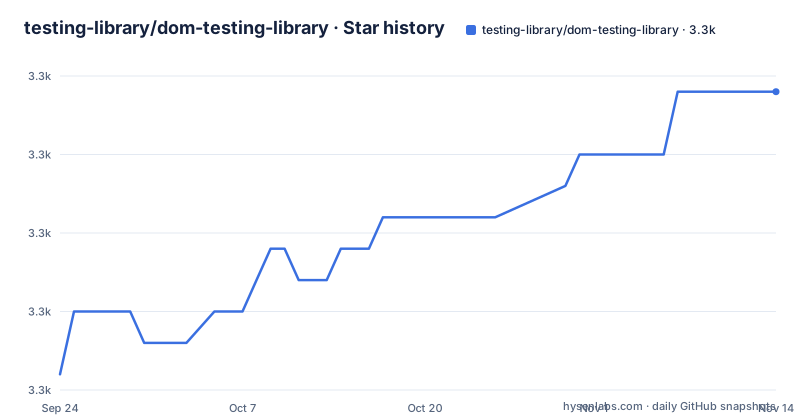
Star history
- testing-library/dom-testing-library3,342 ★ · +9
| Repository | 2026-09-24 | 2026-11-14 |
|---|---|---|
| testing-library/dom-testing-library | 3.3k | 3.3k |
9 Stars in the last 51 days, measured from the daily GitHub snapshot. Compare with other projects
Editorial analysis
The version field is a placeholder string
The package manifest declares its version as 0.0.0-semantically-released. Nothing ships with that value: a release tool computes the real version from commit messages and writes it during publishing, so the string in the repository is a marker rather than a fact. The published tags follow a ten-point line, with v10.4.2 in September 2026, v10.4.1 in July 2025 and v10.4.0 in July 2024, so patch releases arrive on a schedule nobody would predict from the version numbers alone. Two of the three most recent releases touched a patch level, which means breaking changes in this project arrive as a major rather than sliding into a minor. If you pin, pin the tag rather than reading a number out of the manifest.
browserslist reaches Opera Mini, KaiOS and iOS Safari 12
The support list in the package manifest is the interesting part of it. Alongside the usual Chrome, Firefox, Safari and Edge entries it names Opera Mini at all versions, KaiOS 2.5, UC Browser 12.12, QQ browser for Android, Samsung Internet 16 and 17, Android 103 and iOS Safari 12.2 to 12.5, and Node 18. That is a deliberately old matrix for a package most people install to test in Node. The reason is visible in what the package does: even when your test environment simulates the DOM with JSDOM under Jest, the library can also run in a real browser, so browser-based tests need a compatible build for the browsers in which those tests run. Node 18 is the floor, stated once as an engines requirement rather than inferred from the list.
The build runs twice and skips type definitions
The build script is two invocations of the same tool chained together. The first compiles the source while ignoring the test, node test and mock directories, and the second bundles, this time without cleaning, so the bundle step finds the output of the first pass still in place. Both passes pass a flag that turns type definition generation off, which means the declaration files are not a build artifact of this command. They come from elsewhere: a separate typecheck script builds the types directory, and the manifest points at a committed declaration file rather than one produced at pack time. That arrangement is deliberate, but it means a type change that passes the build can still fail the type check, and the two run as separate commands.
Four published entry points, and a bundler config at the root
The manifest declares four shapes of the same code. The main field points at a CommonJS build, module at an ES module build, umd:main at a UMD bundle for a script tag, and source at the uncompiled entry file for bundlers that would rather transform it themselves. The published file list is short, just the dist directory and the declaration files, so the source entry is a bundler hint rather than something you can require. The toolchain around that is visible in the repository root: a Rollup configuration for the bundling, a Jest configuration for the tests, a TypeScript configuration for the declarations, a Husky hook file for git hooks, and a Prettier configuration with its own ignore file. There is also a directory named other, which is not explained anywhere in the documentation.
The guiding principle appears twice in the same document
One sentence carries the project: the more your tests resemble the way your software is used, the more confidence they can give you. It appears as a block quote inside the section describing the solution, and then again, word for word, as the opening of the guiding principles section. Below it sit three numbered rules for admitting a utility. The first says that if something relates to rendering components it deals with DOM nodes rather than component instances, and must not encourage dealing with component instances. The second says utilities should be generally useful for testing components the way a user would, while admitting that trade-offs exist because testing runs on a computer and usually in a simulated browser. The third asks for implementations and APIs that are simple and flexible.
The contributors table is the longest part of the file
After the installation line and a documentation link, the file stops being documentation and becomes an attribution table. The table of contents lists seven sections, and the contributors section is the one that runs longest: a generated HTML table where each person gets a row of cells containing an emoji per contribution type, with links filtered by author on GitHub. The list is produced from a configuration file at the root and sits between comment markers telling tooling not to modify it. The file also carries an auto-generated contents block with a comment telling readers not to edit it and to re-run the generator instead. Two small process notes sit alongside: a Codesandbox directory, and a separate repository that the documentation edit link points to, which is where the docs live rather than here.
Configure a DOM environment for your test runner
DOM Testing Library works with DOM nodes in a real browser or a simulated environment such as JSDOM. Framework-specific wrappers and setup guides are published on the Testing Library documentation site. Install the DOM package as a development dependency:
npm install --save-dev @testing-library/domYour test runner must also provide a DOM environment. For Jest 28 and later, install `jest-environment-jsdom` separately and set `testEnvironment: 'jsdom'` in your Jest configuration. Other runners have their own environment setup. The package provides DOM queries; it does not install or configure a runner for you.
Editorial conclusion
DOM Testing Library is the right tool when your tests are failing on implementation details instead of on behaviour, because the whole design is built around querying the DOM the way a user finds something on the page rather than reaching into component internals, and the admission rules for new utilities are written down so that pressure to add a shortcut has to be argued against. Two practical things before you upgrade. The browser support matrix is far older than your app probably is, so a fresh install may pull a transpiled bundle larger than the source you expected, and that list is deliberate rather than legacy cruft. And a new major will follow the project's own breaking-change policy, with patch releases arriving on an irregular cadence, so read the changelog before pinning. The manifest version tells you nothing useful on its own, since it is a placeholder string until the release tool rewrites it.
Frequently asked questions
What version of @testing-library/dom should I depend on?
Read the release tags rather than the manifest, because the version field in package.json is the placeholder 0.0.0-semantically-released and is rewritten at publish time. The recent line is 10.4.x.
Does DOM Testing Library need a test runner setup?
DOM Testing Library needs a DOM environment supplied by your test runner or a real browser. For Jest 28 and later, install `jest-environment-jsdom` separately and configure `testEnvironment: 'jsdom'`. Other runners have their own setup.
Which browsers does @testing-library/dom support?
The browserslist entry names Chrome, Firefox, Safari, Edge and Opera alongside much older targets: Opera Mini at all versions, KaiOS 2.5, UC Browser, QQ browser and iOS Safari 12.2 to 12.5. Node 18 is the stated minimum.
How do I use DOM Testing Library with React?
This repository is the DOM layer and says nothing framework specific. The framework and tool-specific implementations, including the install guide, are published on the testing-library.com documentation site.
What rule decides whether a new utility gets added?
Three guiding principles: if it relates to rendering components it deals with DOM nodes rather than component instances, it should be generally useful for testing the way a user would use the component, and its implementation and API should be simple and flexible.
Official sources
Add this badge to your README
If you maintain this project, the badge below links readers to this analysis and shows its maintenance status from the daily GitHub snapshot. Paste the markdown into your README; add ?metric=license or ?metric=stars to the image URL for a different field.

[](https://hysenlabs.com/projects/testing-library-dom-testing-library)Star history chart for your README
[](https://hysenlabs.com/projects/testing-library-dom-testing-library)Was this useful?