Telegram X on Android: a TDLib client whose source build needs Git LFS, Rust and your own API keys
The main repository of Telegram X — official alternative Telegram client for Android.
At a glance
- What is it?
- TGX-Android/Telegram-X holds the full source of Telegram X, the official alternative Android client built on TDLib. Installing the app is easy through three stores and channels; building it yourself is a multi-gigabyte job that ends with a debug APK unless you bring your own Telegram API credentials and Firebase config.
- Who is it for?
- Telegram X is for Android users who want an official Telegram client with a different interface, and for developers who want a complete, GPL-3.0 TDLib-based Android app to study or modify. It is not for iPhone or desktop users, and it is a poor weekend project on a machine with little RAM or disk.
- Can I use it commercially?
- Yes, with conditions. GPL-3.0 is a copyleft licence: if you distribute software that includes it, you must release that software's source code under the same licence. Running it internally without distributing it does not trigger that obligation.
- Is it still maintained?
- Yes. The repository last received commits 1 day ago.
- What is it written in?
- Mainly Java, according to GitHub's language statistics.
Answers come from the project's GitHub data, last synced on November 14, 2026, and from our analysis. They are not legal advice.
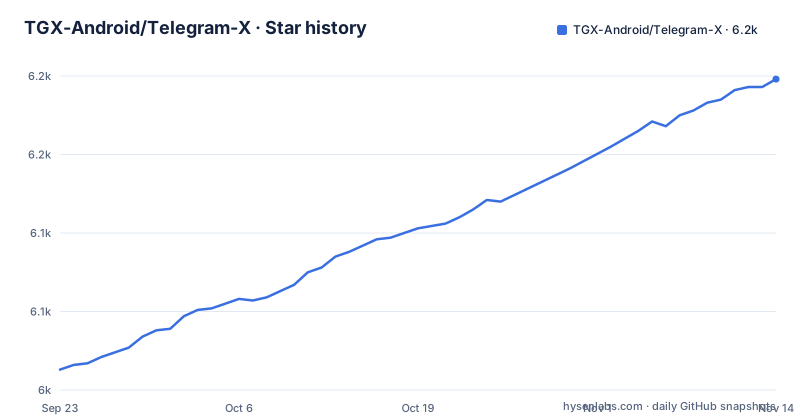
Star history
- TGX-Android/Telegram-X6,198 ★ · +185
| Repository | 2026-09-23 | 2026-11-14 |
|---|---|---|
| TGX-Android/Telegram-X | 6k | 6.2k |
185 Stars in the last 52 days, measured from the daily GitHub snapshot. Compare with other projects
Editorial analysis
Telegram X talks to Telegram through TDLib, not a custom network layer
Telegram X is the official alternative Android client for the Telegram messenger. It uses the Telegram API and the MTProto protocol through TDLib, and the repository pulls TDLib in from the TGX-Android/tdlib fork as a submodule, alongside tgcalls/, vkryl/ and thirdparty/. The project calls itself a slick experimental client, and the app's package name on Google Play is org.thunderdog.challegram.
The practical consequence is that protocol behaviour comes from TDLib, while the interface and media handling are the project's own Java and native code. The source is published under GPL-3.0, so any modified build you distribute must also ship its source under the same licence.
Three install channels, plus a bot that checks APK hashes
Most people never need to build anything. The app is on Google Play, where you can also subscribe to the beta channel, on Huawei AppGallery, and on GitHub Releases. APKs and build information are posted to the t.me/tgx_log channel. A Telegram bot at t.me/tgx_bot verifies an APK hash, which is the way to confirm that a sideloaded APK matches an official build before installing it. The repository also carries a reproducible-builds/ directory.
Releases move quickly: 0.29.0.1813 shipped on 17 September 2026, 0.29.1.1817 on 11 October, and 0.29.1.1822 beta on 3 November 2026. There is no iOS or desktop edition in this repository; it is an Android client only, so the searches for Telegram X on iPhone or PC lead nowhere here.
The checkout alone needs gigabytes, Git LFS and a real git clone
The repository must be fetched with git, so a ZIP download from GitHub will not build. You need a JDK or Android Studio with a compatible bundled JDK, at least 8GB of RAM, and at least 7,32GB of free disk space even when cloning with --shallow-submodules --depth=1. Files generated during the build need two to five times more space again. Git LFS is required on every platform; on macOS it is installed with Homebrew and on Ubuntu with apt, followed by git lfs install.
The build entry point is a recursive clone:
git clone --recursive https://github.com/TGX-Android/Telegram-X tgxIf you forget --recursive, run git submodule update --init --recursive inside tgx. A check task confirms that submodules and LFS files actually arrived:
./gradlew :app:validateGitSetupRust is pinned by version.properties and must be reinstalled when it changes
Part of the native code is built with Rust, and the toolchain version is not left to you. The value version.rust in version.properties fixes it, and scripts/setup-rust.sh installs that Rust with the Android targets through rustup, then prints a rust.dir value to put into local.properties. When version.rust changes after a pull, run the script again, or the build will use the wrong toolchain.
Windows builds go through MSYS2 in the UCRT64 environment, with git, git-lfs, perl, make and diffutils installed by pacman, git config --global core.longpaths true set, and msys2.dir added to local.properties. Paths in properties files must use \\ or / as separators. On Ubuntu with several JDKs, update-java-alternatives selects a JDK 25 build. The script that sets up the Android SDK, NDK and local.properties in one go is:
scripts/setup.shWithout your own API credentials and Firebase file you only get a debug build
./gradlew assembleLatestDebug produces a debug build. Publishing a build is a separate step, and it does not reuse the project's credentials. You obtain your own Telegram API ID and hash, then write them into local.properties as telegram.api_id and telegram.api_hash next to sdk.dir and rust.dir. You also set up Firebase and replace google-services.json with one that suits your app.id.
For anyone planning a fork, that means the official client's identity does not come with the source. A redistributed build is a separate app registered under your own Telegram API credentials and your own Firebase project, and the work of setting those up falls on you before the first release. If the build fails, the project's instruction is to follow what the error message says.
ABI and flavor flags decide what gets compiled
By default every ABI is built. The -Pabi flag limits native libraries to arm64, arm32, x64 or x86, comma separated, which is the main lever for shorter builds while developing:
./gradlew :app:installLatestDebug -Pabi=arm64Latest in task names is a flavor and can be swapped. The legacy flavor targets Android 4.x and needs an older NDK:
./gradlew :app:assembleLegacyDebug -PuseLegacyNdk=true -Pabi=arm32libvpx, FFmpeg and tlottie are built by their own tasks, such as ./gradlew :app:buildFfmpeg. The arm64-v8a build of tlottie is optimized with a drawing profile in app/jni/tlottie/arm64-v8a.profdata. After a tlottie or Rust update the build warns that the profile no longer matches, and regenerating it requires a connected arm64 device playing animated stickers and emoji.
Most of the test suite needs an emulator or a connected phone
Only unit tests run on the host alone:
./gradlew :app:testLatestDebugUnitTestIntegration, UI and benchmark tests run on an emulator or a connected device, for example ./gradlew :app:emulatorLatestDebugAndroidTest -Pabi=arm64, and scripts/check-test-tools.sh checks test tooling on a connected test device. A contributor without a device or emulator setup can only cover a slice of what a pull request is checked against.
Two checks matter for compatibility. checkMinSdk finds classes added after each flavor's minSdk and calls to them without version checks, with a -PuseLegacyNdk=true variant for Android 4.x. For pull requests, clearCheckResults, saveCheckResults and describeCheckResults record check results before and after a change, so a reviewer sees what the change altered rather than a raw list of warnings.
Editorial conclusion
Telegram X is for Android users who want an official Telegram client with a different interface, and for developers who want a complete, GPL-3.0 TDLib-based Android app to study or modify. It is not for iPhone or desktop users, and it is a poor weekend project on a machine with little RAM or disk. Before building, check that you cloned with git and Git LFS, that Rust matches version.rust in version.properties, and that you have your own Telegram API ID and hash if you intend to ship anything.
Frequently asked questions
How do I install Telegram X on Android?
Install Telegram X from Google Play, Huawei AppGallery or GitHub Releases, or get APKs from the t.me/tgx_log channel. Google Play also offers a beta subscription.
How safe is Telegram X?
Telegram X is the official alternative Telegram client, built on TDLib and the MTProto protocol, and its full source is public under GPL-3.0. If you sideload an APK, the t.me/tgx_bot bot verifies its hash against official builds.
Can I install Telegram X on iPhone?
No. Telegram X in the TGX-Android/Telegram-X repository is an Android client, distributed through Google Play, Huawei AppGallery and GitHub Releases.
Official sources
Add this badge to your README
If you maintain this project, the badge below links readers to this analysis and shows its maintenance status from the daily GitHub snapshot. Paste the markdown into your README; add ?metric=license or ?metric=stars to the image URL for a different field.

[](https://hysenlabs.com/projects/tgx-android-telegram-x)Star history chart for your README
[](https://hysenlabs.com/projects/tgx-android-telegram-x)Was this useful?