Sparkle packs Windows debloating, DNS switching and 156 apps into one Electron window
A Windows app to debloat and optimize your PC
At a glance
- What is it?
- Sparkle bundles a 40-tweak registry panel, a six-category cleaner, a DNS manager and a 156-app installer into one Electron window, with restore points and unapply scripts as the way back. The catch is a beta warning and a quick start that pipes a remote script straight into the shell.
- Who is it for?
- Sparkle suits a Windows user who wants the bloat list handled in one window and accepts a beta build. It does not suit anyone who wants a documented, audited registry script or an audit trail after the fact, and for those readers the answer is to open `tweaks/`, `scripts/` and `get.ps1` before running anything.
- Can I use it commercially?
- Yes, with conditions. GPL-3.0 is a copyleft licence: if you distribute software that includes it, you must release that software's source code under the same licence. Running it internally without distributing it does not trigger that obligation.
- Is it still maintained?
- Yes. The repository last received commits 12 days ago.
- What is it written in?
- Mainly TypeScript, according to GitHub's language statistics.
Answers come from the project's GitHub data, last synced on October 23, 2026, and from our analysis. They are not legal advice.
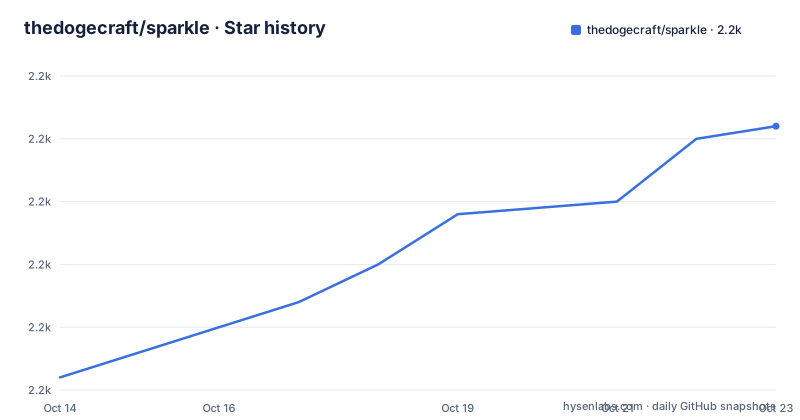
Star history
- thedogecraft/sparkle2,181 ★ · +20
| Repository | 2026-10-14 | 2026-10-23 |
|---|---|---|
| thedogecraft/sparkle | 2.2k | 2.2k |
20 Stars in the last 9 days, measured from the daily GitHub snapshot. Compare with other projects
Editorial analysis
Seven Windows chores packed into one Electron window
Sparkle collects the unglamorous Windows chores that people otherwise do by hand: stripping preinstalled apps, applying registry tweaks, emptying junk folders, running SFC and DISM, changing DNS, restoring points and a stats dashboard. The repository is TypeScript with an Electron shell, so what you launch is a Chromium runtime with tools inside it rather than a PowerShell module you dot-source. `package.json` keeps the dependency list short enough to read in one pass, and each entry maps to a visible part of the window:
  "dependencies": {
    "discord-rpc-new": "^1.4.2",
    "electron-log": "^5.4.4",
    "electron-store": "8.1.0",
    "electron-updater": "^6.8.9",
    "systeminformation": "^5.32.0"
  },
`systeminformation` feeds the dashboard readings, `electron-store` persists settings between runs, `electron-updater` pulls new builds over the network. Then there is `discord-rpc-new`, which publishes Discord rich presence. For anyone whose reason for debloating a PC is to cut background chatter, that entry is worth a second look, and no page in the repository mentions it or offers a switch to turn it off. Dev dependencies pin Electron at `^43.1.1`, so the runtime you ship to users is large even before any Windows tooling is counted.
Forty tweaks across seven categories, every one reversible
Apply Tweaks is the core screen: 40 tweaks split across 7 categories, each drawn as a reversible toggle, with recommended presets for people who would rather not read 40 decisions before lunch. GPU compatibility detection sits next to them, which matters because the classic failure mode of registry tuning is a graphics driver that stops behaving after a toggle nobody connected to the driver. A built-in debloater with 2 methods shares the same screen. At the repository root a `tweaks/` directory holds the definitions and the topic tags include registry-tweaks and windows-tweaks, so changes live as data files rather than as logic buried in the interface code.
The project's own answer to the performance question is unusually candid: gains depend on your hardware and what you apply, and the FAQ insists none of the tweaks are made up or untested. Read that carefully, because the same answer carries no measurements behind it. What you get is a preset, a toggle, and the reverse of whatever you just flipped.
Two debloat methods and no list of what they touch
The debloater offers 2 methods, and the feature table stops right there. It does not name them, and no page in the documentation follows up on the question of uninstalling preinstalled apps, so the count tells you almost nothing about blast radius. Reading what those two methods act on inside the `tweaks/` definitions is the only way to know before you click. What the table does establish is scope: software removal sits on the same screen as registry tweaks, which means one screen can change installed programs and system configuration at once, and both fall under a single undo story.
That undo story is Backup & Revert: Windows restore points, plus unapply scripts for an individual tweak or for all applied tweaks. No line in the documentation says how many of the 40 tweaks actually have an unapply script, so assume coverage is partial until you match the scripts under `scripts/` against the tweaks you plan to enable.
Six junk categories, and the cleaner has no undo of its own
System Cleaner targets 6 categories: temp files, prefetch, the recycle bin, the Windows Update cache, thumbnail cache and error reports, with per-category size detection so you can see the weight of each before deleting it. Two of those six are not simply leftovers. Emptying the Windows Update cache does not switch updates off, it discards what has already been downloaded so the next one fetches it again, and clearing prefetch throws away the file hints Windows rebuilt from your last session. Both regenerate on their own, yet neither carries a note saying so.
Unlike the tweak screen, this one has no unapply script behind it. Once a pass finishes, those files are gone, and the restore point machinery in the app is aimed at configuration changes the cleaner never makes. Running it category by category with the size readout open is a different risk decision from hitting one sweep button, and the tool gives you the per-category numbers to make it.
DNS switching and 15 utilities wrapped over Windows own tools
DNS Manager offers 5 preset providers, a custom entry, a viewer for the servers currently in use, a cache flush, and a Find Fastest DNS ping test. That test measures round-trip latency from the machine in front of you at that moment, and the documentation does not say how many samples it collects, whether results are cached, or what happens on a network that drops ICMP. Where ping is filtered, a fast resolver and a blocked one look identical, so treat the ranking as a hint rather than a measurement.
The Utilities tab counts 15 entries, most of them Windows programs with a button in front: SFC and DISM for file and component repair, Check Disk for the volume, a GPU driver restart, a network reset, a power plan manager and Storage Sense. Check Disk is the odd one out in practice, since chkdsk normally runs its real pass at the next boot, and nothing here says which mode Sparkle schedules or whether it warns you about the restart.
156 apps in 10 categories, handed off to Winget or Chocolatey
The App Installer browses 156 apps across 10 categories and delegates the work to Winget or Chocolatey. That split is the design decision: Sparkle keeps the catalogue and the interface, while the package manager handles download, dependency resolution and installation. Uninstall through the same screen removes whatever the selected manager considers installed, not whatever Windows shows under Apps and Features, and on plenty of machines those two lists have drifted apart.
Two engines also mean two different states for the same app depending on which provider was picked. If you already manage software with Winget from a shell, Sparkle adds a browsable catalogue and a size readout rather than a new capability. On Windows builds where Winget is not present, no page in the repository explains whether the catalogue falls back to Chocolatey or stops listing those entries.
The one-line PowerShell install and what it leaves out
The quickest route is the single line the quick start gives, labelled non admin:
irm https://getsparkle.net/get | iexThat takes whatever the web host serves at that path and hands it to the shell interpreter, so you run code chosen by a remote server at the moment you paste it. If you would rather read it first, the repository keeps `get.ps1` at its root, and the build path is spelled out in the scripts:
  "scripts": {
    "dev": "electron-vite dev -w",
    "build": "node build.js",
    "build:vite": "electron-vite build",
    "test": "vitest run  --reporter=verbose",
    "test:smoke": "node scripts/smoke-test.mjs"
  },
Read the label as describing the installer rather than every action in the window, because the documentation never says which steps prompt for elevation, and the same app applies registry tweaks, removes preinstalled apps and runs Check Disk. A portable Installer/Portable build and a SourceForge mirror are linked as the alternative to piping anything into your shell.
The first real use is small. Launch the app, check the dashboard where CPU, GPU, RAM, OS version, disk info and the active tweak count live, then flip one tweak and watch that count move. Make the restore point before the toggle, since the project's own warning calls Sparkle a beta and asks for a backup first.
Contradictions between the README header and the repository it sits in
The header mixes two projects. The logo image, the Trendshift badge, the CI badge and the version badge point at `thedogecraft/sparkle`, while the logo link and the Installer/Portable link point at `github.com/Parcoil/Sparkle`, and `package.json` names Parcoil as the author. Check both links before assuming which tree a build came from.
A bigger one sits in the FAQ, which states there is no CI/CD yet, while the tree carries a `.github/` directory, the header carries a CI badge, and `test:all` chains typecheck, lint and vitest into one command. One of the two is stale, and until you know which, read the scripts for what actually runs: typecheck splits into node and web configs, lint uses eslint, and a separate smoke test goes through `scripts/smoke-test.mjs`. Update delivery is configured too, since `dev-app-update.yml` at the root is the updater manifest, and no page explains how update signatures are set up.
Builds land on a steady cadence: version 2.24.0 is dated 2026-09-11, 2.23.0 on 2026-08-16 and 2.22.0 on 2026-07-28, and `package.json` already sits at 2.24.0. The last push was on 2026-09-11. The code ships under GPL-3.0, which is why the project answers safety questions by telling you to build it yourself and read it. The default branch is v2, so a plain clone of the default branch is not the v1 tree most old articles link to.
Editorial conclusion
Sparkle suits a Windows user who wants the bloat list handled in one window and accepts a beta build. It does not suit anyone who wants a documented, audited registry script or an audit trail after the fact, and for those readers the answer is to open `tweaks/`, `scripts/` and `get.ps1` before running anything. Three checks come first: which of the 40 tweaks have an unapply script behind them, whether `discord-rpc-new` publishing presence suits you, and what elevation the first tweak actually demands.
Frequently asked questions
Does Sparkle need administrator rights to install and run?
The quick start labels its PowerShell install non admin, but the same app applies registry tweaks, removes preinstalled apps and runs Check Disk. The documentation does not say which actions prompt for elevation and which do not.
Can Sparkle changes be undone?
Backup and Revert covers restoring Windows restore points and running unapply scripts for a single tweak or for all applied tweaks. No line states how many of the 40 tweaks have an unapply script, so treat revert coverage as partial until you check the scripts in the repository.
How much faster will my PC get after applying Sparkle tweaks?
The project's own answer is conditional: improvements depend on your hardware and what you apply. It counts 40 tweaks across 7 categories and says none of them are made up or untested, but it publishes no measurements to compare against.
What package manager do the 156 apps in the App Installer use?
They are installed with Winget or Chocolatey, covering 156 apps across 10 categories. Sparkle keeps the catalogue and the interface while the selected package manager handles download and installation.
Does Sparkle support Windows 11 as well as Windows 10?
The feature text and topic tags cover Windows generally, including tags for windows-10-debloat and windows-10-optimization. The documentation does not state a minimum Windows version or a list of supported builds.
Official sources
Add this badge to your README
If you maintain this project, the badge below links readers to this analysis and shows its maintenance status from the daily GitHub snapshot. Paste the markdown into your README; add ?metric=license or ?metric=stars to the image URL for a different field.

[](https://hysenlabs.com/projects/thedogecraft-sparkle)Star history chart for your README
[](https://hysenlabs.com/projects/thedogecraft-sparkle)Was this useful?