Cortex Observable Analysis and Active Response Engine
Cortex: a Powerful Observable Analysis and Active Response Engine
At a glance
- What is it?
- Cortex is a Scala-based analysis service for SOCs, CSIRTs, security researchers, and teams using TheHive or MISP. It centralizes observable analysis through analyzers, a web interface, and a stateless REST API, while leaving analyzer configuration and service requirements to the operator.
- Who is it for?
- Cortex fits teams that need a shared analyzer layer for TheHive, MISP, or direct REST automation, especially when investigators otherwise submit the same observable to several services. It is a poor fit for an organization that needs a self-contained verdict, a turnkey data store, or a fully documented installation without consulting the separate CortexDocs repository.
- Can I use it commercially?
- Yes, with strict conditions. AGPL-3.0 is a network copyleft licence: if people use a modified version over a network, for example as a hosted service, you must offer them its source code under the same licence.
- Is it still maintained?
- Yes. The repository last received commits 3 days ago.
- What is it written in?
- Mainly Scala, according to GitHub's language statistics.
Answers come from the project's GitHub data, last synced on October 23, 2026, and from our analysis. They are not legal advice.
Star history
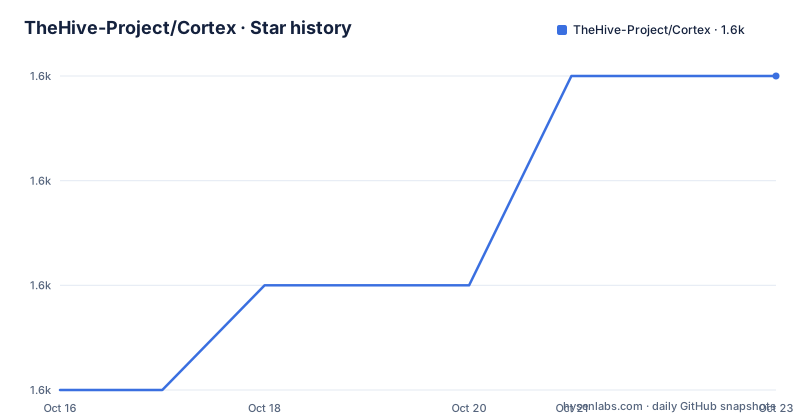
- TheHive-Project/Cortex1,635 ★ · +3
| Repository | 2026-10-16 | 2026-10-23 |
|---|---|---|
| TheHive-Project/Cortex | 1.6k | 1.6k |
3 Stars in the last 7 days, measured from the daily GitHub snapshot. Compare with other projects
Editorial analysis
Why Cortex centralizes observable investigations
Cortex addresses a recurring investigation problem: analysts collect IP addresses, email addresses, URLs, domain names, files, and hashes, then send each item to different tools and services. The README says this becomes costly in threat intelligence, digital forensics, and incident response because each investigation can require several separate queries. Cortex places a common analysis layer in front of those tools.
The intended users are SOCs, CSIRTs, and security researchers. TheHive integration is a primary use case for teams that already manage security incidents. Cortex can analyze one observable or a bulk set through its web interface, while its REST API allows the same operations to be automated. That matters when the same indicators need to be checked repeatedly across cases or when analysts need to submit many values before deciding which ones deserve attention.
Cortex does not present itself as a replacement for threat intelligence platforms, forensic tools, or individual external services. Its role is orchestration and result presentation. A VirusTotal analyzer, for example, can submit a file to VT or retrieve the latest available report associated with a file or hash. The actual intelligence and service response still come from the selected analyzer and its external provider. Cortex therefore reduces repeated integration work, but it does not eliminate the need to understand what each result means.
Cortex's analyzer and API architecture
Cortex is written in Scala. Its front end uses AngularJS with Bootstrap, and the provided analyzers are written in Python. Additional analyzers can be written in Python or in another language supported by Linux. This split makes Cortex useful as a service boundary: the web and API layers remain common while specialized programs handle communication with external tools.
The REST API is stateless. According to the architecture description, that design allows Cortex to be deployed horizontally, which is relevant when analysis volume or service availability matters. Stateless operation also means that the API itself is not described as the place where case state is kept. Case management remains associated with systems such as TheHive, while Cortex handles analysis requests and returns analyzer output.
The analyzer model is extensible. The README directs users who are missing a tool or service to create a suitable program and make it available to a team or community. The analyzer list, flavors, and requirements are maintained in a separate Cortex Analyzers Requirements Guide. This is a practical advantage for heterogeneous environments, because one interface can expose several services, but it also makes the deployment dependent on external tools, credentials, network access, and compatibility with the analyzer contract.
Cortex and MISP have bidirectional integration. Cortex can invoke MISP modules, and MISP can invoke Cortex analyzers. TheHive can invoke one or more Cortex instances, with the choice of instances related to operational security and performance requirements. These integrations make Cortex less isolated than a simple analyzer runner, but they also create additional configuration and failure paths.
Installing Cortex and completing a first analysis
The README does not provide installation commands or a container invocation. It directs users to the Cortex installation guide in the CortexDocs repository, or to a training VM for trying the project. That distinction matters for an engineer. A training VM can provide a defined path for evaluation, while a production installation requires the separate installation documentation.
Before installation, identify the analyzers needed for the investigation types in scope. The README says the full analyzer list includes flavors and requirements, so checking that guide is necessary before selecting services. It also indicates that analyzers can have different behavior. A file submission flavor, for example, is not interchangeable with a report lookup flavor simply because both relate to VirusTotal.
The first practical use should begin with one observable through the web interface. Select an observable type, choose an analyzer or analyzer flavor, submit the value, and inspect the returned report. The documentation excerpt does not define the exact form fields, authentication flow, or response schema, so those details cannot be filled in with invented commands or parameters. After that manual check, the same operation can be moved to the REST API for automation.
For a team evaluating Cortex, the important first result is not only whether a report appears. It is whether the selected analyzer can reach its external dependency, whether the output is understood by TheHive or MISP, and whether the deployment can support the required number of requests. The README gives no installation commands, ports, environment variables, or complete configuration example, so those values must come from the Installation Guide rather than from this repository summary.
TheHive, MISP, and analyzer coverage
Cortex is positioned as a companion to TheHive, which can analyze tens or hundreds of observables through one or more Cortex instances. TheHive also provides a report template engine for adjusting analyzer output. This is a more specific integration story than calling Cortex a generic dashboard: an incident response platform can collect indicators, request analysis, and render results within a case workflow.
The MISP relationship works in the opposite direction as well. MISP can invoke Cortex analyzers, while Cortex can invoke MISP modules. That flexibility may suit organizations with both systems, but it does not mean the two products share one data model. The README does not document synchronization semantics, deduplication behavior, timeout handling, or conflict resolution between the systems. Those points need verification in the integration documentation and in the selected deployment.
The README reports 39 publicly available analyzers as of April 14, 2018. That dated statement should not be read as a current count. It does show the original design goal: cover common observable types and let teams select among specialized services rather than hard-code every integration into the case platform. The analyzer requirements guide is the proper place to check availability, flavors, and prerequisites.
An analyzer can also be the wrong tool when the desired answer requires a local forensic workflow, a proprietary internal dataset, or a service whose API is unavailable. Cortex can provide a common interface, but it cannot create a trustworthy result when the underlying analyzer lacks access, credentials, or current data.
Operational limits, licensing, and upgrade work
Cortex has clear operational limits because its results depend on analyzers and external services. A network outage can prevent an analyzer from reaching its target. A missing or expired credential can make a request fail. Different analyzer flavors can require different inputs and produce different report structures. The README does not document retries, rate-limit handling, result caching, timeout policy, or rollback, so those behaviors should not be assumed during deployment planning.
The stateless REST API is useful for horizontal scaling, but the repository excerpt does not specify the required storage services, deployment topology, or observability configuration. Operators should not treat the API label as a complete production guide. The separate CortexDocs repository is the authoritative installation and integration destination named by the README.
The project is released under AGPL-3.0. That license is a material adoption condition for organizations that modify Cortex and distribute or offer the modified software. This is not legal advice. Teams should have their own licensing review, especially when combining Cortex with internal services, packaged distributions, or externally hosted deployments.
The repository is not archived, and its last push was on 2026-10-13. Recent releases include 4.1.0 on 2026-06-30, 4.0.0 on 2025-11-27, and 3.2.1 on 2025-07-16. These dates indicate recent project activity, but an upgrade can still require checking analyzer compatibility, configuration changes, and integration behavior because the README does not provide an upgrade procedure.
Editorial conclusion
Cortex fits teams that need a shared analyzer layer for TheHive, MISP, or direct REST automation, especially when investigators otherwise submit the same observable to several services. It is a poor fit for an organization that needs a self-contained verdict, a turnkey data store, or a fully documented installation without consulting the separate CortexDocs repository. Before adoption, verify the required analyzers, their credentials, external service requirements, and how Cortex output will be consumed by the incident response workflow.
Frequently asked questions
What is Cortex used for?
Cortex analyzes observables such as IP and email addresses, URLs, domain names, files, and hashes. It supports single or bulk analysis through a web interface and automation through a stateless REST API.
Does Cortex work with TheHive and MISP?
Yes. TheHive can invoke Cortex analyzers, Cortex can invoke MISP modules, and MISP can invoke Cortex analyzers. The README does not specify conflict handling or synchronization details for those integrations.
How do I install Cortex?
The README points users to the CortexDocs Installation Guide for installation and offers a training VM as a way to try the project. It does not include installation commands, ports, environment variables, or a complete configuration example.
Official sources
Add this badge to your README
If you maintain this project, the badge below links readers to this analysis and shows its maintenance status from the daily GitHub snapshot. Paste the markdown into your README; add ?metric=license or ?metric=stars to the image URL for a different field.

[](https://hysenlabs.com/projects/thehive-project-cortex)Star history chart for your README
[](https://hysenlabs.com/projects/thehive-project-cortex)Was this useful?