ESPConnect: flash, back up and inspect ESP32 boards from a Chromium tab over WebSerial
Zero-installation web application that lets you explore, back up, and manage your ESP32… right from your browser
At a glance
- What is it?
- ESPConnect is a browser app for ESP32 and ESP8266 boards. It flashes firmware, manages file systems and reads NVS, with limited ESP8266 support.
- Who is it for?
- Use ESPConnect when you want to flash, back up or browse the file system of an ESP32 from a Chromium browser without installing anything. Do not use it on an ESP8266 for more than connecting, and do not trust the NVS Inspector for recovery.
- Can I use it commercially?
- Yes. MIT is a permissive licence: you can use, modify and sell software built on it, as long as you keep its copyright and licence notices.
- Is it still maintained?
- Yes. The repository last received commits 4 days ago.
- What is it written in?
- Mainly TypeScript, according to GitHub's language statistics.
Answers come from the project's GitHub data, last synced on November 25, 2026, and from our analysis. They are not legal advice.
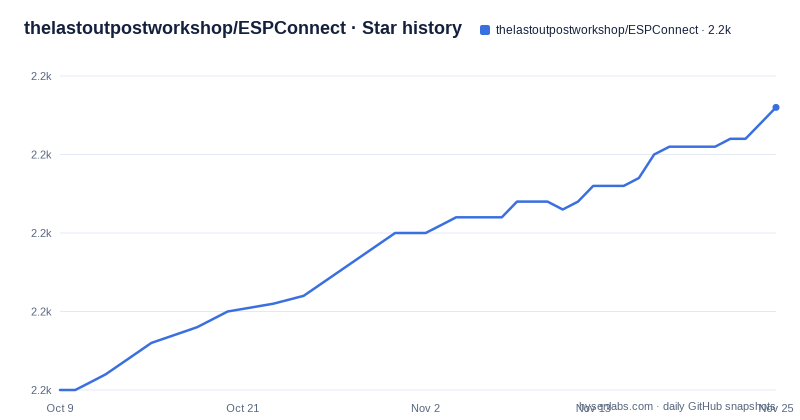
Star history
- thelastoutpostworkshop/ESPConnect2,206 ★ · +36
| Repository | 2026-10-09 | 2026-11-25 |
|---|---|---|
| thelastoutpostworkshop/ESPConnect | 2.2k | 2.2k |
36 Stars in the last 47 days, measured from the daily GitHub snapshot. Compare with other projects
Editorial analysis
WebSerial limits ESPConnect to Chromium 89 and newer, and the USB port belongs to one program at a time
ESPConnect runs entirely inside a modern Chromium browser. The README names Chrome, Edge, Brave, Arc or another Chromium browser based on version 89 or newer. Firefox and Safari are not on that list, and the README gives no fallback for them.
The tool talks to the board over USB, so you need an ESP32, ESP32-C3, ESP32-S2, ESP32-S3, ESP32-C6, ESP32-H2, ESP32-C5, ESP32-P4 or ESP8266 and a USB cable with data lines. A charge-only cable fails in a way that looks like a driver problem.
Exclusive access is the second constraint. Only one application can use the USB serial bridge at a time, so Arduino IDE, PlatformIO and any other tool must be closed before you click Connect. The README's Disconnect button exists for the reverse case: press it to free the port for another program.
The code is built on Jason2866's WebSerial ESPTool, and package.json pins the library as `tasmota-webserial-esptool` at exactly `7.3.10`, the one dependency that is not a caret range.
Connect, then a drawer of seven tools: Device Info, Partitions, SPIFFS, Apps, Flash, Console and Logs
The README's quick start has four steps. Open the hosted page at thelastoutpostworkshop.github.io/ESPConnect, click Connect, choose your device when the browser asks for permission, and wait for the handshake. After the handshake the navigation drawer unlocks Device Info, Partitions, SPIFFS, Apps, Flash, Console and Logs.
Device Info shows chip family, revision, MAC address, flash size, crystal frequency and capabilities, with a No device connected card when nothing is attached. The Partitions tab draws a graphical map and a table of every partition entry with sizes, offsets and unused flash, so you can check a layout before flashing. The Apps tab lists the application slots and OTA partitions, showing which slot is active together with build metadata and sizes.
Nothing is installed on the computer and no account is involved. The Dockerfile in the repository builds the app with node:22-alpine and serves the output from nginx:alpine on port 80, which is the route to self-hosting a copy, though the README does not mention it.
The file manager handles SPIFFS, LittleFS and FATFS, and stages edits until you press Save to Flash
The file system tab browses files with text filtering and pagination, uploads through a picker or drag-and-drop, and checks the free space first, blocking files too large to fit before any transfer starts. You can run a full backup of the file system, restore an image, or format the partition after confirming you have a backup.
Edits are staged locally. Nothing reaches the board until you push the changes with Save to Flash. That is the safety net, and also the trap: a browser tab closed with staged edits loses them, and the README does not say whether staged changes survive a reload.
Preview works without leaving the page. UTF-8 text such as JSON, HTML and logs is shown directly, images render inline, and audio plays for MP3, WAV, OGG/Opus, AAC/M4A, FLAC and WebM. Individual files can be downloaded or deleted, and gauges show used, free and total bytes. The package.json has a `test:fatfs` script that runs `vitest run src/tests/fatfs.fixture.test.ts`, a test file dedicated to FATFS handling.
Flash tools cover any .bin file, partial backups and MD5 checks, but erasing the chip is one checkbox away
Flash Firmware loads any `.bin` file, offers common offset presets, and can optionally erase the entire chip before writing, with progress shown in dialogs. The erase option is the dangerous one: the README presents it as a plain option with confirmations on control actions, and the offset you choose decides where the image lands.
Backups come in several shapes. You can capture individual partitions, the whole partition table, only the used areas of flash, or arbitrary regions you specify. Integrity checks take an offset and a length and compute an MD5 hash, so you can compare what the device holds against a known file.
Register access reads or writes hardware registers directly, using an integrated guide of addresses and descriptions. Cancelling a flash or download pauses safely, and you simply run it again when you are ready.
The Serial Monitor streams UART output, sends commands including Ctrl+C, clears the console, changes the baud rate and resets the board. The Session Log keeps a chronological ledger of connects, flashes, downloads and warnings.
The NVS Inspector is read-only and explicitly not a recovery tool
The experimental NVS Inspector reads and visualizes the Non-Volatile Storage partition. It detects the NVS format, v1 or v2, automatically, lists namespaces and keys, decodes integers, strings and blobs, decodes floats and doubles heuristically, and shows page state, sequence numbers, CRC status, entry usage and page occupancy.
The README lists the limits plainly. It is read-only, with no editing or writing. Parsing is based on reverse-engineering ESP-IDF behavior and may not handle all edge cases. Some value types may appear as raw blobs, and corrupt or partially erased pages may produce warnings.
The status note says it is for inspection and debugging only, and output should not be considered authoritative for recovery or forensic use. A reader who has lost Wi-Fi credentials stored in NVS should read that sentence twice: the inspector can show what it sees, and cannot be trusted to prove what was there. Feedback and test reports are welcome, per the README.
ESP8266 boards connect but cannot read partition tables or reach SPIFFS or LittleFS
The README is blunt about ESP8266. Devices can connect, but support is very limited. The tool cannot read partition tables or access SPIFFS or LittleFS, and the advanced features available on ESP32 are not implemented for ESP8266.
That undercuts the first sentence of the README, which calls ESPConnect a control center for ESP32- and ESP8266-class boards. In practice an ESP8266 owner gets a connection and little more, and should look at the stated limits before building a workflow around it. The README does not say which features do work on an ESP8266, so the connection and the serial console are the only things it implies.
For connection trouble the README has a sequence. If automatic boot entry fails, hold BOOT, tap RESET, keep holding BOOT while clicking Connect, and release when you see the ESP-ROM banner. If reads time out, reconnect the cable, choose 115200 in the baud-rate selector before clicking Connect, and try again. If transfers stall after connecting, drop to 460800 or 115200.
Stable comes from tagged releases, Preview rebuilds from main, and package.json is ahead of both
The README publishes two variants. Stable, at the root of the GitHub Pages site, is built from tagged releases and is recommended for everyday use. Preview, under /preview/, is automatically built from the main branch and may include new fixes, features, experiments or breaking changes. If you report a problem, say whether it happened on stable or preview.
The latest release is v1.1.23 from 20 September 2026, after v1.1.22 on 11 September and v1.1.21 on 29 August. package.json reads 1.1.24, so the main branch is at least one version beyond the newest tag. The last push was on 15 October 2026, and the repository is not archived. CHANGELOG.md lists the current preview changes.
The repository also holds Electron scaffolding. package.json sets `"main": "electron/main.cjs"` and has `electron-forge` scripts with makers for deb, dmg, rpm, squirrel and zip, and requires Node `>=22.12.0`. The README calls the browser version zero-installation and says no desktop software is needed, so the packaged desktop builds are a separate path the README does not describe.
Editorial conclusion
Use ESPConnect when you want to flash, back up or browse the file system of an ESP32 from a Chromium browser without installing anything. Do not use it on an ESP8266 for more than connecting, and do not trust the NVS Inspector for recovery. Before flashing, back up the flash and close any other program that holds the serial port.
Frequently asked questions
What is ESPConnect?
A browser-based control center for ESP32- and ESP8266-class boards. It runs inside a Chromium browser so you can inspect hardware, manage file systems, back up flash and deploy firmware without desktop software.
How do I use ESPConnect?
Open the hosted page, click Connect and pick your device when the browser asks permission. After the handshake the navigation drawer unlocks Device Info, Partitions, SPIFFS, Apps, Flash, Console and Logs.
How do I connect my ESP32 device to ESPConnect from my computer?
Plug the board in with a USB cable that has data lines, use Chrome, Edge, Brave, Arc or another Chromium browser based on version 89 or newer, and click Connect. Close Arduino IDE or PlatformIO first, since only one program can use the serial bridge.
Official sources
Add this badge to your README
If you maintain this project, the badge below links readers to this analysis and shows its maintenance status from the daily GitHub snapshot. Paste the markdown into your README; add ?metric=license or ?metric=stars to the image URL for a different field.

[](https://hysenlabs.com/projects/thelastoutpostworkshop-espconnect)Star history chart for your README
[](https://hysenlabs.com/projects/thelastoutpostworkshop-espconnect)Was this useful?