Themaister/Granite Vulkan Renderer Architecture and Adoption Guide
My personal Vulkan renderer
At a glance
- What is it?
- Granite is a C++ Vulkan renderer that wraps low-level resource management and scheduling while retaining a render graph, scene graph, PBR pipeline, and asset tools. It is aimed at developers studying renderer architecture or embedding Granite in another application, not at users expecting a supported production engine.
- Who is it for?
- Granite suits engineers studying Vulkan scheduling and render graph design, or teams prepared to own integration work. It is a poor fit for teams needing supported samples, polished PBR, multithreaded rendering, or predictable shader pipelines.
- Can I use it commercially?
- Yes. MIT is a permissive licence: you can use, modify and sell software built on it, as long as you keep its copyright and licence notices.
- Is it still maintained?
- Yes. The repository last received commits 7 days ago.
- What is it written in?
- Mainly C++, according to GitHub's language statistics.
Answers come from the project's GitHub data, last synced on October 24, 2026, and from our analysis. They are not legal advice.
Star history
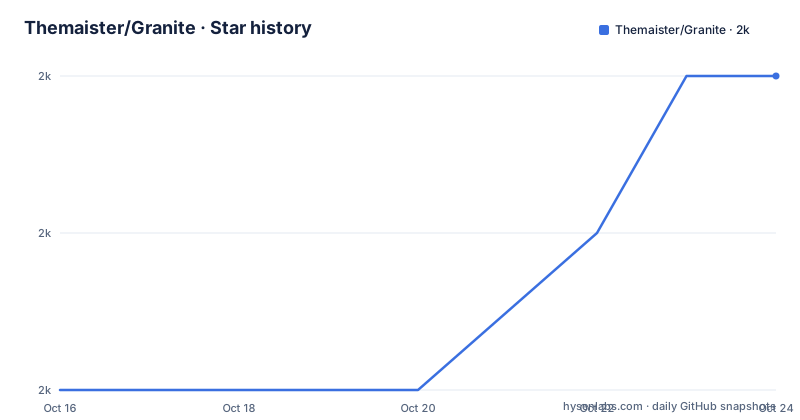
- Themaister/Granite1,967 ★ · +2
| Repository | 2026-10-16 | 2026-10-24 |
|---|---|---|
| Themaister/Granite | 2k | 2k |
2 Stars in the last 8 days, measured from the daily GitHub snapshot. Compare with other projects
Editorial analysis
Granite's Scope and Intended Users
Granite addresses the gap between writing Vulkan directly and using a higher-level graphics API. Its README describes the project as the author's personal Vulkan renderer, with the backend reusing Vulkan enums and data structures while simplifying some of the more involved work of writing straight Vulkan. The intended users are developers looking for implementation ideas, learning material, or a rendering component that they can integrate themselves. The project is not positioned as a general-purpose engine with documented support.
The repository includes a low-level backend under `vulkan/`, a high-level backend under `renderer/`, a basic PBR renderer, post-processing code, asset conversion tools, a scene graph, an entity system, and platform-specific components. That scope is useful for architectural reading, but it also creates a large surface area for an adopter to understand. The README calls the PBR renderer "pretty barebones" and says that fancy rendering is not the main motivation. Multithreaded rendering and optimized SPIR-V precompilation are explicitly listed as missing.
The project also carries a clear operational boundary. Its disclaimer says not to expect support or help, and that pull requests will likely be ignored or dismissed. The repository has no GitHub releases, so there is no release channel documented for users who need versioned upgrades. The last push was on 2026-10-07, which establishes the most recent repository activity available here, but it does not turn the project into a supported or compatibility-tested engine.
Low-Level Vulkan Simplifications
Granite's `vulkan/` backend keeps Vulkan's native concepts visible while reducing repetitive CPU-side management. The README lists a memory manager, deferred destruction and release of API objects and memory, automatic descriptor set management, linear allocators for vertex, index, uniform, and staging data, automatic pipeline creation, and easier-to-use fences and semaphores.
Command buffers track state in a way described as similar to older graphics APIs. On desktop, data in linear allocations can be uploaded in bulk through the Vulkan transfer queue. Shaders use Vulkan GLSL and are compiled at runtime with shaderc. Pipeline caches can be saved to disk and reloaded, while Fossilize is used to warm internal hash maps. These features target CPU overhead and setup friction, not maximum renderer performance. The author explicitly places Granite between direct Vulkan and APIs such as OpenGL or D3D11.
The important adoption question is whether retaining Vulkan types is desirable. Code written against this backend can remain closer to Vulkan's execution model than code written for a more abstract engine. That helps learning and specialized scheduling, but it does not remove the need to understand barriers, queues, descriptors, synchronization, and image layout rules. The backend simplifies some operations; it does not make Vulkan an independent implementation detail.
Render Graph Scheduling and Data Flow
The render graph in `renderer/render_graph.hpp` and `renderer/render_graph.cpp` is the project's central technical feature. It records rendering passes and derives synchronization and resource usage rather than requiring every application pass to spell out the full Vulkan dependency structure by hand.
The documented responsibilities include automatic layout transitions, automatic `loadOp` and `storeOp` usage, scaled load operations for simple lower-resolution game rendering combined with high-resolution UI rendering, and automatic use of async compute queues. The graph attempts early signaling and late waiting. In-queue resources use `VkEvent`, while cross-queue resources use `VkSemaphore`. It also provides basic render target aliasing, conditional passes, mip-map generation on request, transient attachments for tile-based architectures, render target history for feedback, pass reordering, and multisample resolve through `pResolveAttachments`.
The default application scene in `application/application.cpp` demonstrates how these pieces form a frame. The graph can produce a full-scene shadow map conditionally, render a close shadow map, add reflection or refraction passes when the scene graph contains them, and render a deferred G-Buffer. Lighting is merged with the G-Buffer pass into one render pass. Bloom threshold and pyramid downsampling follow, while async compute calculates average luminance and adjusts exposure. Two blur upsampling steps can proceed in parallel with async work. Tonemapping then writes HDR and bloom data to an sRGB backbuffer.
This design is especially relevant to tile-based GPUs, where transient attachments and subpass merging can affect memory use and execution. However, the README uses qualified wording such as "optimal barrier placement" and "optimal (?)" for pass reordering. The mechanism is documented, but the repository does not provide a formal guarantee that every schedule is optimal for every device.
Building Granite and Opening the glTF Viewer
The README directs users to initialize submodules before configuring the build. This is necessary because the project obtains SDL3, glslang, rapidjson, shaderc, SPIRV-Cross, SPIRV-Headers, SPIRV-Tools, stb, volk, meshoptimizer, Fossilize, muFFT, and other dependencies through submodules.
From the repository root, create a build directory, configure CMake with Ninja in Release mode, and compile with Ninja. The documented commands are:
mkdir build
cd build
cmake .. -DCMAKE_BUILD_TYPE=Release -G Ninja
ninja -j16
The resulting build is primarily useful to developers who already intend to use Granite as a submodule or inspect its components. The README states that there are no real samples yet. The `viewer/gltf-viewer` executable is described as a basic glTF viewer and as a sandbox for more complex testing. Its documentation points users toward models from `glTF-Sample-Models`, but it does not specify a command line, input path, or output behavior, so those details cannot be added safely here.
For Android, the documented build entry point is the Gradle build from the `viewer` directory. The assets used by the default `gltf-viewer` target are read from `viewer/assets`:
cd viewer
gradle build
The README does not document a single universal first-run scenario that works across all supported platforms. A new user should therefore treat the viewer as a development sandbox, not as a packaged end-user demonstration.
Scene, Shader, and Texture Constraints
Granite supports glTF 2.0 with PBR materials on a mostly supported basis, and it adds a custom JSON format for combining multiple glTF files for rapid prototyping. The PBR implementation is intentionally basic, and image-based lighting support is described as very simplified.
Texture loading covers PNG, JPG, TGA, and HDR through stb, as well as GTX, Granite's custom texture format for compressed textures. ASTC, ETC2, and BCn or DXTn compressed formats are supported. The `gltf-repacker` can repack glTF models, compress textures to ASTC or BC through ISPC Texture Compressor, and optimize meshes with meshoptimizer. The resulting glTF includes Granite-specific extras and is mainly intended for internal use, so compatibility with another consumer's glTF tooling should not be assumed.
Shader and asset iteration has platform constraints. On Linux and Android, changes to shaders or textures trigger automatic recompilation and reload through inotify. The README explicitly says this is Linux-only unless a Windows backend is implemented. Shaders are compiled at runtime with shaderc, and precompiling all shaders into optimized SPIR-V is listed as a missing feature. That combination can simplify source editing but leaves startup compilation, cache management, and production deployment as integration concerns rather than solved product features.
Platform Support and Maintenance Boundaries
The documented platform paths include SDL3 on Linux and Windows, `VK_KHR_display` for headless Linux with basic keyboard, mouse, and gamepad support, a libretro Vulkan hardware interface, a headless benchmarking target, a custom surface plugin, and Android. The README lists Vulkan implementations tested on AMD, Intel, NVIDIA, Arm Mali, and Tegra hardware across Linux, Windows, and mobile devices.
These statements establish a broad set of intended environments, but they are not the same as a published support matrix. The repository has no GitHub releases, no documentation of a stable compatibility promise, and an explicit disclaimer against support requests. Users should treat driver behavior, Vulkan feature availability, build dependencies, and platform-specific asset paths as part of their own validation.
The last push was on 2026-10-07. That is recent repository activity, but the README still identifies important missing pieces, including multithreaded rendering and full optimized SPIR-V precompilation. Upgrade planning should therefore focus on reviewing `CMakeLists.txt`, submodule changes, Vulkan validation results, and platform-specific code rather than relying on semantic version releases. The MIT license permits reuse under its terms, while the repository provides no separate maintenance commitment or support service.
Granite Compared with Direct Vulkan Development
Direct Vulkan development gives an application complete control over resources, queues, synchronization, memory, and pipeline construction, but it also exposes every low-level operation directly. Granite keeps Vulkan enums and data structures where appropriate, then adds abstractions for memory, descriptors, pipeline creation, synchronization, and render graph scheduling.
That is a meaningful difference for a developer who wants to study implementation choices without starting from an empty renderer. The render graph can derive layout transitions, load and store behavior, async compute placement, target aliasing, and subpass merging. An application using direct Vulkan may instead implement those decisions in its own pass scheduler. Granite does not eliminate Vulkan expertise, because the backend still exposes Vulkan concepts and includes platform-specific behavior.
The trade-off is dependency on a personal project with a deliberately narrow PBR focus. Direct Vulkan may be preferable when an application already has its own scheduling and resource infrastructure. Granite is more relevant when those systems are absent and the developer wants a readable reference implementation to study or embed. Its high-level renderer is described as the least optimized and most naive part, so adopting it as a complete engine would be a different decision from adopting its render graph.
Editorial conclusion
Granite suits engineers studying Vulkan scheduling and render graph design, or teams prepared to own integration work. It is a poor fit for teams needing supported samples, polished PBR, multithreaded rendering, or predictable shader pipelines. Verify first that the current build can compile with the selected Vulkan implementation and that its scene and shader workflow matches the application.
Frequently asked questions
What is Themaister/Granite used for?
Granite is a personal Vulkan renderer in C++. The README positions it as useful for learning renderer implementation ideas or generating implementation ideas, rather than as a supported end-user engine.
How do I build Granite?
Initialize the Git submodules, create a build directory, configure CMake with Ninja in Release mode, and run Ninja. The README also documents an Android build from the `viewer` directory with `gradle build`.
Does Granite support glTF and texture formats?
Granite mostly supports glTF 2.0 with PBR materials. It documents PNG, JPG, TGA, HDR, GTX, ASTC, ETC2, and BCn or DXTn texture support, along with a custom JSON scene format for combining glTF files.
Does Granite provide support for production use?
No support promise is documented. The README says not to expect support or help, and it says pull requests will likely be ignored or dismissed. The repository also has no GitHub releases.
Official sources
Add this badge to your README
If you maintain this project, the badge below links readers to this analysis and shows its maintenance status from the daily GitHub snapshot. Paste the markdown into your README; add ?metric=license or ?metric=stars to the image URL for a different field.

[](https://hysenlabs.com/projects/themaister-granite)Star history chart for your README
[](https://hysenlabs.com/projects/themaister-granite)Was this useful?