mrustc's default source download is the oldest version it supports
Alternative rust compiler (re-implementation)
At a glance
- What is it?
- mrustc is an in-progress Rust compiler written in C++ whose stated goal is bootstrapping rustc rather than serving everyday use. The fully tested bootstrap version is 1.90.0, the version the build downloads by default is 1.29.0, and the same page says 1.29 and older no longer build on a modern system because of outdated openssl bindings.
- Who is it for?
- mrustc suits someone studying compiler construction or trying to build a specific pinned rustc from source with an external C compiler doing the optimisation, and it is not a drop-in rustc for day to day work by its own admission. Before starting, set the version explicitly rather than accepting the default tarball, since the download target and the tested bootstrap target are six releases apart and the default one is the one flagged as broken on modern systems.
- Can I use it commercially?
- Yes. MIT is a permissive licence: you can use, modify and sell software built on it, as long as you keep its copyright and licence notices.
- Is it still maintained?
- Yes. The repository received new commits within the last day.
- What is it written in?
- Mainly C++, according to GitHub's language statistics.
Answers come from the project's GitHub data, last synced on November 15, 2026, and from our analysis. They are not legal advice.
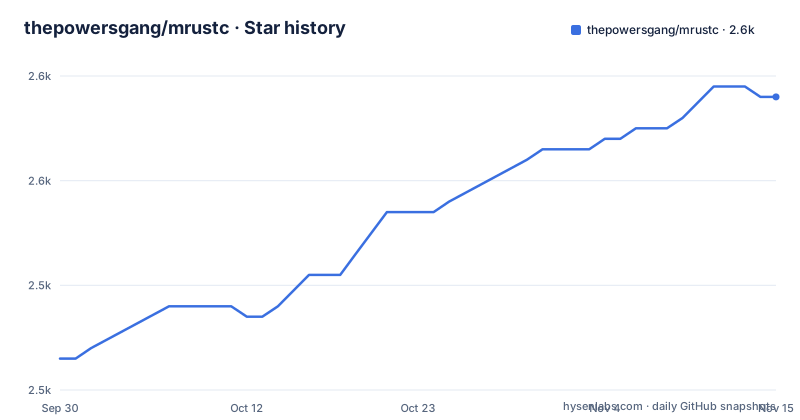
Star history
- thepowersgang/mrustc2,558 ★ · +25
| Repository | 2026-09-30 | 2026-11-15 |
|---|---|---|
| thepowersgang/mrustc | 2.5k | 2.6k |
25 Stars in the last 46 days, measured from the daily GitHub snapshot. Compare with other projects
Editorial analysis
The download target and the tested target are six releases apart
The build commands and the progress list do not agree about which rustc you get by default. On Linux and macOS the first command is `make RUSTCSRC`, which downloads the rustc source tarball, and the note in parentheses says which one: 1.29.0 by default. The progress section, further up, says the version currently tested to fully bootstrap is 1.90.0, with a binary-equal 1.91.1, and that 1.19.0, 1.29.0, 1.39.0, 1.54.0 and 1.74.0 are supported and might still bootstrap given the right environment. So the default is the second oldest of six, and the next line says why that is a poor default today: older versions, 1.29 and older, do not build on modern systems because of outdated openssl bindings. The Windows instructions have the same shape, asking you to download and extract `rustc-1.29.0-src.tar.gz` into the repository root by hand.
make RUSTCSRCSix build scripts and a hand written object list
The repository carries one shell script per supported version, named for the version it handles, from a 1.19.0 script through a 1.90.0 one, plus the matching source patches and, for the later ones, override files carrying a `.toml` extension. Two more files sit beside them, one holding a rust version and one holding a rust nightly date. That is a lot of per release state in the root, and it is state that has to be added to by hand each time a version is picked up. The Makefile has the same character. It does not use wildcard rules to discover sources: it lists every object file explicitly, grouping them by stage with names like the parser, the AST and the type definitions, then compiles each with a suffix rule. Add a source file and the build stops until the list is edited. The upside is that the file is also a readable map of the compiler's own structure, which is more than most makefiles give you.
Two warnings are errors, one is commented out, and bash is forced
The compiler flags are short enough to read in full. The base set is debug info, wall warnings, the C++14 standard and optimisation level two, followed by two suppressions for pessimizing moves and misleading indentation. Two flags are promoted to errors, return type and switch, which is a narrow and deliberate choice: those two catch real mistakes without the noise of treating every warning as fatal. The extra warnings flag is present but commented out, so the project has decided against the larger set. Two other things stand out. The shell is forced to bash regardless of what the platform would pick, which is a portability decision written into the build rather than left to the user. And profiling is a first class mode: setting the gprof variable switches the object directory to a separate one, adds the profiling and no-position-independent flags to both the compile and link lines, and renames the output binary with a suffix, so a profiled build never overwrites a normal one.
The dependency list is a decade old and platform split
The stated toolchain requirements are specific and dated. The C++ compiler must be C++14 compatible, tested with gcc 5.4, gcc 6 and MSVC 2015. A C11 compiler is needed as well, for the output rather than the input, because code generation is C. Beyond that you need GNU make for the makefiles, patch for minor edits to the rustc source, pkg-config for finding crate build dependencies such as libssl, python3 and cmake at least 3.4.3 for building LLVM inside rustc, and libz-dev for shrinking bytecode files, which is a Linux only item because Windows gets it through vcpkg. curl is also Linux only, for fetching the rust source. On Windows the same list becomes Visual Studio 2015 plus the vcpkg route, and the page is explicit that the build there has been tested with that one IDE.
Valid input is an assumption, and the borrow checker is still a plan
The design decision that shapes everything else is stated in the introduction. The primary goal is bootstrapping rustc, so the compiler tends to assume the code it is compiling is valid, and any error in the generated output is by definition a bug in mrustc. That assumption is why it emits a high level assembly, currently C that the page describes as very ugly, and lets an external tool such as gcc do the optimisation and machine code generation. Other backends, LLVM, cretone or GIMPLE, are named as possible but are not what it uses. The feature list shows what does exist: the full chain through high level IR and mid level IR, optimisations at the mid level to take some load off the C compiler, an optional exhaustive validation pass, a working cargo clone with build script support, procedural macros for custom derive, and custom target specifications. What does not exist yet is in the plans section, and the first medium term item is implementing the mid level borrow checker.
One target is fully tested and the rest are described by what was tried
The support list is honest about its shape. The primary target is x86-64 Linux with the GNU toolchain, specifically Debian or Ubuntu, described as always working and fully bootstrap tested. Windows on x86-64 with MSVC is second: runnable executables on Windows 10, but the page says bootstrap has never been fully tested. Under a secondary heading sit x86-64 and arm64 macOS, and an x86 Windows MSVC target marked incomplete. FreeBSD is not in the list at all but gets its own section, because it needs the default target named explicitly, the compiler named explicitly, GNU make invoked as gmake, and the compiler variable set when the system default is clang:
gmake CC=gcc RUSTC_TARGET=x86_64-unknown-freebsd -f minicargo.mkThat recipe is also the clearest example of the shape of the build system: everything that differs between platforms is passed on the command line to the same makefile.
Debug output is one file per compilation plus a list of pass names
Diagnostics are arranged so that a failed build leaves something behind. Both the makefiles and minicargo write the compiler's standard output to a file in the output directory, so compiling a file called `output/libcore.hir` also produces `output/libcore.hir_dbg.txt` beside it. To narrow that output, an environment variable takes a colon separated list of the passes you want, and the pass names are printed in every log line, which is how you find the name to paste in. A separate variable turns on exhaustive mid level IR validation, at a cost in build time. Bug reports are asked to carry four things: what you were trying to build, the host system version, the compiler version, and the repository revision you ran. Questions that do not warrant an issue go to an IRC channel on a named network. Two small inconsistencies sit in the configuration: the page badges a hosted CI service and a GitHub Actions workflow while a Travis configuration file is what sits in the tree, and a file listing disabled tests that are marked as passing sits at the root.
Editorial conclusion
mrustc suits someone studying compiler construction or trying to build a specific pinned rustc from source with an external C compiler doing the optimisation, and it is not a drop-in rustc for day to day work by its own admission. Before starting, set the version explicitly rather than accepting the default tarball, since the download target and the tested bootstrap target are six releases apart and the default one is the one flagged as broken on modern systems. Read the target support list before choosing a platform, because one platform is fully bootstrap tested and the others are described in terms of what has or has not been tried. And if you are after error messages, this is the wrong tool by its own first line.
Frequently asked questions
What is mrustc?
It is an in-progress alternative Rust compiler written in C++. Its primary goal is bootstrapping rustc, meaning it can build a working copy of rustc and cargo, but the page states it is not suitable for everyday use because of its error messages. Its licence file is named LICENCE-MIT and the repository publishes no releases.
Can mrustc build my own code?
Yes, after you build at least libcore and probably the full standard library, with `make -f minicargo.mk LIBS` on Linux or macOS or `build_std.cmd` on Windows. Then use `minicargo -L <path_to_libstd> <crate_path>` for a cargo project or `mrustc -L <path_to_libstd> --out-dir <output_directory> <path_to_main.rs>` to call the compiler directly. Both programs have a help option.
Which rustc versions does mrustc bootstrap?
Version 1.90.0 is currently tested to fully bootstrap, with a binary-equal 1.91.1. Versions 1.19.0, 1.29.0, 1.39.0, 1.54.0 and 1.74.0 are supported and might still bootstrap in the right environment. The page notes that 1.29 and older do not build on modern systems because of outdated openssl bindings.
What does mrustc need in order to build?
A C++14 compatible compiler, tested with gcc 5.4, gcc 6 or MSVC 2015, plus a C11 compiler for the output code, GNU make, patch, pkg-config, python3 and cmake at 3.4.3 or newer for building LLVM inside rustc. On Linux you also need libz-dev and curl, while Windows uses vcpkg for the compression library.
How do I get debug output from mrustc?
The compiler's standard output is written next to the file it produced, so `output/libcore.hir` comes with `output/libcore.hir_dbg.txt`. Set MRUSTC_DEBUG to a colon separated list of pass names, which are printed in every log line, for example MRUSTC_DEBUG=Expand:Parse, and set MRUSTC_FULL_VALIDATE for exhaustive mid level IR validation.
Official sources
Where developers are discussing it
Posts on Hacker News, dev.to and Lobsters that link to this repository, found by our scan of those communities. 0 in the last 30 days; newest first.
- mrustc – Alternative Rust CompilerHacker News · Sep 30, 2026 · 1 points · 1 comments
Add this badge to your README
If you maintain this project, the badge below links readers to this analysis and shows its maintenance status from the daily GitHub snapshot. Paste the markdown into your README; add ?metric=license or ?metric=stars to the image URL for a different field.

[](https://hysenlabs.com/projects/thepowersgang-mrustc)Star history chart for your README
[](https://hysenlabs.com/projects/thepowersgang-mrustc)Was this useful?