python-dotenv: one boolean reverses which configuration source wins
Reads key-value pairs from a .env file and can set them as environment variables. It helps in developing applications following the 12-factor principles.
At a glance
- What is it?
- The library that reads key-value pairs from a .env file into environment variables, where the documented precedence order is literally swapped by the override flag, a key with no value is ignored by one entry point and nulled by the other, and an environment variable can disable file loading outright.
- Who is it for?
- python-dotenv suits a twelve-factor style service that reads its configuration from environment variables but needs a workable local setup, and it suits teams that want sensitive values layered separately from shared settings. It does not suit a design that treats the file as the single source of truth, because by default a real environment variable deliberately wins over the file.
- Can I use it commercially?
- Yes. BSD-3-Clause is a permissive licence: you can use, modify and sell software built on it, as long as you keep its copyright and licence notices.
- Is it still maintained?
- Yes. The repository last received commits 5 days ago.
- What is it written in?
- Mainly Python, according to GitHub's language statistics.
Answers come from the project's GitHub data, last synced on November 14, 2026, and from our analysis. They are not legal advice.
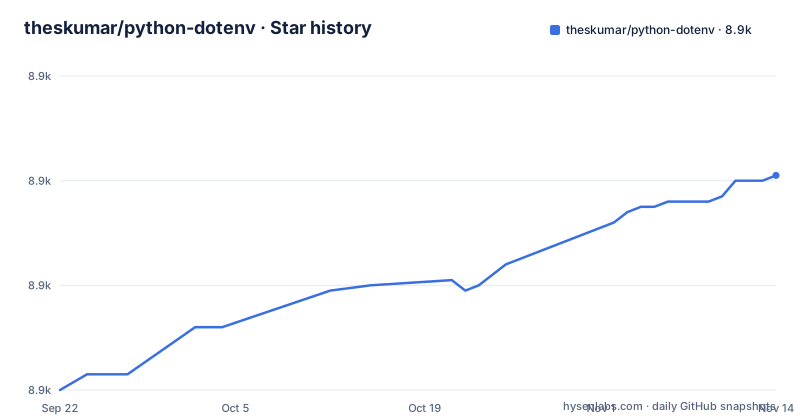
Star history
- theskumar/python-dotenv8,921 ★ · +41
| Repository | 2026-09-22 | 2026-11-14 |
|---|---|---|
| theskumar/python-dotenv | 8.9k | 8.9k |
41 Stars in the last 53 days, measured from the daily GitHub snapshot. Compare with other projects
Editorial analysis
The override flag reverses the documented precedence order
Variable expansion resolves each variable to the first available value from an ordered list of four candidates, and the order is not fixed. With the override flag enabled, or when using the entry point that returns a dictionary instead of writing to the environment, the list starts with the value in the file, then the value in the environment, then a supplied default, then an empty string. With the override flag left at its default, the list starts with the value in the environment, then the value in the file, then the default, then the empty string. Only the file and environment positions swap; the default and empty-string fallback remain last. That makes one boolean the difference between your file being authoritative and your shell being authoritative, with no error either way.
A key with no value is ignored by one entry point and null in the other
The file format allows a variable written with no value at all, just the name. What happens to it depends on which entry point read the file. The function that returns a parsed dictionary associates that name with a null value, so your configuration dictionary contains the key mapped to nothing. The function that loads into the process environment simply ignores such variables, so they never appear. And neither behaviour is the same as writing an empty value after the equals sign, which associates the name with an empty string rather than a null. So three superficially identical things, a bare name, a name with nothing after the sign, and a name with a value, produce three different results depending on how you read the file.
An environment variable switches the whole feature off
There is a kill switch, and it is worth knowing about before you need it. Setting an environment variable to the value 1 disables the loading function from reading .env files or streams at all. The stated situations for it are when you cannot modify calls inside a third-party package, or when you are in production. That second case is the interesting one. If something in your dependency tree calls the loading function and you cannot modify that call, this variable is the answer, and it means a library you did not write can be prevented from reading your development configuration purely through the environment it inherits.
Reading a dictionary instead of mutating the environment
There is a second entry point that parses the file and returns a dictionary without touching the process environment at all, and the documentation shows the pattern it is for. You merge a shared development file, merge a separate sensitive file, and then merge the environment last so that real environment variables override whatever the files said. That ordering in the merge expression is the whole design: later keys win in a dictionary merge, so putting the environment last gives it precedence without passing any flag. The consequence is that you can keep sensitive values out of the process environment entirely, split shared settings from secrets into two files, and get a defined precedence rule without a global mutation that other libraries might observe.
Both entry points take a stream, so the file is optional
Neither entry point requires a path. Both accept a stream through a stream argument, and the page draws the conclusion directly: it is therefore possible to load the variables from sources other than the filesystem, such as the network. The example wraps an in-memory string containing two assignments and passes it straight in. That has two consequences. The parser is decoupled from the file, so it can be exercised in a test without touching a filesystem. And the source of configuration becomes something you choose at the call site, so a configuration service, a secret store or a database row can stand in for a path without changing the parsing behaviour at all. The IPython integration works the same way, exposing the loader as a notebook magic that searches for a file by default but accepts a relative, absolute or home-relative path. There is also a command line tool for editing the file without opening it, and for running a command with the variables injected:
$ pip install "python-dotenv[cli]"
$ dotenv set USER foo
$ dotenv set EMAIL [email protected]
$ dotenv list
$ dotenv list --format=json
$ dotenv run -- python foo.py
The tool is an optional extra rather than part of the default install, and it gives you a fourth way in alongside the library, the stream and the notebook magic.
The format is informal, still changing, and reads named pipes
The documentation is honest that the file format is not formally specified and still improves over time, while advising that these files should mostly look like Bash files. Reading from named pipes on Unix systems is supported, which is how you consume configuration from another process without a temporary file. Within that informal grammar, keys may be unquoted or single-quoted, values may be unquoted, single- or double-quoted, whitespace around keys, equals signs and values is ignored, a value may be followed by a comment, and lines may begin with the export directive without that changing their meaning. Escape sequences differ by quote style, with a shorter set available in single quotes than in double quotes. Quoted values may also span multiple lines, and the page shows that a literal line break inside quotes and an escaped newline in the same quoted value produce equivalent results. One expansion gotcha is called out explicitly: a variable used inside a value must be wrapped in braces, since a bare dollar-prefixed name is not expanded. The consequence of the informal format is that you should not write a generator of these files and expect byte-stable output.
Releases are gated on the branch name and a clean tree
The build file contains a release target that refuses to do anything until two preconditions hold. It checks that the current branch is main, and if it is not, it prints which branch you are on and exits with a failure. It then checks that the working tree has no uncommitted changes, and if it does, it tells you to commit the changelog first and exits again. Only then does it run the linter, run the tests, and perform the version bump, where the bump size defaults to a patch and can be overridden for a minor release. It finishes by echoing the tagged version and the exact remaining manual steps, pushing the branch along with tags and then creating the release to publish to the package index. So publishing is a two-step human process with an explicit checklist, and the version is changed by a configuration file rather than edited.
Editorial conclusion
python-dotenv suits a twelve-factor style service that reads its configuration from environment variables but needs a workable local setup, and it suits teams that want sensitive values layered separately from shared settings. It does not suit a design that treats the file as the single source of truth, because by default a real environment variable deliberately wins over the file. Before adopting, add .env to your ignore file, decide consciously whether you want the override flag on, and remember that an environment variable exists specifically to switch file loading off in production.
Frequently asked questions
What does dotenv do in Python?
It reads key-value pairs from a .env file and can set them as environment variables, which helps when developing an application that follows the twelve-factor approach and otherwise has to set every variable by hand. By default it looks for a .env file beside the script or higher up the tree, adds each pair to the environment, and does not override variables already set.
How do you use python-dotenv?
Call the loading function near the start of your program and then read configuration from the environment as usual. Three variations are documented: a companion function that returns a parsed dictionary without touching the environment, which supports layering shared and sensitive files, passing a stream instead of a path so configuration can come from anywhere, and a notebook magic for loading the file inside IPython.
How do I install python-dotenv?
With pip install python-dotenv. The command line interface is an optional extra, installed by asking for the bracketed variant, and it provides subcommands to set, list and run commands with the file's variables injected. The package requires Python 3.10 or newer and declares itself stable and operating-system independent.
Why don't we push .env files?
The documentation's advice is that you will probably want to add .env to your .gitignore, especially if it contains secrets like a password. It also records a set of alternative projects in the same space, including one dedicated to loading these files for a particular web framework, in case the built-in behaviour is not what a given stack expects.
What is python-dotenv used for?
Loading local development configuration from a file so that an application which takes its configuration from environment variables can be launched without setting them by hand. It also ships a command line tool for editing the file and for running a command with its variables injected, and an environment variable that disables file loading entirely when you need it off.
Official sources
Add this badge to your README
If you maintain this project, the badge below links readers to this analysis and shows its maintenance status from the daily GitHub snapshot. Paste the markdown into your README; add ?metric=license or ?metric=stars to the image URL for a different field.

[](https://hysenlabs.com/projects/theskumar-python-dotenv)Star history chart for your README
[](https://hysenlabs.com/projects/theskumar-python-dotenv)Was this useful?