ThingsGateway: .NET Edge Gateway for Industrial Device Connectivity
ThingsGateway is a cross-platform, high-performance gateway for edge data acquisition and IoT connectivity. Developed with .NET 8, it offers a suite of powerful tools, including advanced PLC communication libraries and debugging software.
At a glance
- What is it?
- ThingsGateway is an open-source .NET 8 industrial IoT gateway for collecting, processing, and forwarding equipment data. It suits Windows and Linux edge deployments, with Docker and source-build paths, while protocol support and operational guarantees vary between the open-source and PRO editions.
- Who is it for?
- ThingsGateway is a reasonable fit for engineers building a self-hosted industrial data path with Windows or Linux edge hardware, especially when .NET, MQTT, Modbus, or server-side protocol exposure is required. It is less suitable for teams that need the full protocol catalog or expect every PRO capability to be present in the open-source edition.
- Can I use it commercially?
- Yes. Apache-2.0 is a permissive licence: you can use, modify and sell software built on it, as long as you keep its copyright and licence notices.
- Is it still maintained?
- Yes. The repository last received commits 39 days ago.
- What is it written in?
- Mainly C#, according to GitHub's language statistics.
Answers come from the project's GitHub data, last synced on October 23, 2026, and from our analysis. They are not legal advice.
Star history
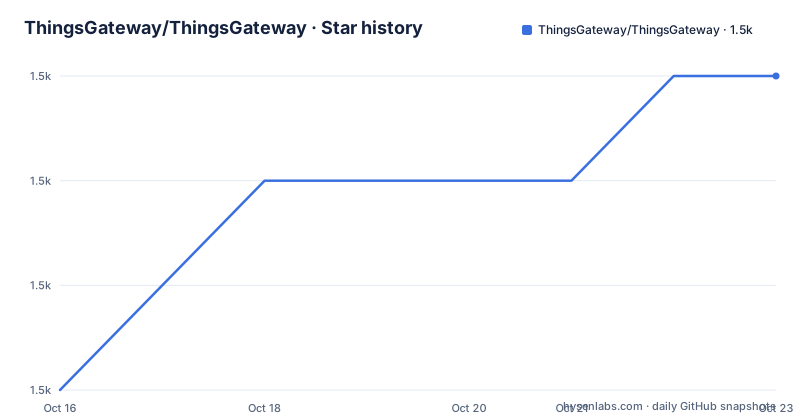
- ThingsGateway/ThingsGateway1,489 ★ · +3
| Repository | 2026-10-16 | 2026-10-23 |
|---|---|---|
| ThingsGateway/ThingsGateway | 1.5k | 1.5k |
3 Stars in the last 7 days, measured from the daily GitHub snapshot. Compare with other projects
Editorial analysis
What ThingsGateway solves at the edge
ThingsGateway addresses the boundary between industrial equipment and the systems that consume its data. The README describes acquisition for protocols including Modbus RTU, Modbus TCP, OPC, MQTT, and S7, followed by edge-side filtering, conversion, preprocessing, and rule-based actions. The intended users are engineers building industrial automation, energy, power, manufacturing, or building systems where PLCs and other devices need to expose data to databases, Web APIs, Kafka, MQTT, or other services.
Its central design is a gateway rather than a single protocol library. A deployment can sit beside equipment on an industrial PC or edge server, acquire values, process them locally, and forward structured results to upstream systems. The project also describes server-side roles such as OPCUAServer, ModbusServer, and MQTTServer. That makes it different from a narrow PLC driver package, although the exact protocol implementation still depends on the available plugin or edition.
The repository is not archived, and its last push was on 2026-09-14. That indicates recent repository activity, but the repository has no GitHub releases. Release cadence and upgrade packaging therefore cannot be inferred from a published GitHub release history.
Channels, devices, and points in ThingsGateway
The documented data model separates configuration into channels, devices, and points. A channel represents the communication context, a device represents connected equipment, and points represent individual values or addresses. This hierarchy is useful for industrial sites because it maps software configuration to physical connections rather than requiring every tag to be handled as an unrelated task.
For acquisition, the README says the runtime uses an asynchronous, non-blocking model. It also describes intelligent variable scanning, grouping, and batch reads. In practical terms, the documented flow is: configure a communication channel, define devices and their points, acquire values through the relevant driver, and make the resulting structured data available to processing and forwarding components. The repository layout separates the gateway platform from foundations, administration, ORM, ASP.NET Core utilities, plugins, and documentation, which supports a modular development model.
ThingsGateway also documents a rule engine for condition-triggered events and actions. Edge processing can include C# script extensions and in-memory variables. These features can reduce unnecessary traffic before data reaches a cloud or central service. They also introduce operational questions that the README does not answer in detail, such as script deployment, sandboxing, persistence, versioning, and the exact behavior of a failed rule. Those details should be checked against the project documentation and the selected deployment before production use.
Protocol plugins and northbound forwarding
ThingsGateway uses plugins for both acquisition and forwarding. The open-source description lists Modbus RTU, Modbus TCP, OPC, MQTT, and S7 among its common acquisition protocols. It also lists MQTT, databases, Web API, and Kafka as possible destinations. The protocol list is not presented as a guarantee that every driver is available in every edition or configuration, so the required driver must be confirmed before selecting the project.
The repository includes a `ThingsGateway.Plugin` project, while the README identifies `ThingsGateway.Foundation` as the home of utility code, driver interfaces, and driver implementations. This separation suggests that a deployment can add communication capabilities without placing every protocol implementation directly in the gateway host. The documented PRO offering adds protocols such as FINS, CIP / EtherNet/IP, MC Protocol, IEC 60870-5-104, OPC AE, VIGOR, and SECS / SECS-I / HSMS.
That distinction has a direct effect on adoption cost. A team requiring an open-source PLC protocol not named in the main README may need to investigate the Foundation and Plugin repositories. A team requiring a protocol listed under PRO must account for the separate commercial offering. The README does not document plugin installation, compatibility matrices, or upgrade procedures, so protocol coverage should be verified from the relevant project and edition documentation.
Running ThingsGateway with Docker
The README gives Docker deployment as a direct way to run the gateway without first compiling the source. It requires .NET 8.0 or 10.0 or higher for the documented development environment, although the published container can encapsulate the runtime dependency. The following commands are copied from the README. The first image is for x64 and the second is for arm64; run the command matching the target machine.
docker pull registry.cn-shenzhen.aliyuncs.com/thingsgateway/thingsgateway:latestdocker pull registry.cn-shenzhen.aliyuncs.com/thingsgateway/thingsgateway_arm64:latestThe first use is to start the x64 container and map port 5000 to the host. The README shows the container name `thingsgateway` and then instructs the reader to open the management interface.
docker run -d -p 5000:5000 --name thingsgateway registry.cn-shenzhen.aliyuncs.com/thingsgateway/thingsgateway:latestdocker run -d -p 5000:5000 --name thingsgateway_arm64 registry.cn-shenzhen.aliyuncs.com/thingsgateway/thingsgateway_arm64:latestAfter the container starts, browse to `http://localhost:5000`. The README does not give initial credentials, a sample device configuration, or a first protocol exchange, so the first real use is the management interface rather than a documented end-to-end tutorial.
Building the gateway from source
For development environments, the README provides a source-based path. It clones the repository, changes into the project directory, and runs the server project with `dotnet run`. This is more useful when engineers need to inspect the solution or change code than when they simply need an edge runtime.
git clone https://gitee.com/ThingsGateway/ThingsGateway.git
cd ThingsGateway
The server project is launched with the following command.
dotnet run --project src/ThingsGateway.Server/ThingsGateway.Server.csprojThe README then directs the user to `http://localhost:5000`. The repository contains `ThingsGateway.slnx`, a `test/` directory, and separate projects for the server, Foundation, ORM, ASP.NET Core utilities, administration, plugins, and documentation. That layout gives developers several integration points, but it also means a source build may involve more setup than the Docker route.
The README does not document database initialization, environment variables, production reverse-proxy settings, TLS configuration, or a documented backup procedure. It also does not provide release artifacts through GitHub. For a production decision, the absence of those instructions is a concrete limitation, not evidence that the features are absent from the code.
Reliability, deployment limits, and maintenance
The README claims built-in reconnect handling, caching, compensation, heartbeat detection, timeout control, and exception isolation. It also describes failed retries, batch sending, and anomaly handling for network output. These are relevant requirements for edge gateways, where a temporary network failure should not necessarily stop local acquisition. However, the README does not specify cache capacity, durability guarantees, retry limits, delivery ordering, or behavior when the edge device restarts.
ThingsGateway supports Windows and Linux and can be deployed on industrial PCs or edge servers. That makes it suitable for sites where the gateway must run close to equipment rather than on a central cloud host. The same choice creates operating-system considerations that the README leaves open. The repository describes .NET 8 and .NET 10 support, while the professional edition is described as using a .NET 10 and Vue architecture. The source and container paths may therefore not represent identical feature sets.
The repository is licensed under Apache-2.0. That license permits use and modification under its terms, including the patent and notice conditions described by the license itself. The README separately states that PRO plugins are paid additions and that the professional website covers commercial use details. It also mentions a migration path for users of the former non-source authorization model. This is a licensing boundary, not legal advice. Confirm which edition and plugins will be deployed before treating the project as an unrestricted commercial component.
The last push was on 2026-09-14, and the repository is not archived. No GitHub releases are listed, so upgrade planning should account for the difference between repository activity and a documented release package.
ThingsGateway compared with a standalone PLC library
The main alternative is a standalone PLC communication library or a device-specific integration service. Such a library can be smaller and may be a better fit when the system reads one PLC family and forwards values through an application-specific pipeline. It generally offers less of the gateway management surface described by ThingsGateway.
ThingsGateway goes further by combining protocol acquisition, a channel and device model, point configuration, edge processing, rule events, caching, forwarding, and management monitoring. It also presents server-side protocol endpoints. The tradeoff is a larger deployment with more configuration and operational responsibilities. A standalone driver generally leaves protocol handling to the host application and does not provide the same gateway lifecycle model.
The choice depends on scope. Use a library when the application already owns scheduling, storage, forwarding, and recovery. Consider ThingsGateway when those responsibilities should be assembled as an edge service and when its supported protocols match the equipment. Neither option should be chosen solely from a general claim of high performance. The README describes batching and asynchronous collection, but it does not provide a performance report for a particular PLC model, network, point count, or deployment.
Editorial conclusion
ThingsGateway is a reasonable fit for engineers building a self-hosted industrial data path with Windows or Linux edge hardware, especially when .NET, MQTT, Modbus, or server-side protocol exposure is required. It is less suitable for teams that need the full protocol catalog or expect every PRO capability to be present in the open-source edition. Verify the required protocol plugin, licensing terms, persistence model, reconnect behavior, and target operating system before adoption; the documented starting point is the container image and its management interface on port 5000.
Frequently asked questions
What is ThingsGateway used for?
ThingsGateway is an open-source industrial IoT gateway for acquiring equipment data, processing it at the edge, and forwarding it to systems such as MQTT, databases, Web APIs, or Kafka. The README targets industrial automation, energy, power, manufacturing, and building environments.
How do I install ThingsGateway with Docker?
The README provides x64 and arm64 images in the `registry.cn-shenzhen.aliyuncs.com/thingsgateway` registry. Pull the image for the target architecture, run it with port 5000 mapped to the host, and open `http://localhost:5000`.
Which industrial protocols does ThingsGateway support?
The open-source description names Modbus RTU, Modbus TCP, OPC, MQTT, and S7. Additional protocols, including FINS, CIP / EtherNet/IP, MC Protocol, IEC 60870-5-104, OPC AE, VIGOR, and SECS / SECS-I / HSMS, are listed under the paid PRO plugins.
Official sources
Add this badge to your README
If you maintain this project, the badge below links readers to this analysis and shows its maintenance status from the daily GitHub snapshot. Paste the markdown into your README; add ?metric=license or ?metric=stars to the image URL for a different field.

[](https://hysenlabs.com/projects/thingsgateway-thingsgateway)Star history chart for your README
[](https://hysenlabs.com/projects/thingsgateway-thingsgateway)Was this useful?