Threekiii/Vulnerability-Wiki: three Chinese vulnerability archives behind docsify
A project for quickly deploying the Awesome-POC vulnerability documentation repository via docsify.
At a glance
- What is it?
- A docsify wrapper that serves the Awesome-POC collection, a repackaged 0sec archive and a Wooyun mirror on ports 3001 to 3003, with the encoding problem stated up front.
- Who is it for?
- Adopt this project if you want a searchable reading copy of three Chinese-language vulnerability writeups on your own machine, and you are prepared to deal with GB2312 sources and a directory that needs a repackaged archive dropped into it before anything renders. It is a documentation wrapper, not a vulnerability scanner, so it gives you nothing to detect anything with.
- Can I use it commercially?
- Not without permission. GitHub finds no licence file in the repository, and without a licence all rights are reserved by default: you may read the code but not reuse it. Check the README, or ask the authors, before using it.
- Is it still maintained?
- Yes. The repository last received commits 165 days ago.
- What is it written in?
- Mainly HTML, according to GitHub's language statistics.
Answers come from the project's GitHub data, last synced on October 23, 2026, and from our analysis. They are not legal advice.
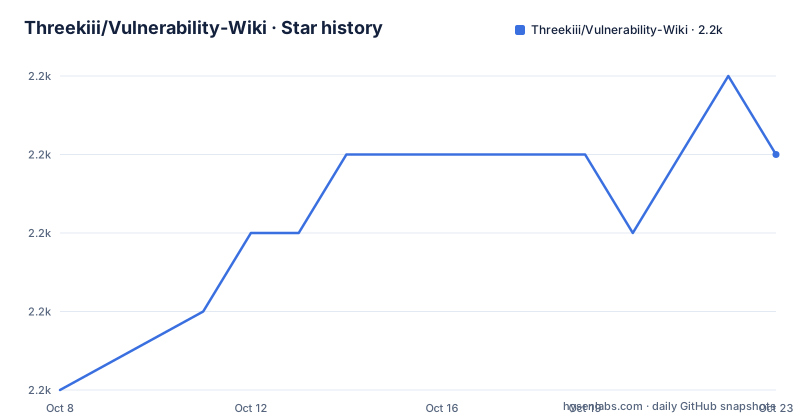
Star history
- Threekiii/Vulnerability-Wiki2,197 ★ · +3
| Repository | 2026-10-08 | 2026-10-23 |
|---|---|---|
| Threekiii/Vulnerability-Wiki | 2.2k | 2.2k |
3 Stars in the last 15 days, measured from the daily GitHub snapshot. Compare with other projects
Editorial analysis
Five top-level entries and three separate archives
The repository tree is short: `README.md`, `docker-compose.yml`, `docs-0sec/`, `docs-base/` and `images/`. That is the whole thing. There is no application code, no database and no indexing service, which tells you what kind of project this is before the README does. It is a documentation wrapper whose job is to make three existing collections of Chinese-language vulnerability writeups readable in a browser.
Those three collections are named separately because they have different origins. `docs-base/` is described as the core library and is based on another repository by the same owner, Awesome-POC. `docs-0sec/` is a repackaged copy of the Zero Group vulnerability library, and the README states plainly that Zero Group stopped operating in 2021, with the content recovered from `.docx` files found on the internet and converted to HTML. The third is wooyun, a historical Wooyun archive, which is not built from this repository at all: the README points to `v7hinc/wooyun_final` and uses a prebuilt image pulled from Docker Hub.
The split has a documented reason. A changelog entry from 2022.07.15 says the 0sec content was separated into its own subproject because keeping it inside the main project was slowing down loading and search. That is a real constraint rather than a preference, and it shapes the deployment: three services, three ports, three Dockerfiles.
Fix the encoding before you serve anything
The first block in the README's preparation section is not the clone. It is the clone followed by a character set conversion, and the ordering is the point. Much of the underlying content is GB2312, and docsify rendering that as UTF-8 produces the garbled text that the README later files under its own issues page.
# git clone
git clone https://github.com/Threekiii/Vulnerability-Wiki.git
# fix coding error
yum install convmv
convmv -f gb2312 -t UTF-8 --notest -r ./Vulnerability-Wiki/ --replace
Note the tool choice. `convmv` comes from a distribution package manager rather than from Python or Node, and the recursive flag with `--replace` rewrites files in place across the whole tree. The `--notest` flag skips the interactive preview, so on a large tree the conversion starts immediately. The issues section repeats the command with the target narrowed to `./Vulnerability-Wiki/docs-base/docs`, which suggests the conversion is scoped differently depending on what you have already done to the tree.
The repository does not say whether the conversion is idempotent, so running it twice on already-converted files is the kind of thing that will not warn you. There is also no CI configuration in the tree that would catch an encoding regression, which means a converted file that gets reverted upstream shows up as broken text rather than as a failed build.
docsify serve for reading, Docker for three ports
The local path is the shorter one. Install the CLI globally, then serve each archive's `docs` directory from inside it:
npm i docsify-cli -g# docs-base
cd ./Vulnerability-Wiki/docs-base
docsify serve docsThe same two commands run against `./Vulnerability-Wiki/docs-0sec`. The README lists four docsify plugins alongside this: sidebar collapse, copy-to-clipboard, PrismJS for highlighting, and pagination navigation. Nothing in the tree pins their versions, so a fresh install picks up whatever is current, and the README gives repository links rather than install commands for them.
The Docker path builds one image per archive and pins a host port. For `docs-base`:
# docker build & run
cd ./Vulnerability-Wiki/docs-base
docker build -f Dockerfile -t threeki/vulnerability_wiki .
docker run -d -p 3001:3001 threeki/vulnerability_wiki:latest
The 0sec build is the same two commands against `docs-0sec` with port 3002. Wooyun is different in kind, because it is a third-party image rather than a build from this tree, and it needs a volume mount for uploads or images fail to render:
# docker build & run
docker pull v7hinc/wooyun
docker run --privileged=true --name wooyun -v ~/upload:/home/wwwroot/default/upload -p 3003:80 -dit v7hinc/wooyun:latest /bin/bash
That last line runs the container privileged and starts it as a detached interactive shell rather than a web server entrypoint. The README says the mount is required or images will not display, so the privileged flag is a consequence of that upstream image rather than a choice this project documented the reasoning for.
docker-compose brings up all three, after two downloads
`docker-compose.yml` is the only configuration file in the tree, and it is nineteen lines of YAML that reference ports 3001, 3002 and 3003. The Wooyun service names port 3003 in the compose file while the standalone command maps the container's port 80, which is consistent between the two.
The compose file defines a service named `0sec`. A YAML key beginning with a digit is legal, and Docker Compose accepts it, but it is worth knowing before you write a script that addresses that service by name. The build context is `./docs-0sec/`, which is the directory the repository ships empty until you populate it.
The README's compose instructions put the two downloads ahead of `docker-compose up -d`, and that ordering is not cosmetic:
# download docs-0sec release
wget https://github.com/Threekiii/Vulnerability-Wiki/releases/download/v1.0/docs-0sec.zip
unzip -o docs-0sec.zip

# download wooyun image
docker pull v7hinc/wooyun

# create and start containers
docker-compose up -d
The issues section confirms what happens when you skip it. A 404 error on docs-0sec is attributed to the release not having been downloaded and extracted, with a rebuild required if the service is already running. The README links that to issue 6 as the reference fix, and does not describe a health check that would have surfaced the missing payload before a request arrives.
Two release dates that do not line up with the changelog
The repository has two GitHub releases and a changelog, and they tell slightly different stories. The changelog records a 2.0 version on 2022.06.20 with a note that vulnerability sections were redrawn and the search strategy optimised. The release tagged `v2.0` carries a publish date of 2024-04-01, and its body describes the post-refactor directory layout as eleven categories spanning OA, CMS, development frameworks, network devices, programming languages, operating systems, web applications, middleware, databases, cloud security and everything else.
Inside that same release body, the refactor is dated 2023.04.01. The changelog dates the same directory refactor 2024.04.01 and adds an entry for the same day about merging vulhub content into the individual categories. So the eleven-category layout is described identically in two places while carrying two different years, and the tag that represents version 2.0 is stamped two years after the changelog says 2.0 shipped.
The last push was on 2026-05-11, which is a separate signal from the release history. The changelog's most recent entry is dated 2024.05.01 for a Dockerfile optimisation, so the most recent commit is well after the last entry in the published changelog. Rather than pick one version story over the other, treat the release page as the record of what is downloadable and the changelog as the record of what the author intended to change. If you are pinning anything, pin to the download URLs, which are stable: the v1.0 `docs-0sec.zip` asset is the one the deployment instructions reference.
No license file sits under a security archive
GitHub does not identify a license for this repository, and the tree contains no LICENSE file. The five top-level entries include the README, the compose file, three directories and an images folder, and none of them is a license. For a collection of writeups and proof-of-concept material scraped from public sources, that absence is worth registering before you plan to redistribute a copy internally.
The README does carry a disclaimer in both Chinese and English restricting use to learning and research and prohibiting illegal activity, unauthorized penetration testing and commercial use, with a link to a separate laws repository. That is a statement of intent from the author rather than a legal instrument, and it is not a substitute for a license grant. The distinction matters most for the two third-party pieces: the Wooyun content is served by someone else's image, and the 0sec content originates in `.docx` files that the README attributes to the internet.
One more housekeeping point, which the README is honest about. The repository has no open issues, the last push was on 2026-05-11, and the changelog stops at 2024.05.01. An empty issue tracker is consistent with fixes being documented in the README's own issues section instead of in GitHub, so the README is the better place to look when a deployment step fails.
Editorial conclusion
Adopt this project if you want a searchable reading copy of three Chinese-language vulnerability writeups on your own machine, and you are prepared to deal with GB2312 sources and a directory that needs a repackaged archive dropped into it before anything renders. It is a documentation wrapper, not a vulnerability scanner, so it gives you nothing to detect anything with. The first thing to verify is the docs-0sec payload: the directory in the repository is empty until you download the v1.0 zip, and the README itself reports 404 errors when that step is skipped. After that, check the character encoding of whatever you added, because the conversion step is manual and unverified by the project.
Frequently asked questions
What does Threekiii/Vulnerability-Wiki actually contain?
Three separate collections of Chinese-language vulnerability writeups, served as docsify sites. `docs-base/` holds the core library based on the owner's Awesome-POC repository, `docs-0sec/` holds a repackaged Zero Group archive recovered from `.docx` files and converted to HTML, and wooyun is served by a separate third-party image from `v7hinc/wooyun_final`.
Why do the pages come out as garbled text after deployment?
The underlying content is GB2312 and docsify expects UTF-8. The README's first instruction is a recursive in-place conversion with convmv before serving anything, and the issues section repeats it scoped to the docs-base docs directory. The project has no CI step that would catch an encoding regression afterwards.
What does the docs-0sec directory need before Docker Compose will work?
It needs the v1.0 release archive. The directory ships empty, and the README requires downloading `docs-0sec.zip` and extracting it there before running `docker-compose up -d`. Skipping this step is the documented cause of the 404 errors reported in issue 6, and fixing it requires a rebuild once the service is already running.
Is Vulnerability-Wiki a vulnerability scanner?
No. It is a documentation wrapper with no application code, no database and no detection logic. Its purpose is fast search across archived writeups, which is a different task from finding vulnerabilities in a live system, and it ships nothing that would scan anything.
Official sources
Add this badge to your README
If you maintain this project, the badge below links readers to this analysis and shows its maintenance status from the daily GitHub snapshot. Paste the markdown into your README; add ?metric=license or ?metric=stars to the image URL for a different field.

[](https://hysenlabs.com/projects/threekiii-vulnerability-wiki)Star history chart for your README
[](https://hysenlabs.com/projects/threekiii-vulnerability-wiki)Was this useful?