JKVideo after bilibili's legal notice: DASH playback in the tree, no updates behind it
B React Native. High-looking third-party B station React Native client
At a glance
- What is it?
- JKVideo is a React Native and Expo client for bilibili that stopped taking issues and pull requests after a legal notice from the platform, with its last release on 2026-05-12. Here is what the code still does, what each install route costs you, and what was never finished.
- Who is it for?
- JKVideo is worth reading as a worked example of DASH playback and WBI signing inside React Native, because the code is complete enough to trace from the DASH streams to the local MPD to ExoPlayer. It is not worth shipping or forking as a product: bilibili asked it to stop calling the API, the repository no longer accepts issues, and the last commit is dated 2026-05-12.
- Can I use it commercially?
- Yes. MIT is a permissive licence: you can use, modify and sell software built on it, as long as you keep its copyright and licence notices.
- Is it still maintained?
- Activity is slowing. The repository last received commits 6 months ago.
- What is it written in?
- Mainly TypeScript, according to GitHub's language statistics.
Answers come from the project's GitHub data, last synced on November 14, 2026, and from our analysis. They are not legal advice.
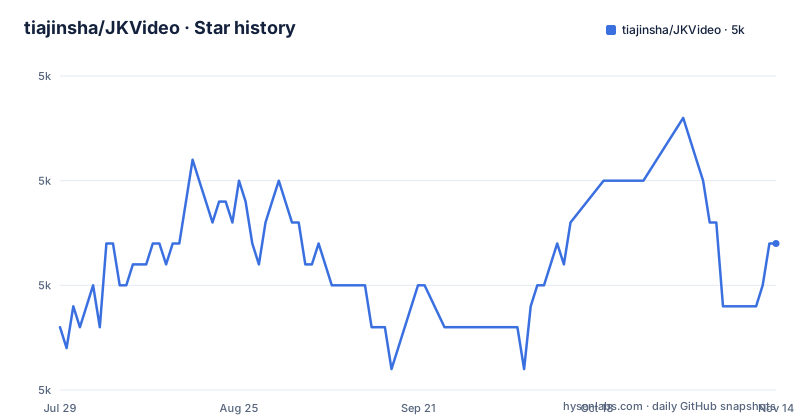
Star history
- tiajinsha/JKVideo4,997 ★ · +4
| Repository | 2026-07-29 | 2026-11-14 |
|---|---|---|
| tiajinsha/JKVideo | 5k | 5k |
4 Stars in the last 108 days, measured from the daily GitHub snapshot. Compare with other projects
Editorial analysis
A legal notice sits above the feature list, and the last commit is 2026-05-12
JKVideo is a third party bilibili client written in React Native and TypeScript. The first thing on its README page is not a feature list but a notice: bilibili sent a lawyer letter asking the project to stop calling the bilibili API and to stop the imitation behaviour, the repository ends maintenance and updates on the spot, and no new issues or pull requests will be accepted. The code stays in the tree for study and reference only.
The timeline matches that notice. The newest release is v1.0.19, pushed on 2026-05-12, and v1.0.18 landed a week earlier on 2026-05-05. The LICENSE file is still MIT, copyright 2026 JKVideo Contributors, and the project is not marked archived, so nothing in the metadata warns you that the work ended. The notice does.
What a reader inherits is a fixed snapshot: expo is pinned at ~55.0.5, react-native at 0.83.2, and the rest of the tree hangs off those pins, with nobody left here to move them. The disclaimer repeats the boundary. Study and research use only, no commercial use, video content stays with the original authors and bilibili, and the project has no affiliation with bilibili.
DASH playback depends on a local MPD assembled by buildDashMpdUri()
bilibili splits most on demand video into DASH, and JKVideo cannot hand that straight to the platform player. The project fetches the DASH streams, runs buildDashMpdUri() to produce a local MPD file, and lets ExoPlayer decode it natively. That path is what makes 1080P and 4K HDR Dolby Vision possible at all. The dependency carrying it is react-native-video ^6.19.0, listed as handling DASH MPD, HLS and MP4, and the second player, react-native-webview 13.16.0, exists to inject an HTML5 video element when native playback is not available.
That fallback is the first real bill attached to the quick path. Expo Go has no custom native module, so video degrades to the WebView route and the project says outright that some qualities are restricted there.
The home page leans on the same machinery. BigVideoCard plays inline DASH muted and automatically, horizontal gestures seek, live cards are interleaved into the list, and the layout mixes two columns. A mini player keeps the current video running in a bottom overlay after you navigate to another page, with VideoStore holding that state across components. The compression library pako ^2.1.0 and expo-av ^16.0.8 sit alongside it in the dependency list.
WBI signing is hand written MD5, and the nav endpoint caches for 12 hours
bilibili signs most of its API calls with the WBI scheme, and JKVideo implements it in pure TypeScript with a hand written MD5 and no external crypto dependency. The same code path caches the nav endpoint automatically for 12 hours, which is the request that hands out the keys used for signing. The signing keys are therefore refreshed twice a day rather than per request.
Login is a QR code flow instead of a password form: the app generates a QR code, polls every 2 seconds, and pulls SESSDATA straight out of the response headers of the polling reply. Cookie handling lives in the axios layer, and services/ is the directory that wraps the bilibili API with that cookie interceptor. Cached data and account state are kept in @react-native-async-storage/async-storage 2.2.0, and expo-secure-store ~55.0.9 is present in the dependency list as well.
One rough edge is documented and easy to hit: the QR code expires after 10 minutes. The stated fix is to close the login dialog and open it again, which generates a fresh code. Anything that automates this flow has to handle that refresh.
Three ways to run it, and each one puts a ceiling on playback
The project offers three routes, and the one you pick decides what you can watch.
Expo Go, no compile step:
git clone https://github.com/tiajinsha/JKVideo.git
cd JKVideo
npm install
npx expo start
Scan the terminal QR code with the Expo Go app and it runs.
Dev Build, the route the project points at for full features:
npm install
npx expo run:android   # Android
npx expo run:ios       # iOS(需 macOS + Xcode)
Only this route unlocks native DASH at 1080P and 4K HDR together with the complete danmaku system, and the iOS half needs macOS and Xcode.
Web:
npm install
npx expo start --web
Web needs a second process because images sit behind a Referer check: a local proxy is required, `node scripts/proxy.js` on port 3001. The package.json shortcut runs a different file, `node dev-proxy.js`, so check which one your checkout has before expecting images to load.
There is also a sideload path for Android: download the latest APK from the Releases page and install it after turning on the setting that allows apps from unknown sources. That skips the toolchain and inherits whatever the 2026-05-12 build contained.
Downloads are served to your Wi-Fi from an HTTP server inside the app
Downloaded videos can also be shared beyond the phone. JKVideo runs background downloads at multiple quality tiers, then starts an HTTP server inside the app, generates a QR code for the local network address, and hands it over so other devices on the same Wi-Fi can scan it and play the file directly. The server side is @dr.pogodin/react-native-static-server ^0.26.0, the code is react-native-qrcode-svg ^6.3.21, and storage goes through expo-file-system ~55.0.10 with expo-media-library ~55.0.10 for the system library and expo-network ~55.0.9 for connectivity.
That design carries the widest exposure of anything in the tree. Anything you download becomes reachable by every device that can read that code, on the same Wi-Fi, and the app picks the address rather than you. The project documents no passcode, no expiry on the shared link, and no way to pin the server to a single client.
The queue lives at app/downloads.tsx as its own route, so it is inspectable in the app. Because the file is local rather than a stream from bilibili, what you are serving is a copy on disk, and the project does not document encryption at rest for it.
Live rooms always fall back to HLS because FLV is in neither player
Live streaming is where the ceiling is hardest. bilibili pushes rooms as FLV, and the limitation table says FLV is unsupported because neither HTML5 nor ExoPlayer handles it, so the app selects HLS automatically instead. Every live room you open plays HLS chosen by the client, and app/live/[roomId].tsx is described as HLS playback with real time danmaku.
The danmaku half is the more complete side. Video danmaku arrives as an XML timeline synchronised with playback and is drawn across five lanes with a scrolling overlay, while live danmaku comes over a WebSocket with 舰长 badges and running gift counts. The live detail page is also where the multi quality selector and the 4K HDR label appear.
Quality above 1080P is not something you unlock locally. The table states that 4K and 1080P+ need a 大会员 account because of bilibili API policy, so a fresh install without that login shows the lower tiers and no switch in the app changes that. The installed react-native-video version has no FLV path either, so the HLS choice is fixed in the dependency rather than in a setting.
The write side is empty: posting, likes and submissions need bili_jct
JKVideo reads bilibili and never writes to it. The limitation table names the three missing pieces: 动态流 (dynamic feed posts), 投稿 (submissions) and 点赞 (likes) all require the bili_jct CSRF token, which is not implemented. Nothing in the tree adds it, and no login path in the app asks for one.
That leaves a specific shape of damage. You can watch, follow rooms, download and share over the LAN, but you cannot like a video, publish a submission, or post to your own dynamic feed from the app. The video detail route app/video/[bvid].tsx is described as playback plus description, comments and danmaku, so reading comments is in scope while writing them appears nowhere in the dependency list.
Search, downloads and settings each get a flat route, and app/settings.tsx holds quality selection and logging out, so the account from the scanned QR code is bound to whatever the store keeps. With a 10 minute QR expiry on top of that, this is an app shaped for watching on a single device, with the write side left to the official client.
Five routes under app/ and a Zustand store carry the state
The layout follows expo-router v4 file system routing with a Stack navigator, and package.json sets the entry point to expo-router/entry. app/index.tsx is the home page with PagerView tabs for hot videos and live rooms, app/video/[bvid].tsx is the video detail route, app/live/[roomId].tsx is the live room, then search.tsx, downloads.tsx and settings.tsx as flat routes. components/ holds the player, danmaku and card components, hooks/ the data hooks for lists, streams and danmaku, services/ the API wrapper with axios plus the cookie interceptor, store/ the Zustand slices for login, downloads, playback and settings, and utils/ the formatting, image proxy and MPD builder.
State is global rather than per screen. zustand ^5.0.11 backs VideoStore, which is what lets the mini player survive navigation, while react-native-pager-view 8.0.0 drives the tabbed home page and @expo/vector-icons ^15.0.2 supplies Ionicons.
Two details are easy to trip over. A .env file sits at the top level next to dev-proxy.js and eas.json, outside any documented setup step. The npm scripts are start, android, ios, web and proxy, mapping to expo start, expo run:android, expo run:ios, expo start --web and node dev-proxy.js.
Editorial conclusion
JKVideo is worth reading as a worked example of DASH playback and WBI signing inside React Native, because the code is complete enough to trace from the DASH streams to the local MPD to ExoPlayer. It is not worth shipping or forking as a product: bilibili asked it to stop calling the API, the repository no longer accepts issues, and the last commit is dated 2026-05-12. Before you build anything on it, check what the bilibili API does today, since nothing in this tree will be updated for you.
Frequently asked questions
What is JKVideo and is it still being updated?
JKVideo is a third party bilibili client written in React Native and TypeScript on Expo SDK 55, with DASH playback, danmaku and WBI signing. Its README carries a notice that bilibili sent a lawyer letter asking the project to stop calling the bilibili API, and that the repository no longer accepts issues or pull requests. The last release was v1.0.19 on 2026-05-12.
Can JKVideo run in Expo Go, or does it need a Dev Build?
Expo Go starts from npx expo start after git clone and npm install, but the project says some video qualities fall back to a WebView player there. Native DASH playback at 1080P and 4K HDR with the complete danmaku system needs a Dev Build started with npx expo run:android or npx expo run:ios, and the iOS build needs macOS with Xcode.
Why does the web version of JKVideo need a local proxy?
Bilibili serves images behind a Referer check, so the web build needs a local proxy on port 3001, started with node scripts/proxy.js. The package.json also defines a proxy script that runs node dev-proxy.js. Without one of those processes running, images in the web version do not load.
What can JKVideo not do?
Dynamic feed posts, submissions and likes are all missing because they need the bili_jct CSRF token, which is not implemented. FLV live streams are not supported by HTML5 or ExoPlayer, so live rooms play HLS instead, and 4K or 1080P+ video needs a 大会员 premium member account.
Official sources
Add this badge to your README
If you maintain this project, the badge below links readers to this analysis and shows its maintenance status from the daily GitHub snapshot. Paste the markdown into your README; add ?metric=license or ?metric=stars to the image URL for a different field.

[](https://hysenlabs.com/projects/tiajinsha-jkvideo)Star history chart for your README
[](https://hysenlabs.com/projects/tiajinsha-jkvideo)Was this useful?