Docker Swarm Rocks: a Swarm mode handbook the author has now deprecated
Docker Swarm mode rocks! Ideas, tools and recipes. Get a production-ready, distributed, HTTPS served, cluster in minutes, not weeks.
At a glance
- What is it?
- dockerswarm.rocks is a set of ideas, documentation, and tools for using Docker Swarm mode to run a distributed, HTTPS-served cluster from a single server. The site carries a deprecation warning, points readers to a Swarm versus Kubernetes comparison and to a continuation project, and the repository is now a MkDocs site with a Python tooling layer.
- Who is it for?
- dockerswarm.rocks fits a reader who wants the argument for Swarm mode rather than a tutorial to follow, since the site argues the case clearly and names the scale at which the argument stops holding. It is the wrong resource for anyone setting up a cluster today, because the site itself is deprecated.
- Can I use it commercially?
- Yes. MIT is a permissive licence: you can use, modify and sell software built on it, as long as you keep its copyright and licence notices.
- Is it still maintained?
- Yes. The repository received new commits within the last day.
- What is it written in?
- Mainly Python, according to GitHub's language statistics.
Answers come from the project's GitHub data, last synced on November 7, 2026, and from our analysis. They are not legal advice.
Star history
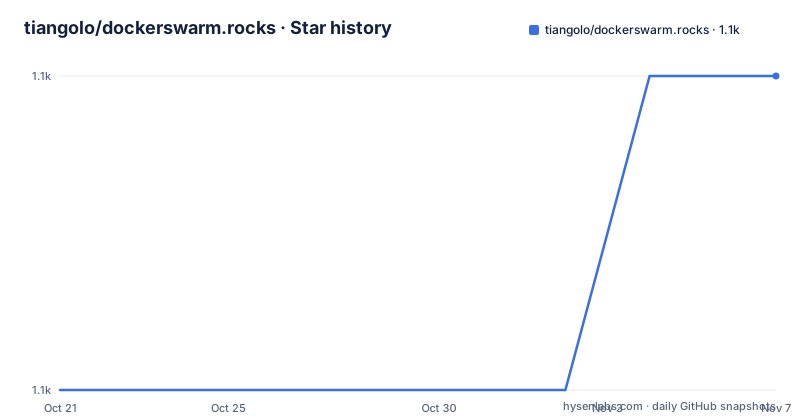
- tiangolo/dockerswarm.rocks1,148 ★ · +1
| Repository | 2026-10-21 | 2026-11-07 |
|---|---|---|
| tiangolo/dockerswarm.rocks | 1.1k | 1.1k |
1 Stars in the last 17 days, measured from the daily GitHub snapshot. Compare with other projects
Editorial analysis
The site says it is deprecated, and means it
The first thing on the page is a deprecation warning, and it is not a soft one. The website is deprecated, and it is kept around mainly for historical reasons. Readers are pointed to a page comparing Docker Swarm mode with Kubernetes, and told that if they want alternative resources they could check the awesome-swarm list for more about Docker Swarm Mode, or have a look at Docker Swarm still rocks, described as a continuation of the work done here.
That is an unusually clean handover, and it tells you something about the project. It was not abandoned, it was moved. There is a successor site, and the deprecation notice names it, which is more than most deprecated projects do.
The description of what the site was is worth keeping in view, because the argument is the durable part. Docker Swarm mode rocks: ideas, tools and recipes, to get a production-ready, distributed, HTTPS served, cluster in minutes, not weeks.
And the project's own framing of what it is, in the About section, is important for reading the rest of the site correctly. Docker Swarm Rocks is not associated with Docker or any of the tools suggested there. It is mainly a set of ideas, documentation, and tools to use existing open source products efficiently together.
So this was never a competing orchestrator. It was a guide to assembling Docker Swarm mode, Traefik, and Let's Encrypt into something that looks like a production platform, plus the code to generate the documentation and the site. The topics list is consistent with that: docker, docker-swarm, https, letsencrypt, linux, traefik.
The licence is MIT, the primary language is Python, and the last push to the repository was on 2026-10-10, so the site is still being built even though the content is frozen.
The argument, and the scale at which it stops holding
The Why section is a short piece of persuasion, and its structure matters because the conclusion is conditional.
Docker is a great tool, the de facto standard, to build Linux containers. Docker Compose is great to develop locally with Docker, in a replicable way. Docker Swarm Mode is great to deploy application stacks to production, in a distributed cluster, using the same files used by Docker Compose locally. So with Swarm mode you have replicability, using the same files as when developing locally, simplicity and speed for development and deployment, and robustness and security with fault-tolerant clusters.
The alternatives named are Kubernetes and Mesos, and the objection to them is stated as learning cost. To use any of them you need to learn a huge new set of concepts, configurations, files, commands, and so on. Docker Swarm mode is comparable to them, but it is what the author would recommend for teams of less than 200 developers, or clusters of less than 1000 machines. That includes small and medium size organizations, like when you are not Google or Amazon, startups, one-man projects, and hobby projects.
So the recommendation has an explicit scope, and the scope is stated in numbers, which is unusual and useful. The argument is not that Swarm mode is better than Kubernetes. It is that for a certain size of organisation, the learning cost of Kubernetes exceeds the benefit, and that the twenty minutes spent here are not much when the alternative is weeks.
The single-server section makes the same point from the other end. With Docker Swarm mode you can start with a cluster of a single server, set it up, deploy applications, and do everything on a five dollar a month server. And then when the time to grow comes you can add more servers with a one-line command, and you can create your applications to be ready for massive scale from the beginning, starting from a single small server.
The framing of the site is thus a proposal to be tried and abandoned if it does not fit. Try it, set up a distributed cluster ready for production, in about twenty minutes. If it doesn't work for you, then you can go for Kubernetes, Mesos, or any other.
One more piece of terminology, because the site is careful about it. Whenever you read here Docker Swarm, it is actually Docker Swarm mode, not the deprecated product called Docker Swarm. And if you have Docker installed you already have Docker Swarm, it is integrated into Docker, and you do not have to install anything else.
The setup walkthrough, and how dated it is
The install and set up section is a hands-on guide, and reading it today is a lesson in how fast infrastructure moves.
The prerequisites are to know some Linux and to know some Docker. Then you create a new remote VPS, deploy the latest Ubuntu LTS, and the documentation pins that to `Ubuntu 18.04` at the time of writing. You connect by SSH, for example `ssh [email protected]`. You define a server name using a subdomain of a domain you own, such as `dog.example.com`, make sure the DNS records point at the VPS IP, and create a temporary environment variable for later use, `export USE_HOSTNAME=dog.example.com`.
Then the hostname is set with `echo $USE_HOSTNAME > /etc/hostname` and `hostname -F /etc/hostname`, with a note that a non-root user might need `sudo`, and a genuinely useful warning attached to it: `sudo` does not preserve environment variables by default, but this can be enabled via the `-E` flag.
Packages are updated with `apt-get update` and `apt-get upgrade -y`, and Docker is installed either by following the official guide or by running the convenience script, `curl -fsSL get.docker.com -o get-docker.sh` followed by `CHANNEL=stable sh get-docker.sh` and removing the script. And if you are setting up multiple nodes you repeat these steps for each one, making sure to use a different domain or subdomain for each node.
The version markers are everywhere in this section. Ubuntu 18.04. The Docker engine version 18.06 in the node listing output. And a `CHANNEL=stable` install rather than the default edge channel.
The swarm commands themselves are short. On the main manager node you run:
docker swarm initIf you see an error like:
Error response from daemon: could not choose an IP address to advertise since this system has multiple addresses on interface eth0 (198.51.100.48 and 10.19.0.5) - specify one with --advertise-addryou select the public IP and run the command again with the flag, for example `docker swarm init --advertise-addr 198.51.100.48`. On each additional node you get a join token with `docker swarm join-token manager` or `docker swarm join-token worker` and paste the result into that node.
The node listing at the end shows the expected shape, with the ID, hostname, status, availability, manager status, and engine version columns, and the values Ready, Active, and either Leader or Reachable for the manager status. A manager that has joined but is not the leader shows Reachable, which is the word to look for when a node has joined but the cluster is not using it yet.
The honest framing for a reader in 2026 is that this is a working procedure written for a specific generation of Docker and a specific generation of Ubuntu. The structure of it, one hostname per node, one DNS record per node, one join token, is still how Swarm works. The specific versions, and the fact that the convenience script and the LTS of the day have both moved on, are what you have to reconcile yourself.
The repository is a documentation site with a Python build layer
The top level of the tree shows what the project has become, which is a documentation site rather than a software package.
There is `mkdocs.yml` and `mkdocs.env.yml`, so the site is built with MkDocs, and a `docs/` directory holding the content, which matches the site being a set of markdown pages rather than a runnable tool. The `swarm-or-kubernetes.md` page the deprecation notice points to is one of those documents.
The Python is the build layer. The pyproject.toml names the project `dockerswarm-rocks` at version 0.1.0 with the description Docker Swarm mode ideas and tools, and it requires Python 3.11 or newer. The dependencies are split into groups that map onto the site's jobs.
The docs group is the interesting one. `zensical` is the documentation engine dependency, `mdx-include` lets one markdown file include another, which is how a page pulls in a shared block, `typer` is a command line interface library, `pyyaml` handles configuration, and `pillow` with `cairosvg` is an image and vector graphics pair, which is what the site uses to render SVG artwork, including its own logo, into raster formats for social previews and similar.
The github-actions group is the maintenance automation: `PyGithub` for the GitHub API, `pydantic` and `pydantic-settings` for validated configuration, and `httpx` for HTTP requests. That is the machinery for a bot that reads and writes issues and pull requests on the repository, which is how a site like this tracks the state of the ecosystem it documents.
The dev group adds `prek`, which is a pre-commit hook runner, and `zizmor`, which is a static analysis tool for GitHub Actions workflows. Running a security analyser over the workflow definitions of a repository that creates servers is a sensible precaution, and its presence in the dev dependencies is a sign the maintainer takes the workflows seriously.
There is also a `.pre-commit-config.yaml` at the root, a `.python-version` file, a `uv.lock` for the dependency lock, and a `scripts/` directory. The default groups configured in the tool are the ones you would expect to run together. And there is no `src/` directory and no library code, which confirms the point: the Python here builds and maintains the documentation, it does not run a cluster.
The release history explains how the site was maintained
The three release tags tell a clear story about the project's shape over its life.
There is 0.1.0 from 2019-02-13, 0.2.0 from 2019-04-03, and 0.3.0 from 2020-05-25. So the site was actively released through 2019 and into the first half of 2020, and then the releases stopped.
That gap is the deprecation in version numbers. The site itself is still being built, with a last push in October 2026 and a recent set of dependencies including `zensical` and `zizmor`, which are recent tools. So the content is frozen and the site machinery is current, which is the pattern of a project where the author has moved the substance elsewhere and keeps the archive building cleanly.
The 0.x versioning is consistent with the nature of the thing. There was never a library API to stabilise, because the project was always a set of ideas, documentation, and tools. The website is the deliverable.
The MIT licence and the primary language being Python are both consequences of the same fact, and so is the fact that the topics list contains no library, no API, and no framework. The subject matter is docker, docker-swarm, https, letsencrypt, linux, and traefik, and the language on the repository is the language of the site generator.
Which is also why the project is worth reading even now. A handbook that explains how to assemble Swarm mode, Traefik for routing, and Let's Encrypt for certificates, written by someone who wanted a small team to have a working distributed platform without learning Kubernetes, has a value that outlives the specific version numbers in it.
Editorial conclusion
dockerswarm.rocks fits a reader who wants the argument for Swarm mode rather than a tutorial to follow, since the site argues the case clearly and names the scale at which the argument stops holding. It is the wrong resource for anyone setting up a cluster today, because the site itself is deprecated. Check three things before you follow it: that the successor site and the Swarm versus Kubernetes comparison it points to, since the author has moved the work rather than abandoned it, that the operating system version in the instructions matches what your current Docker supports, since the walkthrough names Ubuntu 18.04 and Docker engine 18.06, and that you are not planning to build new automation on the repository, because the Python in it exists to build the documentation rather than to run a cluster.
Frequently asked questions
What is Docker Swarm Rocks and is it still maintained?
It is a set of ideas, documentation, and tools for using Docker Swarm mode, Traefik, and Let's Encrypt together to run a distributed, HTTPS-served cluster. The website now carries a deprecation warning, saying it is kept around mainly for historical reasons, and points to a Swarm versus Kubernetes comparison page, the awesome-swarm list, and Docker Swarm still rocks as a continuation of the work.
What does the site recommend Docker Swarm mode over Kubernetes for?
For teams of less than 200 developers, or clusters of less than 1000 machines, which the project describes as small and medium size organizations, startups, one-man projects, and hobby projects. The argument is that learning Kubernetes or Mesos takes weeks while twenty minutes in Swarm mode is not much, and the site explicitly says that if it does not work for you then you can go for Kubernetes, Mesos, or any other.
How do you set up a Docker Swarm mode cluster according to the guide?
Create a VPS with the latest Ubuntu LTS, connect over SSH, set a subdomain and its DNS record, export the hostname as an environment variable, write it to `/etc/hostname`, install Docker, then run `docker swarm init` on a manager node, and use `docker swarm join-token manager` or `worker` to get a join token for each additional node. `docker node ls` shows the cluster state with Ready, Active, and Leader or Reachable.
What is in the dockerswarm.rocks repository itself?
It is a MkDocs site rather than a software package. The tree holds `mkdocs.yml` and `mkdocs.env.yml`, a `docs/` directory with the pages, and a Python build layer whose dependency groups cover documentation, image rendering with pillow and cairosvg, and GitHub automation with PyGithub, pydantic, and httpx. There is no library code and no cluster runtime.
Official sources
Add this badge to your README
If you maintain this project, the badge below links readers to this analysis and shows its maintenance status from the daily GitHub snapshot. Paste the markdown into your README; add ?metric=license or ?metric=stars to the image URL for a different field.

[](https://hysenlabs.com/projects/tiangolo-dockerswarm-rocks)Star history chart for your README
[](https://hysenlabs.com/projects/tiangolo-dockerswarm-rocks)Was this useful?