NeuraPress review: Markdown formatting for WeChat publishing
NeuraPress 是一个现代化的 Markdown 编辑器,专注于提供优质的微信公众号排版体验。响应式设计,支持移动设备。搭配 DeepSeek和微信公众号助手使用,碎片时间也能用手机发有排版的文章了。
At a glance
- What is it?
- NeuraPress is a responsive Markdown editor built around a live, WeChat-oriented preview and formatted clipboard output. It suits authors who prepare articles on desktop or mobile, although the README does not document publishing directly to WeChat or explain its stated DeepSeek integration.
- Who is it for?
- Authors who already assemble and publish articles in the WeChat editor should evaluate NeuraPress, while users expecting direct WeChat publishing or a documented AI writing workflow should first confirm those gaps. The first adoption check is whether copied output preserves the required typography and spacing in the actual WeChat editor.
- Can I use it commercially?
- Yes. MIT is a permissive licence: you can use, modify and sell software built on it, as long as you keep its copyright and licence notices.
- Is it still maintained?
- Activity is slowing. The repository last received commits 6 months ago.
- What is it written in?
- Mainly TypeScript, according to GitHub's language statistics.
Answers come from the project's GitHub data, last synced on October 23, 2026, and from our analysis. They are not legal advice.
Star history
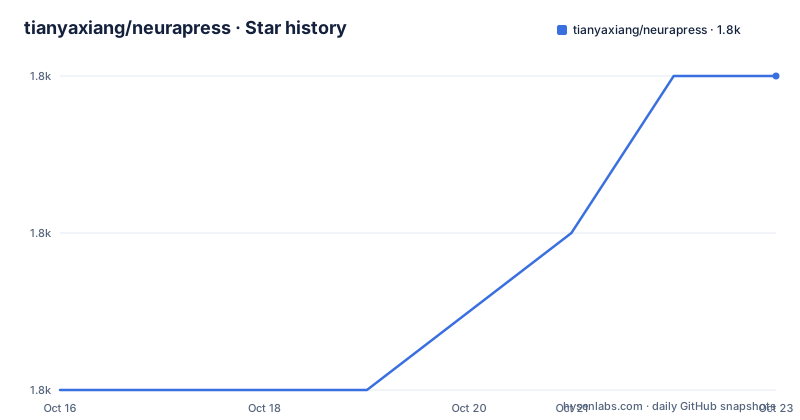
- tianyaxiang/neurapress1,839 ★ · +2
| Repository | 2026-10-16 | 2026-10-23 |
|---|---|---|
| tianyaxiang/neurapress | 1.8k | 1.8k |
2 Stars in the last 7 days, measured from the daily GitHub snapshot. Compare with other projects
Editorial analysis
What NeuraPress does for mobile WeChat authors
NeuraPress addresses the formatting gap between ordinary Markdown tools and the final presentation expected inside a WeChat public account article. Its target user is an author who writes in Markdown but does not want to rebuild headings, typography, colors, and spacing after moving the text into the WeChat editor. The repository describes support for standard Markdown and GitHub Flavored Markdown, with a responsive interface intended for direct editing on phones.
The project centers on a split workspace: Markdown is entered on the left, while a live rendering of the article appears on the right. The preview represents the intended WeChat appearance rather than the generic Markdown view commonly offered by general-purpose editors. Authors can select bundled templates, open a style configuration dialog, and change properties such as fonts, colors, and spacing. They can also hide the preview when a narrower editing view is preferable.
This makes NeuraPress a formatting aid rather than a complete publishing system. The documented workflow ends with copying content into the WeChat editor. It does not publish through the WeChat platform, manage accounts, schedule posts, or report whether pasted styling survives. That boundary matters for teams expecting a direct content pipeline from a repository or CMS.
How Markdown becomes WeChat-ready formatted content
Based on the documented stack, the rendering path uses Marked for Markdown processing and ByteMD for the editing experience, while React and Next.js 14 form the application layer. Tailwind CSS and shadcn/ui support the interface, and packages including PrismJS, KaTeX, and Mermaid indicate support for richer technical content components. The README does not expose the internal component graph, but it does identify the rendering and presentation technologies involved.
The visible data flow is straightforward. An author types Markdown into the editor, the right-hand preview updates as the text changes, and style controls alter how that preview is presented. Two output paths are documented. “Copy Source” gives the generated HTML source, while “Copy Preview” copies the formatted preview content. The latter is the path described for pasting into the WeChat editor.
The package manifest also includes `html2canvas`, `jszip`, `clipboard-polyfill`, and Tiptap extensions. Those dependencies suggest additional export, image, archive, clipboard, or editing capabilities, but the README does not connect them to a documented user workflow. It would be unsafe to infer a working DOCX, PDF, image, or batch export feature without source-level documentation. The supported assessment should stay with the two documented copy actions and the live preview.
Installing NeuraPress and starting the editor locally
NeuraPress requires Node.js 18 or newer and pnpm 8 or newer. Clone the repository, install its locked dependencies, and start the Next.js development server with the following commands. The `pnpm dev` script sets `NODE_NO_WARNINGS=1` and runs `next dev`. The README does not document a port other than the Docker deployment shown later, so no local URL beyond the project homepage should be assumed from the installation section.
git clone https://github.com/tianyaxiang/neurapress.git
cd neurapress
pnpm install
pnpm dev
A production build uses the scripts defined in `package.json`. The build command runs `next build`, while the start command runs `next start`.
pnpm build
pnpm start
For the first real use, open the local editor, enter standard or GFM Markdown in the left pane, and watch the right pane update. Select a template or open the style configuration dialog to adjust fonts, colors, and spacing. Then choose “Copy Preview” and paste the result into the WeChat editor. If source HTML is needed instead, use “Copy Source.” The important inspection point is the pasted result, because the README claims WeChat-oriented output but does not document which HTML properties WeChat preserves.
Docker deployment for development and production
The repository includes separate Docker configurations under `docker`, covering development and production. The development Compose file supports hot reload and offers foreground, detached, and shutdown commands.
docker compose -f docker/docker-compose.yml upUse the detached form when the container should continue running in the background.
docker compose -f docker/docker-compose.yml up -dStopping that Compose environment is done through the same file.
docker compose -f docker/docker-compose.yml downThe production path builds from `docker/Dockerfile.prod` and publishes the container on host port 3000.
docker build -t neurapress:prod -f docker/Dockerfile.prod .
docker run -p 3000:3000 neurapress:prod
The README does not document persistent volumes, environment variables, health checks, authentication, or database services for either Docker setup. Based on the files described, NeuraPress appears to be deployed as a self-contained web application rather than a multi-service backend, but the repository excerpt does not confirm the contents of the Dockerfiles or Compose file. Operators should inspect those files before relying on a production deployment.
Template flexibility, browser workflow, and mobile limits
The editor's strongest documented feature is the separation between content and presentation. Markdown remains the editing format, while templates and style settings determine the preview. This is useful when several articles need a consistent visual treatment without manually styling every element.
Mobile support is explicit in the project description, but the README does not specify whether the side-by-side panes become tabs, stack vertically, or use another arrangement. It also does not identify browser support, offline storage, autosave behavior, local draft naming, or recovery after closing the page. The description mentions using NeuraPress with DeepSeek and a WeChat public account assistant, yet no API key, model setting, prompt interface, or request flow is documented. Those integration details cannot be verified from the current README.
NeuraPress may therefore be the wrong choice for a writer who needs traceable drafts, collaborative editing, account-level publishing, or a server-side content pipeline. It is also a weak fit for developers who require a documented plugin API or a precise explanation of how generated HTML is sanitized and transformed. The project is better viewed as a focused formatting workspace whose final integration remains manual.
Maintenance, license, and the practical alternative
The repository is not archived, and the last push was on 2026-04-21. Recorded releases include v1.1.8 on 2025-07-27, v1.1.7 on 2025-07-16, and v1.1.6 on 2025-07-01. Those dates show that releases occurred during 2025, while the later push indicates repository activity after the latest listed release. The README does not define a release policy, migration process, long-term support window, or automated upgrade procedure.
The package metadata reports version `0.1.0`, which differs from the release tags and can confuse dependency or image labeling. The repository is marked `private` at the package level, but the project itself is released under the MIT License and includes a `LICENSE` file. That means the source licensing is permissive, subject to its terms, but self-hosters still need to account for the licenses of their own Node.js dependencies and container base images.
A real alternative is to keep Markdown in a general-purpose editor or static-site pipeline, then manually apply WeChat formatting after copying the article. That approach offers less built-in visual tailoring but keeps content ownership and publication controls outside NeuraPress. Choose NeuraPress when template-driven WeChat presentation saves meaningful manual work. Prefer the conventional pipeline when portable Markdown, direct version control, or fully understood publishing steps matter more than a ready-made visual preview.
Editorial conclusion
Authors who already assemble and publish articles in the WeChat editor should evaluate NeuraPress, while users expecting direct WeChat publishing or a documented AI writing workflow should first confirm those gaps. The first adoption check is whether copied output preserves the required typography and spacing in the actual WeChat editor.
Frequently asked questions
How do I install and run NeuraPress locally?
Use Node.js 18 or newer and pnpm 8 or newer, clone the repository, run `pnpm install`, and then run `pnpm dev`. The development script invokes `next dev` with warnings suppressed through `NODE_NO_WARNINGS=1`.
Does NeuraPress publish directly to WeChat?
No direct publishing mechanism is documented. The documented workflow copies formatted preview content or generated HTML source and pastes it into the WeChat editor.
Can NeuraPress edit articles on a mobile device?
Yes. The repository description and README identify mobile editing and responsive design as supported capabilities. The README does not describe the exact small-screen layout or whether drafts persist automatically.
Official sources
Add this badge to your README
If you maintain this project, the badge below links readers to this analysis and shows its maintenance status from the daily GitHub snapshot. Paste the markdown into your README; add ?metric=license or ?metric=stars to the image URL for a different field.

[](https://hysenlabs.com/projects/tianyaxiang-neurapress)Star history chart for your README
[](https://hysenlabs.com/projects/tianyaxiang-neurapress)Was this useful?