TiddlyDesktop: A local desktop browser for TiddlyWiki
A custom desktop browser for TiddlyWiki 5 and TiddlyWiki Classic, based on nw.js
At a glance
- What is it?
- TiddlyDesktop gives Windows, macOS, Linux, and NixOS users a purpose-built browser for locally stored TiddlyWiki files. It uses NW.js, adds Chromium developer tools, and supports isolated configuration directories, but it does not support Alpine Linux or Windows UNC shares.
- Who is it for?
- Adopt TiddlyDesktop when the primary requirement is opening and working with locally stored TiddlyWiki 5 or TiddlyWiki Classic files in a desktop application. Do not choose it for Alpine Linux, server distributions, or a wiki stored on a Windows UNC share.
- Can I use it commercially?
- Not without permission. GitHub finds no licence file in the repository, and without a licence all rights are reserved by default: you may read the code but not reuse it. Check the README, or ask the authors, before using it.
- Is it still maintained?
- Yes. The repository last received commits 68 days ago.
- What is it written in?
- Mainly JavaScript, according to GitHub's language statistics.
Answers come from the project's GitHub data, last synced on November 7, 2026, and from our analysis. They are not legal advice.
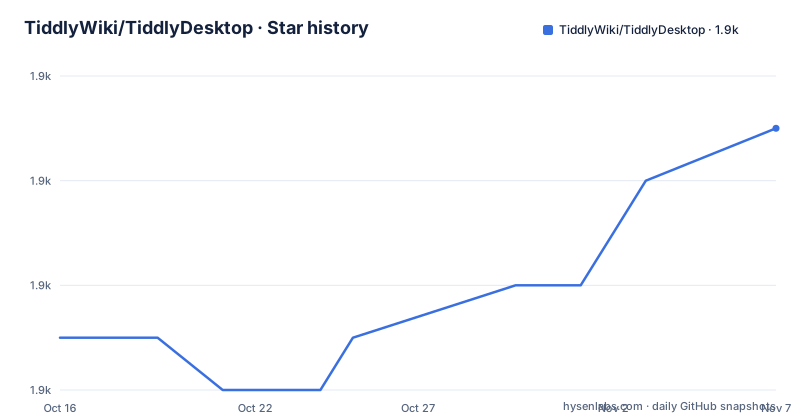
Star history
- TiddlyWiki/TiddlyDesktop1,923 ★ · +4
| Repository | 2026-10-16 | 2026-11-07 |
|---|---|---|
| TiddlyWiki/TiddlyDesktop | 1.9k | 1.9k |
4 Stars in the last 22 days, measured from the daily GitHub snapshot. Compare with other projects
Editorial analysis
Why TiddlyDesktop wraps TiddlyWiki in NW.js
TiddlyDesktop solves a narrow but practical problem for people who keep TiddlyWiki data as local files: it provides a dedicated desktop interface instead of asking them to treat every wiki as an arbitrary web page. The README identifies it as a “special purpose web browser for working with locally stored TiddlyWikis.” It supports TiddlyWiki 5 and TiddlyWiki Classic, so users working with either format do not need a separate desktop project for each.
The application is based on NW.js, which combines Chromium browser technology with the Node.js environment. That choice explains two documented features. The rendered wiki appears inside a desktop window rather than in a conventional browser tab, while the F12 key opens Chromium developer tools for the current window. Those tools can expose the DOM, console output, and network activity for a loaded wiki, although the README does not document any TiddlyDesktop-specific debugging interface.
Based on the repository layout, TiddlyDesktop is packaged as an application rather than published as a general-purpose browser. The root includes `html/`, `js/`, `images/`, `tiddlywiki/`, and `package.json`, while `bld.sh` constructs output directories for macOS, Windows, and 32-bit or 64-bit Linux. The repository therefore treats the desktop shell, bundled TiddlyWiki dependency, and platform-specific executable as separate build concerns. This is useful context, but the README does not provide a detailed internal architecture beyond identifying NW.js as the base.
Installing the release ZIP on Windows, macOS, or Linux
The supported installation path in the README is to download a platform-specific binary ZIP from the GitHub releases page. There is no package-manager installation sequence in the release instructions. After unzipping the archive, Windows uses `nw.exe`, macOS uses `TiddlyWiki.app`, and Linux uses `nw`.
Choose the archive for the operating system on which the wiki will remain local. The release documentation names Windows, Linux, and Mac packages, but it does not provide checksums or a signed-installation explanation. That omission matters when an organization plans to distribute the application itself, because the README gives no basis for verifying an archive beyond obtaining it from the project’s releases page.
For the first launch, keep the extracted directory structure intact. The developer instructions call out folders such as `html`, `images`, `js`, and `tiddlywiki`, plus `package.json`. Running only an executable copied away from those resources may prevent TiddlyDesktop from loading its interface correctly. The README does not state the complete startup sequence for opening a specific `.tid` or Classic HTML wiki, so the confirmed first-use operation is simply launching the packaged application after extraction.
Running separate personal and professional wiki profiles
TiddlyDesktop accepts `--user-data-dir`, which gives each launch its own directory for configuration data. This is the clearest documented workflow for users who need separate Personal and Professional instances. It is more targeted than merely opening several windows because the option names the storage location used by the application instance.
The value must point to a directory intended to hold configuration data. The README does not say that the directory is created automatically, and it does not document migration steps between an existing default profile and a new `--user-data-dir` location. Treat directory creation and profile transfer as setup details that the application may handle but the project documentation does not promise.
This mechanism is useful when one local TiddlyWiki is personal and another contains work material that should remain in a distinct application profile. It can also reduce accidental crossover between configurations. However, it should not be confused with encrypted storage, permission isolation, or a complete backup policy. None of those properties is stated in the README.
Linux AppImage and NixOS installation boundaries
AppImage support is documented but unavailable as a normal release artifact. The README says that AppImages work with glibc-based distributions such as Ubuntu, Fedora, and Arch Linux. They do not work with musl-based distributions such as Alpine Linux, and the project excludes Linux server distributions because they lack the required dependencies. A compatible system must also provide `fusermount3`, typically through the `fuse3` package.
Before execution, the user must make the image executable. This is the exact command documented by the project:
chmod u+x tiddlydesktop-*-v*.AppImageThat command only changes the executable permission. The README explicitly warns that AppImages are not currently included in TiddlyDesktop releases. Its suggested workaround is to fork the repository, push a dummy commit to `master`, let CI produce an AppImage, and retrieve that build from the workflow. This is a build-oriented workaround rather than an official end-user download channel.
NixOS has separate support through Flakes and non-Flakes instructions. The README shows pinning by branch, commit, or tag, then adding the package to `environment.systemPackages`. Its non-Flakes section also supports npins, lon, niv, nvfetcher, or a direct `fetchTarball` import. One boundary is explicit: the documented package selection fails when `pkgs.stdenv.hostPlatform.system` is anything other than `x86_64-linux`, including ARM.
Platform failures that require a different setup
Windows UNC shares are a clear exclusion. The README says TiddlyDesktop will not work correctly from a path such as `\\MY-SERVER\SHARE\MyFolder`. The prescribed workaround is to map the network share to a local drive and run the application from that drive. This is not merely a recommendation: the project directly states that the UNC location fails.
Linux support has similarly firm boundaries. Alpine Linux is excluded because its musl base differs from the glibc-based distributions targeted by the AppImage build. Server distributions are also outside the intended AppImage environment because required desktop dependencies are missing. The documented NixOS package example is narrower still, with x86_64-linux called out as the expected system.
TiddlyDesktop is therefore the wrong tool when the required wiki must remain on an unsupported network path or the host lacks the desktop runtime expected by the chosen package. A normal browser may serve some static TiddlyWiki files, but the README does not document which Classic or TiddlyWiki 5 operations work in that arrangement. The project does not claim a server deployment mode or remote administration interface.
Release maintenance, license, and upgrade work
The repository is not archived. Its last push was on 2026-09-01, and the releases list includes a preview build labeled v0.0.23 on that date, v0.0.22 on 2026-02-28, and v0.0.20 on 2024-03-02. These dates show recent repository activity, but they do not by themselves define the upgrade policy. The preview label also means a published preview artifact should not be treated as equivalent to the stable v0.0.22 release.
The root `package.json` identifies the package license as BSD. It pins the `tiddlywiki` dependency to a specific Git commit rather than a broad version range. For NixOS installations, the README offers branch, commit, and tag inputs, which makes source selection explicit. Users who rely on reproducible package inputs should record the selected revision or tag rather than assuming that a moving branch will remain unchanged.
Upgrading TiddlyDesktop involves obtaining and extracting a newer platform archive. The README does not document automatic application updates, rollback, migrations for `--user-data-dir`, or compatibility between releases. It also does not explain whether upgrading changes the bundled TiddlyWiki revision. License compliance may require reviewing the BSD terms for the particular distribution, but this review does not provide legal advice.
Editorial conclusion
Adopt TiddlyDesktop when the primary requirement is opening and working with locally stored TiddlyWiki 5 or TiddlyWiki Classic files in a desktop application. Do not choose it for Alpine Linux, server distributions, or a wiki stored on a Windows UNC share. Verify first that your operating system and release archive match, especially because the repository currently offers ZIP archives while its AppImage workflow depends on a separate CI trigger.
Frequently asked questions
How do I install TiddlyDesktop?
Download the ZIP for Windows, macOS, or Linux from the GitHub releases page, extract it, and run `nw.exe`, `TiddlyWiki.app`, or `nw` as appropriate. AppImages are not included in normal releases.
Can TiddlyDesktop run on Alpine Linux?
No. The README states that the documented AppImage builds are not compatible with musl-based distributions such as Alpine Linux. They also do not target Linux server distributions.
Can I use separate configurations in TiddlyDesktop?
Yes. Pass `--user-data-dir` followed by a directory path when starting `nw`. The README presents this as a way to maintain separate instances, such as Personal and Professional configurations.
Official sources
Add this badge to your README
If you maintain this project, the badge below links readers to this analysis and shows its maintenance status from the daily GitHub snapshot. Paste the markdown into your README; add ?metric=license or ?metric=stars to the image URL for a different field.

[](https://hysenlabs.com/projects/tiddlywiki-tiddlydesktop)Star history chart for your README
[](https://hysenlabs.com/projects/tiddlywiki-tiddlydesktop)Was this useful?