BuntDB: one writer at a time, and a second B-tree for every index you create
BuntDB is an embeddable, in-memory key/value database for Go with custom indexing and geospatial support
At a glance
- What is it?
- BuntDB is an embeddable in-memory key/value database in pure Go that persists through an append-only file and runs locking, ACID transactions with rollback. It fits programs that want speed over data size, and its sharp edges sit at the transaction boundary.
- Who is it for?
- BuntDB fits a Go program that wants an embedded store with real transactions and secondary indexes without running a server, and it does not fit a workload where writes must overlap. Before committing, check the Go 1.18 floor in go.mod, decide between a file path and `:memory:`, make sure every read handles `ErrNotFound`, and confirm that no helper closes over the `DB` handle instead of the `Tx` it was given.
- Can I use it commercially?
- Yes. MIT is a permissive licence: you can use, modify and sell software built on it, as long as you keep its copyright and licence notices.
- Is it still maintained?
- Yes. The repository last received commits 7 days ago.
- What is it written in?
- Mainly Go, according to GitHub's language statistics.
Answers come from the project's GitHub data, last synced on November 14, 2026, and from our analysis. They are not legal advice.
Star history
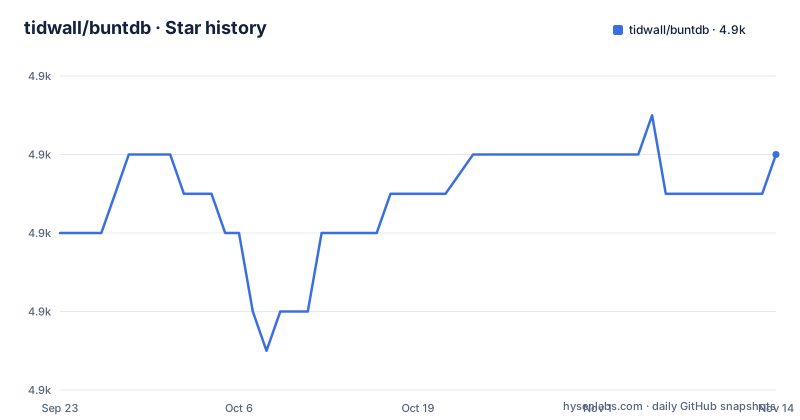
- tidwall/buntdb4,872 ★ · +2
| Repository | 2026-09-23 | 2026-11-14 |
|---|---|---|
| tidwall/buntdb | 4.9k | 4.9k |
2 Stars in the last 52 days, measured from the daily GitHub snapshot. Compare with other projects
Editorial analysis
go get pulls one module with a Go 1.18 floor
BuntDB installs the way any Go library does: install Go, then fetch the module. There is no binary to download and nothing to configure before the first import.
$ go get -u github.com/tidwall/buntdbThe module declares `go 1.18` and lists its dependencies in one place. Two of them are indirect, `github.com/tidwall/pretty` and `github.com/tidwall/tinyqueue`. The repository root is small: `buntdb.go`, `buntdb_test.go`, `go.mod`, `go.sum`, `README.md`, `LICENSE` and `logo.png`, which is what a pure Go library with no code generation looks like. Licensing is MIT. There are no GitHub releases to pin against. The last commit on the default branch is dated 19 May 2026.
module github.com/tidwall/buntdb

go 1.18

require (
	github.com/tidwall/assert v0.1.0
	github.com/tidwall/btree v1.4.2
	github.com/tidwall/gjson v1.14.3
	github.com/tidwall/grect v0.1.4
	github.com/tidwall/lotsa v1.0.2
	github.com/tidwall/match v1.1.1
	github.com/tidwall/rtred v0.1.2
)
A path that creates the file, or :memory: that never touches one
The primary object is `DB`, and `buntdb.Open` both opens and creates. Point it at a filename and the file appears if it is not there yet. Point it at `:memory:` and you get the same API with no file behind it, which is the switch to flip for tests or for a short lived process.
package main

import (
	"log"

	"github.com/tidwall/buntdb"
)

func main() {
	// Open the data.db file. It will be created if it doesn't exist.
	db, err := buntdb.Open("data.db")
	if err != nil {
		log.Fatal(err)
	}
	defer db.Close()

	...
}buntdb.Open(":memory:") // Open a file that does not persist to disk.The consequence of choosing the in-memory form is that nothing survives the process. Any code path you want to inspect later has to be given a real path instead.
One write transaction at a time, many readers, and one snapshot per transaction
Every read and every write happens inside a transaction, and the two kinds behave differently under concurrency. `db.View` opens a read-only transaction, and any number of those can run at once. `db.Update` opens a read/write transaction, and only one of them can exist at a time, which is why the guidance is to close it as soon as the work is finished. Each transaction holds a stable view: once it has begun, other transactions cannot change the data underneath it.
err := db.View(func(tx *buntdb.Tx) error {
	...
	return nil
})err := db.Update(func(tx *buntdb.Tx) error {
...
return nil
})Control flow and durability are tied to that one return value. Returning an error closes the transaction and rolls back every change made inside it. A read/write transaction that returns nil persists its changes to disk, so a forgotten error return turns a rejected write into a silent one.
Reaching for the DB handle inside a transaction can block your app
The transaction function exposes a `Tx` object, and that object is what every operation inside the closure should use. Reaching for the original `DB` handle from inside a transaction is called out as having side effects, with blocking the application given as the example.
One B-tree ordered by key, plus a named family of iteration functions
Initially all data sits in a single B-tree where each item has one key and one value, and items are ordered by the key. That is what makes a lookup by key cheap and iteration over keys straightforward. `tx.Ascend` walks from the beginning, and the callback returns true to keep going.
err := db.View(func(tx *buntdb.Tx) error {
	err := tx.Ascend("", func(key, value string) bool {
		fmt.Printf("key: %s, value: %s\n", key, value)
		return true // continue iteration
	})
	return err
})
Direction and range are chosen by function name rather than by a comparator you pass in: `AscendGreaterOrEqual`, `AscendLessThan`, `AscendRange`, `AscendEqual`, `Descend`, `DescendLessOrEqual`, `DescendGreaterThan`, `DescendRange` and `DescendEqual`. Writing a key uses `tx.Set` inside a read/write transaction.
err := db.Update(func(tx *buntdb.Tx) error {
	_, _, err := tx.Set("mykey", "myvalue", nil)
	return err
})
The index pattern decides which keys a value index ever sees
A custom index is a second B-tree that orders by value, and the second argument of `CreateIndex` decides admission. A `*` wildcard accepts every key; a pattern such as `user:*` accepts only keys carrying that prefix.
db.CreateIndex("names", "user:*", buntdb.IndexString)`IndexString` performs case-insensitive ordering, which is visible in the sample output: jane, Janet, Paula, peter, Randi, Terri, tom, not capitals ahead of lowercase. `IndexInt`, `IndexUint` and `IndexFloat` sit alongside it, and a custom index function can be written for any data type.
user:2:name jane
user:4:name Janet
user:5:name Paula
user:6:name peter
user:1:name Randi
user:7:name Terri
user:0:name tom
Because the pattern filters on keys, a prefix added later puts a record outside an existing index without any error.
ErrNotFound is the error every read has to handle
Getting a key that was never written returns `ErrNotFound`. That is the expected failure mode of `tx.Get`, not an exceptional condition, and code that assumes a key is present has to handle it.
err := db.View(func(tx *buntdb.Tx) error {
	val, err := tx.Get("mykey")
	if err != nil{
		return err
	}
	fmt.Printf("value is %s\n", val)
	return nil
})
The names sample in the documentation shows how easily gaps appear. Keys run `user:0:name` through `user:7:name`, and `user:3` is simply never written. Nothing checks for it, nothing warns about it, and an index over values returns whatever was actually stored. The same sample also shows the `Set` signature, where the third argument is passed as nil for a plain write.
Append-only persistence, a TTL for eviction, and index types beyond flat values
The stated trade is memory first and data size second: the store favors speed over size, and persistence uses a durable append-only file format that grows as writes accumulate. Eviction of old items is available through an expiration TTL, so a cache shaped use needs no second data store.
Indexing is not limited to flat values. Spatial indexing covers up to 20 dimensions for geospatial data, JSON indexes reach fields inside JSON documents, multi value indexes behave like a SQL multi column index, and collate i18n indexes come from the separate collate package, which is optional. Each of those answers a question that key ordering cannot, at the cost of an extra tree to maintain on every write.
Editorial conclusion
BuntDB fits a Go program that wants an embedded store with real transactions and secondary indexes without running a server, and it does not fit a workload where writes must overlap. Before committing, check the Go 1.18 floor in go.mod, decide between a file path and `:memory:`, make sure every read handles `ErrNotFound`, and confirm that no helper closes over the `DB` handle instead of the `Tx` it was given.
Frequently asked questions
How do I install BuntDB in a Go project?
Install Go and run `go get -u github.com/tidwall/buntdb`. The module path is github.com/tidwall/buntdb and its go.mod declares a `go 1.18` floor. There is no binary to download and no release to pin, since the repository has no GitHub releases.
How do I open a BuntDB database that never writes to disk?
Pass `:memory:` as the path, so `buntdb.Open(":memory:")` returns a database that does not persist to disk. A normal path such as data.db is created if it does not exist.
How many write transactions can BuntDB run at the same time?
One read/write transaction at a time, opened with `db.Update`, while any number of read-only transactions opened with `db.View` can run concurrently. The documentation advises closing a write transaction as soon as you are done with it.
Can BuntDB query a field inside a JSON value?
Yes, JSON indexes reach fields inside JSON documents, and the dependency list includes github.com/tidwall/gjson. Custom indexes can also be created for any data type, with IndexString, IndexInt, IndexUint and IndexFloat provided as built-ins.
What happens when a BuntDB transaction returns an error?
The transaction rolls back and reverts every change made to the database during it. A read/write transaction that succeeds instead persists all of its changes to disk, which makes the single return value the switch between rollback and commit.
Official sources
Add this badge to your README
If you maintain this project, the badge below links readers to this analysis and shows its maintenance status from the daily GitHub snapshot. Paste the markdown into your README; add ?metric=license or ?metric=stars to the image URL for a different field.

[](https://hysenlabs.com/projects/tidwall-buntdb)Star history chart for your README
[](https://hysenlabs.com/projects/tidwall-buntdb)Was this useful?